
Conventional Commits and the 50/72 Rule, Explained
The commit header format release tools parse, how breaking changes are marked, why bodies wrap at 72 columns, and the git detail that silently deletes Markdown headings.
· 6 min read
Run git log --oneline on a busy repository and you can usually tell within ten lines whether the team agreed on a commit format. One history reads "fix stuff", "wip", "address review", "final final". The other reads fix(auth): release session listeners on logout and feat(api)!: remove v1 endpoints. The second one is not just tidier. A release tool can read it, decide the next version number and write the changelog without a human.
This guide explains the Conventional Commits format, how breaking changes are marked, where the 50/72 rule comes from, and a git detail that quietly deletes part of messages written with Markdown headings. The Conventional Commit Message Generator applies all of it.
The format in one picture
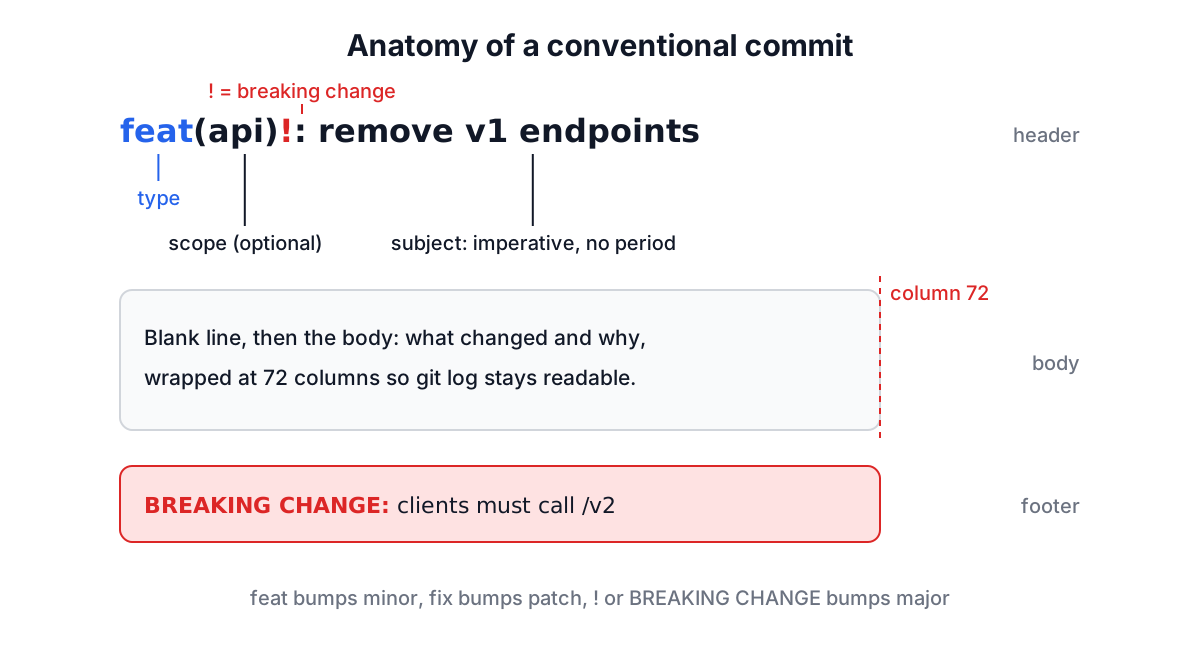
<type>(<scope>)!: <subject>

<body, wrapped at 72 columns>

<footer-token>: <value>
Conventional Commits started from the Angular project's commit guidelines and became its own specification. Version 1.0.0 is the current one. The rules that matter day to day:
- The header is
type, an optional(scope), an optional!, a colon and a space, then a short description. - The body is optional, separated from the header by one blank line, and free-form.
- Footers come after another blank line, one per line, as
Token: valueorToken #value. Tokens use hyphens instead of spaces (Reviewed-by), with one exception:BREAKING CHANGE. BREAKING CHANGEmust be written in upper case.BREAKING-CHANGEis accepted as a synonym.
Types and what they do to your version number
The spec itself only defines two types. Everything else is convention, most often the list from the Angular guidelines that @commitlint/config-conventional enforces.
| Type | Use it for | Release effect (SemVer) |
|---|---|---|
feat | a new feature for users | minor |
fix | a bug fix for users | patch |
perf | a performance improvement | usually patch |
refactor | code change with no behaviour change | none |
docs | documentation only | none |
style | formatting, whitespace, semicolons | none |
test | adding or fixing tests | none |
build | build system or dependencies | none |
ci | CI configuration | none |
chore | other maintenance | none |
revert | reverting an earlier commit | depends |
any type with ! or a BREAKING CHANGE footer | an incompatible change | major |
Tools like semantic-release, release-please and standard-version read these to pick the next version and group the changelog. That is the real argument for the format: once the history is machine-readable, nobody has to remember whether this release is 2.3.0 or 3.0.0.
Scopes
The scope names the part of the codebase a change touches: fix(auth), feat(billing), docs(readme). It is optional, and teams that use it usually keep a short agreed list so the changelog groups well.
The generator derives a scope from the first file you list. src/auth/SessionManager.js gives auth, the folder under the top-level source directory. docs/setup.md gives docs. A file in the repository root, such as package.json, gives no scope at all, which is better than inventing one. Reorder the file list if the first file is not the one that defines the change.
Breaking changes
There are two ways to mark a breaking change, and using both is clearest:
feat(api)!: remove v1 endpoints

The /v1 routes were deprecated in 4.2 and have no traffic.

BREAKING CHANGE: clients must call /v2. Request and response bodies are
unchanged; only the path prefix differs.
The ! makes the break visible in git log --oneline. The footer explains what users must do, and release tools copy it into the changelog. A breaking change without that explanation is the least useful kind: the version number says something broke but not what.
In the generator, tick This is a breaking change and put the migration note in Additional Notes. It becomes the BREAKING CHANGE: footer, and you get a warning if you leave it empty.
The 50/72 rule
Git does not wrap commit messages. Whatever line lengths you type are what every tool shows. In 2008 Tim Pope wrote a short note recommending a summary of about 50 characters and a body wrapped at 72, and it stuck for good reasons:
git logindents the body by four spaces, so 72 plus 4 fits an 80-column terminal.git format-patchturns commits into emails, where long lines wrap badly.- GitHub truncates long commit titles in lists and puts the rest behind an ellipsis.
The generator wraps the body at 72 columns, with a hanging indent for list items, and warns when the header goes past 72 characters. Fifty is the classic target for the header; treat 72 as the hard limit.
Why there are no Markdown headings in the body
It is tempting to structure a long commit body with ## Root cause and ## Testing. Do not. When git opens your editor for a commit message, it strips every line that starts with #, because those are comment lines in the template. Your headings vanish, and the paragraphs under them run together.
Plain labels survive every workflow:
fix(auth): release session listeners on logout

Problem: User sessions were not being properly cleaned up after logout,
causing memory consumption to grow over time

Root cause: Event listeners were not being removed from session objects
when users logged out, preventing garbage collection

Testing: unit tests, integration tests, manual testing.
That is roughly what the generator's Load Sample produces, apart from the subject: the sample keeps "Fixed memory leak in user session management" exactly as typed, and the imperative form shown here is a better habit.
Getting a multi-line message into git
git commit -m "..." works for one line. For a header, body and footer, two cleaner options:
git commit -F msg.txt   # use a message saved in a file
git commit              # or paste it into the editor git opens
You can also pass several -m flags, one per paragraph, and git joins them with blank lines. Avoid stuffing newlines into a single quoted -m argument; shells and terminals handle it inconsistently.
Common mistakes
- Past tense subjects. "Fixed the bug" reads oddly in a changelog. Write the imperative: "fix the bug", as if completing "If applied, this commit will...".
- Trailing periods on the header. The header is a title. The generator strips them.
- Multi-line descriptions in the header. Line breaks are joined into one line, and you get a warning; detail belongs in the body.
- Placeholder footers.
Closes: #issue-numbergets committed verbatim if nobody edits it. Add real references likeRefs: #123yourself. - Mixing changes. If the message needs "and" in the subject, it is probably two commits.
For checking what actually changed before you describe it, the Online Diff Tool helps, and the design doc guide covers writing up larger changes before the commits exist. Pick the format once, add commitlint to CI so it is enforced rather than remembered, and let the release tooling do the version arithmetic.