
CSS Formatting, Minification and Property Order: What Is Safe
Which CSS whitespace is significant, why shorthand properties make alphabetical sorting risky, the value rewrites that break minified CSS, and how to format SCSS and Less.
· 10 min read

CSS looks forgiving about layout. You can write a rule on one line or twenty, indent with tabs or spaces, and the browser does not care. That is mostly true, which is why CSS formatters and minifiers exist. But a few spaces in CSS carry meaning, the order of declarations sometimes decides what you see, and several "optimisations" that minifiers like to apply quietly break valid stylesheets. This guide covers what is safe to change, using the CSS Beautifier and Minifier for the examples.
The whitespace that matters
The CSS Syntax specification turns a stylesheet into tokens, and most whitespace between tokens is ignored. Spaces around {, }, ;, : in a declaration, and , in a selector list or value can all go. Three kinds of whitespace cannot.
The descendant combinator. In a selector, a space is an operator. .card p means "a p inside .card", while .cardp is a different class. The subtle case is a pseudo-class: .menu :hover matches any hovered element inside .menu, but .menu:hover matches .menu itself when hovered. A minifier must keep that space.
Operators inside calc(). The + and - operators in calc(), min(), max() and clamp() must have whitespace on both sides. calc(100% - 2px) works; calc(100%-2px) is invalid because -2px reads as a negative number. Multiplication and division do not need spaces, but keeping the author's spacing is the safe choice.
Spaces inside values. margin: 0 auto has two values, font: 600 1rem/1.3 system-ui has four. Those spaces separate components and must remain, although runs of spaces can shrink to one.
| Whitespace | Example | Removable? |
|---|---|---|
| Around braces, semicolons, colons | a { color : red ; } | Yes: a{color:red} |
| After commas | rgb(0, 0, 0), h1, h2 | Yes |
Around >, +, ~ combinators | ul > li | Yes: ul>li |
| Descendant combinator | .menu :hover | No |
Around + and - in calc() | calc(100% - 2px) | No |
| Between value components | margin: 0 auto | Collapse to one space |
| Inside strings and url() | content: "a b" | Never touch |
Why property order matters, sometimes
Inside one rule, when two declarations set the same property, the later one wins. Usually you do not have duplicates, so order does not matter: color and padding can appear in any order with the same result. The exception is shorthand properties.
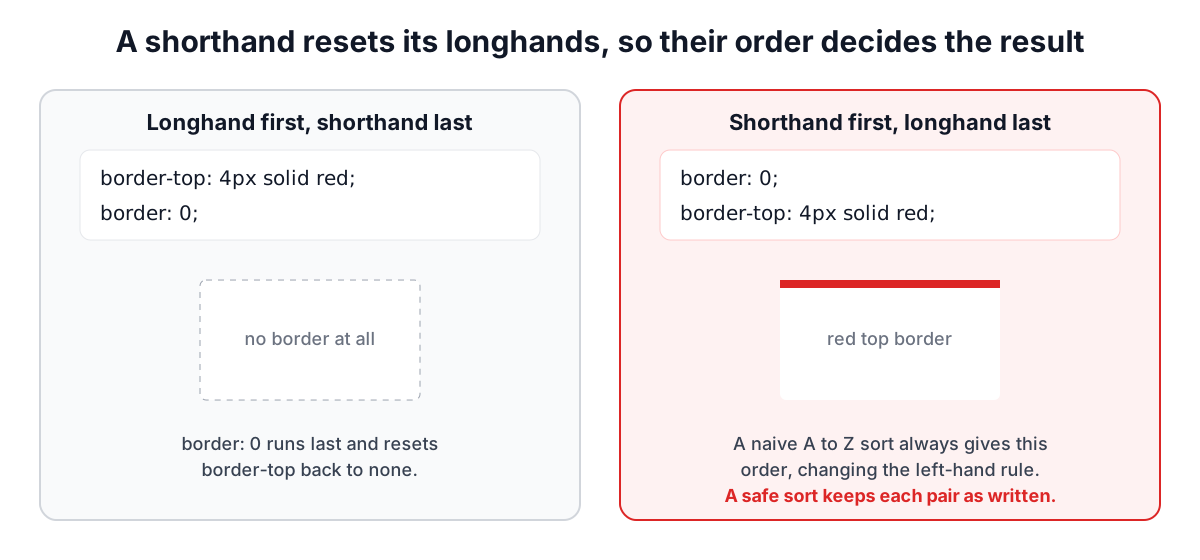
A shorthand sets every longhand it covers, including the ones you did not mention, which it resets to their initial value. border: 0 sets border-top-width, border-top-style, border-top-color and the same for the other three sides, plus border-image. So these two rules differ:
.a { border-top: 4px solid red; border: 0; }   /* no border at all */
.b { border: 0; border-top: 4px solid red; }   /* red top border */
Some shorthands reset longhands whose names give no hint. font resets line-height, inset sets top, right, bottom and left, gap sets row-gap and column-gap, flex-flow sets flex-direction and flex-wrap, and place-items sets align-items and justify-items. all resets nearly everything.
Sorting properties without breaking the cascade
Alphabetical property order has real benefits: declarations are easy to find, duplicates sit next to each other, and two people editing the same rule produce smaller diffs. The danger is that a plain alphabetical sort puts border before border-top every time, which is fine for rule .b above and wrong for rule .a.
A cascade-safe sort treats overlapping properties as a dependency. Our sorter does this:
- Two properties conflict if they are the same property (including vendor-prefixed copies such as
-webkit-transitionandtransition), if one is a shorthand of the other by name (bordercoversborder-topandborder-top-color,border-colorcoversborder-top-color), or if they appear in a list of shorthands with unrelated longhand names (fontandline-height,insetandtop, and so on). - It repeatedly picks the alphabetically first declaration that has no unplaced conflicting declaration before it in the original rule.
The result is as alphabetical as possible while every conflicting pair keeps its original order, so the computed style is identical. Vendor prefixes sort next to the standard property, prefixed first, which is the order autoprefixer writes.
Some declarations are fixed points that sorting must not move across: custom properties (--brand: red), Sass $variables, @include and @extend lines, and nested rules. A mixin can set any property, so moving a declaration from below an @include to above it changes which value wins. The sorter only reorders runs of plain declarations between those points.
There are other conventions. Some teams group properties by purpose (positioning, box model, typography, visual), often enforced with Stylelint's order plugins. Grouping is a matter of taste that a tool cannot infer, while alphabetical order is mechanical, which is its appeal.
The minifier rewrites that cause bugs
Whitespace and comment removal is where most of the savings in a hand-written stylesheet come from. Aggressive minifiers also rewrite values, and each rewrite has a failure mode:
- Dropping units from zero.
0pxand0are equivalent for most lengths, but not everywhere.calc(0px + 5%)becomescalc(0 + 5%), which is invalid because a unitless number cannot be added to a percentage. In a custom property,--gap: 0pxused later incalc(var(--gap) + 1rem)has the same problem. And some older browsers mishandled a unitless flex-basis inflex: 1 1 0. - Shortening colours.
#ffffffto#fffis safe; turning named colours into hex or rgba into hex with alpha can break support in old email clients. - Merging rules. Combining two rules with identical declarations moves one of them, which can change the cascade when a third rule sits between them.
- Removing "duplicate" declarations.
display: -webkit-box; display: flex;looks like a duplicate but is a deliberate fallback: browsers ignore the value they do not understand.
The minifier in our tool does none of these. It removes comments (keeping /*! licence comments if you ask), collapses whitespace, drops the last semicolon in each block and removes rules with no declarations. Every value is left exactly as written. On three real stylesheets the savings were:
| Stylesheet | Original | Minified | Saved |
|---|---|---|---|
| pdfjs-dist 6.4.299, pdf_viewer.css | 168,569 bytes | 122,962 bytes | 27.1% |
| react-day-picker 8.10.2, style.css | 6,265 bytes | 4,590 bytes | 26.7% |
| @xyflow/react 12.12.0, style.css | 18,596 bytes | 15,709 bytes | 15.5% |
Sorting the same three files moved thousands of declarations and the beautified output still matched the input token for token. The chips under the output show the exact figures for your file.
Build-time tools such as Lightning CSS and cssnano are well tested and do more, and they are the right choice in a pipeline where you check the output in the browsers you support. A whitespace-only minifier is for the cases without a pipeline: critical CSS pasted into a page head, styles in an HTML email, a CMS field with a length limit.
SCSS and Less
Preprocessor syntax adds a few things a formatter must understand:
//line comments, which plain CSS does not have (in CSS,//is not a comment andurl(http://...)must survive).- Nesting, including the parent selector
&as in&:hoverand&__title. - Interpolation,
#{$name}, which contains braces that are not blocks. - Variables (
$colorin Sass,@colorin Less), maps such as(key: value), mixins (@include,.mixin();), and control directives like@ifand@each.
Choosing SCSS or Less in the tool turns on // comments; the rest is handled in all modes. Formatting is done by js-beautify's CSS engine, which handles nesting well. Very unusual syntax, such as Less detached rulesets with complex guards, may come out on fewer lines than you like but keeps its tokens.
A worked example
Start with a minified rule:
.btn{padding:8px 16px;border:1px solid #ccc;border-top:0;color:#fff;background:#dc2626}
Beautify with sorting on:
.btn {
  background: #dc2626;
  border: 1px solid #ccc;
  border-top: 0;
  color: #fff;
  padding: 8px 16px;
}
border still comes before border-top, so the button has no top border, as before. Now swap the two in the input (border-top:0;border:1px solid #ccc) and sort again: the sorter keeps border-top first this time, because in that rule border overrides it and moving it would add a top border that was not there.
Checklist
- Never remove the space in a descendant selector or around
+and-incalc(). - Treat shorthand and longhand pairs as ordered; sort everything else freely.
- Keep fallbacks that look like duplicates.
- Leave value rewriting to a build tool you test, or skip it: after gzip it saves little.
- Keep licence comments in distributed CSS.
For JavaScript, see the companion guide on beautifying and minifying JavaScript. Related tools: CSS Gradient Generator, Box Shadow Generator and PX to REM Converter.
Related searches
- css beautifier
- sort css properties alphabetically
- does css property order matter
- css shorthand overrides longhand
- minify css safely
- descendant combinator whitespace
- calc requires spaces around plus
- css property order conventions