
Database Backups with pg_dump, mysqldump and Friends: What Actually Works
Logical versus physical backups, the flags that make dumps consistent, keeping passwords out of scripts, and how to prove a backup restores before you need it.
· 6 min read
Most teams find out their backups do not work on the day they need them. The cron job ran every night for two years, the files are there, and the restore fails because the dump was taken without --single-transaction, or the roles were never exported, or the script wrote a zero-byte file every night since a password change and nobody checked the exit code.
A working backup has three properties: it is consistent, it is somewhere other than the database server, and someone has restored it recently. This guide covers how to get each one with the standard tools, and uses the Database Backup Script Generator to produce scripts with the right flags.
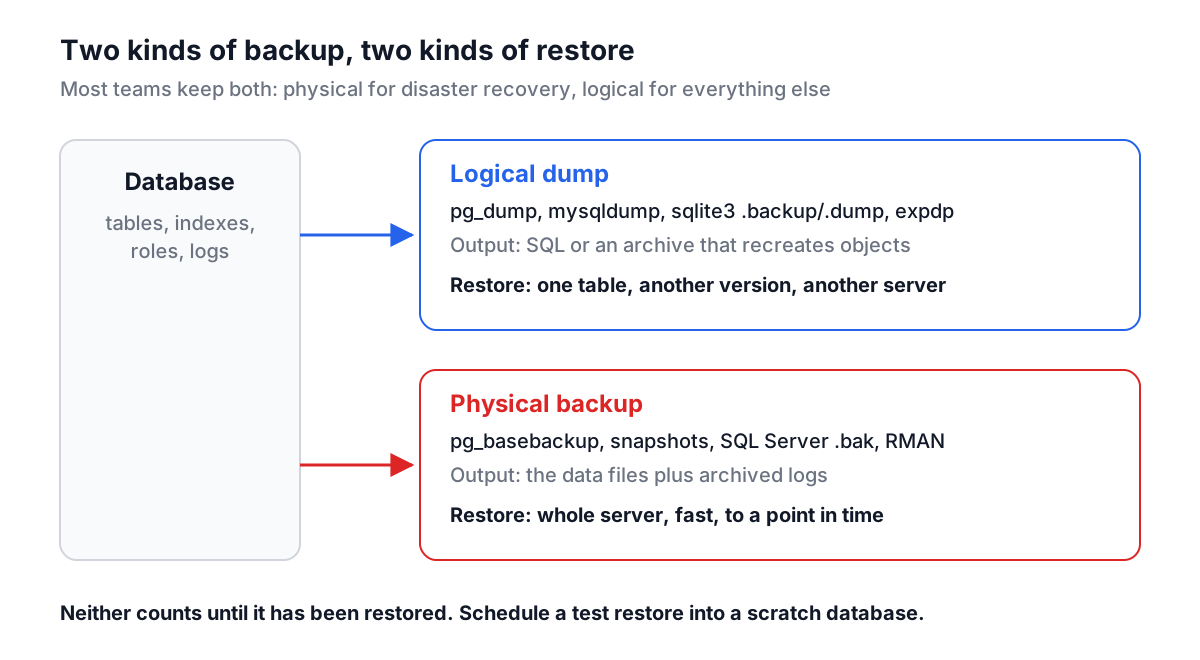
Logical and physical backups
There are two families of backup, and you probably want both.
| Logical (dump) | Physical (files) | |
|---|---|---|
| Tools | pg_dump, mysqldump, sqlite3 .dump, Oracle Data Pump | pg_basebackup, file-system snapshots, SQL Server .bak, Oracle RMAN |
| Contains | SQL or an archive that recreates objects and rows | The database's own data files |
| Restore one table | Easy | Hard |
| Across versions | Usually works | Same major version only |
| Point-in-time recovery | No | Yes, with archived WAL or logs |
| Speed on large databases | Slow to restore | Fast |
A logical dump is what you reach for before a risky migration, to copy production into staging, or to recover one table someone truncated. A physical backup with continuous log archiving is what gets you back to 14:32:05 yesterday after a bad deploy. Managed services such as RDS or Cloud SQL handle the physical side for you; the logical dumps are still worth having, because they are portable and you control them.
Consistency: the flags that matter
A dump is only useful if it represents one moment in time. If table A is dumped at 02:00 and table B at 02:07, an order can exist without its customer.
PostgreSQL. pg_dump is always consistent: it runs inside a single snapshot, so every table is read as of the moment it started, while other sessions keep reading and writing. It takes light locks that block ALTER TABLE and DROP TABLE on the dumped tables until it finishes, which is why long dumps occasionally collide with migrations.
MySQL and MariaDB. mysqldump needs --single-transaction to get the same guarantee for InnoDB tables. Without it, mysqldump locks tables one at a time and the dump can be inconsistent across tables. Add --quick so rows stream to the file instead of being buffered in memory. Neither flag helps MyISAM tables, which have no transactions.
SQLite. Copying the file with cp while the application is writing can capture a half-finished write, and in WAL mode the most recent changes may still be in the -wal file next to it. Use the shell's .backup command, which uses SQLite's online backup API, or VACUUM INTO 'copy.db'.
SQL Server and Oracle. BACKUP DATABASE and Data Pump (expdp) are consistent by design. Both write on the database server, into a path or directory object on that machine, which surprises people running them from a laptop.
What a dump leaves out
Each tool has a default scope, and the gaps bite during restores:
pg_dumpdumps one database. Roles, passwords and tablespaces are cluster-wide and are not included. Runpg_dumpall --globals-onlyas well.mysqldumpincludes tables, views and triggers, but not stored procedures, functions or scheduled events unless you add--routinesand--events.- No dump tool can leave indexes out. Some scripts on the internet pass
--no-indexesto pg_dump; that flag does not exist and the command fails. A data-only dump (--data-onlyfor pg_dump,--no-create-infofor mysqldump) omits all DDL, indexes included.
Generating a script
Here is a PostgreSQL example. In the Database Backup Script Generator, choose PostgreSQL, enter localhost, port 5432, user app and database shop, leave structure and data ticked, tick compression, and click Generate Scripts. The core of the backup script is:
pg_dump -h "$DB_HOST" -p "$DB_PORT" -U "$DB_USER" \
  --format=custom \
  --no-owner \
  --file="$FILE" \
  "$DB_NAME"
STATUS=$?
if [ $STATUS -ne 0 ]; then
    echo "Backup failed with exit code $STATUS" >&2
    exit $STATUS
fi
--format=custom writes pg_dump's compressed archive format. It is restored with pg_restore, which can restore a single table (-t orders), list the contents (-l), and restore in parallel (-j 4). The file is named .dump, not .sql, because it is not plain text. --no-owner lets you restore into a database where the original owner role does not exist. The exit-code check matters: cron only emails you about failures if the script exits non-zero.
The MySQL version looks different in one important way:
mysqldump --defaults-extra-file="$CNF" -h "$DB_HOST" -P "$DB_PORT" -u "$DB_USER" \
  --single-transaction \
  --quick \
  "$DB_NAME" | gzip > "$FILE"
The password is not on the command line. Anything passed as -pSecret is visible to other users on the machine through ps, and MySQL warns about it. The script writes the password into a temporary option file with chmod 600, passes it with --defaults-extra-file (which must be the first option), and deletes it on exit. The PostgreSQL script uses the PGPASSWORD environment variable for the same reason, and for unattended runs both are better replaced with ~/.pgpass or ~/.my.cnf. set -o pipefail makes a mysqldump failure fail the whole pipeline instead of being hidden by gzip's success.
The generator also writes SQL Server scripts that run BACKUP DATABASE ... WITH CHECKSUM through sqlcmd followed by RESTORE VERIFYONLY, and Oracle scripts that use expdp with CONTENT=METADATA_ONLY, DATA_ONLY or ALL.
Where backups should live
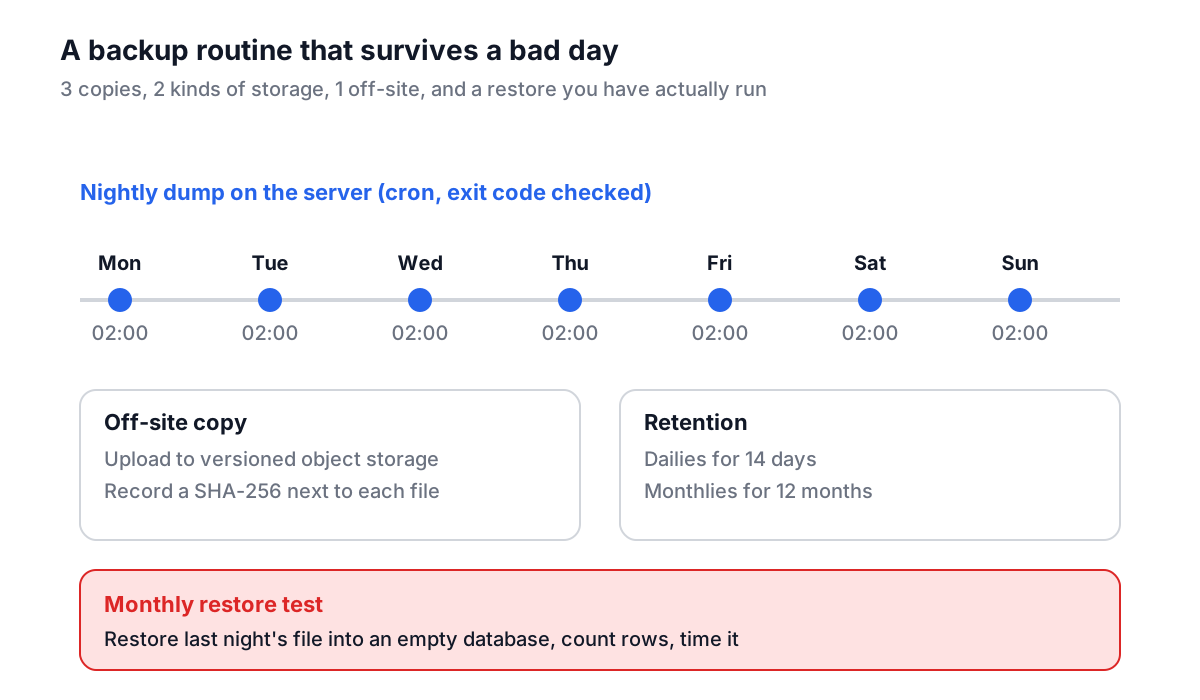
A backup on the same disk as the database protects you from a bad DELETE and nothing else. The usual rule of thumb is 3-2-1: three copies, on two kinds of storage, one of them off-site. For a small service that can be as simple as:
- The nightly dump written to
/backupon the server. - A copy uploaded to object storage (S3, GCS, Azure Blob) with versioning or object lock turned on, so ransomware or a fat-fingered
rmcannot delete history. - A lifecycle rule that keeps dailies for two weeks and monthlies for a year.
Record a checksum with each file so you can tell later whether it was corrupted in transit. The Hash File Verifier checks a downloaded dump against a recorded SHA-256, and the Cron Expression Validator confirms that 0 2 * * * runs when you think it does.
Prove it restores
The only test of a backup is a restore. Once a month, or after any change to the backup script:
- Create an empty scratch database (
createdb shop_restore_test). - Run the restore script against it with last night's file.
- Compare row counts for your biggest tables with production, and run one query your application depends on.
- Time it. If a full restore takes six hours, that is your minimum recovery time, and the business should know.
Automating this as a weekly CI job that restores and counts rows turns "we have backups" into "we restored one on Tuesday".
Common mistakes
No exit-code check. A script that ignores errors writes an empty file every night and reports success.
Backups only on the database host. The disk failure that takes out the database takes the backups with it.
Forgetting globals. A pg_dump restored on a fresh server fails on GRANT statements for roles that do not exist yet.
Restoring over a live database. Restore into a new database, check it, then switch the application over. Overwriting in place leaves you with nothing if the restore fails halfway.
Never testing. Every other mistake on this list is caught by a monthly restore test.
Generate the scripts, run the backup by hand once, restore it into a scratch database the same afternoon, and only then add the cron line. That single round trip will find more problems than any amount of reading flags. If the restored schema is headed for a different database engine, the SQL data types guide covers what has to change.