
Database Schema Design and ER Diagrams: Keys, Relationships and Normal Forms
Primary keys, foreign keys, one-to-one versus many-to-many, the normal forms that matter in practice, and how to read an ER diagram generated from SQL.
· 6 min read
Six months into a project, someone asks why an order can belong to a customer who no longer exists, or why the same address is stored in four tables with three different spellings. Those bugs were decided on day one, when the schema was sketched in a hurry. A schema is the one part of an application that is genuinely expensive to change later, because the data has already taken its shape.
This guide covers the decisions that matter most: keys, relationships, and how far to normalise. It uses the Database Schema Designer to build a small schema and the ERD Generator to check it as a diagram.
Start with entities and their keys
List the things your application keeps track of: users, orders, products, invoices. Each becomes a table, and each table needs a primary key, a column (or set of columns) whose value is unique and non-null, and ideally stays stable.
You have two options:
- Surrogate keys, an auto-generated integer or UUID with no business meaning.
users.id = 1842will never need to change. - Natural keys, a real-world value such as an ISO country code or an email address. They save a join but break when the real world changes, and emails do change.
Most teams use surrogate keys for entity tables and natural composite keys for junction tables, where the pair of foreign keys is already unique. In the Schema Designer, new tables start with an id INT primary key for that reason. If you tick Primary Key on two columns, the generated SQL gets one table-level PRIMARY KEY (a, b) clause, which is how a composite key has to be written.
Pick types with some care while you are here. VARCHAR(255) everywhere is a habit, not a design. Money belongs in DECIMAL(12,2), never FLOAT, because binary floats cannot represent 0.10 exactly. Timestamps that record an instant should be stored in UTC.
Relationships are foreign keys
A relationship in a relational database is a foreign key: a column in one table whose values must exist in another table's key. It lives on the "many" side. A non-nullable posts.user_id REFERENCES users(id) says every post belongs to exactly one user, and one user can have many posts.
| Relationship | How you build it | Example |
|---|---|---|
| One-to-many | Foreign key on the many side | posts.user_id to users.id |
| One-to-one | Foreign key that is also UNIQUE (or the whole PK) | profiles.user_id as primary key |
| Many-to-many | Junction table with two foreign keys | post_tags(post_id, tag_id) |
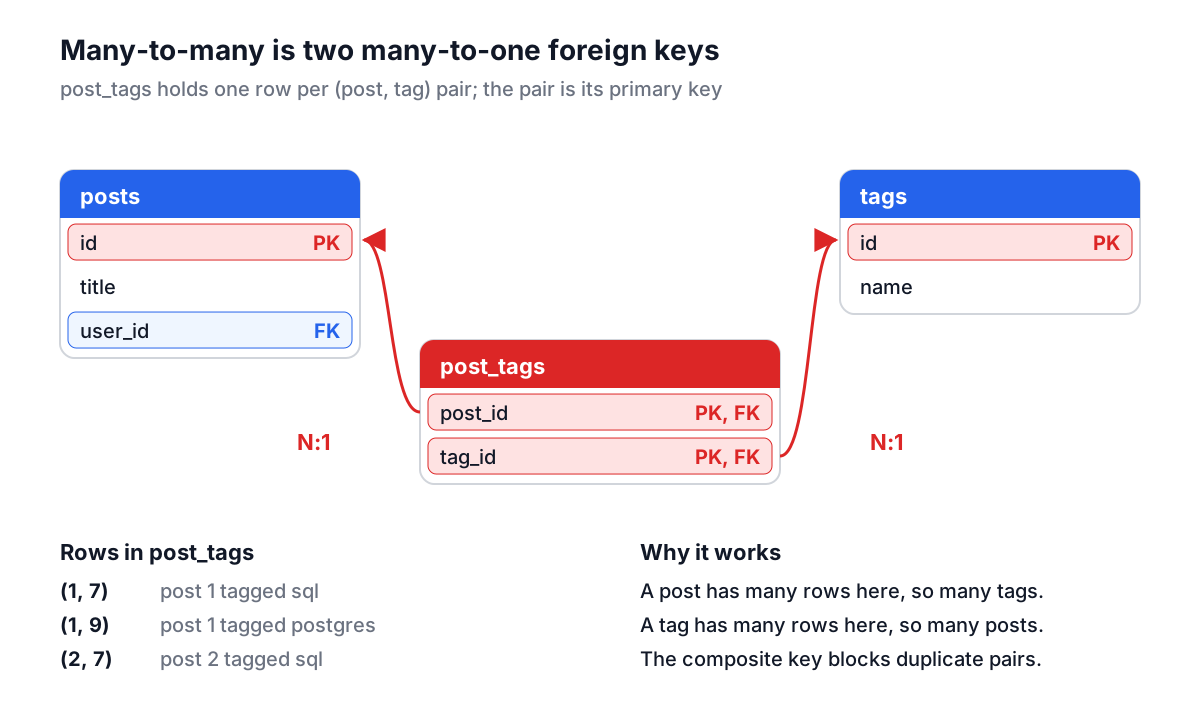
Many-to-many is the one people get wrong. There is no single constraint that expresses it. If posts can have many tags and tags can be on many posts, neither table can hold the other's id, so you add a third table whose rows are pairs. Its primary key is the pair, which also prevents tagging the same post twice.
Foreign keys also decide what happens on delete. ON DELETE CASCADE removes the children with the parent, ON DELETE SET NULL orphans them deliberately, and the default (NO ACTION or RESTRICT) refuses to delete a parent that still has children. Choose per relationship: deleting a user should probably delete their sessions, but not their invoices.
One more practical point: PostgreSQL does not create an index on a foreign key column for you, while MySQL's InnoDB does. Without an index, joins from the parent and every cascading delete scan the child table. Add one.
How far to normalise
Normalisation is a checklist for removing duplicated facts. Edgar Codd introduced the relational model in 1970 and the first normal forms followed within a couple of years. In practice three rules cover most of it:
- First normal form: one value per column. No
tags = 'red,blue,green'strings; that is a junction table waiting to happen. - Second normal form: in a table with a composite key, every other column depends on the whole key. If
order_items(order_id, product_id, product_name)stores the product name, the name depends only onproduct_idand belongs inproducts. - Third normal form: no column depends on another non-key column. If
customersholdspostcodeandcity, and city is determined by postcode, you have a fact stored in two places that can disagree.
Denormalising on purpose is fine when you know why. An orders.total column duplicates the sum of its line items, but it is the price the customer agreed to and must not change if a product price changes later. That is a snapshot, not duplication. The test is whether two copies can ever legitimately disagree.
Building the schema in the Database Schema Designer
Here is a small blog schema built in the Database Schema Designer:
- Click New Table, rename it
users, and addemail VARCHAR(255)(not nullable) andcreated_at TIMESTAMPwith Default ValueCURRENT_TIMESTAMP. Save. - Add
postswithuser_id INT,title VARCHAR(200)andbody TEXT. - Add
tagswithname VARCHAR(50), thenpost_tagswithpost_id INTandtag_id INT, both ticked as Primary Key. - Under Table Relationships, add
posts.user_idtousers.id,post_tags.post_idtoposts.idandpost_tags.tag_idtotags.id. - Click Generate SQL.
The output for the junction table looks like this:
CREATE TABLE post_tags (
  post_id INT NOT NULL,
  tag_id INT NOT NULL,
  PRIMARY KEY (post_id, tag_id)
);

ALTER TABLE post_tags
ADD CONSTRAINT fk_post_tags_post_id
FOREIGN KEY (post_id) REFERENCES posts(id);
Two details are worth noticing. CURRENT_TIMESTAMP is written unquoted, because quoting it would make it the literal string and the CREATE TABLE would fail. And each constraint is named after its table and column, so two foreign keys from one table to the same parent (sender_id and recipient_id both pointing at users) get different names.
The designer's type list follows MySQL. To run the same schema on PostgreSQL, SQL Server or SQLite, convert it with the SQL Data Type Converter; the data types guide explains what changes. The designer does not add AUTO_INCREMENT or secondary indexes, so add those to the generated SQL before you commit it as a migration.
Checking the design with the ERD Generator
A list of CREATE TABLE statements hides the shape of a schema. A diagram shows it at a glance: which tables are hubs, which are leaves, and which relationships you forgot. Paste the generated SQL into the ERD Generator and click Generate ERD.
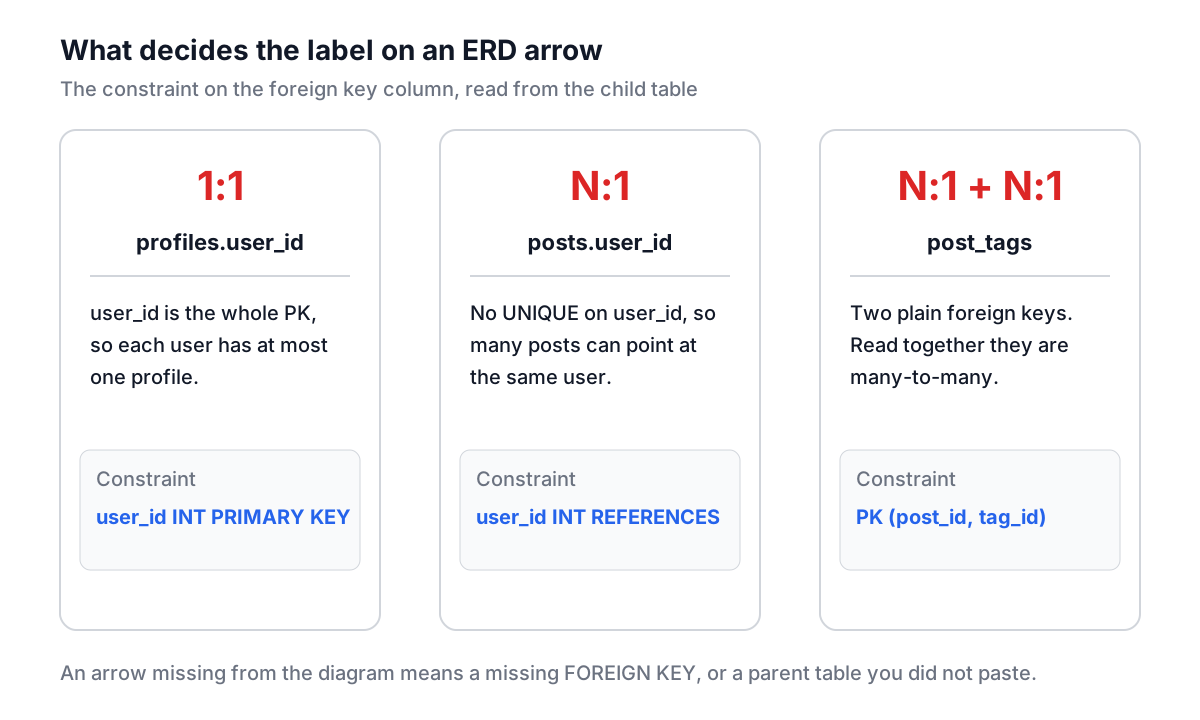
Each table becomes a box with primary key columns highlighted and foreign key columns marked. Each foreign key becomes an arrow from the child to the parent, labelled with the column and its cardinality:
- N:1 for an ordinary foreign key, where many child rows can share a parent.
- 1:1 when the foreign key column is unique or is the entire primary key, as with
profiles.user_id.
Many-to-many appears the way it really exists: as a junction table with two N:1 arrows. If you expected a relationship and see no arrow, either the foreign key is missing from the SQL or it points at a table you did not paste.
The generator reads more than the designer's output. It understands MySQL backticks, PostgreSQL double quotes, SQL Server brackets, IF NOT EXISTS, schema prefixes such as public.users, inline REFERENCES, table-level FOREIGN KEY clauses and ALTER TABLE ... ADD FOREIGN KEY. To diagram an existing database, export its schema with pg_dump --schema-only, mysqldump --no-data or sqlite3 app.db .schema and paste the result. Drag the boxes into a sensible layout, then export a PNG for the design doc.
Mistakes that are hard to undo
No foreign keys at all. "The application enforces it" holds until a script, a migration or a second service writes to the table. Let the database enforce relationships.
Comma-separated lists in a column. They are awkward to query, and the database cannot enforce a foreign key on each value. Use a junction table.
Nullable everything. A column that is nullable "just in case" forces every query to handle NULL and lets bad rows in. Make columns NOT NULL unless absence is a real state.
Floats for money. Use DECIMAL with explicit precision and scale.
Polymorphic foreign keys. A commentable_type plus commentable_id pair cannot have a real foreign key. Separate nullable foreign keys, or one table per parent, keep referential integrity.
Before you write the first migration, sketch the tables, generate the SQL, paste it into the ERD Generator and look at the picture for five minutes. Then fill a copy with test rows from the Database Seed Data Generator and write the three queries your busiest page will run. If they are awkward to write, the schema is telling you something while it is still cheap to change.