
Edge Functions and API Calls: Where Your Secret Keys Are Supposed to Live
Anything the browser can send, a visitor can read. What an API call is, why a key in frontend code is already public, what an edge function does about it, and when you genuinely need one.
By Redbison Dev · · 10 min read
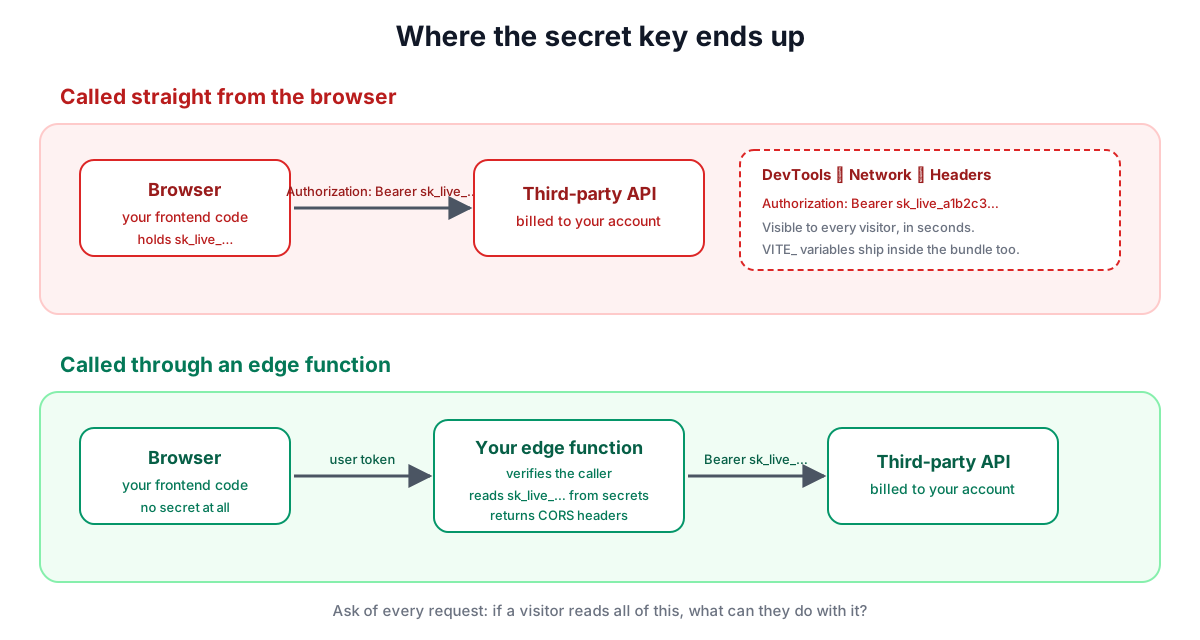
There is one rule underneath this whole topic, and everything else follows from it: anything your browser code can send, a visitor can read. Not a sophisticated attacker. Any visitor, using the developer tools built into their browser, in about fifteen seconds. If your app calls OpenAI or Stripe or a weather service directly from the frontend with your key attached, that key is published, and the bill belongs to you. This article explains what an API call is, why that happens, what an edge function does about it, and the four cases where you genuinely need one rather than reaching for it by habit.
What an API call actually is
An API call is one program asking another program for something over the internet. Your app sends an HTTP request to a URL, usually with a few headers attached, and gets structured data back, almost always JSON.
POST https://api.example.com/v1/summarise
Authorization: Bearer sk_live_a1b2c3...
Content-Type: application/json

{ "text": "..." }
Three parts matter. The URL says which service and which operation. The headers carry metadata, and this is where the key goes, usually as Authorization. The body carries the input.
That Authorization header is the whole problem. It is how the service knows the request is from your account and who to bill. It is also just text in a request that your frontend assembled, which means it was in your frontend to begin with.
Why a key in frontend code is already public
People assume a key is hidden because it is not visible on the page. It is not hidden at all. Anyone can:
- open the Network tab in their browser and read the headers of every request your app sends;
- open the Sources tab and search the JavaScript for the key;
- read your
VITE_-prefixed environment variables, which are substituted into the bundle at build time and ship inside it.
That last one catches people constantly. Putting a secret in a .env file feels like hiding it, but the frontend build inlines those values into the JavaScript it ships. The file is private; the built bundle is not. A variable only stays secret if it is read somewhere the visitor never receives.
This is why services issue two kinds of key. A publishable key is designed to be in frontend code and can only do harmless things. A secret key can spend money, read every record and bypass your security rules. Supabase's publishable key is safe in the browser precisely because row-level security constrains what it can reach; the service role key is not, because it ignores those rules entirely.
What an edge function is
An edge function is a small piece of your code that runs on somebody else's server, close to the user, and only when called. No machine to maintain, no always-on cost. In Supabase they are written in TypeScript and run on Deno; the same idea appears as serverless functions, workers or lambdas elsewhere.
The important property is simply that it runs somewhere the visitor cannot see. Your frontend calls your edge function, the function holds the secret key and calls the third-party service, and the answer comes back. The visitor sees a request to your own function and never sees the key.
"Edge" means it runs in data centres spread around the world rather than one region, so the round trip is shorter. For a key-holding proxy that distinction barely matters; it matters for things called on every page load.
The four cases where you actually need one
Not everything belongs in a function. Reach for one when:
- A secret is involved. Any call to a paid or privileged API: a model provider, a payment processor, an email sender, anything billed per request.
- You must not trust the client. Prices, credit balances, usage limits and permissions have to be decided somewhere the user cannot edit the input. A discount validated in the browser is a suggestion.
- Something must happen after a response is sent. Webhooks from Stripe or similar arrive as HTTP requests to a URL you provide, and a browser is not a URL that a server can call.
- You need to do work on behalf of all users. Scheduled jobs, aggregate reports, anything that legitimately reads across accounts using the service role.
Outside those, calling the database directly from the browser with row-level security doing the filtering is simpler, faster and perfectly safe. A function in front of every query adds a hop and something else to debug.
The parts that trip people up
CORS. Browsers block a page on one origin from reading a response from another origin unless the response says it is allowed. If your function is called from a browser, it must answer the preflight OPTIONS request and return Access-Control-Allow-Origin headers. The error appears in the console and looks like the function is broken when it ran perfectly and the browser simply refused to hand over the result. Name your actual origins rather than leaving a wildcard in place once you know them.
Secrets configuration. Secrets are set on the function's environment, not committed to the repository, and are read at runtime. Changing one usually needs a redeploy before the new value takes effect.
Checking who is calling. An edge function is a public URL. Unless you verify the caller's token, anyone who finds the URL can invoke it, including the expensive parts. Most platforms can require a valid user token by default; if you turn that off for a public endpoint, you are responsible for the check yourself.
Webhook signatures. A webhook endpoint must be public, so it needs a different proof. Providers sign each request, and you verify that signature against a signing secret using the raw request body. Parsing the JSON before verifying usually breaks the comparison, which is why the order matters.
Cold starts and timeouts. A function that has not run recently takes longer on its first call, and platforms cap how long one may run. Long jobs belong in a queue or a scheduled task rather than in a request the user is waiting on.
A rule of thumb
Ask one question of every call your app makes: if a visitor reads this entire request, what can they do with it? If the answer is "nothing I mind", the browser can make it. If the answer involves your money, other people's data, or bypassing your own rules, it belongs in a function. That question is faster than any architecture diagram and gets the answer right nearly every time.
Frequently asked questions
Is an environment variable in my frontend code secret?
No. Frontend build tools substitute those values into the JavaScript bundle that ships to every visitor, so the variable is readable by anyone who opens the browser's Sources tab. Only values read on a server stay private, which is what an edge function provides.
What is the difference between a publishable key and a secret key?
A publishable key is designed to sit in browser code and can only perform limited, harmless operations. A secret key can spend money, read all records or bypass database security rules, so it must only ever be read on a server.
Do I need an edge function for every database query?
No. With row-level security filtering rows inside the database, querying directly from the browser is safe, faster and simpler. Functions are for secrets, decisions the user must not control, incoming webhooks and work spanning many accounts.
Why do I get a CORS error when my function works?
Because the browser blocked your page from reading the response, not because the function failed. The function must answer the preflight request and return headers permitting your origin, otherwise the result is discarded even though the work completed successfully.
Can anyone call my edge function if they find the URL?
Yes, unless it verifies the caller. Most platforms require a valid user token by default, and turning that off for a public endpoint makes checking the caller your responsibility. Webhook endpoints instead verify the provider's signature over the raw body.
Sources and further reading
- Edge Functions, Supabase. What they are, how they are deployed and invoked.
- Environment variables, Supabase. Setting secrets a function reads at runtime.
- CORS support for invoking from the browser, Supabase. Preflight requests and the headers a function must return.
- Understanding API keys, Supabase. Publishable keys against the service role key.
- Cross-Origin Resource Sharing (CORS), MDN. Why the browser blocks a response it did fetch.
- Receive Stripe events in your webhook endpoint, Stripe. Verifying a signature against the raw request body.