
What Is Row-Level Security? The Database Rule That Decides Who Sees What
Enabling RLS and writing a policy are two different switches, USING and WITH CHECK do two different jobs, and the service role ignores both. A plain explanation of the feature your builder set up.
By Redbison Dev · · 10 min read
Your AI builder gave your app a database, and that database talks to the browser directly. There is no server of yours in between deciding who may read what. The thing doing that job instead is row-level security, a feature of PostgreSQL that your builder almost certainly switched on and then never explained. This article explains what it actually does, the two switches people confuse, why a policy that looks right still leaks, and the key that ignores every rule you write. If you want the five-minute version of what to check, Security for Non-Coders Who Vibe-Code Apps covers the test; this is the part underneath it.
The problem RLS solves
In a traditional app, the browser asks your server for data, and your server decides what to send back. The database is on a private network and trusts anything your server asks it.
In an app built with Supabase, Firebase or similar, that middle step is gone. The browser holds a key and queries the database over the internet. The key is in your JavaScript, so every visitor has it, and that is by design: it is meant to be public. Which means the only thing between a visitor and every row in your tables is a rule living inside the database itself.
That rule is a policy, and row-level security is the feature that makes the database consult it.
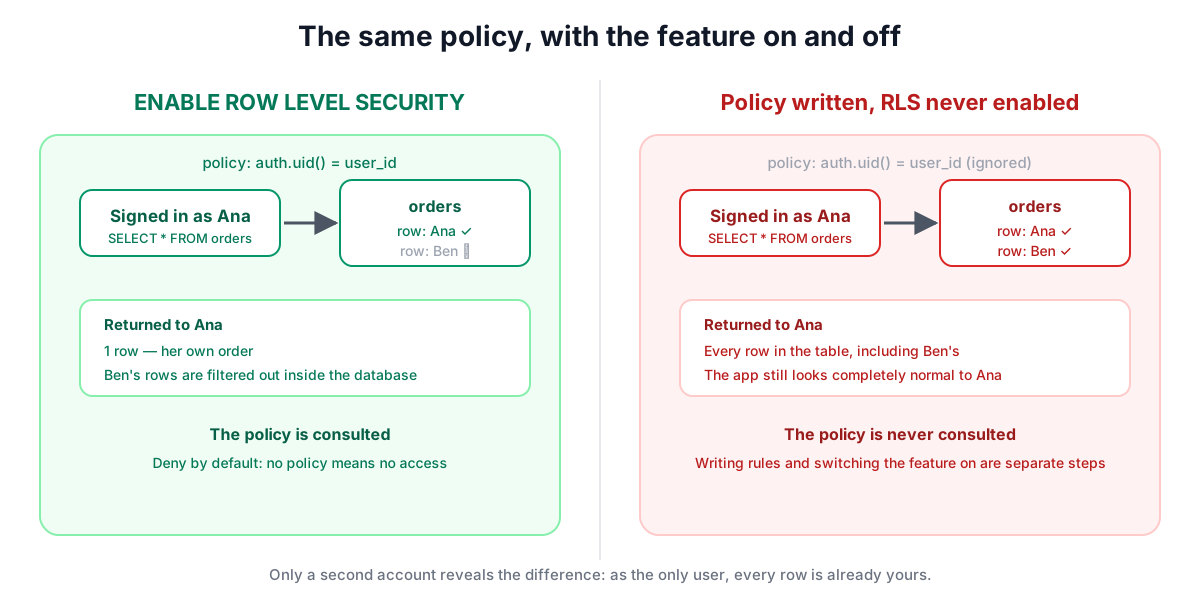
Enabling it and writing a policy are two separate switches
This is the single most common and most expensive misunderstanding.
-- Switch one: turn the feature on for this table.
ALTER TABLE orders ENABLE ROW LEVEL SECURITY;

-- Switch two: say what is allowed.
CREATE POLICY "read own orders" ON orders
  FOR SELECT USING (auth.uid() = user_id);
Those do different things, and either without the other is useless in a different direction:
- Policies written, RLS not enabled. The policies sit in the database and are ignored completely. The table is fully readable by anyone with the public key. Your dashboard shows carefully written rules; the table is wide open.
- RLS enabled, no policy. The opposite failure, and the safe one. With the feature on and no policy granting access, the default is to deny, so nobody reads anything and your app appears broken.
The first case is dangerous precisely because the app behaves perfectly. You are signed in as yourself, you see your own data, everything looks correct. Nothing reveals the problem until someone else looks.
A policy is written per command
Reading, inserting, updating and deleting are four separate permissions. A policy covers one of them, or all of them with FOR ALL.
The usual shape of the bug: someone writes a SELECT policy, tests the app, sees their own data and moves on. Nobody wrote an UPDATE or DELETE policy, so with RLS enabled those operations are denied and the app seems fine. Then someone adds FOR ALL to make editing work, and the read restriction quietly becomes an everything restriction with the same loose condition.
Go table by table and ask all four questions: who may read this row, who may create one, who may change one, and who may delete one. They often have different answers. A user may read their own order and create one, but should probably never delete it.
USING and WITH CHECK do different jobs
Every policy can carry two expressions, and mixing them up produces a table that reads correctly but accepts data it should not.
USINGfilters rows that already exist. It applies toSELECT,UPDATEandDELETE, and decides which rows you are allowed to see or act on.WITH CHECKvalidates rows being written. It applies toINSERTandUPDATE, and decides whether the new or modified row is permitted to exist.
Why that matters: a policy with only USING on an UPDATE lets you pick rows you own, then change user_id to somebody else's and hand the row away. An INSERT with no WITH CHECK lets you create a row stamped with another person's id.
CREATE POLICY "update own orders" ON orders
  FOR UPDATE
  USING (auth.uid() = user_id)          -- which rows you may touch
  WITH CHECK (auth.uid() = user_id);    -- what they may look like afterwards
If a policy only needs one, PostgreSQL will often copy USING into WITH CHECK for you, but writing both deliberately is how you avoid finding out which case you were in.
Roles: anon, authenticated and the one that ignores everything
Requests arrive as a database role, and policies can target roles with TO.
anonis a visitor who has not signed in.authenticatedis a signed-in user, withauth.uid()returning their id.service_roleis the administrative key, and it bypasses row-level security entirely.
That last one deserves its own paragraph. The service role is designed to ignore your policies, because server-side jobs need to read everything. It is not a stronger password; it is a key for which your security rules do not exist. If it ever appears in frontend code, in a public repository, or in a client-side environment variable, every policy you wrote stops mattering. Keep it in server-side configuration only, which in practice means an edge function's secrets. Edge Functions and API Calls covers where it is supposed to live.
One more wrinkle: a table's owner is also exempt from its policies by default. FORCE ROW LEVEL SECURITY applies them to the owner too, which matters when your application connects as the owner rather than as a limited role.
Writing conditions that hold up
A policy condition is just an expression that must be true for the row. The common patterns:
- Ownership.
auth.uid() = user_idis the workhorse and covers most tables. - Membership. For shared data, check that the current user belongs to the owning team, usually with a subquery against a membership table.
- Published flag.
FOR SELECT USING (published = true)lets anonymous visitors read public rows while writes stay restricted.
Two practical cautions. First, a subquery inside a policy runs for every row, so a condition that reads another table can be slow on large tables; indexing the column you filter on matters more here than elsewhere. Second, be careful that the membership table itself has policies, or you have moved the lock to a door you left open.
How to actually test it
Reading your own policies tells you what you intended. Testing tells you what you wrote.
Make a second account. Create a record while signed in as the first, then sign in as the second and try to read, edit and delete the first account's data. While you are the only user, every row belongs to you and no leak can reveal itself.
Then check the anonymous case, which people forget: open the app in a private window, signed out, and see what loads. Supabase's dashboard also flags tables that are exposed to the public schema without RLS, and that advisor list is worth reading before launch rather than after.
Frequently asked questions
Is row-level security the same as logging in?
No. Authentication decides who someone is; row-level security decides which rows that person may touch. An app can have working sign-up and sign-in while every account reads every other account's data, because those are separate mechanisms and only the second one filters rows.
Why does my table show data when I am signed out?
Either row-level security is not enabled on that table, so policies are ignored, or there is a policy granting access to the anonymous role. Check the enable switch first, since writing policies without enabling the feature is the most common cause.
What happens if I enable RLS but write no policy?
Nothing is readable or writable through the public key, so the app appears broken while the data stays safe. That is the intended default: access must be granted explicitly rather than assumed, which is the opposite of leaving the feature off.
Does the service role key respect my policies?
No. The service role bypasses row-level security by design so that server-side jobs can read everything. If that key reaches frontend code or a public repository, every policy you wrote stops applying, so it belongs only in server-side secrets.
Do I need a separate policy for updates and deletes?
Yes, unless you deliberately write one policy FOR ALL. Reading, inserting, updating and deleting are four distinct permissions, and the usual mistake is covering only reads, then widening everything at once to make editing work.
Sources and further reading
- Row Security Policies, PostgreSQL documentation. Enabling, the deny-by-default behaviour and
FORCE ROW LEVEL SECURITY. - CREATE POLICY, PostgreSQL documentation.
USING,WITH CHECK, per-command policies andTO role. - Row Level Security, Supabase. Policy examples,
auth.uid()and the anon and authenticated roles. - Understanding API keys, Supabase. Which key is publishable and which one bypasses RLS.