
How to Read a Hex Dump: Offsets, Bytes and Magic Numbers
What each column of a hex dump means, how to spot file types from their first bytes, and the invisible characters a hex view exposes in seconds.
· 6 min read
A CSV import fails on the first column name. The header reads id, the code asks for id, and the lookup still returns nothing. Open the file in a hex view and the answer is sitting at offset 0: EF BB BF 69 64. Three invisible bytes, a UTF-8 byte order mark, are glued to the front of the column name. No text editor showed them. A hex dump shows them in under a second.
That is the whole case for learning to read hex dumps. They show what is actually in a file rather than what an editor decides to display, and the layout is the same in xxd, hexdump -C, debuggers, Wireshark and the Hex Editor on this site.
Anatomy of a dump line
Here is the string Hello, World! as the Formatted Hex tab prints it:
00000000: 48 65 6C 6C 6F 2C 20 57 6F 72 6C 64 21 |Hello, World!|
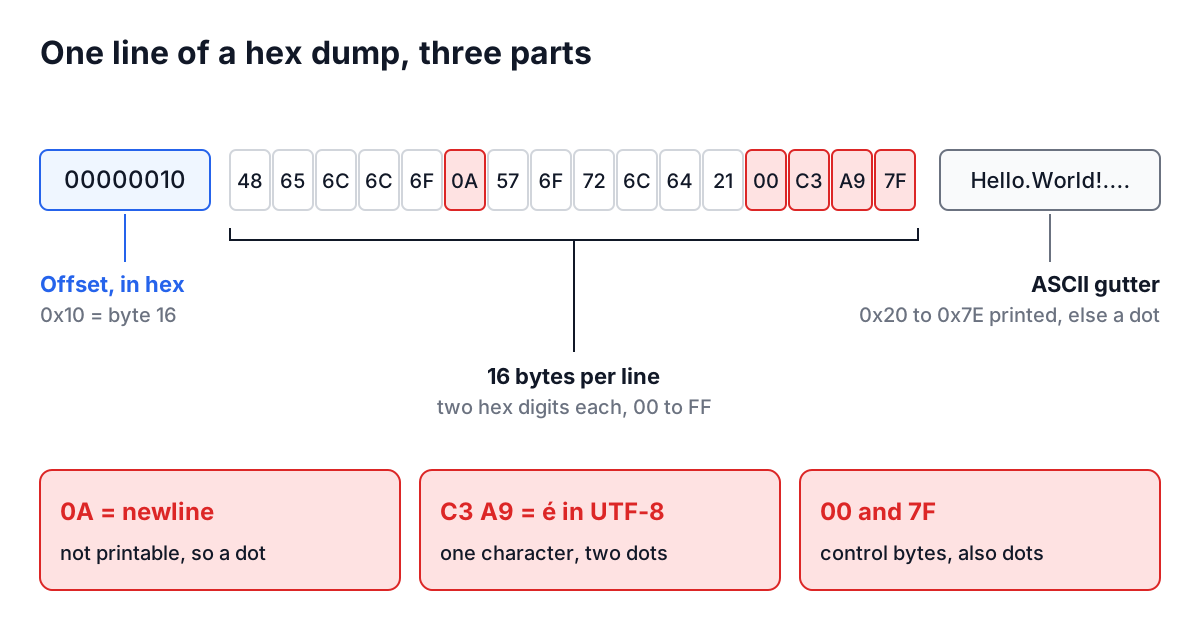
Each line has three parts.
The offset. The number on the left is the position of the line's first byte, in hex. Lines hold 16 bytes, so the second line starts at 00000010, which is byte 16, and the seventeenth line at 00000100, which is byte 256. Reading offsets as decimal is the most common beginner mistake.
The bytes. Sixteen values, two hex digits each. Two digits are enough because one hex digit covers 4 bits and two cover 8, exactly one byte with 256 possible values from 00 to FF. A short last line is padded with spaces so the right-hand column stays aligned.
The ASCII gutter. Bytes from 0x20 (space) to 0x7E (tilde) are printed as characters. Everything else, including newline 0A, tab 09, null 00 and every byte above 7F, becomes a dot. The gutter is a reading aid. When a dot matters, look at the hex.
Magic numbers: identifying a file from its first bytes
Most binary formats start with a fixed signature so programs can recognise them without trusting the file extension. A handful cover most of what you will meet:
| First bytes (hex) | As text | Format |
|---|---|---|
89 50 4E 47 0D 0A 1A 0A | .PNG.... | PNG image |
FF D8 FF | ... | JPEG image |
25 50 44 46 | %PDF | |
50 4B 03 04 | PK.. | ZIP, and formats built on it: DOCX, XLSX, JAR, APK |
1F 8B | .. | gzip |
7F 45 4C 46 | .ELF | Linux executable |
50 41 52 31 | PAR1 | Apache Parquet (also the last 4 bytes) |
EF BB BF | ... | UTF-8 byte order mark at the start of a text file |
The PNG signature is a nice piece of design. The 89 is a byte above 7F, so a transfer that strips the high bit corrupts it visibly. 0D 0A is a Windows line ending and the later 0A a Unix one, so a tool that converts line endings in transit breaks the signature instead of silently breaking the image.
When a "PDF" will not open, upload it to the Hex Editor and look at offset 0. If you see 3C 21 44 4F 43 (<!DOC), the download saved an HTML error page with a .pdf name. If you see 50 4B 03 04, someone zipped it. The Parquet File Viewer does the same kind of check for Parquet and reports a missing PAR1 instead of guessing.
Text in hex: what UTF-8 looks like
Plain ASCII text maps one character to one byte, so it reads straight across the gutter. Anything else is where hex views earn their keep. Type café ☕ and a newline into the Text View tab and the formatted dump shows:
00000000: 63 61 66 C3 A9 20 E2 98 95 0A |caf.. ....|
Seven characters became ten bytes. é is two bytes, C3 A9; the coffee cup is three, E2 98 95. UTF-8 encodes code points above U+007F as a lead byte (starting C, D, E or F in hex) followed by continuation bytes in the range 80 to BF. Once you know that pattern you can spot UTF-8 in any dump, and spot text that is not UTF-8. A lone E9 between ASCII letters is Latin-1 é, and it is exactly the kind of byte that turns into a replacement character or an exception in a UTF-8 parser. The text encoding guide covers those failures in detail.
A few other byte patterns explain a large share of "weird text" bugs:
0D 0Aat line ends: Windows line endings. Shell scripts with them fail with/bin/bash^M: bad interpreter.C2 A0: a UTF-8 non-breaking space, usually pasted from a web page or word processor. It looks like a space and is not one, sosplit(' ')misses it.E2 80 8B: a zero-width space. Invisible everywhere except here.EF BB BFat offset 0: the byte order mark from the opening example. Excel writes it when saving "CSV UTF-8".
Worked example: fixing a file with the Hex Editor
Suppose a config loader rejects a JSON file with "Unexpected token" at position 0, even though the file looks like {"debug": true}.
- Open the Hex Editor, click Upload File and choose the file. It is read by the browser, not uploaded.
- The Text View tab shows a warning that the bytes are not plain UTF-8 text and are displayed with dots. That alone is a clue.
- The Formatted Hex tab shows
EF BB BF 7B 22 64 65 62 75 67 22 .... The JSON starts at byte 3. - In the Hex View tab, delete
EF BB BFfrom the front. The other views update immediately, and the Text view now shows the JSON cleanly. - Click Download Hex to save the bytes as hex text, then turn them back into a file:
xxd -r -p hex-dump.txt config.json
xxd -r -p reads plain hex, ignoring spaces and line breaks, and writes raw bytes. For a one-off fix you can also remove the BOM directly with sed -i '1s/^\xEF\xBB\xBF//' config.json on GNU sed.
Common mistakes when reading dumps
Reading offsets as decimal. 00000040 is byte 64. If a parser reports an error "at byte 64", that is line 00000040, first column.
Counting characters instead of bytes. A line holds 16 bytes, not 16 characters. In a dump of Japanese or emoji text a line may show only five or six characters' worth of data.
Trusting the dots. A dot in the gutter can be any of about 160 different byte values. Never edit a binary file through its ASCII column. The Hex Editor warns about this because typing over dots replaces every hidden byte with 2E, the code for a literal period.
Odd-length hex. Each byte is exactly two digits. A is not a byte; 0A and A0 are, and they are different bytes. The editor rejects odd input rather than guessing.
Forgetting endianness. Multi-byte numbers are often little-endian on disk. The Parquet footer length, for instance, is four bytes at the end of the file with the least significant byte first, so 2C 01 00 00 means 300, not 738,263,040.
Command-line equivalents
The same views are a command away on any Unix system:
xxd file.bin | head            # offset, hex, ASCII, 16 bytes per line
hexdump -C file.bin | head     # same idea, offsets without a colon
xxd -s 0x100 -l 64 file.bin    # 64 bytes starting at offset 256
xxd -b file.bin | head         # binary digits instead of hex
file file.bin                  # name the format from its magic number
file uses a database of the same signatures in the table above, so it is a quick first check before reaching for a hex view.
Keep a hex view one click away for the next "the file looks fine" bug. Check offset 0 for a signature or a BOM, check line ends for 0D 0A, and search the hex for C2 A0 when whitespace misbehaves. For checking that two copies of a file are byte-identical without reading them, the File Hash Verifier compares their digests.