
UTF-8, Mojibake and Byte Order Marks: Text Encoding for Developers
Why é turns into é, how UTF-8 lays out bytes, what surrogate pairs do to JavaScript strings, and a checklist for fixing encoding bugs at the source.
· 6 min read
A customer named José signs up, and the welcome email greets "José". Nobody touched the name. It went into a form as UTF-8, passed through a service that assumed Latin-1, and came out as two characters where one used to be. Every developer meets this bug eventually, and it is always the same mistake: bytes were decoded with a different encoding from the one that wrote them.
This guide explains what is going on underneath, using the Text Encoding Converter to look at real bytes, and ends with a checklist for fixing encoding bugs where they start rather than patching the output.
Characters are not bytes
Unicode gives every character a number called a code point, written U+ and hex: U+0041 is A, U+00E9 is é, U+1F600 is 😀. That is the abstract layer. To store or send text, the code points have to become bytes, and an encoding is the rule for doing that.
There are several encodings in common use, and the same character produces different bytes in each:
| Character | Code point | UTF-8 | UTF-16 (big-endian) | Latin-1 |
|---|---|---|---|---|
| A | U+0041 | 41 | 00 41 | 41 |
| é | U+00E9 | C3 A9 | 00 E9 | E9 |
| € | U+20AC | E2 82 AC | 20 AC | not representable |
| 😀 | U+1F600 | F0 9F 98 80 | D8 3D DE 00 | not representable |
Bytes on their own do not say which encoding produced them. C3 A9 is é in UTF-8 and the two characters é in Latin-1. The decoder has to be told, through an HTTP Content-Type: text/html; charset=utf-8 header, a database column's character set, a file's BOM, or a convention everyone agrees on.
How UTF-8 lays out bytes
UTF-8, designed by Ken Thompson and Rob Pike in 1992 and standardized in RFC 3629, uses one to four bytes per code point. The top bits of each byte say what role it plays:
| Code points | Bytes | Bit pattern |
|---|---|---|
| U+0000 to U+007F | 1 | 0xxxxxxx |
| U+0080 to U+07FF | 2 | 110xxxxx 10xxxxxx |
| U+0800 to U+FFFF | 3 | 1110xxxx 10xxxxxx 10xxxxxx |
| U+10000 to U+10FFFF | 4 | 11110xxx 10xxxxxx 10xxxxxx 10xxxxxx |
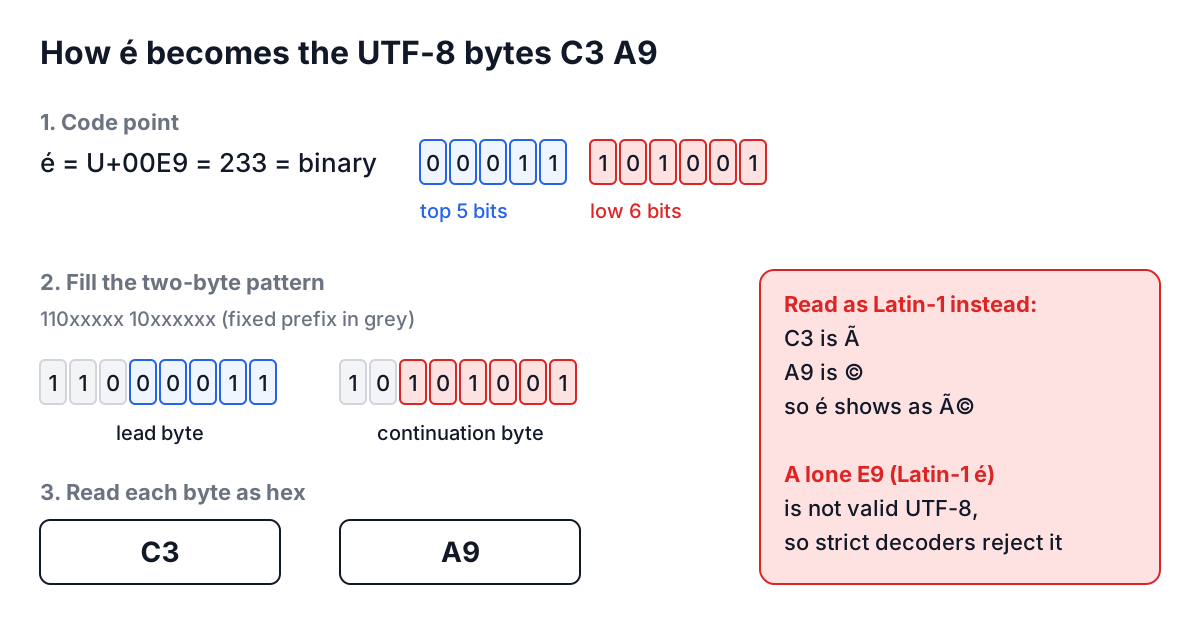
Three properties fall out of this design. ASCII text is already valid UTF-8, byte for byte. A continuation byte (10xxxxxx, hex 80 to BF) can never be mistaken for the start of a character, so a decoder that lands mid-character can resynchronise. And many byte sequences are simply invalid: E9 followed by a space, or C3 followed by 28. That last property is useful, because it means a strict decoder can tell you when bytes are not UTF-8 instead of guessing.
Mojibake: the bug you can read
Mojibake is text decoded with the wrong encoding. The common pairs are predictable enough to diagnose on sight:
| You see | It should be | What happened |
|---|---|---|
é | é | UTF-8 bytes C3 A9 read as Latin-1 or Windows-1252 |
€ | € | UTF-8 E2 82 AC read as Windows-1252 |
’ | ’ | UTF-8 decoded wrongly, then encoded again (double encoding) |
� | anything | Bytes that are not valid UTF-8, replaced by U+FFFD |
 at the start | nothing | A UTF-8 BOM EF BB BF read as Windows-1252 |
The tempting fix is to reverse the damage in code:
>>> 'José'.encode('latin-1').decode('utf-8')
'José'
It works on that one string, and it is the wrong fix. The next record may be clean, or double-encoded, and the reversal will corrupt it. Find the step that decoded with the wrong charset and fix that step.
JavaScript strings and surrogate pairs
JavaScript, Java and C# store strings as UTF-16 code units. Code points above U+FFFF, which include most emoji, do not fit in one 16-bit unit and are stored as a surrogate pair: a high surrogate from D800 to DBFF followed by a low surrogate from DC00 to DFFF.
'😀'.length                    // 2, two UTF-16 code units
[...'😀'].length               // 1, one code point
'😀'.charCodeAt(0).toString(16) // 'd83d', only the high half
'😀'.codePointAt(0).toString(16) // '1f600'
new TextEncoder().encode('😀')  // Uint8Array [240, 159, 152, 128]
Code that loops over .length and calls charCodeAt sees half a character at a time. An earlier version of the converter on this site had exactly that bug: escaping 😀 produced only \ud83d and the emoji was lost. It now escapes both halves, 😀, which is what JSON.stringify and JavaScript source expect, and decodes \u{1F600} too. The same trap catches substring and slice, which can cut a pair in half, and string length limits, which count code units, not characters.
Byte order marks
A byte order mark is the character U+FEFF placed at the start of a file. In UTF-16 it is needed, because it tells the reader whether the file is big-endian (FE FF) or little-endian (FF FE). In UTF-8 byte order does not exist, so the BOM (EF BB BF) only acts as a signature saying "this is UTF-8".
Windows tools, Excel's "CSV UTF-8" export among them, still write it. Many parsers do not expect it, and the result is a first column called id instead of id, or JSON that fails with "Unexpected token" at position 0. The Hex Editor shows the three bytes at offset 0; the hex dump guide walks through removing them.
Worked example: diagnosing a garbled name
A support ticket says a customer's name shows as Renée. Here is how to confirm the cause with the Text Encoding Converter.
- Paste
Renée(the correct name) with From set to UTF-8 and To set to Hexadecimal. The output is52656ec3a96565: the é isc3 a9. - Now paste the garbled
Renéethe same way. The output is52656ec383c2a96565. The é has become four bytes,c3 83 c2 a9, which are the UTF-8 encodings of à (U+00C3) and © (U+00A9). Someone decoded UTF-8 as Latin-1 and saved the result as UTF-8 again. - To check what an upstream system sent, take its raw Base64 or hex payload and convert From Base64 To UTF-8. If the converter reports that the bytes are not valid UTF-8, the sender is not using UTF-8 at all, and the fix belongs in its configuration or in the charset you declare when reading it.
Step 2 tells you the damage is double encoding, which happens in the write path. That rules out the email template and points at whatever stored the name.
Common mistakes and how to avoid them
Calling btoa on arbitrary text. btoa accepts only characters up to U+00FF and treats each as one byte. btoa('€') throws, and btoa('é') gives 6Q==, the Latin-1 byte, not UTF-8. Encode to bytes first with TextEncoder. The Base64 encoding guide shows the full pattern.
Not declaring a charset. HTML without <meta charset="utf-8">, HTTP responses without charset=utf-8, and MySQL tables created with the old utf8 (which stores only up to three bytes per character, so no emoji; use utf8mb4) all invite a default you did not choose.
Opening files without an encoding. Python's open() uses the platform default, which is not UTF-8 on older Windows setups. Pass encoding='utf-8', or 'utf-8-sig' to strip a BOM.
Escaping in the wrong layer. Unicode escapes, URL encoding and HTML entities are representations for a specific context, not encodings of the file. The escape sequences guide covers which one each context needs.
Normalisation surprises. é can be one code point (U+00E9) or two (e plus combining accent U+0301). They look identical and compare unequal. Normalise with str.normalize('NFC') before comparing or using text as a key.
Set UTF-8 explicitly at every boundary your text crosses: the HTML page, the HTTP header, the database connection and column, the file reader. When something still looks wrong, convert the suspect string to hex and compare it with the correct one. Two minutes with the bytes usually tells you which boundary is lying.