
HMAC Signatures Explained, with GitHub, Stripe and Slack Webhooks
What HMAC adds to a hash, how RFC 2104 builds it, how the big webhook providers sign requests, and the raw-body and timing mistakes that break verification.
· 11 min read
When GitHub, Stripe or Slack calls your webhook endpoint, how do you know the request really came from them and not from someone who found the URL? They sign each request with an HMAC: a short value computed from the request body and a secret that only you and the provider know. Your server recomputes it and compares. This guide explains what an HMAC is, why it is built the way it is, how each major provider applies it, and the handful of mistakes that make verification fail. You can reproduce every example in the HMAC Generator.
A hash is not enough
A cryptographic hash such as SHA-256 turns any input into a fixed-size fingerprint. Change one bit of the input and the fingerprint changes completely. That is useful for detecting accidental corruption, but it proves nothing about who produced the data: anyone can compute SHA-256 of anything. An attacker who changes a webhook body can simply recompute the hash.
The obvious fix is to mix a secret into the hash: send SHA-256(secret ‖ message), where ‖ means concatenation. Only someone holding the secret can produce it. Unfortunately this construction is broken for SHA-256, SHA-1 and MD5 because of the length-extension attack. Those hashes process input in blocks and output their internal state at the end. Given SHA-256(secret ‖ message) and the length of the secret, an attacker can continue hashing from that state and produce a valid value for secret ‖ message ‖ padding ‖ anything, without knowing the secret. Flickr's API signatures fell to exactly this in 2009.
How HMAC is built
HMAC, defined in RFC 2104 in 1997 and standardised as FIPS 198-1, avoids the problem by hashing twice with two derived keys:
HMAC(K, m) = H( (K′ ⊕ opad) ‖ H( (K′ ⊕ ipad) ‖ m ) )
- K′ is the key adjusted to the hash's block size: padded with zero bytes if it is shorter, or hashed first if it is longer. The block size is 64 bytes for SHA-1 and SHA-256 and 128 bytes for SHA-384 and SHA-512.
- ipad is the byte 0x36 repeated to the block size; opad is 0x5c repeated.
- The inner hash mixes the key with the message. The outer hash wraps the result in a second keyed hash, so the attacker never sees an internal state they could extend.
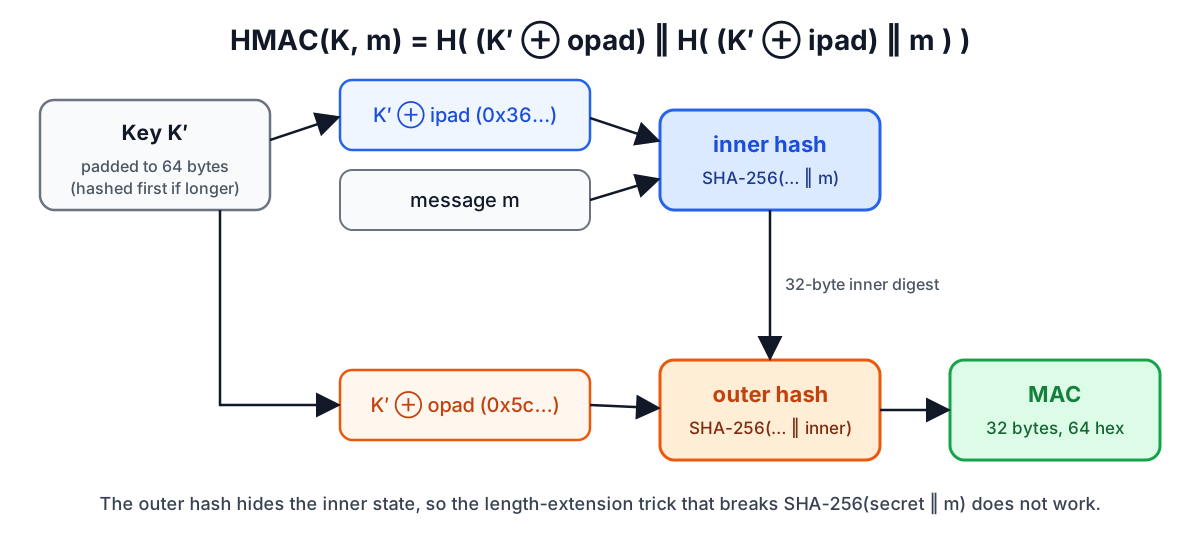
The output is the same size as the hash: 32 bytes for HMAC-SHA256, shown as 64 hex characters or 44 Base64 characters. Two reference values are useful for checking any implementation:
| Key | Message | HMAC-SHA256 (hex) |
|---|---|---|
key | The quick brown fox jumps over the lazy dog | f7bc83f430538424b13298e6aa6fb143ef4d59a14946175997479dbc2d1a3cd8 |
Jefe | what do ya want for nothing? | 5bdcc146bf60754e6a042426089575c75a003f089d2739839dec58b964ec3843 |
The second is test case 2 from RFC 4231, which defines official vectors for HMAC-SHA224, SHA256, SHA384 and SHA512, including keys longer than the block size. RFC 2202 does the same for HMAC-SHA1 and HMAC-MD5. The HMAC Generator is tested against both documents.
Choosing the hash and the key
Hash. Use HMAC-SHA256 unless a protocol tells you otherwise. HMAC-SHA1 is still considered secure as a MAC, because the known SHA-1 attacks produce collisions and HMAC's security does not depend on collision resistance, but there is no reason to choose it for something new. HMAC-SHA512 gives a longer tag, which some protocols prefer, but 256 bits is already far beyond any brute-force attack.
Key. RFC 2104 recommends a key at least as long as the hash output: 32 random bytes for SHA-256. Generate it with a cryptographic random source and store it like a password. A key longer than the block size is hashed down first, so extra length beyond 64 bytes adds nothing. A key that a human chose, such as mysecret, is the weakest point of many integrations: anyone who captures one signed request can try candidate keys offline until the HMAC matches.
Encoding. The key and message are bytes. If the provider gives you the secret as a hex string, decide whether the HMAC key is the text of that string or the bytes it represents; both are common, and they produce different results. The generator lets you mark the key as text, hex or Base64 for this reason.
How the major webhook providers sign requests
All three providers below use HMAC-SHA256 and hex output, but they differ in what exactly they sign.
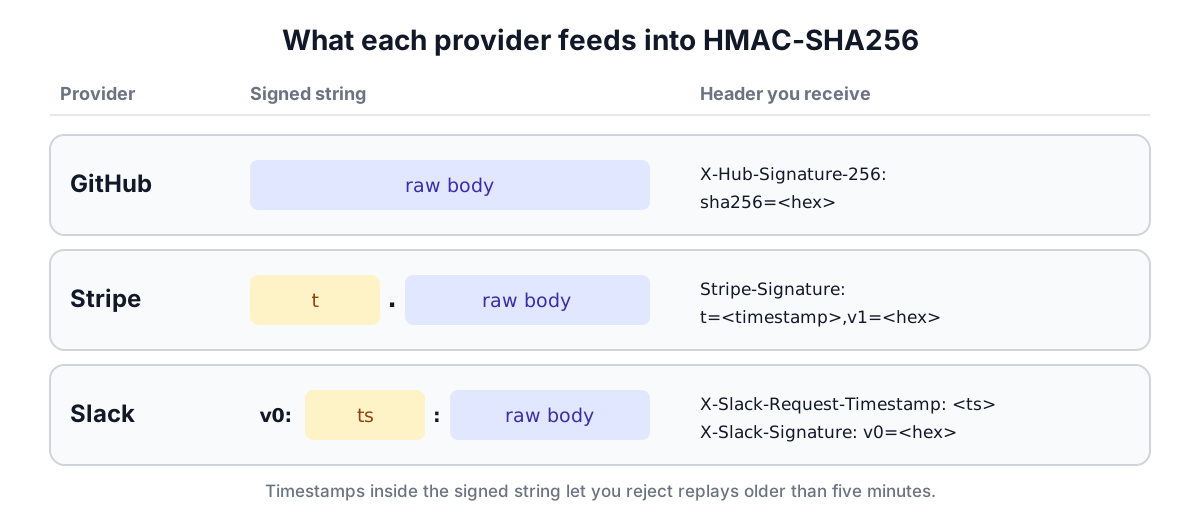
GitHub. The signed string is the raw request body. The header is X-Hub-Signature-256: sha256=<hex>. GitHub also sends a legacy X-Hub-Signature header with HMAC-SHA1, kept for compatibility; use the SHA-256 one.
Stripe. The signed string is <timestamp>.<raw body>, where the timestamp is the t value from the Stripe-Signature header, which looks like t=1700000000,v1=5257a8.... The v1 value is the HMAC-SHA256 in hex. There may be more than one v1 during secret rotation; accept the request if any matches. Stripe's libraries reject events whose timestamp is more than five minutes old by default.
Slack. The signed string is v0:<timestamp>:<raw body>, with the timestamp from X-Slack-Request-Timestamp. The header is X-Slack-Signature: v0=<hex>. Slack's documentation also says to reject requests whose timestamp is more than five minutes from your clock.
Including the timestamp in the signed string, as Stripe and Slack do, is what makes the five-minute check meaningful: an attacker who replays an old request cannot change its timestamp without invalidating the signature. GitHub's scheme has no timestamp, so replay protection there relies on the X-GitHub-Delivery ID, which you can record and refuse to process twice.
In the HMAC Generator, choose the GitHub, Stripe or Slack recipe, paste the raw body, the secret and the timestamp, and it shows the exact signed string and the header your endpoint should have received.
Verifying correctly: the raw body
The most common reason a correct secret produces a wrong signature is that the body was changed before it was hashed. Typical culprits:
- A JSON body parser ran first, and your code re-serialised the parsed object. Key order, whitespace and Unicode escaping can all differ from the original bytes.
- A framework normalised line endings or decoded percent-encoding in a form body.
- A proxy or API gateway re-encoded the request.
The fix is always the same: capture the body as raw bytes before any parsing. In Express, mount express.raw({ type: 'application/json' }) on the webhook route. In Flask, use request.get_data(). In Django, use request.body. Then verify, and only after verification parse the JSON.
A quick way to tell a body problem from a key problem: compute the HMAC of the body as your server received it and as the provider's dashboard shows it. If they differ, the body changed.
Verifying correctly: constant-time comparison
Comparing the expected signature with == leaks information. Most string comparisons stop at the first byte that differs, so a guess with a correct first byte takes slightly longer to reject than one without. Over many requests an attacker can measure that difference and recover the signature byte by byte. Use a comparison that always examines every byte:
| Language | Constant-time compare |
|---|---|
| Node.js | crypto.timingSafeEqual(a, b) (buffers of equal length) |
| Python | hmac.compare_digest(a, b) |
| PHP | hash_equals($known, $user) |
| Ruby | Rack::Utils.secure_compare(a, b) or OpenSSL.fixed_length_secure_compare |
| Go | hmac.Equal(a, b) |
| Java | MessageDigest.isEqual(a, b) |
Compare the raw bytes or the lowercase hex consistently; uppercase versus lowercase hex is a frequent false mismatch.
A complete Node.js example
import crypto from 'node:crypto';
import express from 'express';

const app = express();
app.post('/webhooks/github', express.raw({ type: 'application/json' }), (req, res) => {
  const sig = req.get('X-Hub-Signature-256') ?? '';
  const mac = crypto.createHmac('sha256', process.env.GITHUB_WEBHOOK_SECRET)
    .update(req.body) // raw Buffer, not parsed JSON
    .digest('hex');
  const expected = Buffer.from(`sha256=${mac}`);
  const received = Buffer.from(sig);
  if (expected.length !== received.length || !crypto.timingSafeEqual(expected, received)) {
    return res.status(401).end();
  }
  const event = JSON.parse(req.body.toString('utf8'));
  // handle event...
  res.status(204).end();
});
The length check comes first because timingSafeEqual throws on buffers of different length. That check leaks only the length, which is public anyway.
What HMAC does not do
An HMAC proves that someone holding the key produced the message and that it was not modified. It does not:
- Hide the message. The body travels in clear unless you also use TLS or encryption. For encrypting data, see AES-GCM vs AES-CBC.
- Prove which party signed. Both sides hold the same key, so either could have produced the signature. When you need one party to sign and many to verify, such as JWTs checked by many services, use a public-key signature (RS256, ES256, EdDSA) instead of HS256. The RSA and EC Key Pair Generator creates keys for that.
- Stop replay on its own. Add a timestamp or a unique ID to the signed data and check it.
HMAC is also the engine inside other constructions you may use without noticing: TOTP two-factor codes are an HMAC of the current time step, PBKDF2 is repeated HMAC, and HS256 JWTs are HMAC-SHA256 over the header and payload.
Sources
- RFC 2104, HMAC: Keyed-Hashing for Message Authentication (1997).
- FIPS 198-1, The Keyed-Hash Message Authentication Code (2008).
- RFC 4231, Identifiers and Test Vectors for HMAC-SHA-224, -256, -384 and -512; RFC 2202, Test Cases for HMAC-MD5 and HMAC-SHA-1.
- GitHub Docs, "Validating webhook deliveries"; Stripe Docs, "Check the webhook signatures"; Slack API, "Verifying requests from Slack".
Related searches
- hmac explained
- hmac sha256
- verify webhook signature
- github webhook signature
- stripe signature verification
- slack signing secret
- hmac vs hash
- timing safe compare
- length extension attack