
How TOTP 2FA Codes Work: RFC 6238 Step by Step
From a Base32 secret to a six-digit code: HMAC-SHA1, dynamic truncation, 30-second time steps, drift windows, the otpauth URI and the mistakes that make codes fail.
· 11 min read
The six-digit code in your authenticator app looks like magic: no network connection, no message from the server, and yet the website knows whether the number is right. The trick is a shared secret plus a clock, combined with a few lines of cryptography published in two short RFCs. This guide walks through the algorithm step by step, explains the otpauth link inside every 2FA QR code, and covers the practical problems that make codes fail. You can follow along in the TOTP Generator, which shows the current code, the neighbouring time steps and a code checker.
The shared secret
When you turn on two-factor authentication, the website creates a random secret, typically 20 bytes (160 bits), stores it against your account and shows it to you once, as a QR code and usually as text under a "can't scan it?" link. Your authenticator app stores the same bytes. From then on, both sides can compute the same code independently. Nothing secret crosses the network at login, only the six digits.
The text form is Base32, defined in RFC 4648: the 26 letters A to Z and the digits 2 to 7, each standing for 5 bits. Base32 was chosen because it is case-insensitive and avoids the easily confused characters 0, 1, 8 and 9, which makes it practical to type. Twenty bytes become 32 Base32 characters, often shown in groups of four such as JBSW Y3DP EHPK 3PXP.
RFC 4226 requires the secret to be at least 128 bits and recommends 160. Shorter secrets still produce codes, but they could in principle be brute-forced from a handful of observed codes.
HOTP: a counter, an HMAC and a truncation
The older standard, HOTP (RFC 4226, 2005), defines how to turn the secret K and a counter C into a code:
- Write the counter as 8 bytes, big-endian. Counter 1 is
00 00 00 00 00 00 00 01. - Compute HMAC-SHA1(K, counter). That gives 20 bytes.
- Dynamic truncation: take the low 4 bits of the last byte as an offset (0 to 15), then read 4 bytes starting at that offset.
- Clear the top bit of those 4 bytes so the number is a positive 31-bit integer.
- Take that number modulo 10^6 for six digits (or 10^8 for eight), padding with leading zeros.
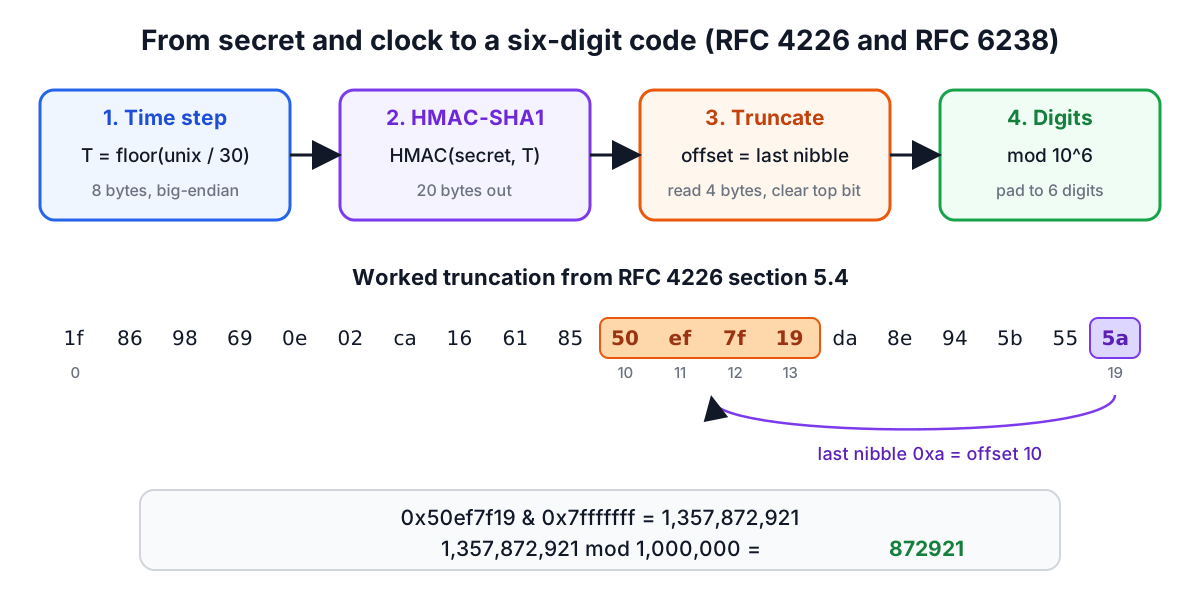
RFC 4226 section 5.4 gives a worked example. Suppose the HMAC result is 1f 86 98 69 0e 02 ca 16 61 85 50 ef 7f 19 da 8e 94 5b 55 5a. The last byte is 5a, whose low nibble is a, so the offset is 10. Bytes 10 to 13 are 50 ef 7f 19, which is 1,357,872,921 in decimal (the top bit is already clear). The last six digits give the code 872921.
Why truncate dynamically instead of always taking the first four bytes? Choosing the offset from the HMAC itself means every byte of the output influences the code, which the RFC's security analysis relies on.
With HOTP, the server and the device each keep a counter. Pressing the button on a hardware token advances the device's counter; a successful login advances the server's. If someone presses the button without logging in, the counters drift apart, so the server checks a few counters ahead (the look-ahead window, section 7.4 of the RFC) and resynchronises when it finds a match.
TOTP: replace the counter with the clock
TOTP (RFC 6238, 2011) removes the counter bookkeeping by deriving the counter from the current time:
T = floor((Unix time − T0) / X)
with T0 = 0 and X = 30 seconds by default. Everything else is HOTP. At Unix time 59, T = 1; at 1,111,111,109, T = 37,037,036 (0x023523EC in the RFC's table). Every device with the right secret and a correct clock computes the same T and therefore the same code, which changes every 30 seconds.
RFC 6238 also allows HMAC-SHA256 and HMAC-SHA512, and Appendix B lists test values for all three. They make a good check for any implementation:
| Unix time | Step T (hex) | SHA-1 | SHA-256 | SHA-512 |
|---|---|---|---|---|
| 59 | 1 | 94287082 | 46119246 | 90693936 |
| 1111111109 | 23523EC | 07081804 | 68084774 | 25091201 |
| 1234567890 | 273EF07 | 89005924 | 91819424 | 93441116 |
| 2000000000 | 3F940AA | 69279037 | 90698825 | 38618901 |
These are 8-digit codes, and the secrets are the ASCII strings 12345678901234567890 (20 bytes) for SHA-1, the same digits to 32 bytes for SHA-256 and to 64 bytes for SHA-512. To try the first row in the TOTP Generator, enter the Base32 secret GEZDGNBVGY3TQOJQGEZDGNBVGY3TQOJQ, choose 8 digits and set the clock offset so the time is 59. The tool's automated tests check every row of the table.
Clock drift and the acceptance window
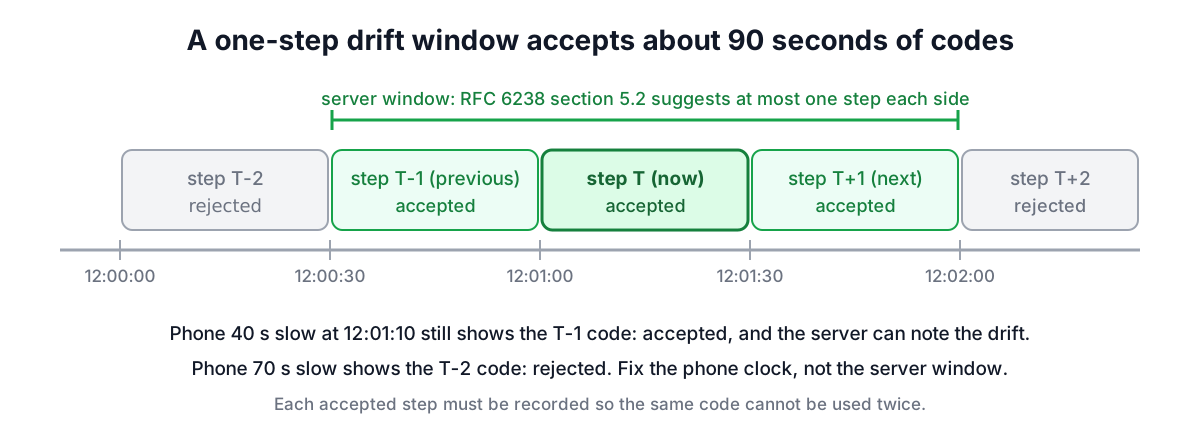
A TOTP code is only as good as the clocks. If your phone runs 40 seconds slow, it is still showing the previous step's code when the server has moved on. Network delay and the time it takes you to type add a few more seconds.
RFC 6238 section 5.2 therefore recommends that the server accept codes from at most one step either side of the current one, a window of roughly 90 seconds, and section 5.3 suggests the server record the drift it observes for each device and adjust. Most servers accept the previous, current and next step.
Two consequences matter for anyone building a login:
- Replay. A code stays valid for the whole window, so an attacker who sees it can reuse it. The server must remember the last step used for each account and refuse any code for that step or earlier. RFC 6238 says so explicitly: the verifier must not accept the second attempt of the same OTP.
- Brute force. Six digits is a million possibilities, and with a three-step window an attacker has three chances in a million per guess. That is safe only with rate limiting: lock or slow the account after a handful of wrong codes.
When a code fails for a user, the TOTP Generator's checker tells you which step it belongs to. "Valid 1 step behind" means the clock is off; no match anywhere means the secret, algorithm or digits are wrong.
The otpauth URI inside the QR code
The QR code shown during setup is just a URL in the Key URI Format that Google documented for Google Authenticator and that nearly every app now reads:
otpauth://totp/ACME%20Co:john@example.com?secret=HXDMVJECJJWSRB3HWIZR4IFUGFTMXBOZ&issuer=ACME%20Co&algorithm=SHA1&digits=6&period=30
| Part | Meaning | Default |
|---|---|---|
totp or hotp | The algorithm family | required |
Label Issuer:account | Shown in the app; issuer prefix is optional | required |
secret | Base32 secret, padding optional | required |
issuer | Service name; should match the label prefix | recommended |
algorithm | SHA1, SHA256 or SHA512 | SHA1 |
digits | 6 or 8 | 6 |
period | Seconds per step (TOTP) | 30 |
counter | Starting counter (HOTP only) | required for HOTP |
The format's own notes say that some implementations, Google Authenticator among them, ignore the algorithm, digits and period parameters. That is why almost every service uses SHA-1, 6 digits and 30 seconds, even though the RFC allows more. If you change any of them, test the first code in the apps your users actually have.
Because the URI contains the secret, a screenshot of the QR code is as sensitive as the password. Do not paste it into chat, tickets or a website you do not control.
Is HMAC-SHA1 still safe here?
SHA-1 is broken for collisions: researchers produced two different PDF files with the same SHA-1 hash in 2017. That matters for digital signatures and certificates. It does not matter for HMAC, whose security rests on the hash behaving like a pseudorandom function under a secret key, not on collision resistance. No practical attack on HMAC-SHA1 is known, and RFC 6238 still uses it as the default. The realistic attacks on TOTP are elsewhere:
- Phishing. A fake login page asks for your password and the current code and relays both to the real site within the 30-second window. TOTP does not stop this; passkeys and FIDO2 security keys do, because they are bound to the website's domain.
- Stolen secrets. A server database leak exposes every user's secret unless they are encrypted at rest. A phone backup can expose them on the user's side.
- Account recovery. Weak recovery flows, such as SMS fallback, let attackers skip the second factor entirely.
Implementing TOTP on a server: a checklist
- Generate a 20-byte secret from a cryptographic random source (
crypto.randomBytes,secrets.token_bytes), encode it as Base32, and show it as a QR code and text. - Require the user to enter one valid code before you enable 2FA, so you know their app works.
- Store the secret encrypted, with the key outside the database.
- On login, accept the current step and one either side, compare in constant time, and record the step used so it cannot be replayed.
- Rate-limit attempts per account.
- Issue one-time recovery codes at enrolment and let users regenerate them.
- Use a well-tested library (pyotp, otplib, Google's or your framework's implementation) and verify it against the RFC 6238 table above.
The algorithm itself is small enough to read in an afternoon. The HMAC Generator shows the HMAC step in isolation, and the HMAC signatures guide explains why the construction is safe. For the password half of the login, see password strength and entropy.
Sources
- RFC 4226, HOTP: An HMAC-Based One-Time Password Algorithm (2005), sections 5.3, 5.4 and 7.4, Appendix D.
- RFC 6238, TOTP: Time-Based One-Time Password Algorithm (2011), sections 4, 5.2 and 5.3, Appendix B.
- RFC 4648, The Base16, Base32, and Base64 Data Encodings.
- Google Authenticator project, Key Uri Format.
Related searches
- how totp works
- totp algorithm
- rfc 6238 explained
- hotp vs totp
- otpauth uri format
- 2fa code not working
- totp time drift window
- base32 secret
- implement totp server