
How to Build an MCP Server in TypeScript or Python
Tools, resources and prompts, a first server with the official TypeScript and Python SDKs, stdio or HTTP, wrapping an API, auth, testing with MCP Inspector and tool design tips.
· 7 min read
An MCP server is a small program that gives AI applications something to work with: actions they can take, data they can read and prompt templates people can reuse. Once it speaks the Model Context Protocol, the same server works in Claude, Cursor, VS Code, Codex and other clients. This article walks through what a server can offer, a first server with the official TypeScript and Python SDKs, choosing a transport, wrapping an API you already have, authentication, testing with MCP Inspector, and the tool design choices that decide whether a model uses your server well. The code matches the SDKs' documentation as of 1 November 2026, and the MCP Server Generator produces a complete project like the ones shown.
Tools, resources and prompts
A server can offer three kinds of thing, and they differ in who decides to use them:
- Tools are actions the model chooses to call, such as
search_ordersorcreate_ticket. Each has a name, a description and a JSON Schema for its arguments, and returns content (usually text) or an error the model can read. - Resources are read-only data addressed by a URI, such as
notes://readmeor a file path. The application decides when to load them into context. - Prompts are templates a user picks from a menu in the client, with arguments, such as "summarise notes about {topic}".
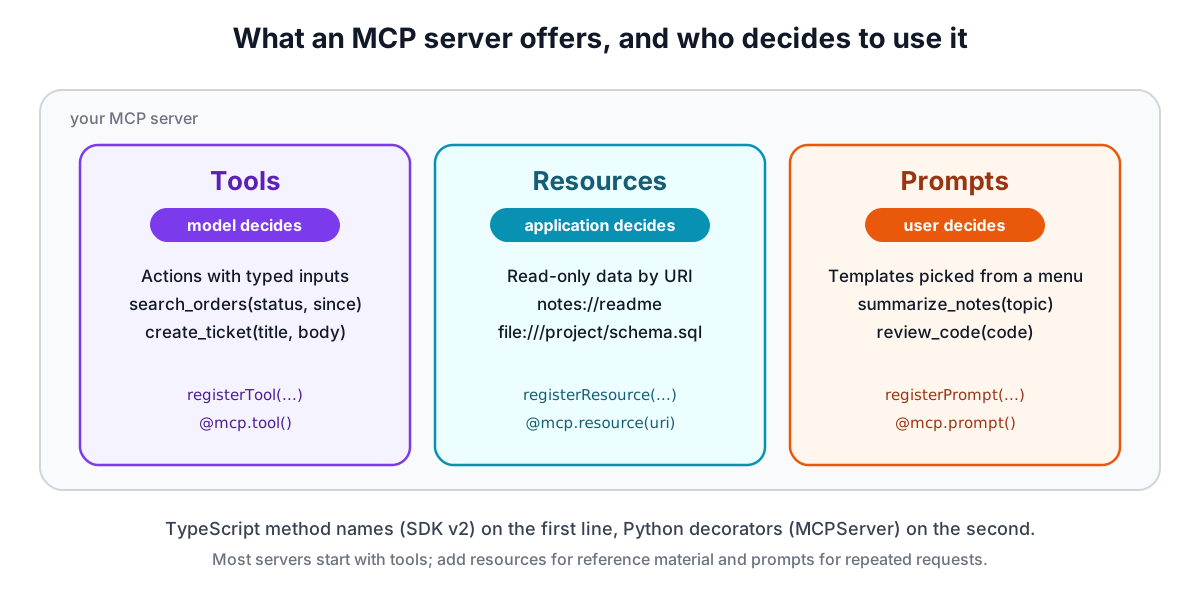
Most servers start with tools. Add resources when there is reference material a client should be able to attach, and prompts when users repeat the same request.
A first server in TypeScript
The TypeScript SDK's v2 line splits the old @modelcontextprotocol/sdk package into @modelcontextprotocol/server and @modelcontextprotocol/client, and uses Zod 4 for schemas. Install the server package and Zod, plus TypeScript for the build:
npm install @modelcontextprotocol/server zod
npm install -D typescript @types/node
Set "type": "module" in package.json and register tools inside a factory function. serveStdio calls the factory when it needs a server instance, so it must return a new one each time:
import { McpServer } from "@modelcontextprotocol/server";
import { serveStdio } from "@modelcontextprotocol/server/stdio";
import * as z from "zod/v4";

function createServer() {
  const server = new McpServer({ name: "notes-server", version: "0.1.0" });
  server.registerTool(
    "search_notes",
    {
      description: "Search notes by keyword. Use when the user asks what they wrote about a topic. Returns id, title and first lines.",
      inputSchema: z.object({
        query: z.string().describe("Words to look for in the title or body."),
        limit: z.number().int().default(10).describe("Maximum results, 1 to 50."),
      }),
    },
    async ({ query, limit }) => ({
      content: [{ type: "text", text: JSON.stringify(await searchNotes(query, limit)) }],
    }),
  );
  return server;
}

serveStdio(createServer);
console.error("notes-server running on stdio");
The Zod schema does three jobs: it becomes the JSON Schema clients see in tools/list, it validates arguments before your handler runs, and it types the handler's parameters. If the handler throws, or returns isError: true, the SDK sends the message back as a tool error the model can read and react to. Resources and prompts follow the same shape with server.registerResource(name, uri, metadata, read) and server.registerPrompt(name, { description, argsSchema }, build).
Note the last line: it logs with console.error. Over stdio, standard output carries the protocol, and one console.log corrupts it.
A first server in Python
The official Python package is mcp, and its v2 line calls the high-level server class MCPServer (earlier versions called it FastMCP). It needs Python 3.11 or newer. With uv:
uv add "mcp[cli]"
from typing import Annotated

from pydantic import Field
from mcp.server import MCPServer

mcp = MCPServer("notes-server")


@mcp.tool()
def search_notes(
    query: Annotated[str, Field(description="Words to look for in the title or body.")],
    limit: Annotated[int, Field(description="Maximum results, 1 to 50.")] = 10,
) -> str:
    """Search notes by keyword. Use when the user asks what they wrote about a topic."""
    return find_notes(query, limit)


@mcp.resource("notes://readme")
def readme() -> str:
    """How notes are organised."""
    return "Tag notes with project names."


if __name__ == "__main__":
    mcp.run()
Type hints become the schema, the docstring becomes the description, and a parameter with a default is optional. uv run mcp dev server.py opens the server in MCP Inspector.
stdio or streamable HTTP
Over stdio the client starts your server as a child process. That is the right choice for a server that runs on the user's machine: no port, no network exposure, and secrets come in as environment variables from the client's config.
Over streamable HTTP the server listens on a URL and many clients can connect. In TypeScript, createMcpHandler(createServer) builds a web-standard request handler; on Node you wrap it with toNodeHandler from @modelcontextprotocol/node and put the SDK's localhostHostValidation and localhostOriginValidation checks in front, which stop DNS-rebinding attacks while the server is bound to 127.0.0.1. In Python, mcp.run(transport="streamable-http", port=8000) serves http://127.0.0.1:8000/mcp. The older SSE transport still exists for old clients; do not build new servers on it.
Wrapping an API you already have
If the service has an OpenAPI description, most of the tool definitions already exist: each operation has an id, a summary and parameter schemas. The OpenAPI to MCP Converter maps operations to tools, resolves $refs, puts the JSON request body under a body argument and generates a server whose handlers call the API with fetch, reading the base URL and credentials from environment variables. It uses the SDK's fromJsonSchema, which registers a plain JSON Schema without rewriting it in Zod.
Treat that as a first draft. An API designed for programs is rarely the best tool set for a model. Pick the operations an agent needs, rewrite thin summaries, and consider merging several calls into one task-level tool, such as a single get_order_status that looks up the order, the shipment and the latest tracking event.
Authentication
For a stdio server, read keys from environment variables inside the server and let each user set them in their client's config. Never take secrets as tool arguments: the model would see them and they would end up in logs.
For a hosted HTTP server, the MCP specification defines an OAuth-based authorization flow so that clients can log users in, and the SDKs include helpers for verifying bearer tokens in front of the handler. Whatever you choose, check the caller's permission on every call, rate limit tool calls and log them for audit. The specification's security section asks servers to validate all tool inputs and sanitise outputs.
Testing with MCP Inspector
MCP Inspector is the official test client. It connects to your server, lists its tools, resources and prompts, and lets you call them by hand:
npx @modelcontextprotocol/inspector node build/index.js
npx @modelcontextprotocol/inspector --cli node build/index.js --method tools/list
npx @modelcontextprotocol/inspector --cli -e API_KEY=test node build/index.js --method tools/call --tool-name search_notes --tool-arg query=tax
npx @modelcontextprotocol/inspector --server-url http://127.0.0.1:3000/mcp --transport http
The first opens a web UI. The --cli form prints JSON, which suits scripts and CI. Pass environment variables with -e, because the server process does not inherit them automatically. Every project the generator produces was checked this way: listing tools, calling them, reading the resource and filling the prompt, in both languages and both transports.
Designing tools models get right
The model never sees your code, only names, descriptions and schemas, so those are the interface:
- Describe when, not just what. "Search orders by status and date. Use when the user asks about past or pending orders. Returns up to 20 orders, newest first." beats "Searches orders."
- Fewer, task-shaped tools. Long tool lists make models choose wrongly; OpenAI's function calling guide suggests keeping fewer than 20 available at once. Merge related calls and prefix names by service when you have many.
- Constrain inputs. Use enums for fixed choices, give formats in descriptions ("ISO date, YYYY-MM-DD") and mark only truly required fields as required.
- Return what matters. Trim responses to the fields a model needs and paginate long lists; a 200 KB JSON dump costs tokens and buries the answer.
- Write helpful errors. "No order 1234 for this customer; ask them to check the number" lets the model recover. A stack trace does not.
- Keep names portable. Letters, digits, underscores and hyphens, up to 64 characters, is accepted by every major API. The AI Tool Schema Builder checks names and schemas against each provider.
When the server works in Inspector, connect it to your client. The guide on setting up MCP servers in AI clients shows the config for each one, and the MCP Config Generator writes it for you.