
How to Set Up MCP Servers in Claude, Cursor, VS Code, Codex and Gemini CLI
What MCP is, local stdio versus remote servers, the exact config file and format for each AI client, keeping API keys out of shared files, and how to fix a server that will not connect.
· 7 min read
The Model Context Protocol (MCP) lets an AI application use tools and data from outside programs, called MCP servers, through one standard interface. Write a server once and Claude, Cursor, VS Code, Codex and Gemini CLI can all use it. The catch is that every client keeps its server list in a different file with slightly different key names. This article explains the two kinds of server, shows the exact config for each popular client, covers where API keys should live, and lists the fixes for servers that will not connect. The formats below were checked against each vendor's documentation on 1 November 2026, and the MCP Config Generator writes all of them from one list of servers.
What MCP is, in one paragraph
An MCP client (inside an app such as Claude Desktop or Cursor) connects to an MCP server and asks what it offers. A server can expose tools the model may call (search orders, run a query, open a web page), resources the application can read (files, documents, records) and prompts a user can pick from a menu. Messages are JSON-RPC. The current specification revision is dated 2026-07-28, and the official SDKs negotiate the revision with each client, so older clients keep working.
Local (stdio) and remote (HTTP) servers
There are two ways to reach a server:
- Local, over stdio. The client starts the server as a child process, for example
npx -y @modelcontextprotocol/server-filesystem ~/Documents, and talks to it over the process's standard input and output. The server runs with your user account's permissions, needs no network port, and gets its secrets from environment variables in the client config. - Remote, over streamable HTTP. The server runs somewhere else and the client connects to a URL such as
https://api.githubcopilot.com/mcp/. Authentication is a header token or an OAuth login the client handles. An older HTTP transport based on server-sent events (SSE) is still around; Claude Code's documentation calls it deprecated and the Python SDK's docs say not to build anything new on it.
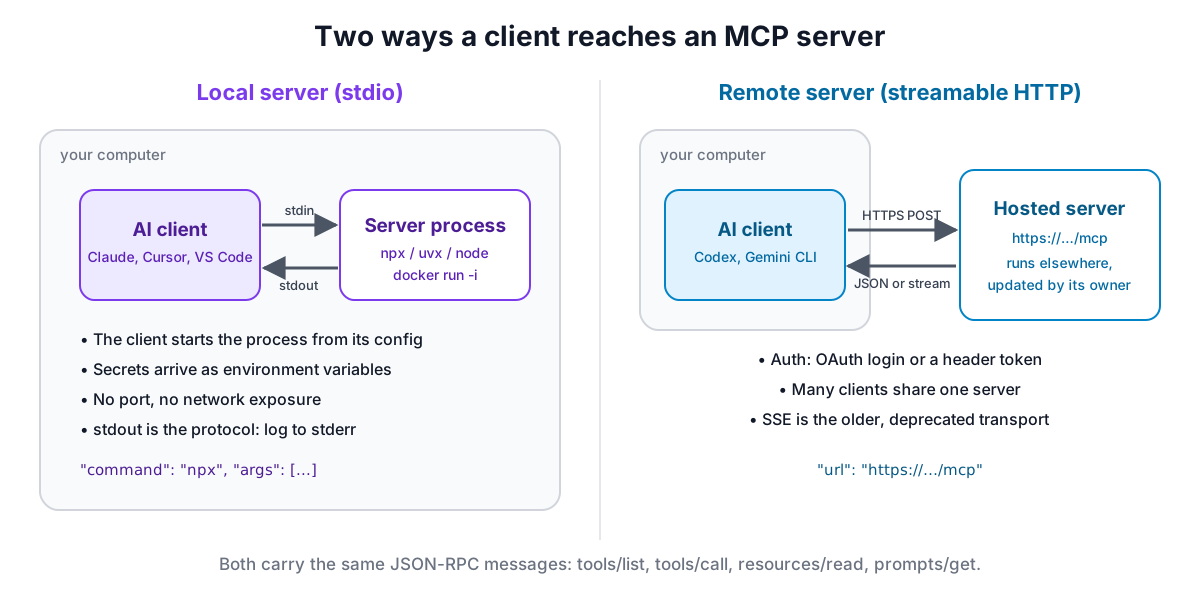
Use a local server for anything that touches your files, your shell or local apps. Use a remote server for hosted services, so you are not running and updating their code yourself.
Claude Desktop
Open Settings, then Developer, then Edit Config. The file is ~/Library/Application Support/Claude/claude_desktop_config.json on macOS, %APPDATA%\Claude\claude_desktop_config.json on Windows and ~/.config/Claude/claude_desktop_config.json on Linux.
{
  "mcpServers": {
    "filesystem": {
      "command": "npx",
      "args": ["-y", "@modelcontextprotocol/server-filesystem", "/Users/you/Desktop", "/Users/you/Downloads"]
    }
  }
}
The paths after the package name are the only folders the server may touch. Quit Claude Desktop completely and reopen it after saving. This file starts local processes only; remote servers are added in the app as custom connectors on plans that include them, or bridged through the community mcp-remote package as a local command.
Claude Code
Claude Code adds servers from the terminal. Everything after -- is the command that starts the server:
claude mcp add --env API_KEY=$API_KEY --transport stdio my-server -- npx -y some-mcp-server
claude mcp add --transport http github https://api.githubcopilot.com/mcp/ --header "Authorization: Bearer $GITHUB_PAT"
Put --env before --transport, not directly before the server name, or the CLI reads the name as another KEY=value pair. The --scope flag decides where the server is stored: local (the default, only you in this project, kept in ~/.claude.json), user (all your projects) or project, which writes a .mcp.json file in the repository root for the whole team. That file expands ${VAR} and ${VAR:-default} from each person's environment, so it can be committed without secrets:
{
  "mcpServers": {
    "github": {
      "type": "http",
      "url": "https://api.githubcopilot.com/mcp/",
      "headers": { "Authorization": "Bearer ${GITHUB_PAT}" }
    }
  }
}
Run claude mcp list, or /mcp inside a session, to check the connection.
Cursor
Cursor reads .cursor/mcp.json in a project and ~/.cursor/mcp.json for all projects, with the same mcpServers key. Remote servers use url and optional headers. Values can pull from your environment with ${env:NAME}, and ${workspaceFolder} points at the project root:
{
  "mcpServers": {
    "github": {
      "url": "https://api.githubcopilot.com/mcp/",
      "headers": { "Authorization": "Bearer ${env:GITHUB_PAT}" }
    }
  }
}
VS Code
VS Code's format differs in two ways: the top-level key is servers, and every server needs a type of stdio, http or sse. Put it in .vscode/mcp.json in the workspace, or run "MCP: Open User Configuration" for your profile. For secrets, declare an input and reference it; VS Code asks for the value the first time the server starts and stores it securely:
{
  "inputs": [
    { "type": "promptString", "id": "github-pat", "description": "GitHub token", "password": true }
  ],
  "servers": {
    "github": {
      "type": "http",
      "url": "https://api.githubcopilot.com/mcp/",
      "headers": { "Authorization": "Bearer ${input:github-pat}" }
    }
  }
}
Windsurf, now Devin Desktop
Windsurf's MCP documentation now redirects to Cognition's Devin Desktop docs. The current files are .devin/mcp_config.json in a project, .devin/mcp_config.local.json for personal overrides (gitignored) and ~/.config/devin/mcp_config.json for your user, all with an mcpServers object. Remote servers use url, headers can reference ${env:VAR}, and the client tries streamable HTTP before falling back to SSE. Older Windsurf editor builds read ~/.codeium/windsurf/mcp_config.json and called the remote key serverUrl.
OpenAI Codex CLI
Codex uses TOML in ~/.codex/config.toml, one table per server, and a trusted project can have its own .codex/config.toml. Local servers take command, args, env and env_vars (names of variables to forward from your shell). Remote servers take url, plus bearer_token_env_var for a token kept in the environment. Codex documents stdio and streamable HTTP only.
[mcp_servers.github]
url = "https://api.githubcopilot.com/mcp/"
bearer_token_env_var = "GITHUB_PAT"

[mcp_servers.filesystem]
command = "npx"
args = ["-y", "@modelcontextprotocol/server-filesystem", "/Users/you/Projects"]
codex mcp add <name> -- <command> and codex mcp add <name> --url <url> write the same entries. Start-up times out after 10 seconds and tool calls after 60 unless you set startup_timeout_sec or tool_timeout_sec.
Gemini CLI
Gemini CLI reads mcpServers from ~/.gemini/settings.json or .gemini/settings.json in a project. It is the one client where the remote key depends on the transport: httpUrl for streamable HTTP and url for SSE. Values in env can reference $VAR or ${VAR}. Its docs recommend hyphens rather than underscores in server names. Google's own banner notes that for unpaid and Google One users, Antigravity CLI replaced Gemini CLI in June 2026, so check which tool you are running.
Keeping secrets out of config files
A config file that holds a real token ends up in a backup, a screenshot or a Git commit sooner or later. Use the reference syntax each client provides instead: ${VAR} in Claude Code's .mcp.json, ${env:VAR} in Cursor and Devin, ${input:id} prompts in VS Code, env_vars and bearer_token_env_var in Codex. Claude Desktop's file has no documented expansion, so keep that file out of version control. Prefer servers that support OAuth, where the client handles login and you store no long-lived token, and give tokens the narrowest scopes that work.
Only install servers you trust. A local server can do whatever your user account can, and a server's tool descriptions are text your model will read and may act on.
When a server will not connect
- Run the command yourself. Paste the exact command and arguments into a terminal. Missing Node.js, Python or uv, a typo in the package name or a bad path shows up immediately.
- Use absolute paths. Clients often start servers from a different working directory, so relative paths break.
- Check stdout. A stdio server must print nothing but protocol messages to stdout. A stray log line breaks the connection; logs belong on stderr.
- Restart the client. Most read MCP config only at start-up.
- Read the logs. Claude Desktop writes
mcp.logandmcp-server-<name>.logto~/Library/Logs/Claudeon macOS and%APPDATA%\Claude\logson Windows. - Windows and npx. On native Windows,
npxis a batch file, and a client that starts processes directly may fail to launch it. Wrapping it as"command": "cmd", "args": ["/c", "npx", ...]is the usual fix; the generator has a switch for it. - Test the server alone.
npx @modelcontextprotocol/inspectorconnects to a server, lists its tools and lets you call them, which separates server bugs from client config mistakes.
If you want a server to try first, RedBison runs a public one with hundreds of calculators and developer utilities; the MCP Config Generator has it as a preset. To write your own, read how to build an MCP server, or start from the MCP Server Generator or the OpenAPI to MCP Converter.