
How to Crop Photos for Social Media: Ratios, Pixels and Composition
Aspect ratio versus pixel size, the crops Instagram, YouTube, X and LinkedIn expect, why upscaling a small crop looks soft, and composition rules that survive a square frame.
· 9 min read

Cropping looks like the simplest edit there is: draw a box, keep what is inside. Most cropping problems come from mixing up two separate things, the shape of the picture and the number of pixels in it, and from letting a social network crop for you. This guide explains both, lists the sizes the big platforms ask for, and shows the composition habits that keep a subject intact when a landscape photo has to become a square or a tall Story. The Crop Image tool follows the same steps.
Aspect ratio and resolution are different numbers
The aspect ratio is the shape: width divided by height, written as 16:9, 4:5 or 1.91:1. The resolution is the pixel count, such as 1920 x 1080. A 3840 x 2160 frame and a 1280 x 720 frame are both 16:9, but the first has nine times as many pixels.
Cropping changes both at once. Take a 12-megapixel phone photo of 4000 x 3000 pixels (4:3). Crop it to a 4:5 portrait and the largest box that fits keeps the full 3000 pixel height and becomes 3000 x 4/5 = 2400 pixels wide. You lose 1600 columns, 800 from each side if the box is centred. Nothing about the kept pixels changes.
Scaling is a second, independent step. Instagram shows feed photos at up to 1080 pixels wide, so that 2400 x 3000 crop will be scaled to 1080 x 1350. Scaling down discards detail you would never see on a phone anyway, and it keeps the shape. Scaling up is the dangerous direction, covered below.
The Crop Image tool keeps the steps visible. The frame you drag sets the shape. Choosing a social size additionally fixes the output pixels, and the result panel shows the final size, the reduced aspect ratio and how much of the original area you kept.
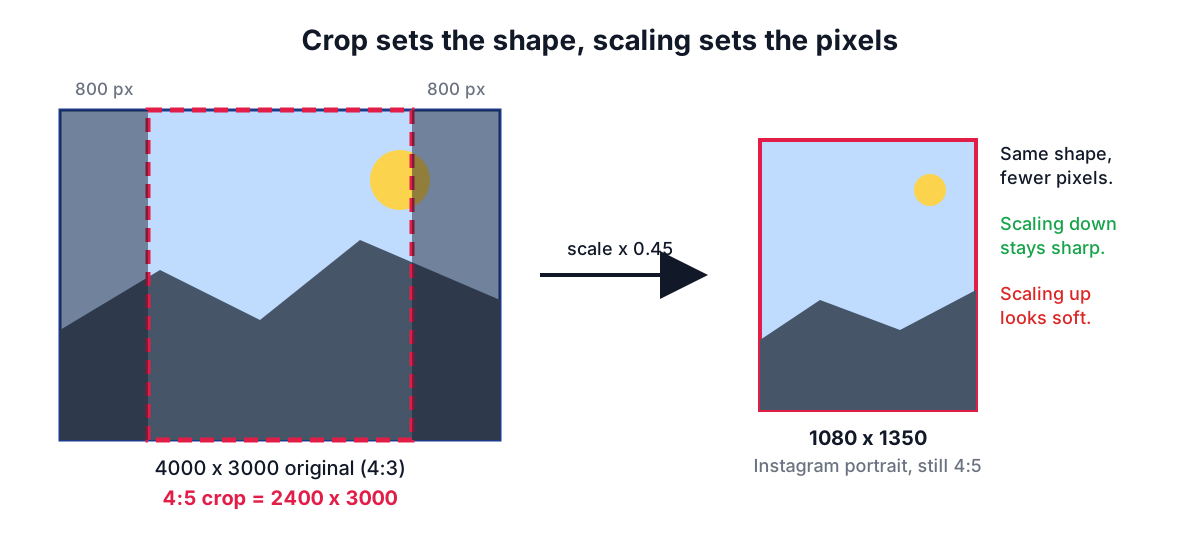
How the largest crop is found
For a chosen ratio r (width / height) the biggest box that fits a W x H image is found in two tries. First assume the box uses the full width: its height is W / r. If that is taller than the image, use the full height instead and make the width H x r. The box is then centred.
| Image | Ratio | Largest crop | Trimmed |
|---|---|---|---|
| 1920 x 1080 | 1:1 | 1080 x 1080 | 420 px from each side |
| 4000 x 3000 | 4:5 | 2400 x 3000 | 800 px from each side |
| 1080 x 1920 | 16:9 | 1080 x 608 | 656 px from top and bottom |
| 6000 x 4000 | 1.91:1 | 6000 x 3141 | 429 or 430 px top and bottom |
The last column matters for composition. Turning a portrait phone frame into a 16:9 thumbnail throws away two thirds of the picture, so the subject must already sit in the middle band.
Sizes the main platforms ask for
Platforms publish recommended sizes in their help centres and adjust them now and then. These were current in October 2026; check the help page before a campaign where a few pixels matter.
| Use | Pixels | Ratio | Notes |
|---|---|---|---|
| Instagram post, square | 1080 x 1080 | 1:1 | Feed width is 1080 px |
| Instagram post, portrait | 1080 x 1350 | 4:5 | Tallest feed ratio, most screen space |
| Instagram post, landscape | 1080 x 566 | 1.91:1 | Widest feed ratio |
| Story, Reel, TikTok | 1080 x 1920 | 9:16 | Keep text out of the top and bottom 250 px or so, where buttons sit |
| YouTube thumbnail | 1280 x 720 | 16:9 | Minimum width 640 px |
| YouTube channel banner | 2048 x 1152 | 16:9 | Only a central strip shows on every device |
| X (Twitter) header | 1500 x 500 | 3:1 | Profile photo overlaps the lower left |
| LinkedIn profile background | 1584 x 396 | 4:1 | Profile photo overlaps the left |
| Open Graph link preview | 1200 x 630 | 1.91:1 | Used by Facebook, LinkedIn, Slack and others |
In early 2025 Instagram changed its profile grid from square thumbnails to taller 3:4 ones. A 4:5 post is shown cropped to 3:4 on the grid, so the top and bottom few percent disappear there. If your feed grid matters, keep important detail away from those edges, or crop at 3:4 in the first place.
Uploading at exactly the recommended size has a practical benefit. Every platform re-encodes uploads, and many resize them. If you hand over the final size, the only resize is the one you chose, done with high-quality smoothing in your browser, and the platform's compressor has less work to do.
Why a crop can look soft
When the crop has fewer pixels than the target, the image must be enlarged, and enlarging cannot invent detail. A 1080 x 608 strip cut from a vertical screenshot and saved as a 1280 x 720 thumbnail is stretched by about 18% in each direction. Edges blur and text loses its crispness.
The tool compares the crop with the target and shows a warning when the target is larger. The fixes are simple: make the crop box bigger, start from the original camera file rather than a downsized copy, or pick a target that matches what you have. For thumbnails, a frame grabbed from 4K video gives plenty of room.
A second source of softness is the file format. JPEG and WebP discard detail to save space. At a quality of 85 to 90% the loss is invisible on photos, but screenshots with small text look better as PNG, which stores pixels exactly.
Composition that survives the crop
Cropping is a composition decision, so a few habits help.
Use the thirds grid. The crop frame shows lines at one third and two thirds of its width and height. Placing eyes, horizons or a product on those lines usually looks more deliberate than dead centre. For a square avatar, centre the face but put the eyes near the upper third line.
Leave room in the direction of movement or gaze. A person looking to the right needs space on the right side of the frame. A tight crop that cuts that space feels cramped.
Do not cut at joints. Cropping exactly at wrists, knees or elbows looks like an amputation. Crop between joints, mid-thigh or mid-forearm, instead.
Think about overlays. Stories have the username at the top and reply bar at the bottom. X and LinkedIn headers put a round profile photo over one corner. YouTube banners show only a central strip on phones. Keep text and faces inside the area that stays visible everywhere.
Crop before you resize. If you resize a photo to 1080 pixels wide and then crop a small square from it, the square might be only 400 pixels. Crop from the original and scale once.
A worked example
You have a 4032 x 3024 photo of a cafe front and want an Instagram portrait post plus a YouTube thumbnail.
- Open the photo in Crop Image. Choose Instagram post, portrait 4:5. The frame becomes 2419 x 3024, centred. Drag it left so the door and sign sit on the left third line.
- The result panel shows 1080 x 1350, ratio 4:5, and no warning, because 2419 pixels wide is more than enough.
- Save as JPEG at 90%. The file is typically a few hundred kilobytes.
- Choose YouTube thumbnail. The frame becomes 4032 x 2268. Move it down so the sign is in the upper third, leaving room on the right for title text you will add in an editor.
- Download again. The output is exactly 1280 x 720.
If you later need the same image smaller, use the Image Resizer; if the file is too big for an upload form, run it through the Image Compressor.
Privacy and orientation
Phones often store pixels sideways and add an EXIF orientation tag that tells viewers to rotate them. Browsers honour the tag when decoding, so the photo appears upright in the cropper, and the cropped file is written with upright pixels and no tag. If a photo ever shows sideways in another app, the Rotate and Flip Image tool and the guide on rotating and straightening photos explain why.
Because the crop is drawn onto a canvas and encoded fresh, none of the original EXIF metadata is copied: no GPS coordinates, camera serial number or capture time. If you want to see what a photo carries before sharing it, open it in the Image Metadata Viewer.
Sources
- Instagram Help Centre, photo resolution and aspect ratio guidance.
- YouTube Help, "Add video thumbnails" and "Manage your channel banner".
- X Help Center, profile and header image guidelines; LinkedIn Help, "Add or change your background photo".
- Open Graph protocol (ogp.me) and Meta for Developers image guidance for link previews.
- CIPA DC-008 (Exif), Orientation tag; CSS Images Module Level 3,
image-orientation.
Related searches
- crop image to 4:5 for instagram
- aspect ratio vs resolution
- youtube thumbnail size 1280x720
- crop photo to 16:9 online
- linkedin banner size 1584x396
- why is my cropped photo blurry
- rule of thirds crop
- crop to square without losing quality