
How to Watermark a PDF: Text, Logos, Opacity and Placement
Choosing watermark text, size, angle and transparency, diagonal versus tiled stamps, logo watermarks, rotated pages, and an honest look at how easily a watermark can be removed.
· 9 min read
A watermark tells everyone who opens a document what its status is before they read a word: DRAFT, CONFIDENTIAL, COPY, SAMPLE, or a company logo. It also marks a file as yours when it leaves your hands. This guide covers the decisions that make a watermark readable without ruining the page (text, size, angle, opacity, placement), how the Watermark PDF tool draws it, how rotated and cropped pages are handled, and an honest look at what a watermark can and cannot protect.
What a PDF watermark actually is
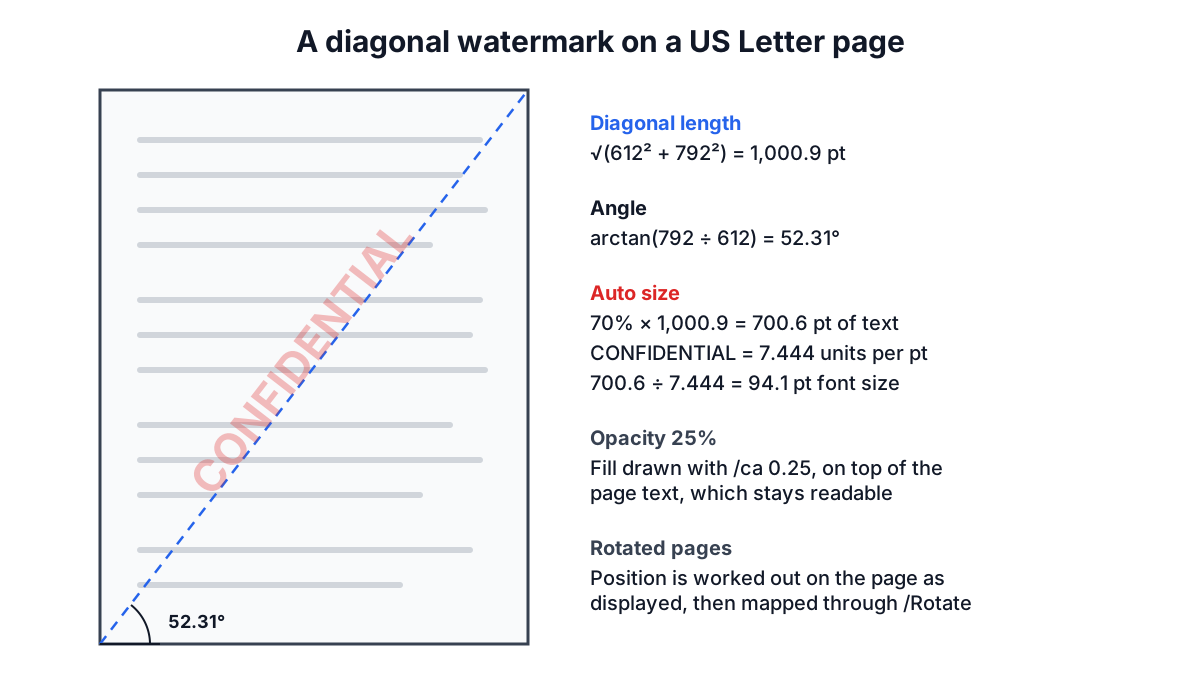
There is no special "watermark" object in an ordinary PDF. A watermark is extra drawing added to a page's content: a line of text in a font, or an image, placed with a transformation matrix that sets its position, scale and angle. What makes it look like a watermark is transparency. The PDF graphics state has two opacity values, /CA for strokes and /ca for fills (ISO 32000-1, section 8.4.5), and text drawn with a fill opacity of 0.25 lets 75% of whatever is underneath show through.
The Watermark PDF tool appends the watermark to the end of each selected page's content, so it is drawn on top of the existing text and images. With a low opacity the page stays readable; the stamp tints rather than hides. Drawing on top is also more reliable than drawing underneath: many scanned PDFs are one opaque full-page image, and a watermark placed under it would be completely hidden.
Choosing the text, font and colour
Short words work best. CONFIDENTIAL and DRAFT are instantly recognised; a sentence stamped across a page is hard to read at an angle. Put longer notices (for example "Prepared for Acme Ltd, not for distribution") in a header or footer instead, or use a tiled watermark at a smaller size.
The tool uses the standard 14 PDF fonts (ISO 32000-1, section 9.6.2.2): Helvetica, Times and Courier in regular and bold. Every PDF reader has them, so they add almost nothing to the file. The catch is the character set. These fonts are drawn with WinAnsiEncoding (Annex D), which covers English and Western European letters, digits and common punctuation such as €, ’ and the en dash. Chinese, Japanese, Korean, Arabic, Cyrillic, Greek and emoji are not in it, so the tool refuses such text and tells you which characters it cannot draw. For those languages, make the watermark as a PNG image (typed in any app, exported with a transparent background) and use image mode.
Colour is a matter of convention: red or grey for CONFIDENTIAL and DRAFT, a brand colour for logos. Remember that opacity lightens the colour on white paper, so a strong red at 25% opacity prints as a soft pink.
Size, angle and the diagonal
A diagonal stamp running from the bottom-left corner to the top-right is the classic look, because it crosses every line of text and is hard to crop out. The angle that follows the page diagonal depends on the page shape: it is arctan(height ÷ width).
| Page | Size (pt) | Diagonal length (pt) | Diagonal angle | Auto size for CONFIDENTIAL (Helvetica Bold) |
|---|---|---|---|---|
| US Letter portrait | 612 × 792 | 1,000.9 | 52.31° | 94.1 pt |
| A4 portrait | 595.28 × 841.89 | 1,031.1 | 54.74° | 97.0 pt |
| US Letter landscape | 792 × 612 | 1,000.9 | 37.69° | 94.1 pt |
With "Fit text to the page" switched on, the tool sizes the text so its length is about 70% of the line it sits on: the diagonal for a diagonal stamp, the page width for a horizontal one, and the longest line through the centre for other angles. CONFIDENTIAL in Helvetica Bold measures 7.444 units per point of font size, so on Letter it gets 0.7 × 1,000.9 ÷ 7.444 = 94.1 pt. DRAFT is much shorter (3.388 units per point) and comes out at about 207 pt, which is why short words look bolder at the same setting. Switch auto-fit off to set an exact size in points.
The other angle choices are horizontal (0°), 45°, −45° and vertical (90°). Angles are measured counter-clockwise as you look at the page, so 45° rises to the right.
Opacity and readability
Opacity is the setting people most often get wrong. Too faint and nobody notices; too strong and the document becomes hard to read and expensive to print.
| Opacity | Typical use | Effect on the page |
|---|---|---|
| 10 to 20% | Background branding, tiled ownership marks | Barely visible on screen, faint in print |
| 20 to 35% | DRAFT, CONFIDENTIAL across text pages | Clearly visible, text underneath still easy to read |
| 40 to 60% | SAMPLE or PREVIEW on images and proofs | Deliberately gets in the way of reuse |
| 70 to 100% | Small logos or stamps in a corner | Solid mark, only for areas without text |
The tool defaults to 25%. Check the preview on a page with dense text before applying it to the whole document: the preview is the real output for that page, produced by the same code and rendered with pdf.js, not an approximation.
Centred, tiled or in a corner
Centred puts one stamp in the middle of the page. It is right for status words like DRAFT.
Tiled ("Repeat across the page") repeats the text or image in a grid, with every second row shifted by half a step so the stamps do not line up in columns. Auto-fit uses about 30% of the line length per stamp when tiling, so several fit across. Tiling is harder to remove by cropping or by covering one spot, which makes it the usual choice for preview copies of photos, plans or reports you send before payment.
Corner or edge is available for images: pick top, middle or bottom and left, centre or right, with a 36 pt (half inch) margin from the edges. A small logo at the bottom right at full opacity is a typical brand mark.
Image watermarks take a PNG or JPG. The width is set as a percentage of the page width and the height follows the image's own aspect ratio. A PNG with a transparent background looks best; a JPG always brings its rectangle with it, though opacity softens the edges.
Rotated and cropped pages
Two details of real-world PDFs trip up simple watermark scripts. First, a page can carry a /Rotate value of 90, 180 or 270 (ISO 32000-1, section 7.7.3.3), which turns it for display while its coordinates stay unrotated. Scanned landscape pages are often stored this way. Second, the visible area is the CropBox, which can be smaller than the MediaBox and offset from the origin.
The tool works out where things should appear on the page as you see it, then converts that position into the page's own coordinates, adding the page rotation to the drawing angle. A DRAFT stamp therefore runs along the visible diagonal of a rotated landscape page and is centred on the cropped area, instead of appearing sideways or half off the page. The same logic is tested with pdf.js, which reports where the text lands on the displayed page.
Worked examples
Board pack draft. A 24-page Letter document, text "DRAFT", Helvetica Bold, red, auto-fit, diagonal, 25% opacity, all pages. Each page gets one stamp of about 207 pt at 52.31°. The file grows by a few kilobytes: one font reference and a short drawing instruction per page.
Confidential appendix only. The same file, but CONFIDENTIAL should appear only on pages 18 to 24. Type 18- in Pages. The preview shows "not in the selected pages" for earlier pages, which is a quick way to confirm the range.
Photo proof sheet. A 6-page portfolio in landscape, image mode with your logo PNG, 30% width, tiled, 35% opacity. Each page gets a staggered grid of logos that is hard to clone out of the photos.
Can a watermark be removed?
Yes, and anyone relying on one should know how. Because the watermark is ordinary page content, a PDF editor can select and delete the text or image, and a determined person can remove it from a page image with photo editing software. Tiling, higher opacity and placing the stamp across important content make removal more work, not impossible.
To make removal much harder, flatten the result: convert the watermarked pages to images with PDF to JPG and back into a PDF with Image to PDF. The stamp is then part of the pixels. That also removes selectable text and links, so it suits proofs and previews, not working documents. For real protection of confidential material, rely on access control and encryption; treat a watermark as a label and a deterrent.
After watermarking you may also want to add page numbers, which use the same position logic.
Sources
- ISO 32000-1:2008, PDF 1.7. Section 7.7.3.3 (page objects, /Rotate, /CropBox), 8.4.5 (graphics state parameter dictionaries, /ca and /CA), 9.6.2.2 (standard Type 1 fonts, the standard 14), Annex D (WinAnsiEncoding character set).
- ISO 32000-2:2020, PDF 2.0, corresponding sections.
- Adobe Font Metrics for Helvetica-Bold (character widths used for the size calculation), distributed with the Adobe Core 14 AFM files.
- pdf-lib documentation, PDFPage.drawText and drawImage (opacity and rotate options).
Related searches
- watermark pdf
- add confidential watermark to pdf
- draft stamp on pdf
- diagonal watermark pdf
- logo watermark on pdf
- tiled watermark pdf
- best opacity for watermark
- can a pdf watermark be removed
- watermark only some pages