
JSON Web Keys (JWK) Explained: Formats, JWKS and Thumbprints
How a JWK represents RSA, EC and Ed25519 keys, how it maps to PEM, what a JWKS endpoint is for, and how RFC 7638 thumbprints give you stable key IDs.
· 7 min read
Your API gateway rejects every token with "no matching key found", and the identity provider insists nothing changed. Twenty minutes later you find it: the provider rotated its signing key overnight, the new key has a new kid, and the gateway cached the old key set for 24 hours. Debugging this kind of failure means reading JSON Web Keys fluently: what the members mean, how they map to the PEM files your other tools expect, and how key IDs are derived.
This guide covers the JWK format, JWK Sets, conversion to and from PEM, and RFC 7638 thumbprints, using the JWK Converter and Generator for the hands-on parts.
What a JWK is
A JSON Web Key (RFC 7517) is a cryptographic key written as a JSON object. The kty member says which family it belongs to, and the rest of the members carry the key material as base64url-encoded big-endian integers or byte strings. RFC 7518 defines the RSA, EC and symmetric types; RFC 8037 adds the OKP type for Ed25519, Ed448, X25519 and X448.
| kty | Public members | Private members | Typical alg |
|---|---|---|---|
| RSA | n (modulus), e (exponent) | d, p, q, dp, dq, qi | RS256, PS256 |
| EC | crv, x, y | d | ES256 (P-256), ES384 (P-384), ES512 (P-521) |
| OKP | crv, x | d | EdDSA (Ed25519) |
| oct | none | k (the secret) | HS256 |
Optional members describe how the key may be used. kid is an identifier, use is sig or enc, alg names the one algorithm the key is meant for, and key_ops lists permitted operations. x5c can carry the matching certificate chain.
A public RSA key looks like this (modulus shortened):
{
  "kty": "RSA",
  "n": "0vx7agoebGcQSuuPiLJXZptN9nndrQmbXEps2aiAFbW...",
  "e": "AQAB",
  "alg": "RS256",
  "kid": "2011-04-29"
}
AQAB is base64url for the bytes 01 00 01, which is 65537, the exponent almost every RSA key uses.
The private part is just extra members in the same object. That makes a private JWK easy to leak by accident: one careless JSON.stringify(key) in a log line publishes d. Anything you put on a public endpoint should contain only the public members.
JWK Sets and key rotation
A JWK Set is an object with a keys array. Identity providers publish one at a well-known URL (OpenID Connect discovery lists it as jwks_uri), and every service that verifies their tokens downloads it.
The flow is simple. A JWT header carries alg and kid. The verifier looks up the key with that kid in the set and checks the signature with it. Rotation works by publishing the new key alongside the old one, switching signing to the new key, and removing the old key only after every token signed with it has expired.
The outage in the opening paragraph happens when a verifier caches the set too long and does not refetch on an unknown kid. Good libraries refetch once, with rate limiting, when they see a kid they do not know. If you are debugging tokens, the JWT Decoder shows the header kid you need to match, and the JWT guide covers the rest of the token.
Thumbprints: stable key IDs (RFC 7638)
A kid can be any string, which is why some providers use dates and others use random values. RFC 7638 defines a deterministic alternative, the JWK thumbprint:
- Take only the required public members for the key type:
e,kty,nfor RSA;crv,kty,x,yfor EC;crv,kty,xfor OKP. - Write them as JSON with the member names in lexicographic order and no whitespace.
- Hash the UTF-8 bytes with SHA-256.
- Encode the digest as base64url without padding.
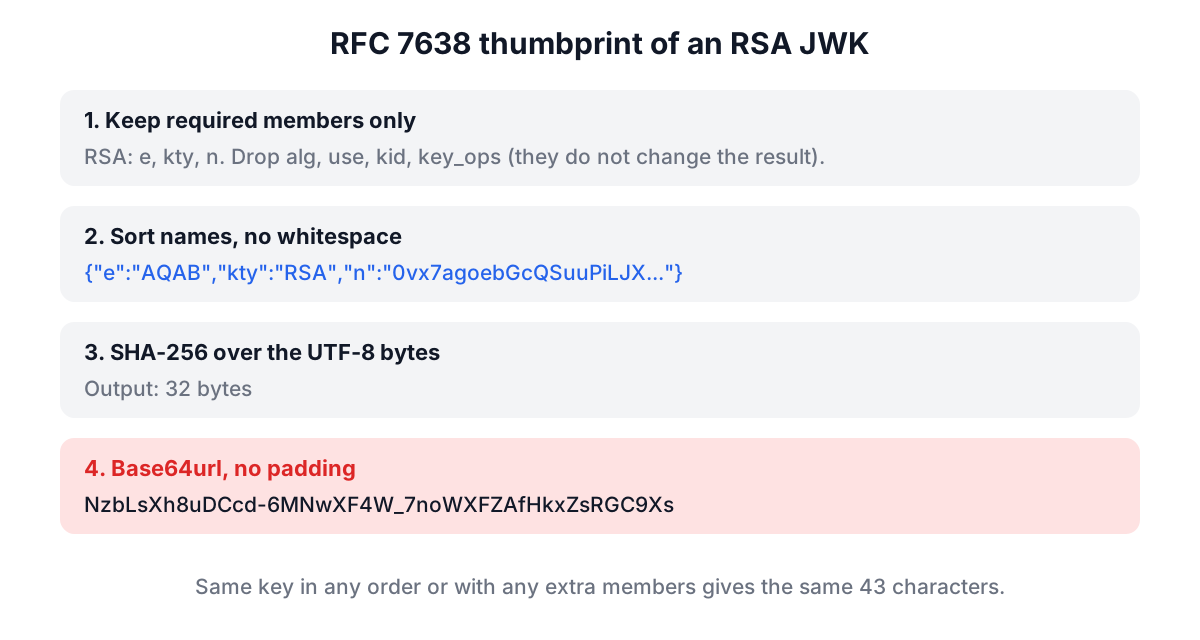
Because optional members like alg, use and kid are excluded, the same key always produces the same thumbprint, however it was serialised. For the example RSA key in RFC 7638 section 3.1 the result is:
NzbLsXh8uDCcd-6MNwXF4W_7noWXFZAfHkxZsRGC9Xs
Paste that key into the JWK tool and click Convert to PEM; the thumbprint shown under the input matches the RFC. Thumbprints are useful as kid values, as cache keys, and for confirming that two systems hold the same public key without comparing 342-character moduli by eye.
JWK and PEM: the same key, different wrapping
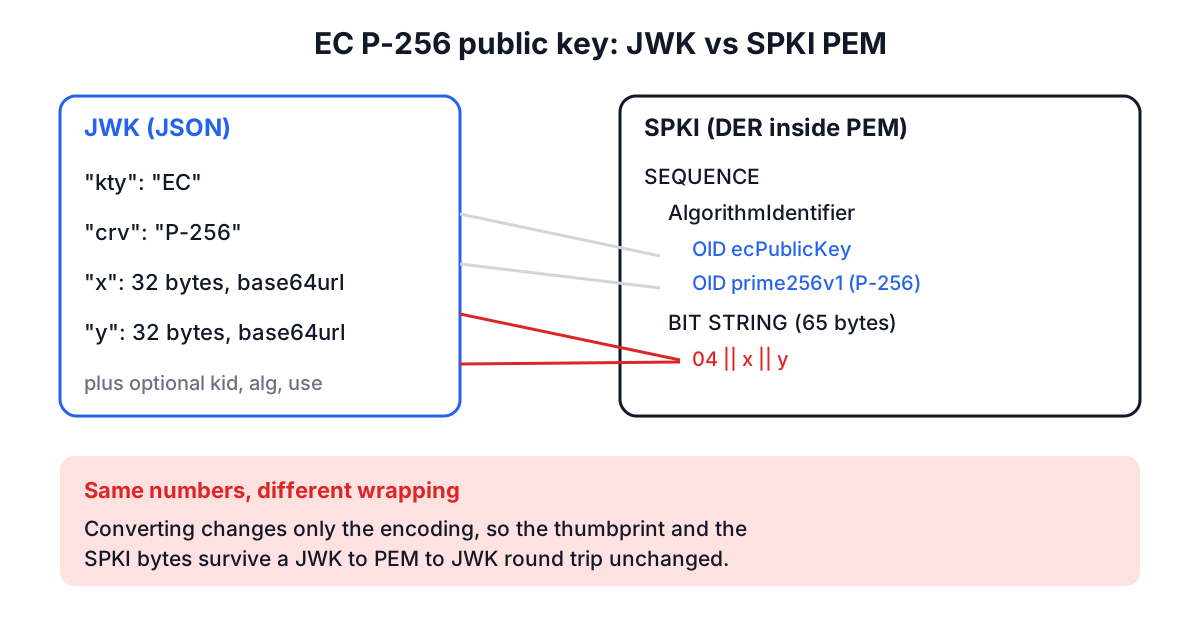
Most non-JavaScript tooling (OpenSSL, nginx, Java keystores, cloud KMS imports) wants PEM. PEM is Base64 DER between BEGIN and END lines, and the label tells you which ASN.1 structure is inside.
| PEM label | Structure | Contains |
|---|---|---|
PUBLIC KEY | SubjectPublicKeyInfo (SPKI, RFC 5280) | Algorithm OID plus the public key, any key type |
RSA PUBLIC KEY | PKCS#1 RSAPublicKey | Just n and e, RSA only |
PRIVATE KEY | PKCS#8 PrivateKeyInfo | Algorithm OID plus the private key, any type |
RSA PRIVATE KEY | PKCS#1 RSAPrivateKey | RSA private key, older OpenSSL default |
EC PRIVATE KEY | SEC1 ECPrivateKey | EC private key with the curve OID |
CERTIFICATE | X.509 certificate | A public key plus identity and a CA signature |
The JWK tool converts in both directions using the browser's Web Crypto API, so keys never leave the page:
- Convert to PEM takes a JWK or a whole JWK Set and produces an SPKI
PUBLIC KEYfor each key, plus a PKCS#8PRIVATE KEYwhen private members are present. - Convert to JWK takes any of the PEM types in the table, including a certificate, and returns the public JWK with
kidset to its thumbprint, plus the private JWK for private-key input. PKCS#1 and SEC1 inputs are rewrapped into SPKI or PKCS#8 before import. - Generate JWK creates an RS256, PS256, ES256, ES384 or EdDSA (Ed25519) key pair, sets
usetosig,algto your choice andkidto the thumbprint, and fills both output tabs.
Two details explain errors you may see. Web Crypto refuses to import a JWK whose alg or key_ops disagree with the algorithm it is imported for, so the tool strips alg, use and key_ops before converting; the key material is unchanged. And Web Crypto supports only the P-256, P-384 and P-521 curves, so secp256k1 keys (common in blockchain tooling) cannot be converted here. Symmetric oct keys have no PEM form at all and are rejected.
Worked example: PEM to JWK and back
Generate a test key with OpenSSL:
openssl genpkey -algorithm EC -pkeyopt ec_paramgen_curve:P-256 -out key.pem
openssl pkey -in key.pem -pubout -out pub.pem
Paste pub.pem into the JWK tool and click Convert to JWK. You get an object with kty: "EC", crv: "P-256", x, y and a kid. Each of x and y is 43 base64url characters, because a P-256 coordinate is 32 bytes.
Now paste that JWK back and click Convert to PEM. The output is byte-for-byte the same SPKI as pub.pem, and the thumbprint is identical both ways. If you paste key.pem instead, you also get the private JWK, shown in a separate box marked to keep secret. The same round trip works for RSA and Ed25519 keys and for a certificate, where the tool extracts the subject's public key.
Common mistakes
- Publishing private members. Before exposing a JWKS, check that no key has
d,p,qork. - Using standard Base64. JWK values are base64url:
-and_instead of+and/, no padding. A value with+or=is not valid. - Dropping a leading zero byte, or keeping one.
nmust not carry the extra 00 byte that DER uses for positive integers. Hand-rolled converters get this wrong. - Matching keys by
alginstead ofkid. With several keys of the same algorithm in a set, onlykidpicks the right one. - Removing the old key on rotation day. Keep it published until the longest-lived token signed with it has expired.
- Treating a thumbprint as a secret. It is derived from the public key and safe to share.
Where to go next
Keys are only half of a signature check. To verify an actual signature against a PEM key, certificate or JWK, use the Digital Signature Validator, and read Checksums vs Digital Signatures for how RSA, ECDSA and Ed25519 verification differ.
When a token fails verification, decode its header, note the kid, fetch the provider's JWKS, and look for that kid in it. If it is missing, you have a caching or rotation problem; if it is there, convert it to PEM and verify the signature directly.