
Kanban Boards That Improve Flow: WIP Limits and Little's Law
Where Kanban came from, how to design columns, why limiting work in progress shortens cycle time, and how to run a board without a tracker.
· 6 min read
Most team boards look busy and move slowly. There are 23 cards in "In Progress", five people, and every stand-up sounds like "still working on it". Nobody is lazy. The board just records everything the team has started, and nothing on it says "stop starting". That missing rule is the whole point of Kanban, and it is the part most boards leave out.
This guide covers where Kanban came from, how to lay out columns, the arithmetic behind work-in-progress limits, and how to run a lightweight board with the Kanban Board tool.
Where Kanban came from
Kanban started on factory floors, not in software. Taiichi Ohno developed it at Toyota from the late 1940s as part of what became the Toyota Production System. The Japanese word means "signboard" or "card". A card travelled with each container of parts, and when the container was used up the card went back upstream as the signal to make more. No card, no production. Work was pulled by real demand instead of pushed by a forecast, and inventory sitting between stations stayed small.
In the mid-2000s David J. Anderson applied the same idea to software teams, and his 2010 book, Kanban: Successful Evolutionary Change for Your Technology Business, made "the Kanban method" a standard term. The physical cards became sticky notes and then digital cards, but the principle carried over: make the work visible, limit how much is in progress, and manage the flow.
Designing the columns
A column is a state that work passes through. Keep columns few and name them after states, not people or teams.
| Column | Means | Typical WIP limit for 4 people |
|---|---|---|
| To Do | Agreed, ready to start, in priority order | None, but keep it short |
| In Progress | Someone is actively working on it | 3 to 4 |
| In Review | Waiting for code review, QA or sign-off | 2 to 3 |
| Done | Released or accepted | None |
The Kanban Board tool starts with exactly these four columns. Rename them with the pencil icon on a column header, add more with the + button beside the board title, and drag columns by their header to change the order.
Two design choices pay off quickly. First, add a waiting state where work really waits. If cards sit in "In Progress" for days while nobody touches them, split out "Blocked" or "Waiting for review" so the queue is visible. Second, define what "done" means for each column. "In Review" is done when a second person approves the change, not when the author thinks it is ready.
WIP limits and Little's Law
The reason to limit work in progress is arithmetic, not discipline. Little's Law, proved by John Little in 1961 for queues in a steady state, says:
average cycle time = average work in progress / average throughput
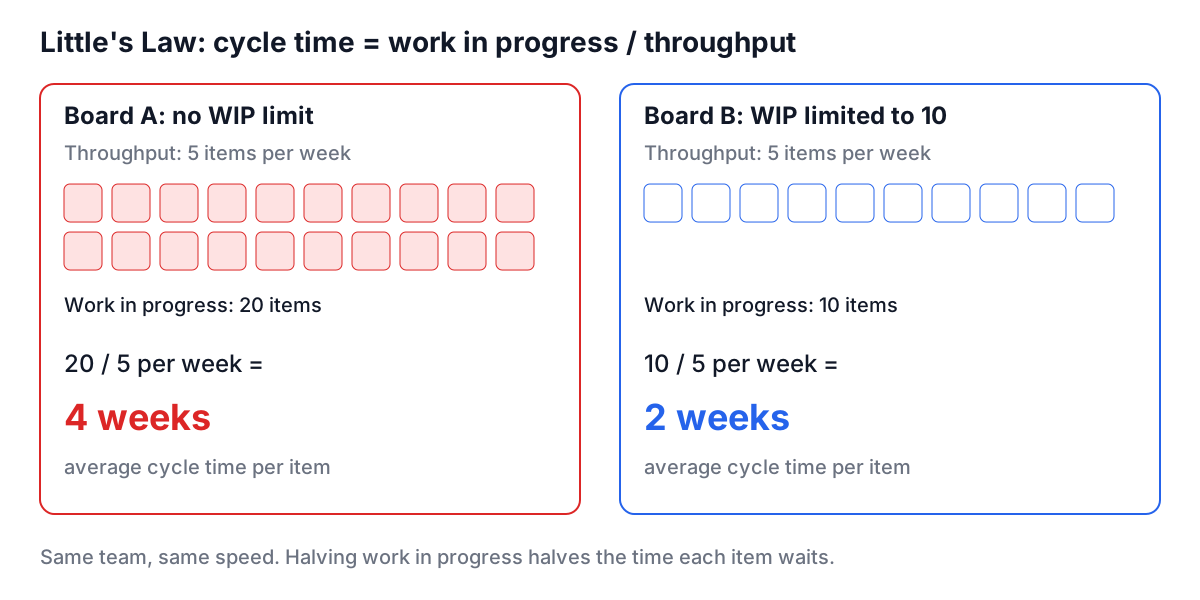
Suppose a team finishes 5 items a week. With 20 items in progress, each one takes about 20 / 5 = 4 weeks from start to finish. Cut work in progress to 10 at the same throughput and the average drops to 2 weeks. Nobody worked harder. Items simply spent less time waiting while their owners were busy with something else.
In practice throughput usually goes up too, because people switch context less, reviews happen sooner and blocked work gets attention instead of being buried. That is why a WIP limit is enforced by the team as a rule: when a column is full, you may not pull a new card into it. You help finish, review or unblock something already there.
The board here shows a card count on each column but does not enforce limits. A simple convention works: put the limit in the column name, such as "In Progress (3)", and treat a count above it as a reason to stop starting.
Worked example: a four-person sprint on one screen
A small team wants a board for a two-week push on a checkout redesign, without setting up a tracker.
- Open the Kanban Board and rename the board "Checkout redesign". Rename "In Progress" to "In Progress (3)" and "In Review" to "In Review (2)".
- Add cards to To Do with outcome-style titles: "Card form supports Apple Pay", "Address autocomplete on mobile", "Error states match new design". Give each a priority and a tag such as
frontendorapi. - In the daily stand-up, put the board in Fullscreen on a shared screen and walk it from right to left: what is closest to Done first. Ask "what can we finish?" before "what can we start?".
- When "In Review (2)" already holds two cards and a developer finishes coding a third, they do not drag it across. They review one of the two waiting cards first.
- At the end of each day, click Export to save the board as a JSON file in the team's shared drive. Anyone can Import it to see the latest state.
After a week, count the cards that reached Done. That is your throughput. Divide the cards in progress by it and you have a rough cycle time to compare against next week.
Kanban and Scrum
Kanban and Scrum are often presented as rivals. They answer different questions.
| Scrum | Kanban | |
|---|---|---|
| Cadence | Fixed-length sprints, usually 1 to 4 weeks | Continuous flow |
| Scope control | Sprint backlog agreed at planning | WIP limits per column |
| Roles | Product Owner, Scrum Master, Developers | None required |
| Key metric | Sprint goal met, velocity | Cycle time, throughput |
| Change mid-cycle | Discouraged during the sprint | New work enters when there is capacity |
Many teams run a Kanban board inside Scrum sprints, using the WIP limits to keep the sprint flowing. If your team runs stand-ups and retros, the Scrum Standup and Scrum Retro tools fit alongside the board.
Running the board tool well
The Kanban Board keeps everything in your browser's localStorage. It saves a moment after every change, needs no account, and nobody else can see it. That privacy has two consequences.
- Export is your backup and your sharing. localStorage belongs to one browser on one device. Clearing site data or browsing privately loses the board. Export writes a JSON file; Import loads one, after checking that it really is a board export, so a wrong file is rejected instead of blanking the board.
- One board per browser. To keep several boards, export each one and import the one you need.
Cards carry a title, a description, a priority (low, medium or high) and tags. Write titles as outcomes rather than activities. "Work on payments" never finishes; "Checkout accepts Apple Pay" does.
Mistakes that keep boards slow
- No WIP limits. The board turns into a list of everything started. Add limits before adding columns.
- Too many columns. Eight states for a three-person team means cards spend their lives moving between columns. Merge until each column reflects a real hand-off or wait.
- Cards that are too big. A card that takes three weeks hides problems. Split it until most cards finish in a few days.
- Columns named after people. "Alice" is not a state. Use tags for ownership if you need it.
- Never looking at Done. Done is where you measure throughput. Count it weekly.
Start with the four default columns, put a limit in the name of the two middle ones, and keep it for two weeks before changing anything. If you also need to decide what goes on the board in the first place, the Idea Prioritizer helps rank the backlog before it reaches To Do.