
MVP vs MLP vs MMP vs SLC: Choosing What to Launch First
Four names for a first release, four different bets. Where each term came from, what it optimises for, and how to cut a feature list down to one of them.
· 7 min read
A team I worked with spent five months on what they called an MVP. It had a billing system, three integrations, a mobile app and an admin panel. When it shipped, nine people signed up and none of them came back after the first week. The product was not minimal, and it had not been built to learn anything. It was a version 1.0 with a humble name.
The four acronyms in this guide (MVP, MLP, MMP and SLC) are all answers to the same question: what is the smallest first release that does its job? They disagree about what that job is. Pick the wrong one and you either ship something too thin for anyone to judge, or something too big to learn from. The MVP, MLP, MMP and SLC Launch Planner is built around making that choice explicit and then cutting a feature list to fit it.
Where each term came from
MVP (Minimum Viable Product). Frank Robinson coined the term in 2001. Eric Ries made it famous in The Lean Startup (2011), where he defined it as the version of a new product that lets a team collect the maximum amount of validated learning about customers with the least effort. Read that definition twice. The output of an MVP is learning, not revenue and not delight. A landing page, a concierge service done by hand or a clickable prototype can all be MVPs.
MMP (Minimum Marketable Product). This one grows out of the "minimum marketable feature" idea in Mark Denne and Jane Cleland-Huang's book Software by Numbers: the smallest unit of functionality that has real value to a customer and can be sold. An MMP is the smallest product you can put a price on and expect people to pay.
MLP (Minimum Lovable Product). The phrase is closely associated with Brian de Haaff, founder of the roadmapping company Aha!. His argument is that in a crowded market "viable" is not enough, because users compare you with polished alternatives on day one. An MLP is still small, but what it does, it does with care.
SLC (Simple, Lovable, Complete). Jason Cohen proposed SLC in a 2015 essay on his blog A Smart Bear, as a replacement for MVP. His complaint was that customers hate MVPs: they are incomplete by design, and people can tell. An SLC product does one narrow job fully. Cohen's examples are deliberately tiny, the first version of a product that does less than competitors but does it completely.
That last point matters for the tool. The planner's SLC card shows a default timeframe badge of 4 to 8 months, and its SLC sample is a large code review platform with five high-effort must-haves. Cohen's SLC is meant to be small, so treat that badge as a rough default, not a rule. If your SLC plan needs eight months, it is probably not simple.
The four frameworks side by side
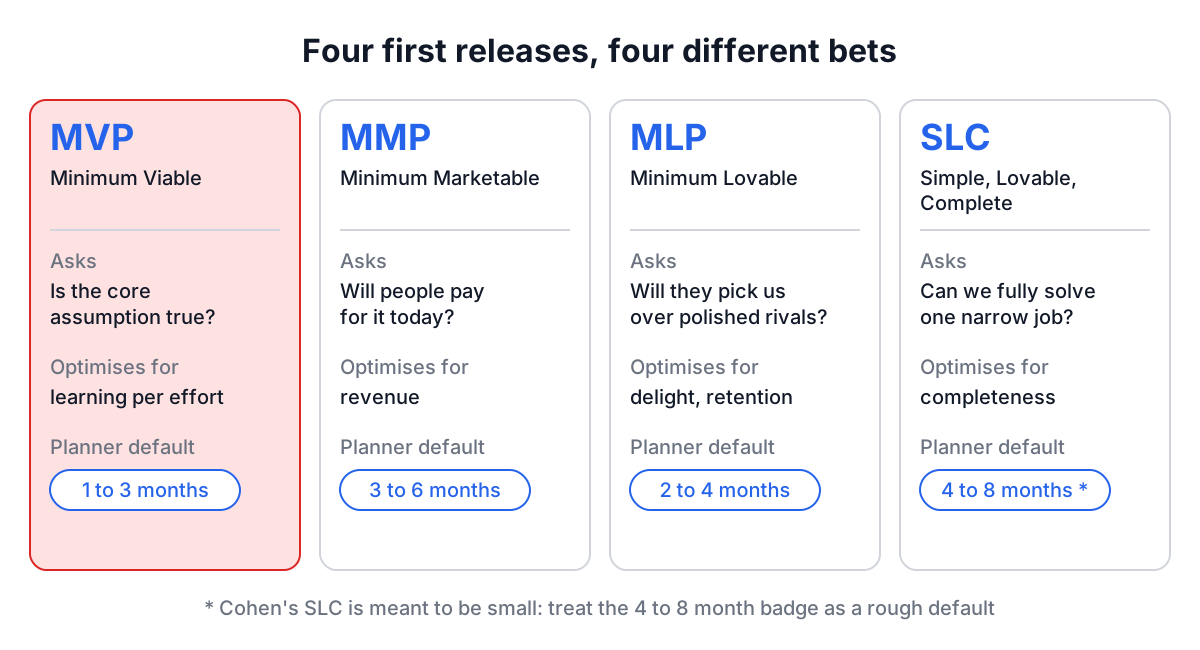
| Framework | Question it answers | Optimises for | Planner's default timeframe | Typical validation |
|---|---|---|---|---|
| MVP | Is our core assumption true? | Learning per unit of effort | 1 to 3 months | Interviews, usage analytics, conversion |
| MMP | Will people pay for this today? | Revenue and sales readiness | 3 to 6 months | Sales, CAC, revenue |
| MLP | Will people choose us over polished rivals? | Delight and retention | 2 to 4 months | Satisfaction, NPS, retention |
| SLC | Can we fully solve one narrow job? | Completeness of a small scope | 4 to 8 months (badge) | Satisfaction, completeness |
A quick way to choose: if you cannot yet say who the customer is or whether the problem is real, you need an MVP. If you know both and need cash flow, you need an MMP. If the problem is real but already solved by others, an MLP or SLC is the honest answer, and the difference between them is mostly whether you lead with feeling (MLP) or with finished scope (SLC).
Planning a release in the tool
The planner has five tabs: Framework, Product, Features, Validation and Report. Everything is saved in your browser's localStorage under the key ilp-planner, so you can close the tab and come back. Nothing is uploaded.
- Framework. Pick MVP, MLP, MMP or SLC. Each card has a Load Sample button that fills the whole plan with a worked example for that framework, which is the fastest way to see what a finished plan looks like. Loading a sample replaces your current plan.
- Product. Name, description, target users, core value proposition, timeline and budget. Keep the target users narrow. "Small remote teams of 5 to 15 people" is a plan; "businesses" is not.
- Features. Click Add Feature for each candidate and set three things: Priority (must-have, should-have or could-have), Impact (high, medium, low) and Effort (low, medium, high).
- Validation. Tick validation methods from the list of twelve (user interviews, landing page tests, pre-sales and so on) and type success metrics and risks.
- Report. A summary with counts and an executive summary, downloadable as Text, Image or PDF.
How Auto-Prioritize scores features
The Auto-Prioritize button sorts the feature list by a simple score:
score = priority x 3 + impact x 2 + ease
priority: must-have 4, should-have 3, could-have 2
impact:   high 3, medium 2, low 1
ease:     low effort 3, medium 2, high 1
The maximum is 21 (a must-have with high impact and low effort). Priority carries the most weight by design: it is your judgement about what the framework needs, and the other two only break ties within it.
A worked example
Say you are planning a task tool for small remote teams and you have chosen MVP. Four candidate features:
| Feature | Priority | Impact | Effort | Score |
|---|---|---|---|---|
| Invite teammates | must-have (4 x 3 = 12) | high (3 x 2 = 6) | low (3) | 21 |
| Recurring tasks | must-have (12) | medium (4) | high (1) | 17 |
| Slack integration | should-have (9) | high (6) | high (1) | 16 |
| Dark mode | could-have (6) | low (2) | low (3) | 11 |
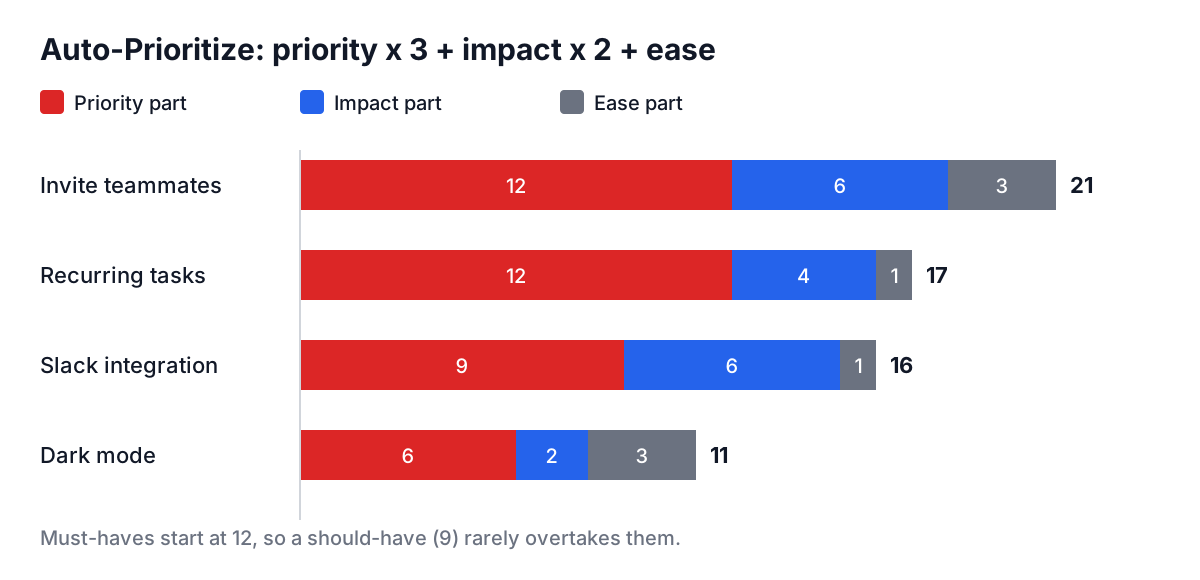
Notice that the Slack integration, rated high impact, still ranks below recurring tasks. That is the formula doing its job: a should-have can never outrank a must-have with the same or better impact unless you change the priority. If you think the integration is what proves your hypothesis, promote it to must-have, and accept that it is high effort.
With two must-haves, the planner's recommendation shows that the MVP looks well-scoped. Switch the framework to MLP with the same list and it suggests that an MVP might be better, because fewer than three must-haves on a non-MVP plan usually means you are not yet sure what the product is. Add nine must-haves to any plan and it warns you to cut scope.
Common mistakes
Calling a version 1.0 an MVP. If it takes more than about three months and nobody will learn anything specific from it, it is not minimal. Write down the one assumption the release tests before you build it.
Marking everything must-have. The score loses meaning when every feature starts at 12 points. A useful test: would you delay the launch for this feature? If not, it is a should-have.
Picking MLP to avoid validation. Lovable is a bar for quality, not a reason to skip interviews. An MLP that nobody wanted is still a failed experiment, just a more expensive one.
Reading SLC as "build it all". Complete applies to a narrow job, not to the whole product vision. Cut the job, not the polish.
Metrics with no number. "Users love it" cannot fail. "40% of trial teams still active in week 4" can, which is why it is useful.
Where this fits
The launch plan sits between knowing your business model and writing the spec. Sketch the model first with the Lean Canvas Generator (the Lean Canvas guide walks through it box by box), test risky assumptions with Idea Validation or a Design Sprint, then turn your must-have list into a spec with the One-Pager PRD Creator.
Start small on purpose: choose the framework first, write the one question the release must answer, and only then add features. If your must-have list still runs past eight items after that, the plan is telling you something, and it is usually to cut.