
Photo Collage Layouts: Grids, Gaps and Print Sizes That Work
Choosing a grid or a feature layout, how gaps and borders are measured, cover versus contain cropping, and the pixel sizes you need for Instagram, 6x4 prints and A4 posters.
· 9 min read

A good collage looks easy: photos of the right size in a tidy grid, even gaps, nothing important cropped off. Getting there involves a few decisions that are easy to make deliberately and annoying to fix later: which layout, how wide the gaps and border, whether photos fill their cells or show whole, and how many pixels the result needs for where it will end up. This guide covers each one with numbers you can reuse. The Photo Collage Maker builds collages exactly this way, in your browser.
Choosing a layout
Layouts fall into two families.
Uniform grids give every photo the same weight: 2 side by side, 2 stacked, 3 in a row, 2 x 2, 3 x 2, 3 x 3, or any custom grid up to 8 x 8. They suit sets of similar photos, such as product angles, a sequence of steps, or a week of outfits.
Feature layouts give one photo more space: one large plus two (left or top), one large plus three, or two over three. They suit sets with a clear hero shot, such as the couple at a wedding followed by details, or a finished room followed by close-ups.
| Photos | Uniform choice | Feature choice |
|---|---|---|
| 2 | Side by side (comparisons) or stacked | |
| 3 | 3 in a row (panorama strip) | 1 large + 2, left or top |
| 4 | 2 x 2 grid | 1 large + 3 |
| 5 | 2 over 3 | |
| 6 | 3 x 2 grid | |
| 9 | 3 x 3 grid |
In feature layouts, photos fill the spaces in list order and the large space comes first. Move your best picture to the top of the list. Viewers look at the largest image first, so it should carry the story.
How gaps, borders and cells are measured
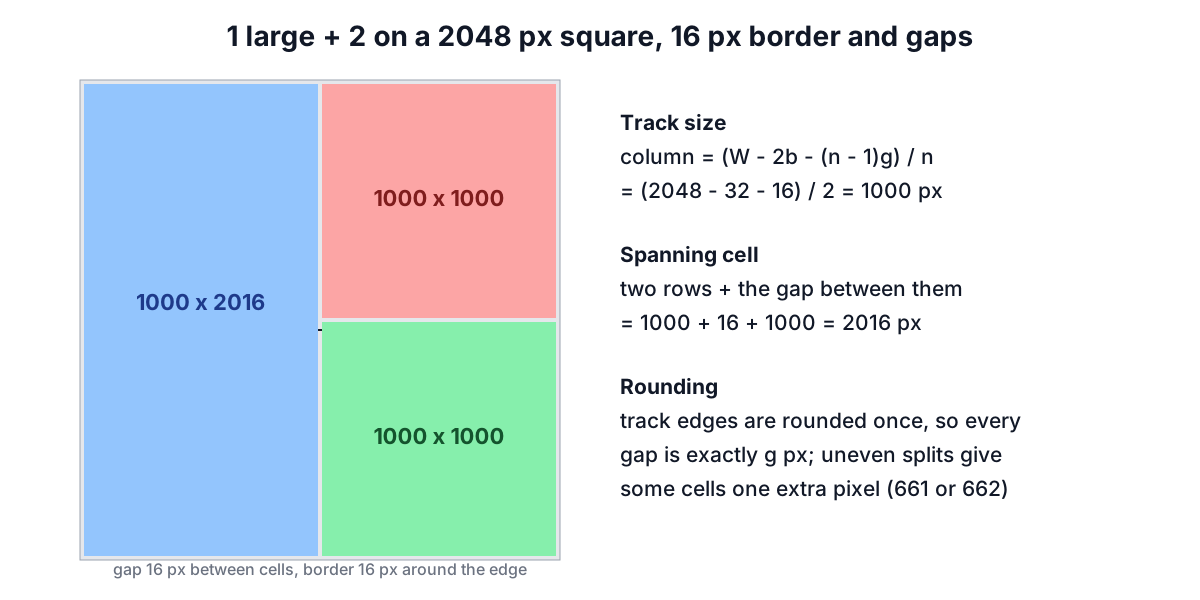
A collage layout is a grid of tracks, much like CSS Grid. With an output width W, an outer border b, n columns and a gap g between them, each column track is
column width = (W - 2b - (n - 1)g) / n
and a cell that spans several columns is the sum of those tracks plus the gaps it covers. Rows work the same way with the height. The tool rounds each track edge once, so every gap is exactly the number of pixels you set and cells meet without one-pixel seams.
For a 2048 x 2048 collage with a 16 px border and 16 px gaps:
| Layout | Cell sizes (px) |
|---|---|
| 2 x 2 | four cells of 1000 x 1000 |
| 1 large + 2 (left) | 1000 x 2016 large, two of 1000 x 1000 |
| 3 x 3 | 661 or 662 px per side (2048 - 32 - 32 = 1984, divided by 3) |
| 1 large + 3 | 2016 x 1339 on top, three of about 661 x 661 below |
| 2 over 3 | two of 1000 x 1000 on top, three of about 661 x 1000 below |
When the space does not divide evenly, as with 1984 / 3 = 661.3, the rounding gives some cells one pixel more than others. Nobody can see a one-pixel difference, but they would see an uneven gap, which is why the gaps are the part kept exact.
Gap size. Between 0.5% and 2% of the width usually looks right: 10 to 40 px on a 2048 px collage. Zero gap works for before-and-after comparisons where the two halves should touch. Very wide gaps make the photos read as separate items rather than one composition.
Border. An outer border equal to the gap gives an even frame. A border two or three times the gap looks like a mat around a print.
Corner rounding. Rounded corners (the tool goes up to 200 px) soften a grid for social media. Keep the radius well under half the smallest cell, or small cells become pill shapes.
Fill the cell or show the whole photo
Photos rarely match the shape of their cell. The tool offers the two standard answers, named after the CSS object-fit values they copy.
Fill cell (cover). The photo is scaled until it covers the whole cell, and the overflow is cropped equally from both sides. A 3000 x 4000 portrait in a square 1000 x 1000 cell keeps its central 3000 x 3000 region, losing 500 px from the top and bottom. The grid looks tidy, with no empty space.
Whole photo (contain). The photo is scaled until it fits inside the cell, and the background colour fills the rest. The same portrait becomes 750 x 1000, centred with 125 px bands on each side. Nothing is cropped, which matters for artwork, documents and screenshots.
Fill is right for most photo collages. Mixing portrait and landscape shots in Fill mode crops a lot from the mismatched ones, so either crop them yourself first with Crop Image to choose what stays, or group them so portraits go in tall cells and landscapes in wide ones.
Pixels for print and for screens
The output width you choose should match where the collage will be used.
Social media. Instagram displays posts 1080 pixels wide. A 2048 px collage will be scaled down and stay sharp, and it leaves room for the platform's compression. Use 1:1 square (2048 x 2048) or 4:5 portrait (2048 x 2560); 9:16 for Stories.
Prints. Sharpness in print is measured in pixels per inch. 300 ppi is the usual target for photo prints viewed at reading distance; 150 to 200 ppi is acceptable for posters seen from further away.
| Size | Pixels at 300 ppi | Tool settings | |
|---|---|---|---|
| 6 x 4 in photo | 152 x 102 mm | 1800 x 1200 | 3:2 print, width 1800 |
| 7 x 5 in photo | 178 x 127 mm | 2100 x 1500 | A-series landscape (1.414:1) is close to 7:5, width 2100 |
| A4 portrait | 210 x 297 mm | 2480 x 3508 | A-series portrait, width 2480 |
| A3 portrait | 297 x 420 mm | 3508 x 4961 | A-series portrait, width 3508 |
A-series paper (ISO 216) has a ratio of 1:√2, about 1:1.414, so every size halves into the next one with the same shape. The tool's A-series option uses that ratio; a 2480 px width gives a 2480 x 3507 canvas, close enough to the 3508 a print shop expects.
Keep in mind that each photo needs enough pixels for its cell. A 3 x 3 grid on an A4 page has cells of about 770 x 1110 px; a 1080-pixel phone screenshot fills that comfortably, but a 400 px thumbnail would be enlarged and look soft.
Worked example: an A4 print of a trip
You want nine holiday photos on an A4 page with a white mat.
- Open the Photo Collage Maker and add the nine photos.
- Choose 3 x 3 grid, shape A4 / A-series portrait, width 2480.
- Set the gap to 24 px and the outer border to 60 px, background white, Fill cell.
- Each cell comes out at about 771 x 1113 px, portrait-shaped, so portrait photos fill it with little cropping and landscape photos lose their sides. Use the arrows to move the landscape photos into the middle row, or crop them first.
- Download as JPEG at 90% for the print shop, or PNG if they prefer lossless files.
For a social version, change the shape to 1:1 square, width 2048, and download again. If you need the collage as a PDF, convert it with Image to PDF; to shrink the file for email, use the Image Compressor.
Sources
- ISO 216, Writing paper and certain classes of printed matter: trimmed sizes, A and B series.
- W3C CSS Images Module Level 3,
object-fit(cover and contain); CSS Grid Layout Module Level 1, track sizing. - Instagram Help Centre, photo resolution guidance.
Related searches
- how to make a photo collage
- collage size for instagram post
- pixels needed to print a4 at 300 dpi
- photo grid with white border
- collage layout for 5 photos
- best gap between collage photos
- collage for 6x4 print
- fill vs fit photo in grid