
Port Scanning Explained: Open, Closed and Filtered Ports
What a port scan actually sends, how to read open, closed and filtered results, why browsers cannot scan, and how to use nmap and nc responsibly.
· 7 min read
A database that "nobody can reach from outside" shows up in a scan of your public IP with port 5432 open, because a security group rule added for a one-off migration two years ago was never removed. That is the most common thing a port scan finds, and it is why every operations team runs one against its own address space eventually. The scan itself is simple. Reading the result correctly, and understanding why "filtered" is not the same as "closed", takes a bit more background.
What a port actually is
An IP address gets a packet to a machine. A port number, a 16-bit value from 0 to 65535 carried in the TCP or UDP header, gets it to a particular program on that machine. A web server listens on TCP 443, an SSH daemon on TCP 22, a DNS server on UDP and TCP 53. Ports 0 to 1023 are the "well-known" range that IANA assigns to standard services, 1024 to 49151 are registered ports, and 49152 to 65535 are the dynamic range that operating systems pick from for outgoing connections.
A port scan sends a probe to a list of ports and classifies each one by how the target, or something in front of it, responds.
Open, closed and filtered
For TCP, the classification falls straight out of the three-way handshake defined in RFC 793 (now RFC 9293). The scanner sends a SYN packet, the first step of opening a connection, and waits.
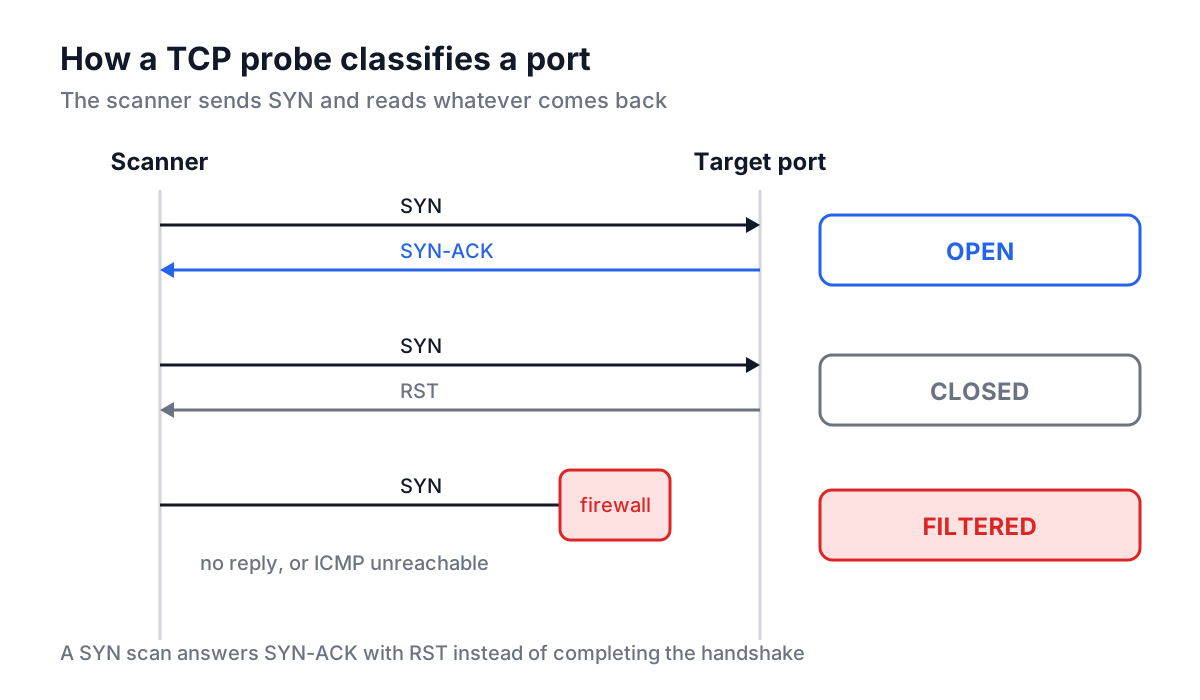
| State | What came back | What it means |
|---|---|---|
| Open | SYN-ACK | A program is listening and accepts connections |
| Closed | RST | The host is reachable, but nothing listens on that port |
| Filtered | Nothing, or ICMP "destination unreachable" | A firewall dropped or rejected the probe, so the state is unknown |
The difference between closed and filtered matters when you read a result. Closed means a packet reached the host and the host's TCP stack answered: you know the host is up and that port is not in use. Filtered means something silently ate the probe. That is usually a firewall with a "drop" rule, and it is the behaviour you want on the public side of most servers, because it gives an attacker nothing to work with. A scan of a well-configured host typically shows a handful of open ports and everything else filtered.
UDP is harder. There is no handshake, so an open UDP port often sends nothing back at all, and the only definite signal is an ICMP "port unreachable" message for a closed port. Many hosts rate-limit those messages, which is why UDP scans are slow and frequently report "open|filtered".
SYN scans and connect scans
There are two common ways to send that SYN.
A connect scan asks the operating system to open a normal TCP connection with the connect() system call. If it succeeds, the port is open and the scanner closes the connection straight away. It needs no special privileges but completes the full handshake, so the target application may log the connection.
A SYN scan, sometimes called a half-open scan, crafts the SYN packet directly and, on receiving SYN-ACK, sends RST instead of completing the handshake. It is faster and quieter at the application layer, but building raw packets needs root or administrator rights.
Nmap is the standard tool for both:
 # SYN scan of the 1,000 most common TCP ports (needs root)
sudo nmap -sS scanme.nmap.org

 # Connect scan of specific ports, no root needed
nmap -sT -p 22,80,443,5432 203.0.113.10

 # A range, with service and version detection
sudo nmap -sS -sV -p 8000-8100 203.0.113.10

 # UDP scan of DNS and SNMP (slow, needs root)
sudo nmap -sU -p 53,161 203.0.113.10
For a single quick check, netcat is enough:
nc -vz -w 3 203.0.113.10 443
 # Connection to 203.0.113.10 port 443 [tcp/https] succeeded!
The Nmap project runs scanme.nmap.org precisely so people can practise against a host that has given permission.
Why a web page cannot scan ports
Browsers do not let JavaScript open raw TCP or UDP sockets. A page can make HTTP requests with fetch, open WebSockets and use WebRTC, and all of those speak specific protocols on top of TCP or UDP, under same-origin and CORS rules. Browsers also refuse outright to fetch a list of "bad ports" such as 25 (SMTP) and 6000 (X11), a defence against pages abusing the browser to talk to non-web services. Any web page that claims to show real open-port results for an arbitrary host is either running the scan from its own server, in which case you are scanning from their IP and on their terms, or making the results up.
The Port Scanner Simulator on this site is honest about that: it does not send anything to the host you type. It exists to show what scan output looks like and to let you practise reading it. You enter a Target Host, a list in Ports to Scan (commas or ranges such as 8000-8010, capped at 1,024 ports), or pick a Quick Preset (Common Ports, Web Servers, Databases, Mail Servers, Ports 1-100), and press Start Simulation. Each port gets a randomly generated open, closed or filtered state, labelled as simulated, along with the usual service name for that port.
Worked example: reading a real result
Here is the kind of output a real scan of a small web server produces:
$ sudo nmap -sS -p 22,80,443,3306,5432,6379 198.51.100.20
PORT     STATE    SERVICE
22/tcp   open     ssh
80/tcp   open     http
443/tcp  open     https
3306/tcp filtered mysql
5432/tcp open     postgresql
6379/tcp closed   redis
Read it line by line. SSH, HTTP and HTTPS are expected. MySQL is filtered, which means the firewall dropped the probe: good. Redis is closed, which means the probe reached the host and the kernel answered with RST. Nothing is listening, but the firewall let the packet through, so if someone starts Redis later it will be reachable from the internet. PostgreSQL is open to the world, which is the finding from the opening paragraph. The fix is a firewall rule restricting 5432 to the application servers' addresses, and the Subnet Calculator helps you write that rule as a tight CIDR range rather than 0.0.0.0/0.
Common ports worth knowing by heart:
| Port | Service | Should it face the internet? |
|---|---|---|
| 22 | SSH | Only if needed, ideally restricted by source IP |
| 25 / 587 | SMTP / submission | Only on mail servers |
| 53 | DNS | Only on DNS servers |
| 80 / 443 | HTTP / HTTPS | Yes, for web servers |
| 3306 | MySQL | Almost never |
| 3389 | RDP | Almost never; use a VPN |
| 5432 | PostgreSQL | Almost never |
| 6379 | Redis | Never; the default config sets no password |
| 27017 | MongoDB | Never |
Legal and ethical ground rules
Scan only systems you own or have written permission to test. Unauthorised scanning breaks the acceptable use policy of most ISPs and cloud providers, and depending on jurisdiction and intent it can fall under computer misuse laws. Cloud providers publish their own rules: scanning your own instances is generally allowed, scanning the provider's infrastructure or other customers is not. If you are testing for a client, agree the scope (IP ranges, ports, time window) in writing before you start. A scan of your own public IP from an external host, for example a small cloud VM, is fair game and the most useful scan you can run.
Common mistakes
- Scanning from inside the network and calling it an external audit. Internal scans bypass the perimeter firewall, so they show far more open ports than the internet sees.
- Treating filtered as safe. Filtered only means this probe, from this source, was dropped. A rule that allows your office IP range may still let others in.
- Forgetting IPv6. A host can be locked down on IPv4 and wide open on its AAAA address. Run
nmap -6against it too. - Ignoring UDP. SNMP on 161, NTP on 123 and DNS on 53 have all been abused for amplification attacks.
- Trusting a browser-based "scanner". If you did not run the probes yourself, check where they came from before acting on them.
Putting it into practice
Pick one public IP you are responsible for this week, scan it from an outside machine with nmap -sS -p- (all 65,535 ports, which takes a while), and compare the open list with what you think should be there. Every surprise is either a firewall rule to tighten or a service to switch off. If the host names involved are unfamiliar, the DNS records guide and the DNS Lookup tool help you trace which name points where before you start closing things.