
Robots.txt and XML Sitemaps: How Crawlers Actually Read Them
RFC 9309 matching rules, why Disallow does not remove pages, the 50,000 URL sitemap limit, and which sitemap fields Google ignores.
· 6 min read
A common way to lose search traffic overnight is a one-line file left over from staging: User-agent: * followed by Disallow: /. It ships with the production build, Googlebot fetches it within a day, and pages start dropping out of results while every dashboard says the site is up. The opposite mistake is quieter: a robots.txt that tries to hide /admin/ and ends up listing the admin URL for anyone who reads the file.
Robots.txt and XML sitemaps are the two plain files crawlers read before anything else. One says where they may go, the other says what exists. Both are simple, and both have rules that surprise people.
What robots.txt is, and what it is not
The Robots Exclusion Protocol started as a mailing-list proposal by Martijn Koster in 1994. For 28 years it was a convention that each crawler interpreted slightly differently, until the IETF published it as RFC 9309 in September 2022. The RFC is short and worth reading once.
Three things robots.txt is not:
- Not access control. It is a request that well-behaved crawlers honour. Anything sensitive needs authentication.
- Not a de-indexing tool. A disallowed URL can still be indexed, without its content, when other pages link to it. To keep a page out of results, let it be crawled and serve
noindex. - Not private. Anyone can open
/robots.txt, so every path you list is advertised.
The file lives at the root of each host and protocol: https://example.com/robots.txt covers that host only, and https://shop.example.com needs its own. It must be plain UTF-8 text served with a 200 status. If the server answers with a 4xx, crawlers treat the site as unrestricted. If it answers with a 5xx, Google treats the whole site as disallowed until it can read the file again, which is how a broken robots.txt route can stop crawling entirely.
How matching works under RFC 9309
A file is a set of groups. Each group starts with one or more User-agent lines followed by Allow and Disallow rules:
User-agent: *
Disallow: /admin/
Allow: /admin/public/
Disallow: /*.pdf$

User-agent: GPTBot
Disallow: /

Sitemap: https://example.com/sitemap.xml
A crawler picks the group whose user agent matches it most specifically and ignores the rest. Googlebot reading this file uses the * group; GPTBot uses only its own group, not both. Then, for a given URL path:
- Every rule is a prefix match.
Disallow: /blogmatches/blog,/blog/postand/blogging-tips. *matches any run of characters and$anchors the end of the URL.- When several rules match, the longest one wins.
- If an Allow and a Disallow match with equal length, Allow wins.
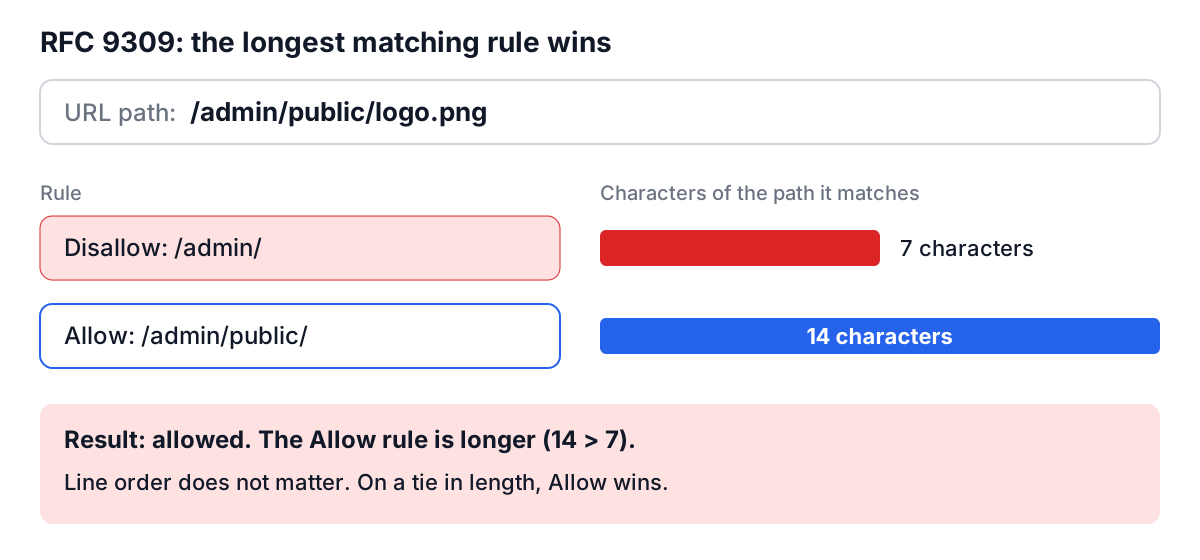
Because of rule 3, the order of lines does not matter. That surprises people who learned robots.txt from older crawlers that used first-match. Here is how the example file treats a few URLs:
| URL path | Matching rules | Winner | Result |
|---|---|---|---|
/admin/users | Disallow: /admin/ | Disallow (7) | Blocked |
/admin/public/logo.png | Disallow: /admin/, Allow: /admin/public/ | Allow (14) | Allowed |
/files/report.pdf | Disallow: /*.pdf$ | Disallow | Blocked |
/files/report.pdf?v=2 | none ($ needs the URL to end in .pdf) | none | Allowed |
/administrator | none (/admin/ needs the slash) | none | Allowed |
Lines outside the RFC are crawler-specific. Crawl-delay is honoured by Bing and Yandex and ignored by Googlebot, which sets its own rate based on how fast and how reliably your server responds. Host was a Yandex directive that Yandex itself retired in 2018. Noindex: inside robots.txt was never officially supported by Google, and Google stopped honouring it in September 2019.
The Robots.txt Generator writes groups in RFC 9309 form, adds the leading slash to paths typed without one, removes duplicate lines, and writes an explicit empty Disallow: for a group that should allow everything.
Sitemaps: a list of what exists
The Sitemaps protocol came from Google in 2005, and Yahoo and Microsoft adopted it under sitemaps.org in 2006. A sitemap is an XML file listing the URLs you want crawlers to know about:
<?xml version="1.0" encoding="UTF-8"?>
<urlset xmlns="http://www.sitemaps.org/schemas/sitemap/0.9">
<url>
<loc>https://example.com/pricing?plan=team&billing=annual</loc>
<lastmod>2026-10-02</lastmod>
</url>
</urlset>
The rules that matter:
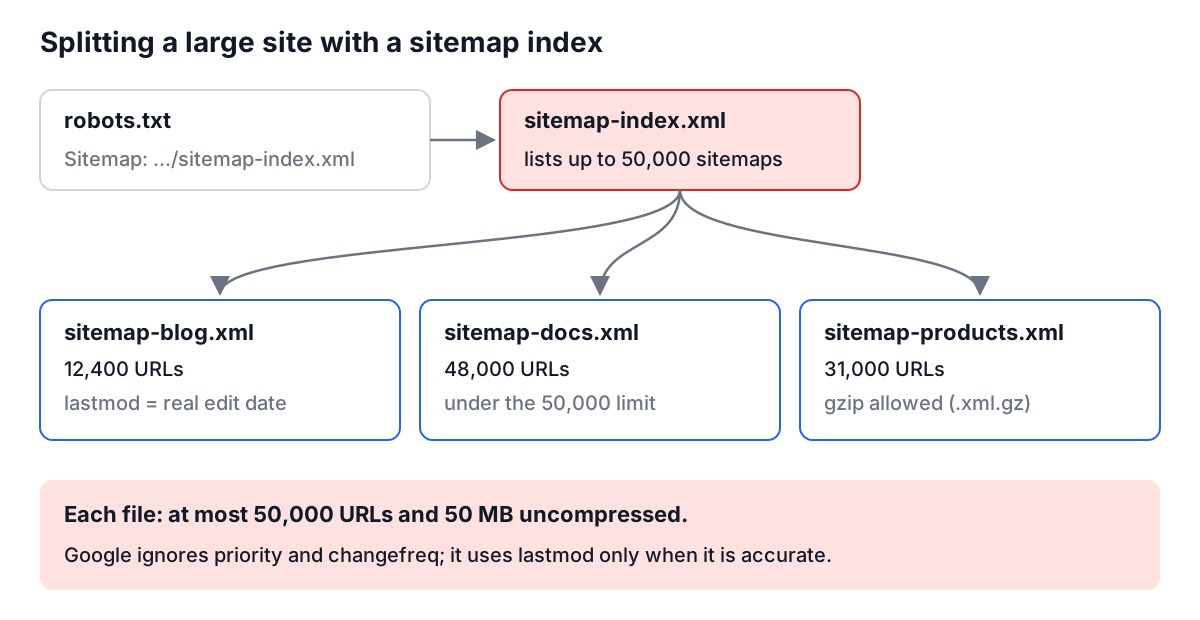
- Limits. One file holds at most 50,000 URLs and 50 MB uncompressed. Beyond that, split into several files and list them in a sitemap index (which can itself list up to 50,000 sitemaps). Gzip is allowed; the limit applies to the uncompressed size.
- Absolute, escaped URLs. Every
locis fully qualified. The file is XML, so&must be&; one bare ampersand makes the whole file unparseable. - Same host. URLs should be on the host where the sitemap lives, unless you have verified the other hosts in Search Console.
- Only indexable URLs. List canonical pages that return 200. Redirects,
noindexpages and parameter duplicates send mixed signals.
lastmod, priority and changefreq
Google has said plainly that it ignores priority and changefreq. It does use lastmod, but only on sites where the dates are consistently and verifiably accurate. "Accurate" means the date the main content last changed. A build pipeline that sets every lastmod to the deploy time teaches Google that your dates mean nothing, and it stops using them.
That is why the XML Sitemap Generator leaves Last Modified empty for imported URLs and common pages until you fill in a real date. It still writes changefreq and priority when you choose them, because they are valid and some other consumers read them, but do not spend time tuning them for Google.
Google also retired its sitemap "ping" endpoint in 2023. Submit a sitemap once in Search Console (and Bing Webmaster Tools), reference it from robots.txt with a Sitemap: line, and let accurate lastmod values do the rest.
Worked example: a small docs site
Say you run https://docs.example.com with 300 pages, a search page that generates endless ?q= URLs, and a /drafts/ folder that should never be crawled.
- In the Robots.txt Generator, keep the
*group and addDisallow: /searchandDisallow: /drafts/. Add the sitemap URL. The output:
User-agent: *
Disallow: /search
Disallow: /drafts/

Sitemap: https://docs.example.com/sitemap.xml
-
Export your page list as a text file, one path per line (
/getting-started,/api/authand so on). In the XML Sitemap Generator set Base URL tohttps://docs.example.com, click Import URLs, then Generate XML Sitemap. Paths become absolute URLs, duplicates are removed, and any line that cannot be resolved is reported. -
For the pages you edited recently, set Last Modified to the edit date. Leave the rest empty rather than guessing.
-
Upload both files, submit the sitemap in Search Console, and use the robots.txt report there to confirm Google fetched the new file.
Note that /drafts/ should also be protected by authentication or removed from the public build. The Disallow line keeps polite crawlers out; it does not stop a person or a rude bot.
Mistakes that keep showing up
- Shipping a staging robots.txt. Generate the file per environment, and add a deploy check that fails if production serves
Disallow: /for*. - Blocking CSS and JavaScript. Google renders pages; if it cannot fetch your bundles, it judges a broken page.
- Disallow plus noindex. A blocked page is never fetched, so its noindex is never read. Use one or the other.
- Forgetting the prefix rule.
Disallow: /pblocks/pricing,/productsand/privacy. - Fake freshness. lastmod set to the build time on every URL.
- Relative or unescaped sitemap URLs. Both make entries, or the whole file, unusable.
For the page-level side of the same problem (titles, canonicals and robots meta tags), see the meta tags guide, and run important URLs through the Meta Tag Analyzer to confirm the robots meta and canonical agree with your robots.txt. Then put a reminder in your release checklist to open /robots.txt on production after every infrastructure change. It takes ten seconds and catches the most expensive mistake on this list.