
Meta Tags That Still Matter: Titles, Descriptions and Open Graph
Which head tags change how a page looks in Google and in link previews, which ones are ignored, and the escaping and rendering bugs that break them.
· 7 min read
A team ships a redesigned pricing page on Friday. On Monday the Google result still says "Home | Acme", the Slack unfurl shows the company logo on a grey square, and LinkedIn has no image at all. Nothing is wrong with the page in a browser. Everything is wrong with the dozen lines in its head element, because the new React route sets them in JavaScript after load, and none of the crawlers that build those previews waited for it.
Meta tags are small, boring and easy to get wrong in ways you never see yourself. This guide covers the handful that change what people see in search results and link previews, the ones that are ignored, and the bugs that break them.
The tags that change what people see
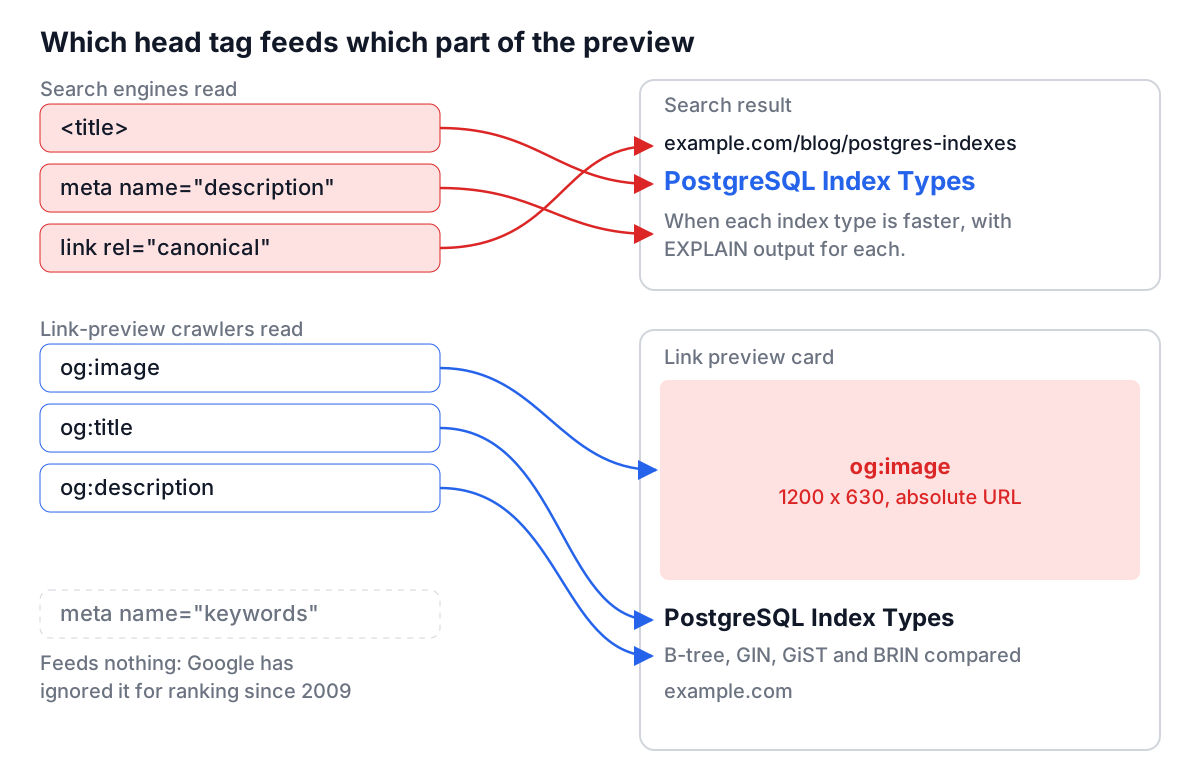
Only a few tags affect the two places most people meet your page before they visit it: a search result and a link card in a chat or social app.
| Tag | What it feeds | Who reads it | Notes |
|---|---|---|---|
<title> | Title link in results, browser tab | All search engines | Strongest hint, but Google may rewrite it |
meta name="description" | Result snippet | Google, Bing | Used when it matches the query better than page text |
link rel="canonical" | Which URL gets indexed | Search engines | A hint (RFC 6596), not a command |
meta name="robots" | Whether the page is indexed or links followed | Search engines | Only seen if the page can be crawled |
og:title, og:description, og:image, og:url | Link previews | Facebook, LinkedIn, Slack, iMessage and most chat apps | Defined at ogp.me |
twitter:card | Card layout on X | X | Falls back to og: values for text and image |
meta name="keywords" | Nothing at Google | Ignored by Google since 2009 | Harmless, not worth maintaining |
A minimal, correct head block for a product page looks like this:
<title>Acme Pro 15 Laptop: 32GB RAM, 1TB SSD | Acme</title>
<meta name="description" content="A 15-inch laptop with 32GB RAM and a 1TB SSD that weighs 1.4 kg. Free returns for 30 days.">
<link rel="canonical" href="https://acme.example/laptops/pro-15">
<meta property="og:type" content="product">
<meta property="og:title" content="Acme Pro 15 Laptop">
<meta property="og:description" content="32GB RAM, 1TB SSD, 1.4 kg.">
<meta property="og:image" content="https://acme.example/img/pro-15-card.png">
<meta property="og:url" content="https://acme.example/laptops/pro-15">
<meta name="twitter:card" content="summary_large_image">
The SEO Meta Tag Generator writes exactly this kind of block from a form, with the Twitter tags using the name attribute that X documents.
Titles: Google writes the title link, you give it the best input
Since 2021 Google has been open about the fact that it generates title links from several sources: the title element, the main visible heading, og:title, other prominent text, and the anchor text of links pointing at the page. It keeps your title element most of the time. It replaces it when the title is empty, the same on many pages, stuffed with keywords, or out of step with what the page shows.
So the practical rules are about giving Google nothing to fix:
- Make every title unique. Template titles like "Products | Acme" on 400 pages are the most common reason for rewrites.
- Lead with what the page is, then the brand. "Acme Pro 15 Laptop: 32GB RAM, 1TB SSD | Acme" survives truncation; "Acme | Shop | Laptops | Acme Pro 15" does not.
- Keep the H1 and title consistent. They do not need to be identical, but a title about laptops over an H1 about "Spring Sale" invites a rewrite.
Length is a display constraint. Google truncates by pixel width, about 600 pixels on desktop, which works out at roughly 50 to 60 characters of normal text. Wide capitals run out sooner. There is no penalty for a long title; the end is just cut, so put the important words first.
Descriptions, keywords and the tags that do nothing
The meta description is not a ranking factor. It is an advert. Google shows it when it describes the page better than any passage it could extract for that query, and for many long-tail queries it builds its own snippet regardless. Aim for one or two specific sentences of 120 to 160 characters that would make someone choose your result: what the page offers and one concrete detail.
Several tags are still copied from template to template although nothing reads them. Google announced in 2009 that it ignores meta name="keywords" for web ranking. There is no standard meta name="language"; search engines and screen readers use <html lang="en"> and hreflang links. meta name="revisit-after" was never supported by any major engine. Removing them will not change rankings; adding them will not either.
Open Graph and X cards
Open Graph came from Facebook in 2010 and became the de facto format for link previews everywhere. The protocol requires four properties (og:title, og:type, og:image, og:url). X reads twitter:card for the layout and falls back to the Open Graph values for title, description and image, so a site rarely needs a full parallel set of twitter: tags.
The image is where most previews fail:
- Relative URLs.
content="/img/card.png"is resolved by some crawlers and not others. Use the absolute https URL. - Protected images. If the image sits behind a login, a signed URL that expires, or a CDN rule that blocks unknown user agents, the crawler gets nothing.
- Size and ratio. 1200 by 630 pixels (about 1.91:1) is the size Facebook recommends for large cards and works on LinkedIn and X. Keep text away from the edges because platforms crop differently.
- Caching. Networks cache the card. After a fix, use Facebook's Sharing Debugger or LinkedIn's Post Inspector to fetch it again.
The Open Graph Checker lists every og: and twitter: tag a page serves, resolves relative image paths so you can see the picture, and draws approximate Facebook, X and LinkedIn cards.
Worked example: auditing a page in three steps
Take a blog post at https://example.com/blog/postgres-indexes. Paste it into the Meta Tag Analyzer and suppose it reports:
- Title Tag (78 characters), warning: "Understanding PostgreSQL Indexes: B-tree, GIN, GiST, BRIN and When to Use Each"
- Meta Description: missing
- Canonical:
https://staging.example.com/blog/postgres-indexes - H1 Tags: 2 found: "Example Blog", "Understanding PostgreSQL Indexes"
Four fixes come straight out of that report. Shorten the title so the distinguishing words survive ("PostgreSQL Index Types: B-tree, GIN, GiST and BRIN"). Write a description that promises something specific ("When each PostgreSQL index type is faster, with EXPLAIN output for each"). Fix the canonical, which points at staging and could ask Google to index the wrong host. Change the logo H1 into a plain element so the article title is the page's single main heading.
Then run the same URL through the Open Graph Checker. If og:title is "Example Blog" on every post, the CMS template is filling it from the site name, and every share will look identical.
Rendering, escaping and other bugs you will not see in a browser
Client-side tags. Most link-preview crawlers do not run JavaScript, and search engines that do may index the first HTML they see before rendering finishes. If a single-page app sets tags with a head manager after load, prerender or server-render each route so the right tags are in the initial HTML. Both analyzers here read the server HTML, which is a good stand-in for what those crawlers see. They fetch it through a public CORS proxy, because browsers do not let one site read another's HTML directly.
Unescaped attributes. A description like The "fast" option & more dropped raw into content="..." ends the attribute at the first quote. Escape " as " and & as &:
<meta name="description" content="The "fast" option & more">
Contradictory directives. Blocking a URL in robots.txt and adding noindex to it does not work: the crawler never fetches the page, so it never sees noindex. Pick one, and for removal from results, pick noindex on a crawlable page. The robots.txt and sitemaps guide covers that interaction.
Duplicated tags. Two og:image tags from a theme and a plugin produce a preview from whichever one the platform reads first. Search the HTML for each property and keep one.
A short checklist
Before a page ships, check that it has a unique title of about 50 to 60 characters with the subject first, a specific description, one canonical with the production hostname, no stray noindex, and absolute og:image and og:url values that load without cookies. Put structured data on top of that when the page type supports it; the JSON-LD structured data guide explains which types still earn rich results. Then paste the live URL into the analyzer once more after deploy, because what the server sends is the only version crawlers see.