
HTTP Security Headers: What to Send and What to Skip
HSTS, Content-Security-Policy, X-Content-Type-Options, frame-ancestors and the rest: what each header blocks, sensible values, and the legacy ones you can drop.
· 6 min read
A penetration test report lands with eleven findings, and seven of them are "missing security header". None of them is an exploit on its own, but each one removes a safety net: the one that stops a stored XSS from loading an attacker's script, the one that stops a login page being framed for clickjacking, the one that stops a first visit over plain HTTP from being hijacked. They are also the cheapest fixes in the whole report, usually a few lines of web server or CDN config.
This guide covers the headers worth sending, the values that actually protect you, and the legacy ones you can stop worrying about. The Security Headers Analyzer grades a real response against the same rules.
Getting the headers to analyse
Browsers enforce CORS on responses from other origins, and one of the effects is that page JavaScript can read only a short safelist of response headers. Strict-Transport-Security and Content-Security-Policy are not on it. A web page therefore cannot fetch https://your-site.example/ and inspect its security headers, which is why the analyser works on headers you paste.
Two ways to get them:
curl -sSIL "https://example.com"
-I asks for headers only, -L follows redirects and -sS hides the progress bar but keeps errors. When curl follows redirects it prints one header block per response; the analyser uses the last block, which is the page you actually land on. The other route is DevTools: Network tab, reload, click the document request, then copy the raw response headers.
One caveat: -I sends a HEAD request. Some frameworks and CDNs attach headers only to GET responses, or route HEAD differently. If a header you know you set is missing, try curl -sS -D - -o /dev/null https://example.com, which makes a GET and prints the headers.
The headers that matter
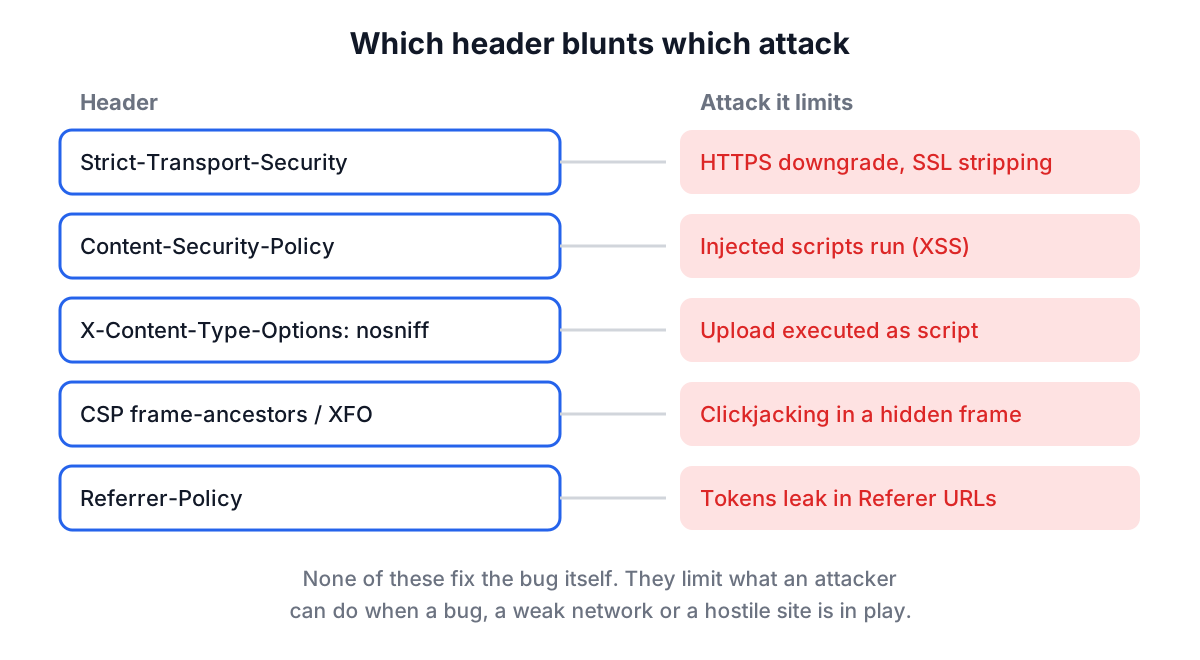
| Header | Good value | Blocks |
|---|---|---|
| Strict-Transport-Security | max-age=31536000; includeSubDomains | SSL stripping, cookies sent over HTTP |
| Content-Security-Policy | Nonce- or hash-based script-src, object-src 'none', frame-ancestors | Injected scripts (XSS impact), plugins, framing |
| X-Content-Type-Options | nosniff | Uploaded files executed as script or CSS |
| X-Frame-Options | DENY or SAMEORIGIN | Clickjacking (older browsers) |
| Referrer-Policy | strict-origin-when-cross-origin or stricter | Tokens and paths leaking in the Referer header |
| Permissions-Policy | camera=(), microphone=(), geolocation=() | Third-party frames using powerful features |
| Cross-Origin-Opener-Policy | same-origin | Cross-window attacks from popups and openers |
| Cross-Origin-Resource-Policy | same-origin or same-site | Other sites embedding your responses |
| Cross-Origin-Embedder-Policy | require-corp | Needed with COOP for cross-origin isolation |
Strict-Transport-Security
HSTS (RFC 6797) tells the browser to use HTTPS for this host for max-age seconds, and to refuse to click through certificate errors. The analyser treats anything under six months (15,768,000 seconds) as weak and one year (31,536,000) as the target. max-age=0 is a deliberate off switch: it tells browsers to forget the policy.
The very first visit is still unprotected, because the browser has not seen the header yet. The HSTS preload list closes that gap. To submit a domain at hstspreload.org you need max-age of at least one year, includeSubDomains and the preload token. Do not add includeSubDomains until every subdomain, including old internal ones, serves HTTPS.
Content-Security-Policy
CSP restricts where scripts, styles, images, frames and connections may come from. Its main job is to limit the damage of an XSS bug: even if an attacker injects a <script> tag, the browser refuses to run it.
That only works if script-src (or default-src when script-src is absent) is strict. 'unsafe-inline' allows any inline script, which is exactly what an injection produces. 'unsafe-eval' allows eval(). A bare *, https: or data: lets scripts load from anywhere. The modern pattern is a per-response nonce or a hash for each inline script, often with 'strict-dynamic' so scripts loaded by a trusted script are trusted too. When a nonce or hash is present, browsers ignore 'unsafe-inline', which is why it is sometimes kept as a fallback for very old browsers.
Two more directives are worth adding. object-src 'none' disables plugins, an old injection route. frame-ancestors controls who may frame the page and is the modern replacement for X-Frame-Options.
Rolling out a CSP is easier with Content-Security-Policy-Report-Only, which reports violations without blocking. It is a migration step, not protection: the analyser flags a Report-Only policy on its own as weak.
X-Content-Type-Options and X-Frame-Options
X-Content-Type-Options: nosniff is the whole header; it has one valid value. It stops browsers guessing that a file served as text/plain is really JavaScript.
X-Frame-Options takes DENY or SAMEORIGIN. The old ALLOW-FROM value is not supported by current browsers. If your CSP already has frame-ancestors, browsers that support it ignore X-Frame-Options, and the analyser counts the CSP directive as coverage.
Referrer-Policy and Permissions-Policy
Browsers default to strict-origin-when-cross-origin: full URL to your own origin, only the origin to other HTTPS sites, nothing on a downgrade to HTTP. no-referrer-when-downgrade sends the full path and query string to every HTTPS site, and unsafe-url sends it everywhere. If your URLs ever carry reset tokens or search terms, those two are leaks.
Permissions-Policy turns off features you do not use, so a compromised ad or widget frame cannot ask for the camera.
The cross-origin trio
COOP, CORP and COEP are newer and more situational. Cross-Origin-Opener-Policy: same-origin cuts the link between your window and cross-origin popups. CORP stops other sites embedding your responses. COEP, combined with COOP, enables cross-origin isolation, which features like SharedArrayBuffer require. Missing them is not critical for most sites, and the analyser does not mark them as such.
Headers you can skip
X-XSS-Protection controlled the XSS auditor, which Chrome, Edge and Safari have removed and Firefox never shipped. The auditor itself could be abused to leak data, so current advice from OWASP is to send 0 or omit the header. The analyser reports it as information, not a failure.
Server and X-Powered-By are the opposite problem: headers to remove or trim. X-Powered-By: Express or Server: nginx/1.25.3 tells an attacker which version-specific bugs to try first. A bare Server: nginx with no version is harmless and the analyser ignores it.
Worked example: the sample response
In the Security Headers Analyzer, click Load Sample. It pastes this response:
HTTP/2 200
content-type: text/html; charset=utf-8
strict-transport-security: max-age=31536000; includeSubDomains
content-security-policy: default-src 'self'; script-src 'self' 'unsafe-inline'; img-src 'self' data:
x-content-type-options: nosniff
x-frame-options: SAMEORIGIN
referrer-policy: no-referrer-when-downgrade
x-powered-by: Express
server: nginx/1.25.3
The results:
- HSTS: good. One year with includeSubDomains. Not preload-ready yet, because the
preloadtoken is missing. - CSP: weak.
'unsafe-inline'inscript-srcwith no nonce or hash, and noobject-src. The policy exists, but it would not stop an injected inline script. - X-Content-Type-Options: good.
nosniff. - X-Frame-Options: good.
SAMEORIGIN. - Referrer-Policy: weak.
no-referrer-when-downgradesends full URLs to other HTTPS sites. - Permissions-Policy, COOP, CORP, COEP: missing. None is critical, so the "Critical Missing" count stays at zero.
- X-XSS-Protection: info. Not set, and nothing needs to change.
- Information disclosure:
x-powered-by: Expressandserver: nginx/1.25.3.
The fix list is short: move inline scripts to nonces, add object-src 'none' and frame-ancestors 'self', change the referrer policy, add a Permissions-Policy, and turn off X-Powered-By (in Express, app.disable('x-powered-by')) and nginx's version string (server_tokens off;).
Common mistakes
- Setting headers only on the HTML page. HSTS and nosniff matter on every response, including API and static file responses.
- Sending two CSP headers. Browsers enforce both, and the effective policy is the intersection, which often breaks the site in confusing ways.
- Adding headers in the app while the CDN strips or overrides them. Always check the response the public sees, not the one from localhost.
- Leaving a Report-Only policy in place for years. It blocks nothing.
- Copying a CSP from a blog post. A policy must list the sources your own pages load; test it in Report-Only mode first.
- Turning on HSTS preload before every subdomain is ready. Removal from the preload list takes months to reach users.
Next steps
Headers sit on top of TLS, so confirm the certificate chain with the SSL Certificate Checker and read the X.509 certificate guide if anything there looks odd. For the wider set of threats these headers only partly cover, the Security Threat Checklist is a good place to plan the rest.
Run curl -sSIL against your production URL today, paste the output into the analyser, and fix the weak and missing items in the order they appear. Most of them are one line of server config.