
How to Read an X.509 Certificate and Debug a TLS Chain
What each field in a TLS certificate means, why browsers ignore the Common Name, how chains are built, and how to diagnose expiry, hostname and missing-intermediate errors.
· 7 min read
A deploy goes out at 4pm, curl works from your laptop, and by 5pm the support queue fills with "your connection is not private" from Android users. The certificate is valid. The hostname is right. The problem is one missing intermediate certificate that your desktop browser happened to have cached. Almost every TLS outage comes down to a handful of fields in an X.509 certificate, and once you can read them, these incidents take minutes instead of hours.
This guide walks through what is inside a certificate, how browsers decide whether to trust it, and how to check a live server's chain with the X.509 Parser and the SSL Certificate Checker.
What is inside an X.509 certificate
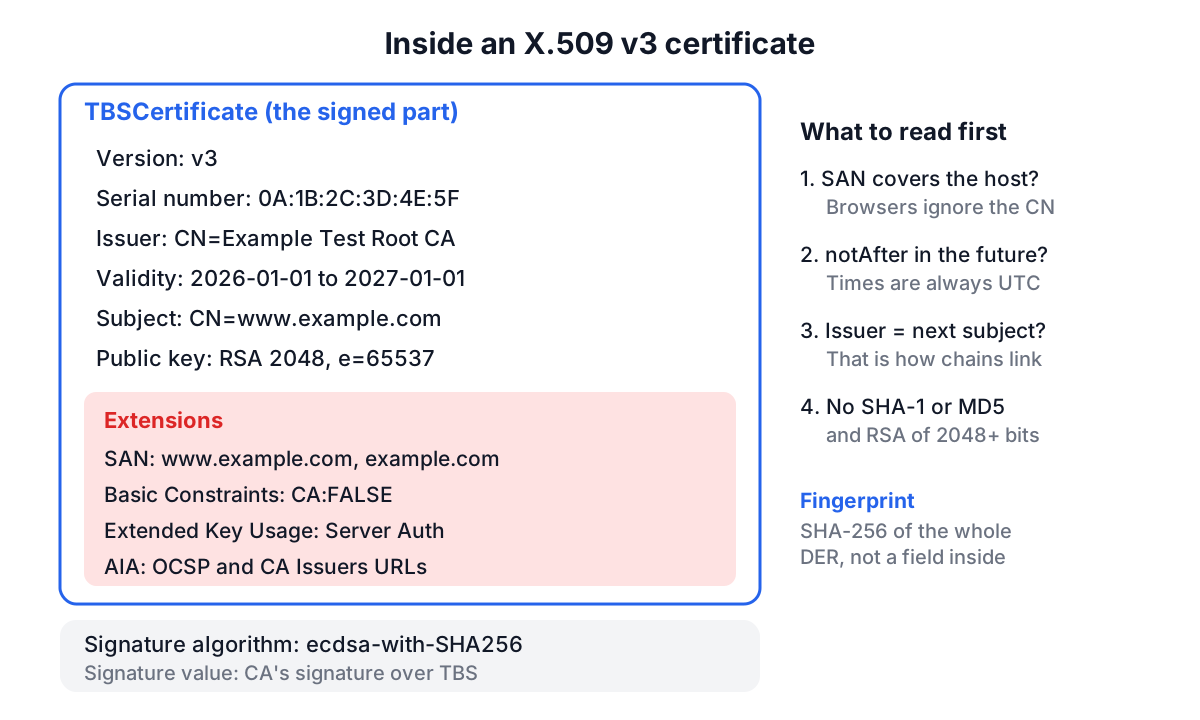
An X.509 v3 certificate, as profiled for the web by RFC 5280, is a signed data structure encoded in DER (binary ASN.1). The PEM form you usually see is that DER encoded in Base64 between -----BEGIN CERTIFICATE----- and -----END CERTIFICATE----- lines. Strip the armour and Base64, and you get three parts: the to-be-signed certificate body, the signature algorithm, and the issuer's signature over the body.
| Field | What it holds | What to check |
|---|---|---|
| Version | Almost always v3 | v1 certificates have no extensions and should not appear on the web |
| Serial number | Unique per issuing CA | Quote it when asking a CA to revoke |
| Signature algorithm | e.g. sha256WithRSAEncryption, ecdsa-with-SHA256 | SHA-1 or MD5 means the certificate is untrusted |
| Issuer | Distinguished name of the signing CA | Must equal the subject of the next certificate in the chain |
| Validity | notBefore and notAfter, in UTC | Clock skew on clients can make a fresh certificate "not yet valid" |
| Subject | Distinguished name of the holder | Mostly informational for TLS today |
| Subject public key | RSA modulus and exponent, or EC curve and point | RSA under 2048 bits or EC under 256 bits is weak |
| Extensions | SAN, key usage, basic constraints, AIA, CRL, policies | SAN decides which hostnames are covered |
Extensions carry most of the meaning. Subject Alternative Name lists the DNS names and IP addresses the certificate is valid for. Basic Constraints says whether the certificate is a CA. Key Usage and Extended Key Usage limit what the key may do (a TLS server certificate needs Server Authentication). Authority Information Access points to the OCSP responder and to a URL where the issuer's certificate can be downloaded. Certificate Policies carries the validation level OID, such as 2.23.140.1.2.1 for Domain Validated.
SAN, Common Name and wildcards
For years, browsers matched the hostname against the subject's Common Name (CN). RFC 2818 deprecated that in 2000, and Chrome 58 removed CN matching entirely in 2017. Every current browser now matches only against the SAN extension. A certificate with CN=www.example.com and no SAN entries fails in every modern browser, even for www.example.com.
Wildcards follow a narrow rule: *.example.com covers exactly one label in the left-most position. It matches www.example.com and api.example.com, but not example.com (no label to replace) and not a.b.example.com (two labels). That is why most certificates list both the bare domain and the wildcard.
IP addresses are separate SAN entries of type iPAddress. A certificate listing DNS:192.0.2.10 will not validate for https://192.0.2.10/; it needs IP:192.0.2.10.
Chains, intermediates and the missing-intermediate bug
Browsers trust a short list of root certificates. Roots almost never sign server certificates directly; they sign intermediates, which sign leaves. To validate a leaf, the client builds a path: leaf, then the certificate whose subject matches the leaf's issuer, and so on until it reaches a root in its trust store.
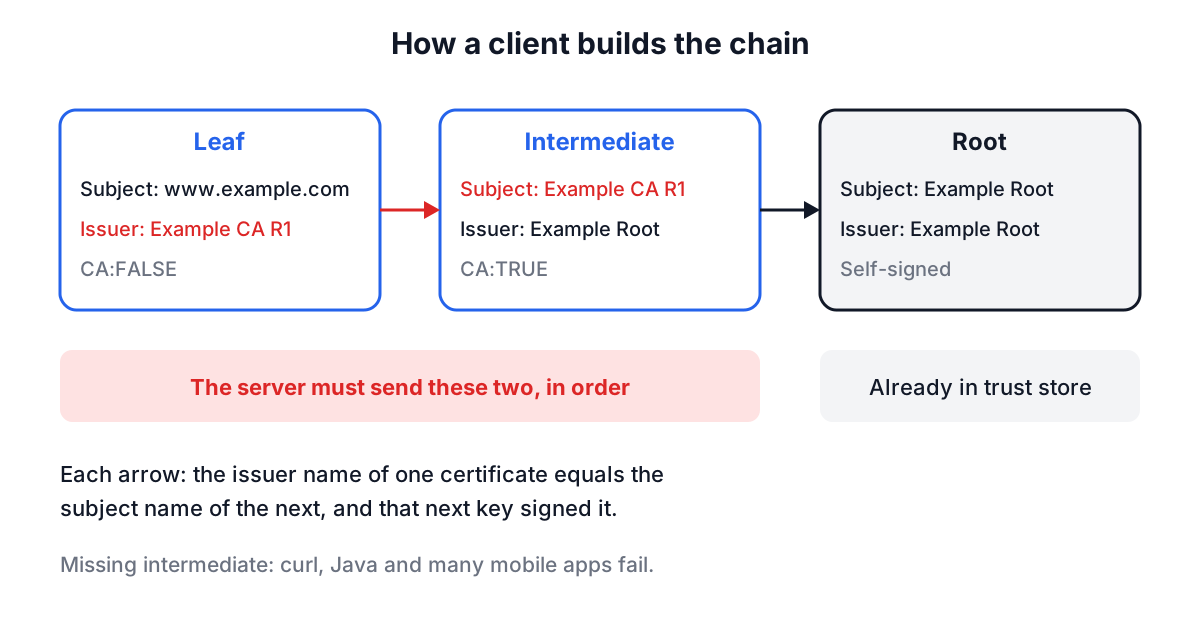
The server is expected to send the leaf followed by the intermediates, in order. It should not need to send the root. When the intermediate is missing, desktop Chrome often still works because it fetches the issuer through the AIA URL or has seen it before. Many mobile apps, curl, Java and Python clients do not, and fail with "unable to get local issuer certificate". That gap between "works on my machine" and "broken for customers" is the classic chain bug.
Fetching and reading a live chain with OpenSSL
Web pages cannot read another site's certificate. The browser handles TLS below the JavaScript layer, and fetch() exposes nothing about it. So the reliable way to see what a server sends is OpenSSL:
openssl s_client -connect example.com:443 -servername example.com -showcerts </dev/null
-servername sets SNI, which matters because one IP address usually serves many certificates. -showcerts prints every certificate the server sent, not just the leaf. The </dev/null makes the command exit instead of waiting for input.
The SSL Certificate Checker builds that command for the hostname you type. Run it, paste the output (everything from the first BEGIN line to the last END line, or the whole output), and the checker parses the chain locally. It reports days until expiry, whether the hostname is covered by the SANs (with the one-label wildcard rule), SHA-1 or MD5 signatures, RSA keys under 2048 bits, a self-signed leaf, a CA certificate in the leaf position, an Extended Key Usage without Server Authentication, out-of-order certificates and a lone leaf with no intermediates.
Be clear about what it does not do. It does not verify the signatures cryptographically, does not check the chain against a trust store, and does not query OCSP or CRLs for revocation. For those, openssl verify or a full TLS scanner is the right tool.
Worked example: reading the sample certificate
Open the X.509 Parser and click Sample Certificate. The parser decodes the DER in your browser and shows:
Version:              v3
Serial Number:        0A:1B:2C:3D:4E:5F
Signature Algorithm:  ecdsa-with-SHA256
Subject:              C=US, ST=California, L=San Francisco, O=Example Corp, CN=www.example.com
Issuer:               C=US, O=Example Test CA, CN=Example Test Root CA
Not Before:           2026-01-01T00:00:00Z
Not After:            2027-01-01T00:00:00Z
Public Key:           RSA, 2048 bits, exponent 65537
Subject Alt Names:    DNS:www.example.com, DNS:example.com, IP:192.0.2.10
Key Usage:            Digital Signature, Key Encipherment
Extended Key Usage:   Server Authentication, Client Authentication
Basic Constraints:    CA:FALSE
SHA-256 fingerprint:  DF:6E:7E:B2:...:8E:EA
A few things are worth noticing. The key is RSA but the signature is ECDSA: the subject's key type and the issuer's signing algorithm are independent, because the signature is made with the CA's key, which here is an EC P-256 key. The validity is exactly one year, longer than public CAs may issue today (see below), which is a hint this is a private test CA. The certificate covers example.com explicitly as well as www.example.com, and also the IP address 192.0.2.10.
The fingerprint is not a field in the certificate. It is the SHA-256 hash of the whole DER encoding, so it changes if any byte changes. It matches openssl x509 -noout -fingerprint -sha256, and it is what you pin or compare when two people need to confirm they are looking at the same certificate.
Now load the same sample in the SSL Certificate Checker with the Load Sample button. It pastes the leaf plus the test root and uses www.example.com as the hostname. The hostname check passes, the chain order check passes because the leaf's issuer bytes equal the root's subject bytes, and the expiry check reports the days left relative to today.
Validity periods are getting shorter
Public TLS certificates have a maximum lifetime set by the CA/Browser Forum Baseline Requirements. Since 1 September 2020 the cap has been 398 days. Ballot SC-081, passed in 2025, steps it down further: 200 days for certificates issued from 15 March 2026, 100 days from 15 March 2027, and 47 days from 15 March 2029.
The practical consequence is that manual renewal stops being viable. If a certificate on your estate is renewed by a calendar reminder, the expiry check in the SSL Checker is a stopgap; automating issuance with ACME (Let's Encrypt, or your CA's ACME endpoint) is the fix.
Common mistakes
- Serving only the leaf. Concatenate the intermediate into the file your server reads (
fullchain.pemwith Certbot, notcert.pem). - Wrong chain order. The leaf must come first, then each issuer. Some servers and load balancers send them reversed after a manual paste.
- Relying on CN. If a hostname is not in the SAN list, it is not covered, whatever the CN says.
- Expecting a wildcard to cover the apex.
*.example.comdoes not coverexample.com. - Checking the wrong certificate. Without
-servername, OpenSSL may receive the server's default certificate rather than the one for your hostname. - Trusting a fingerprint over an insecure channel. A fingerprint only proves identity if you got the expected value from somewhere you already trust.
- Forgetting intermediates expire too. An expired intermediate breaks every leaf under it, even freshly issued ones.
Where this fits
Certificates are one layer of a site's HTTPS posture. Once the chain is right, check the response headers with the Security Headers Analyzer, and if you work with signing keys outside TLS, the JWK guide and the checksums vs signatures guide cover the same public-key ideas from other angles.
Next time a TLS error report lands, run the s_client command first, paste the chain into the checker, and read the failing check before touching the server config. Most of the time the answer is the expiry date, the SAN list or a missing intermediate.