
SQL Indexes and EXPLAIN Plans: Finding Why a Query Is Slow
How B-tree indexes work, why column order matters, how to read a PostgreSQL EXPLAIN ANALYZE plan, and the query patterns that quietly defeat your indexes.
· 7 min read
A query that took 4 ms on your laptop takes 9 seconds in production. Same SQL, same code. The difference is almost always one of three things: the table is 2,000 times bigger, there is no index the query can use, or the planner has stale numbers and picked the wrong plan. All three are visible if you know where to look, and none of them require guessing.
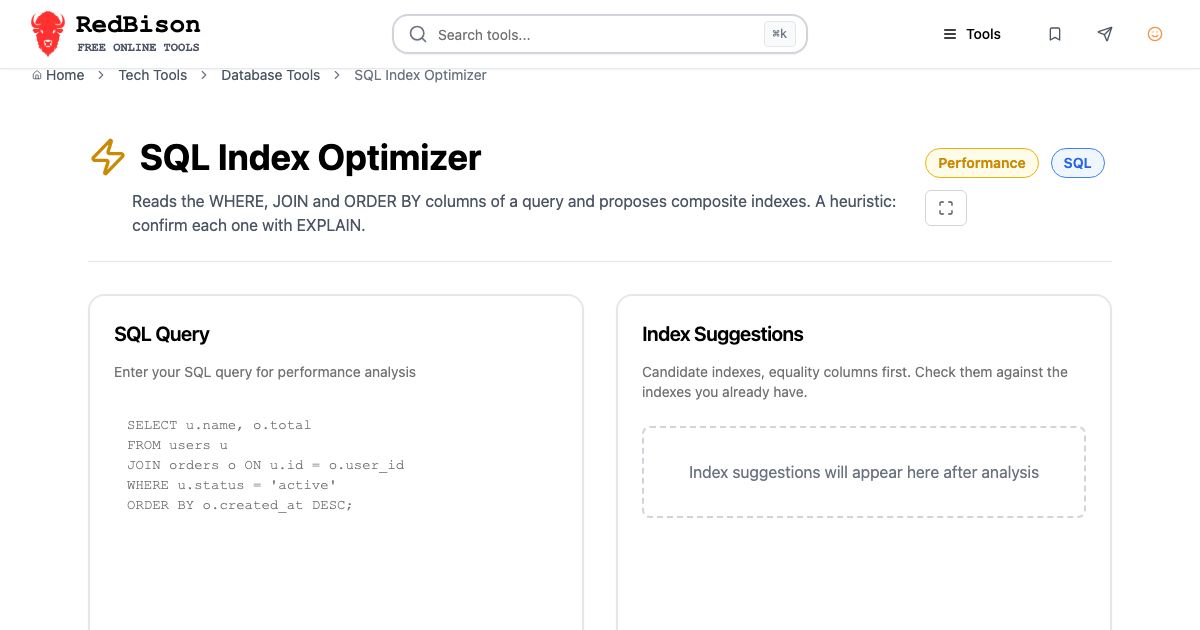
This guide walks through how indexes work, how to choose one, and how to read the plan that tells you whether it is being used. The three tools it covers work as a pipeline: the SQL Query Analyzer catches patterns in the text, the SQL Index Optimizer proposes indexes, and the PostgreSQL EXPLAIN Plan Visualizer shows what the database actually did.
How a B-tree index finds rows
Almost every index you create with a plain CREATE INDEX is a B-tree. Think of it as a sorted copy of one or more columns, each entry pointing back at its row. Because it is sorted, the database can find customer_id = 42 by walking down a few levels of the tree instead of reading every row. On a table of 10 million rows that is the difference between reading three or four pages and reading tens of thousands.
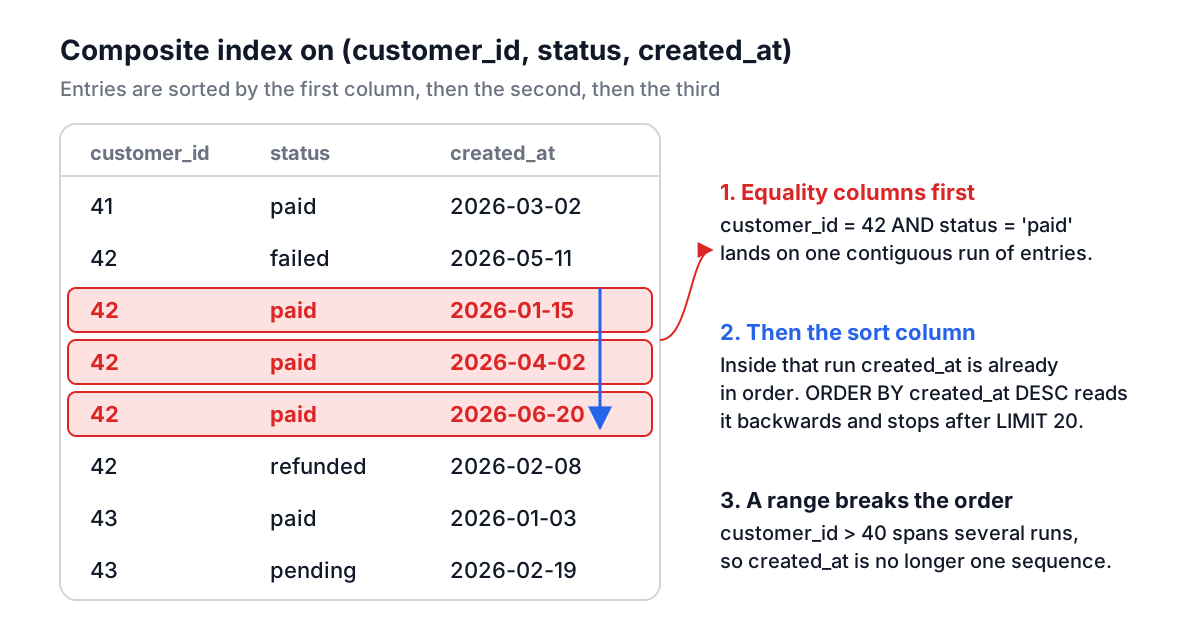
A composite index is sorted by its first column, then by the second within equal values of the first, and so on, like a phone book sorted by surname and then first name. That ordering rule explains nearly everything about which queries an index helps:
Index on (customer_id, status, created_at) | Can the index help? |
|---|---|
WHERE customer_id = 42 | Yes, leftmost column |
WHERE customer_id = 42 AND status = 'paid' | Yes, leftmost two columns |
WHERE customer_id = 42 ORDER BY status | Yes, rows come out already sorted |
WHERE status = 'paid' | Not efficiently, the first column is missing |
WHERE customer_id > 40 ORDER BY created_at | Finds the range, but still has to sort |
The phone book analogy also explains the last row. Once you ask for "every surname after Smith", the first names are no longer in one sorted run, so the book cannot hand them to you in first-name order.
Choosing column order: equality, sort, range
The rule most practitioners use for composite B-tree indexes is:
- Columns compared with
=orINgo first, in any order. - Then the columns in
ORDER BY(orGROUP BY). - Then at most one column compared with
<,>,BETWEENor a prefixLIKE 'abc%'.
If a query has both a range filter and an ORDER BY on a different column, one index can serve the range or the sort, not both. With a LIMIT, serving the sort usually wins, because the database can stop after reading 20 rows instead of sorting thousands.
Here is a worked example. Paste this into the SQL Index Optimizer:
SELECT id, total
FROM orders
WHERE customer_id = 42
  AND status = 'paid'
  AND created_at >= '2026-01-01'
ORDER BY created_at DESC
LIMIT 20;
It suggests:
CREATE INDEX idx_orders_customer_id_status_created_at
  ON orders (customer_id, status, created_at);
customer_id and status are equality columns, so they lead. created_at is both the sort column and a range filter, and putting it third serves both: the index narrows to one customer's paid orders and reads them newest first, walking the index backwards for DESC. The database reads 20 index entries and stops.
The optimizer works on the text of the query, so it cannot know that you already have an index on (customer_id) or that 99% of orders are paid. Before creating anything, list what exists (\d orders in psql, SHOW INDEX FROM orders in MySQL). An existing index on (customer_id, status) might be good enough, and extending it is cheaper than adding a second one.
Patterns that defeat an index
Some queries cannot use an index however well you design it. The SQL Query Analyzer flags the common ones from the SQL text alone:
- A function around the column.
WHERE LOWER(email) = 'a@b.com'orWHERE YEAR(created_at) = 2026hides the column from a plain index. Rewrite the date as a range (created_at >= '2026-01-01' AND created_at < '2027-01-01') or create an expression index such asCREATE INDEX ON users (LOWER(email)). - A leading wildcard.
LIKE '%@gmail.com'cannot use a B-tree because the index is sorted by the start of the string. PostgreSQL'spg_trgmextension or a full-text index handles substring search. SELECT *. It prevents an index-only scan, where the database answers entirely from the index without touching the table.NOT IN (SELECT ...). If the subquery returns a single NULL, the whole condition becomes unknown and the query returns no rows.NOT EXISTShas no such trap and is usually planned as an anti-join.- OR across different columns.
WHERE a = 1 OR b = 2needs two indexes combined, which planners can do with bitmap scans but not always cheaply.UNION ALLof two indexed queries is sometimes faster.
The analyzer also gives a complexity score (10 points per join, 15 per subquery, 5 per aggregate, 3 per condition). It is useful for comparing two versions of the same query. It is not a prediction of speed: a "Low" query with a leading wildcard on a big table is slower than a "High" reporting query on small ones.
Reading a PostgreSQL EXPLAIN plan
Text heuristics only get you so far. The plan is the ground truth. In PostgreSQL, run:
EXPLAIN (ANALYZE, BUFFERS, FORMAT JSON)
SELECT u.name, o.total
FROM users u
JOIN orders o ON o.user_id = u.id
WHERE u.created_at >= '2026-01-01' AND o.status = 'paid';
ANALYZE executes the query and records real timings, so wrap an UPDATE or DELETE in BEGIN; ... ROLLBACK;. Paste the JSON into the EXPLAIN Plan Visualizer and you get a tree like this one, from the tool's built-in sample:
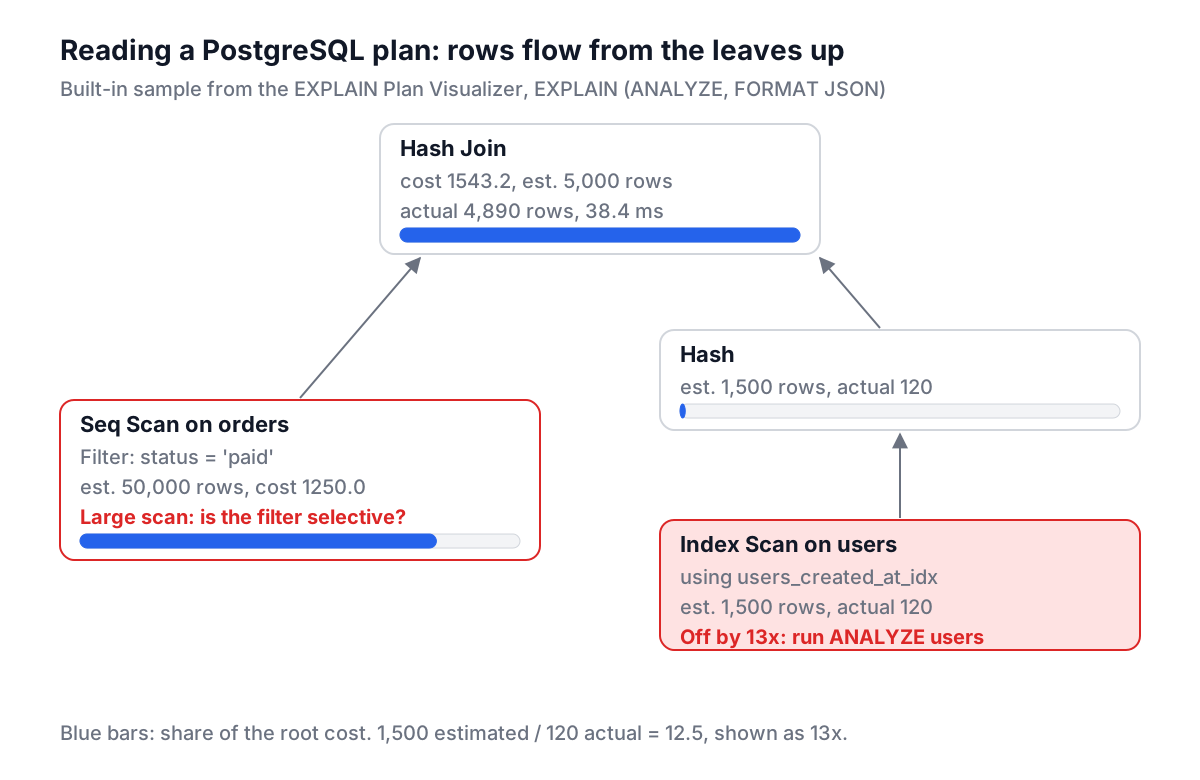
Read it from the leaves up, because that is the order rows flow:
- Node type.
Seq Scanreads the whole table.Index Scanwalks an index and fetches rows.Bitmap Heap Scancollects row locations from an index first, then reads pages in order.Hash Join,Merge JoinandNested Loopare the three join strategies. - Cost. Arbitrary units where reading one page sequentially costs 1.0 by default. A node's total cost includes everything below it, so the root's cost is the estimate for the whole query and the visualizer's bar shows each node's share of it.
- Rows: estimated versus actual. This is the most useful number in the plan. In the sample, the users index scan was estimated at 1,500 rows and returned 120. The visualizer reports that as "off by 13x" (1,500 / 120 = 12.5).
- Loops. Actual time and rows are reported per loop. The inner side of a nested loop that ran 10,000 times shows a tiny per-loop time; multiply by loops for the real total. The visualizer does this for you.
A misestimate matters because the planner picks join strategies from row estimates. A nested loop is perfect for 10 outer rows and terrible for 100,000. When estimates are off by an order of magnitude, run ANALYZE users; first. If a column is heavily skewed, raise its statistics target. If two columns are correlated (city and postcode, say), PostgreSQL's CREATE STATISTICS can teach the planner about it.
The visualizer only reads PostgreSQL's JSON format. MySQL's EXPLAIN FORMAT=JSON has a different structure, and MySQL 8.0.18 and later can print a readable text tree with EXPLAIN ANALYZE directly.
A workflow that holds up
- Run the query through the analyzer and fix anything structural: functions on filtered columns, leading wildcards,
NOT INover a nullable subquery. - Capture the plan on a database with production-like data. Plans on a 100-row dev table tell you nothing.
- Look for the node with the biggest cost share and for row estimates that are off by 10x or more. Fix statistics before adding indexes.
- Ask the index optimizer for a candidate, compare it with existing indexes, and create it on a staging copy. On PostgreSQL use
CREATE INDEX CONCURRENTLYon busy tables so writes are not blocked. - Capture the plan again and compare. If the
Seq Scandid not become an index scan, the planner decided the index was not worth it, usually because the filter keeps too many rows.
Common mistakes
Indexing every column on its own. Five single-column indexes rarely beat one well-ordered composite index, and each one slows every write.
Treating every Seq Scan as a bug. On a small table, or when the filter keeps most rows, reading the table sequentially is the cheapest plan. The planner is often right.
Trusting plans from the wrong environment. Statistics, data volume and settings like work_mem differ between staging and production. Capture the plan where the slowness is.
Forgetting foreign keys. PostgreSQL does not index foreign key columns automatically. Joins and cascading deletes on an unindexed orders.user_id are a classic cause of slow pages. The Database Schema Designer guide covers how to lay those keys out, and the SQL formatting guide helps make long queries readable enough to review.
Start with the plan, not with a hunch. Ten minutes with EXPLAIN ANALYZE and one targeted index fixes more slow queries than any amount of rewriting by intuition.