
Quotes, NULLs and LIMIT: Writing SQL and Seed Data That Run Everywhere
Escaping single quotes, the NULL comparisons that silently return nothing, LIMIT versus TOP versus FETCH FIRST, and seed data that loads cleanly into any database.
· 7 min read
The first customer named O'Brien signs up, and the nightly export job crashes. The fix takes one line, but the bug sat there for a year because every test row was called "Test User". Quotes, NULLs and dialect differences cause a surprising share of real SQL bugs, and they hide precisely because development data is too tidy to trigger them.
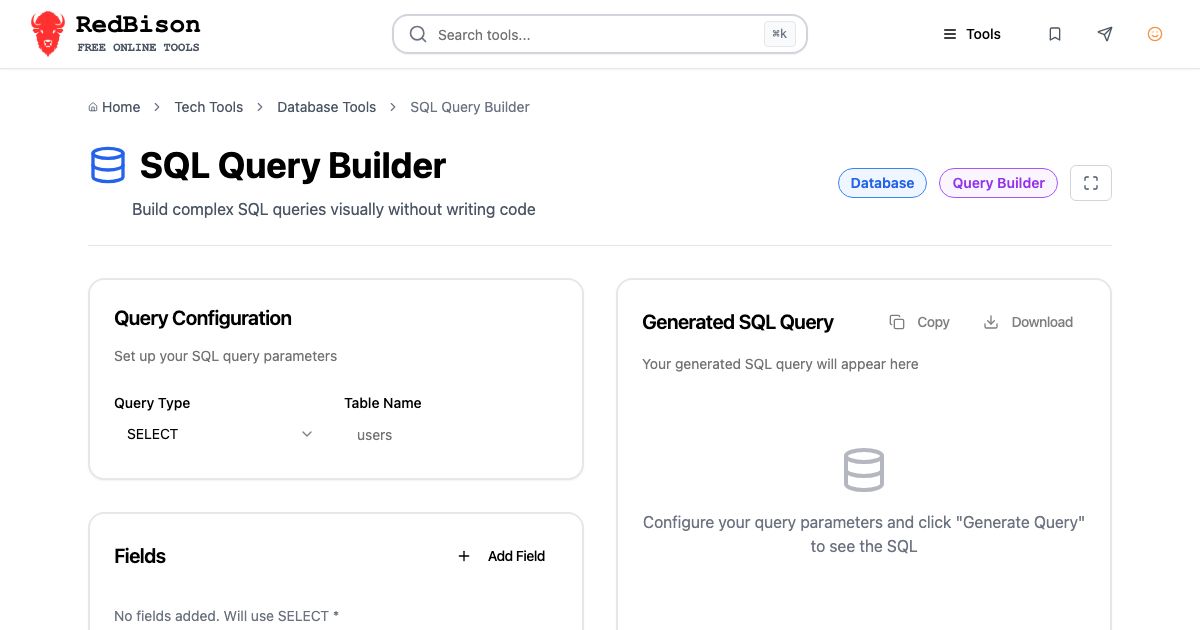
This guide covers the small rules that make SQL text correct and portable, and how to build seed data that exercises them. It uses the SQL Query Builder for writing statements and the Database Seed Data Generator for test rows.
String literals and the doubled quote
In SQL, a string literal is wrapped in single quotes. To put a single quote inside it, you write two:
SELECT * FROM customers WHERE last_name = 'O''Brien';
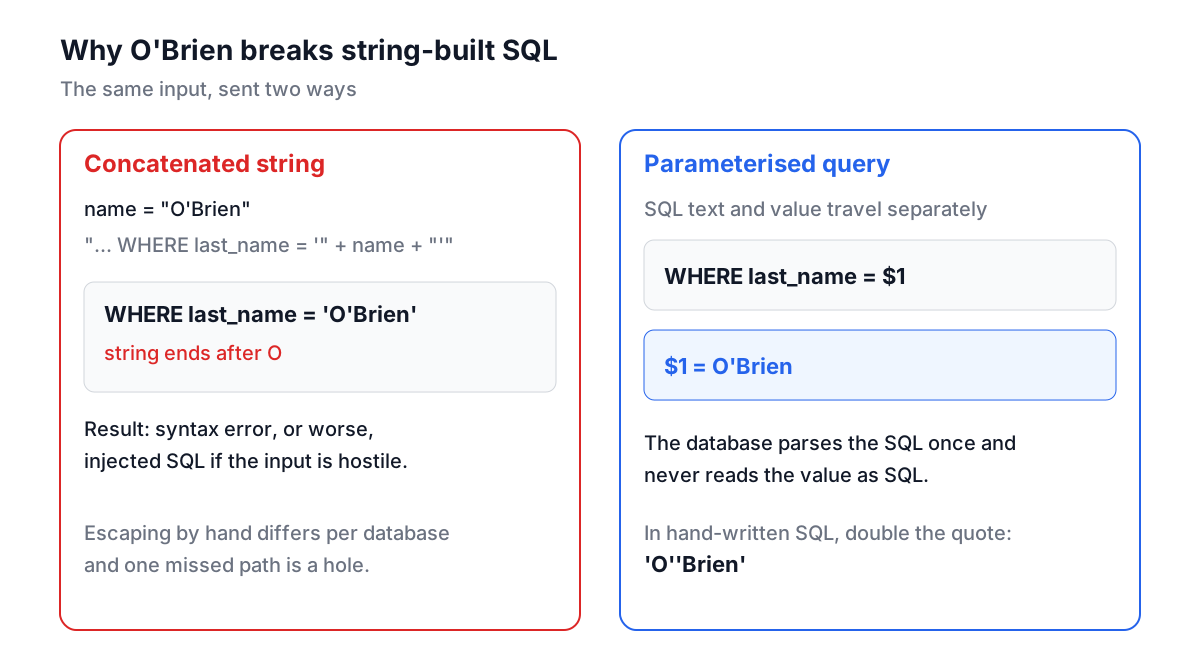
That is the SQL standard, and it works in MySQL, PostgreSQL, SQLite, SQL Server and Oracle. MySQL also accepts a backslash escape ('O\'Brien') unless the NO_BACKSLASH_ESCAPES mode is on, and PostgreSQL accepts backslashes only inside E'...' strings. Code that escapes with backslashes therefore works on one database and breaks on another, which is one of the many reasons not to escape by hand in application code.
Double quotes are a different thing entirely. In standard SQL, PostgreSQL, SQLite and Oracle, "last_name" is an identifier, a column or table name, not a string. MySQL treats double quotes as strings by default and uses backticks for identifiers. Writing WHERE status = "active" works in MySQL and fails in PostgreSQL with column "active" does not exist.
| You want | Portable form | Notes |
|---|---|---|
| A string | 'it''s' | Double any single quote inside |
| An identifier with odd characters | "Order Items" | Backticks in MySQL, brackets also in SQL Server |
| A literal NULL | NULL | Never 'NULL', which is a four-letter string |
| A boolean | TRUE / FALSE | SQL Server and older Oracle need 1 / 0 |
In application code, none of this should be done by string concatenation. Use parameterised queries, where the SQL text contains a placeholder ($1, ? or @name) and the driver sends the value separately. The database never parses the value as SQL, so quotes cannot break out and injection is impossible. The SQL Injection Tester shows what happens when that rule is ignored.
NULL is not a value
NULL means "unknown". Comparing anything with unknown gives unknown, and WHERE keeps only rows where the condition is true. So:
SELECT * FROM users WHERE deleted_at = NULL;   -- always zero rows
SELECT * FROM users WHERE deleted_at IS NULL;  -- what you meant
The same logic produces the nastiest NULL bug in SQL:
SELECT * FROM users
WHERE id NOT IN (SELECT manager_id FROM teams);
If any team has a NULL manager_id, the condition for every user becomes "id is not 1, and not 2, and not unknown", which is unknown, and the query returns nothing. No error, just an empty result. NOT EXISTS does not have this problem:
SELECT * FROM users u
WHERE NOT EXISTS (SELECT 1 FROM teams t WHERE t.manager_id = u.id);
Other NULL rules worth keeping in your head: COUNT(column) skips NULLs while COUNT(*) does not; NULL + 1 is NULL; 'a' || NULL is NULL in PostgreSQL, while Oracle stores an empty string as NULL and so returns 'a'. COALESCE(column, default) is the portable way to substitute a value.
LIMIT, TOP and FETCH FIRST
Limiting rows is the most visible dialect split:
| Database | First 10 rows |
|---|---|
| MySQL, MariaDB, PostgreSQL, SQLite | ... ORDER BY id LIMIT 10 |
| SQL Server | SELECT TOP 10 ... ORDER BY id, or ORDER BY id OFFSET 0 ROWS FETCH NEXT 10 ROWS ONLY (2012+) |
| Oracle 12c and later | ... ORDER BY id FETCH FIRST 10 ROWS ONLY |
| Standard SQL | ... ORDER BY id FETCH FIRST 10 ROWS ONLY |
PostgreSQL also accepts the standard FETCH FIRST form, so if a query must run on several databases, that is the one to pick. Whatever the syntax, a limit without ORDER BY returns an arbitrary set of rows, and the set can change between runs.
Writing statements with the SQL Query Builder
The SQL Query Builder applies all of the above for you when you write ad hoc statements. Choose SELECT, set the table to users, add the fields id and email (alias contact), then three conditions: last_name = O'Brien, status IN active, trial, and deleted_at IS NULL. Add ORDER BY created_at DESC and LIMIT 20, and click Generate Query:
SELECT id, email AS contact
FROM users
WHERE last_name = 'O''Brien'
  AND status IN ('active', 'trial')
  AND deleted_at IS NULL
ORDER BY created_at DESC
LIMIT 20;
The apostrophe is doubled, the comma-separated IN list is split and quoted one value at a time, and the NULL check uses IS NULL with no value. For INSERT and UPDATE, typing NULL, TRUE or FALSE as a value produces the keyword rather than a quoted string. An UPDATE or DELETE with no conditions still generates, but with a warning comment on top, because it touches every row in the table.
The output uses LIMIT. For SQL Server or Oracle, leave LIMIT empty and add TOP or FETCH FIRST by hand. Values are always quoted, even numbers; MySQL, PostgreSQL and SQLite convert '42' to a number when the column is numeric, so that is safe there.
Seed data that finds bugs
Seed data has two jobs: making a development database pleasant to click through, and giving tests realistic inputs. "Test User 1" through "Test User 50" does neither. It never contains an apostrophe, an accent, a long name or an empty optional field, so the bugs those cause wait for production.
The Database Seed Data Generator reads your actual CREATE TABLE statements and fills every column from its type and name. Given:
CREATE TABLE users (
  id INT PRIMARY KEY AUTO_INCREMENT,
  name VARCHAR(100) NOT NULL,
  email VARCHAR(255) UNIQUE NOT NULL,
  created_at TIMESTAMP
);
CREATE TABLE posts (
  id INT PRIMARY KEY,
  user_id INT NOT NULL REFERENCES users(id),
  status ENUM('draft','published')
);
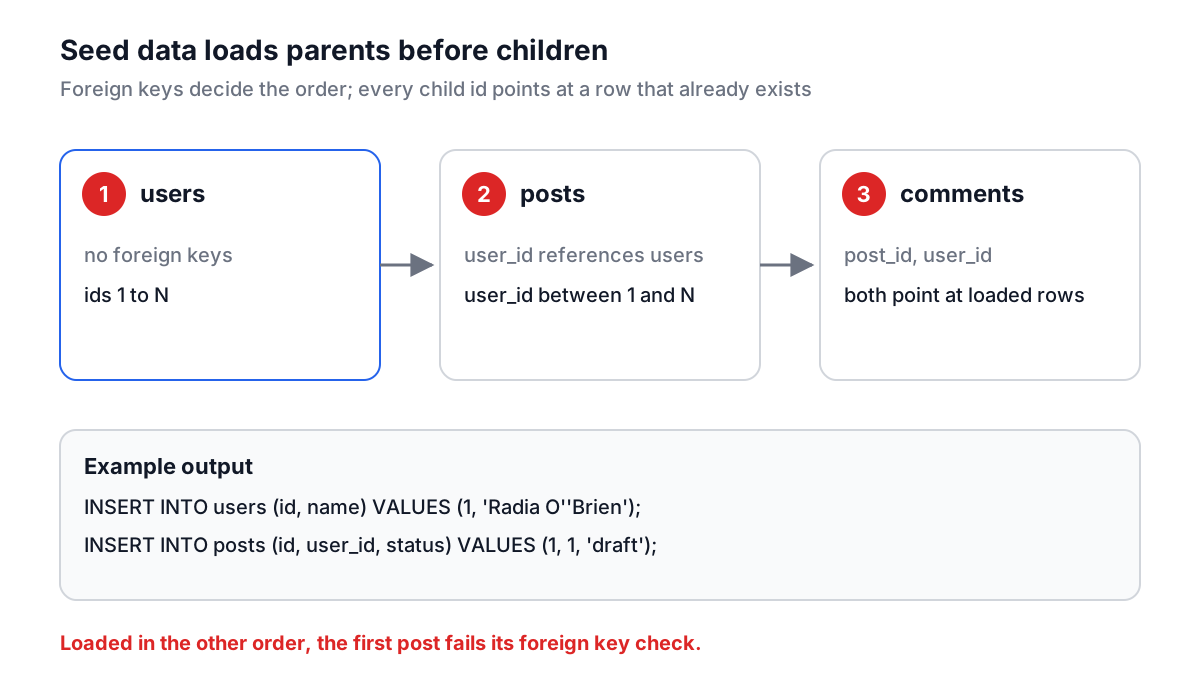
it writes the users rows first, because posts depends on them, then the posts:
INSERT INTO users (id, name, email, created_at) VALUES (1, 'Radia O''Brien', 'user1@example.com', '2026-03-02 18:41:09');
INSERT INTO posts (id, user_id, status) VALUES (1, 1, 'draft');
Your rows will differ, because names and dates are random on each run, but the rules hold. Names include O'Brien, D'Souza, Seán and Zoë, so quoting and encoding bugs show up early. Emails use example.com, which RFC 2606 reserves so it never receives mail, and phone numbers use 555-0100 to 555-0199, which are set aside for fiction in North America. UNIQUE columns get the row number appended so they never collide, ENUM and CHECK (... IN (...)) columns only get allowed values, and every foreign key points at an id that exists in the parent table.
Loading seed data into each database
The output is standard SQL, but each database has one loading quirk:
- PostgreSQL. The seed rows set
idexplicitly, and the sequence behind a SERIAL or identity column does not notice. The next normal insert fails with a duplicate key. Fix it once per table:SELECT setval(pg_get_serial_sequence('users', 'id'), (SELECT max(id) FROM users)); - MySQL and SQLite. Both move the auto-increment counter past the highest inserted id automatically.
- SQL Server. Explicit values in an IDENTITY column need
SET IDENTITY_INSERT users ON;before the inserts andOFFafter. ReplaceTRUEandFALSEwith1and0. - Oracle. Timestamps are written as
'YYYY-MM-DD HH:MM:SS'strings; wrap them inTO_TIMESTAMPor setNLS_TIMESTAMP_FORMATfor the session.
For automated tests, generate the data once, commit it as a fixture file, and load it in a transaction that each test rolls back. Random data on every run makes failures hard to reproduce.
Common mistakes
Escaping by hand in application code. Use parameters. Escaping rules differ between databases and modes, and one missed path is an injection hole.
Double quotes for strings. They are identifiers outside MySQL.
= NULL and NOT IN over nullable columns. Use IS NULL and NOT EXISTS.
LIMIT without ORDER BY. The rows you get are not guaranteed to be the same twice.
Seed data that is too clean. If no seed row has an apostrophe, a 100-character name or a NULL optional field, your tests have not met your customers yet.
Write the query, run it against seed data that looks like the real world, and only then point it at production. For the next step, the SQL indexes and EXPLAIN guide covers making those queries fast, and the SQL formatting guide covers keeping them readable.