
Choosing a Startup Idea: The Idea Maze, Scoring Matrices and Pivots
Map the idea maze before you build, score competing ideas with a weighted matrix (and know how RICE and ICE differ), and plan a pivot when the data says so.
· 8 min read
Most founders do not fail for lack of ideas. They fail because they picked one idea on enthusiasm, never mapped what stood between it and a working business, and then changed direction in a panic instead of on purpose. Choosing, ranking and changing ideas are three separate skills, and each has a simple tool behind it.
This guide covers all three: mapping the Idea Maze before you build, scoring competing ideas with the Idea Prioritizer, and planning a change of direction with the Pivot Strategy Planner. All three run in your browser, and what you type stays there.
The Idea Maze: map the paths before you walk them
The idea maze comes from Balaji Srinivasan's Startup Engineering course at Stanford in 2013. His point was that a good founder can talk you through the whole maze around their idea: which turns lead to treasure, which lead to dead ends, which companies tried each path before and why they failed. Chris Dixon popularised the concept the same year in his essay "The idea maze", arguing that the best founders have usually spent years in the maze before starting.
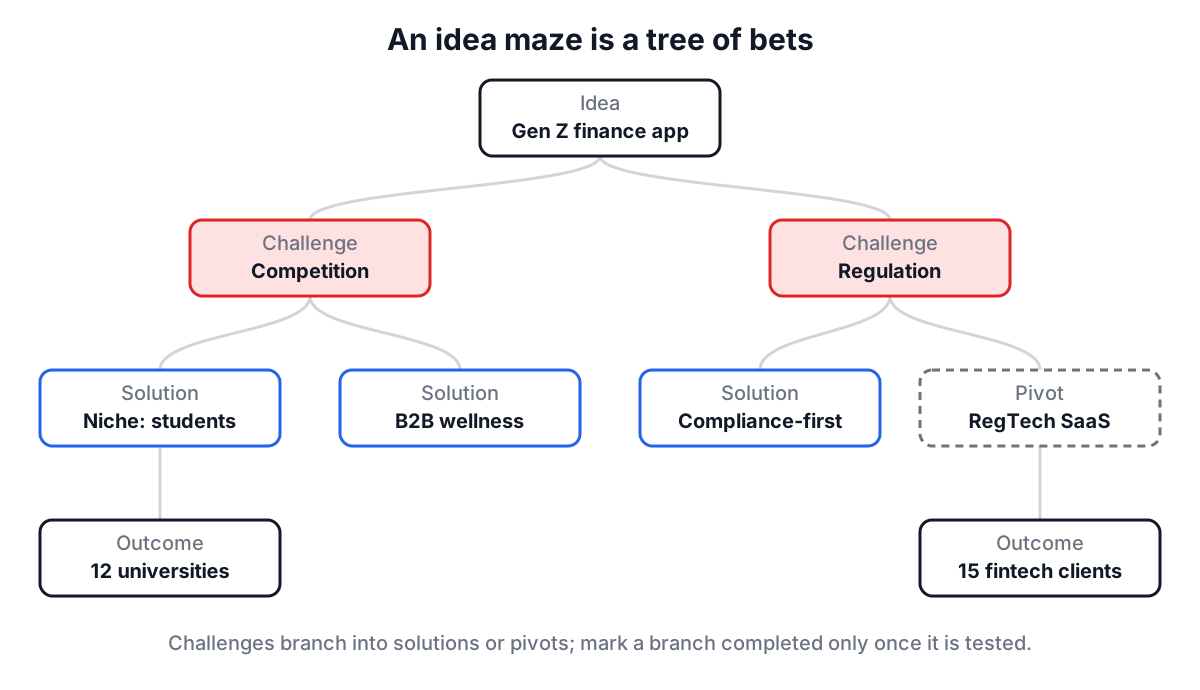
The practical version is a tree. Your idea sits at the root. Under it go the challenges that could kill it. Under each challenge go the possible solutions, and under those, the outcomes you would expect and the new challenges they create. Some branches end in a pivot: a different business that the same insight could support.
Building one in the tool
The Idea Maze tool stores exactly that tree. Every node has a type (Idea, Challenge, Solution, Pivot or Outcome), a title, a description, a priority (low, medium or high), notes and a completed checkbox.
- Click the starting node and rename it to your idea in the edit panel.
- To add a node, select its parent in the tree, choose a type, enter a title and click Add Node. With nothing selected, new nodes go under the starting idea.
- Use priority for how much the branch matters and the completed checkbox for branches you have actually tested. The header shows total nodes, completed nodes and a completion rate.
- Load Sample fills the maze with a worked example: a personal finance app for Gen Z with competition, regulation and retention challenges, and three pivots (embedded finance, RegTech SaaS, financial education).
- Copy puts the maze on your clipboard as JSON and Export downloads it as
idea-maze.json. Clear starts over.
The maze is saved in your browser's localStorage under idea-maze-data. Deleting a node removes everything beneath it.
A maze earns its keep when the notes hold evidence: "12 of 15 interviewees pay for this today" is a fact you can build on, while "users will love it" is a guess wearing a costume. Mark a branch completed only when you have tested it.
The Idea Prioritizer: scoring ideas against each other
Once you have two or three serious candidates, mapping each is not enough. You need to compare them, and the comparison should be written down before you fall in love with one.
The Idea Prioritizer is a weighted decision matrix. You rate each idea from 1 to 10 on five criteria and set how much each criterion matters:
| Criterion | What a 10 means |
|---|---|
| Impact | Large value for users or the business |
| Effort | Very hard to build (inverted in the score) |
| Confidence | Strong evidence it will work |
| Market Size | Large revenue potential |
| Founder Market Fit | You are unusually well placed to build it |
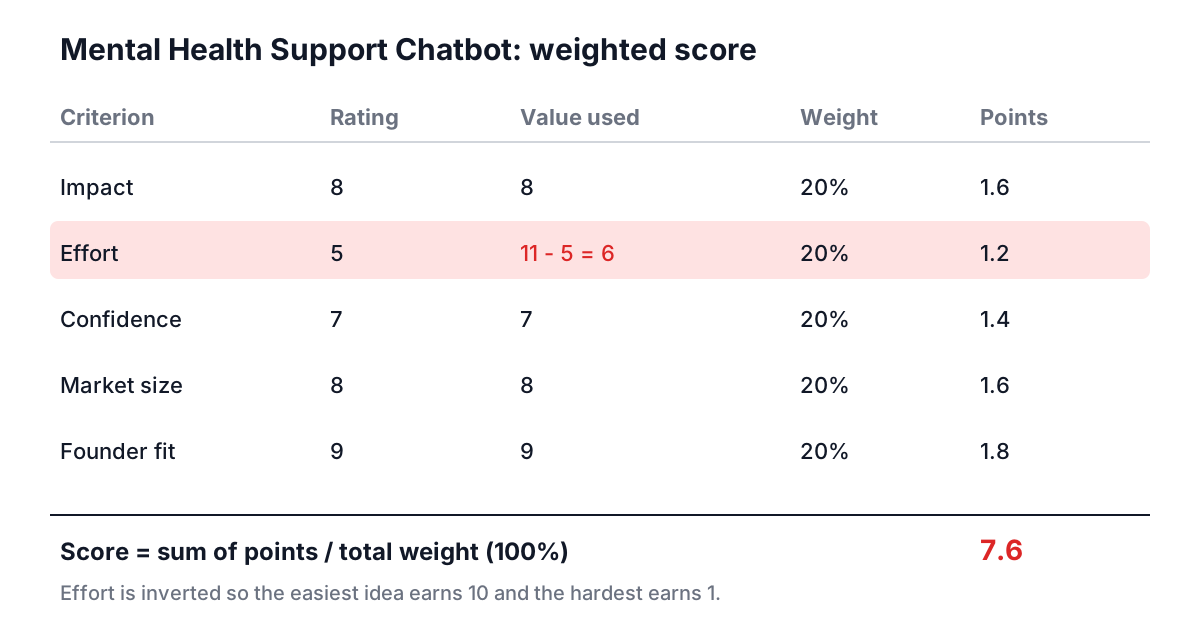
Weights move in 5% steps and are meant to total 100%. The score is the weighted mean, with effort inverted as 11 minus effort so that the easiest idea earns 10 and the hardest earns 1:
score = (impact x w1 + (11 - effort) x w2 + confidence x w3
         + market x w4 + fit x w5) / (w1 + w2 + w3 + w4 + w5)
Dividing by the total weight keeps the score on a 10-point scale even while you are adjusting weights and they do not yet add up to 100%. Scores update as soon as you move any slider, and Export saves the ranking as a text file. Ideas and weights are saved in your browser.
A worked example
Load Sample Ideas adds four ideas with equal 20% weights. Take the Mental Health Support Chatbot, rated impact 8, effort 5, confidence 7, market size 8 and founder fit 9. Effort 5 becomes 11 - 5 = 6, so:
(8 + 6 + 7 + 8 + 9) / 5 = 38 / 5 = 7.6
The full sample ranking is chatbot 7.6, Sustainable Food Delivery 7.0, AI Personal Finance Assistant 6.8 and Remote Team Collaboration VR Tool 5.8. The VR tool has the highest impact rating (9), but its effort of 9 inverts to 2 and its confidence is only 5.
Now change the weights to what an investor-minded founder might use: impact 40%, market size 30% and 10% each for the rest. The chatbot still leads at 7.8, but the finance assistant jumps to 7.6 because of its market rating of 9, and the VR tool rises to 6.8. Weights are opinions, and changing them is how you find out whether your ranking is stable or a coin flip.
How this differs from RICE and ICE
The Idea Prioritizer is not RICE, though the two are often confused. RICE and ICE were designed for ranking features inside one product, where reach can be counted:
| Method | Formula | Origin | Best for |
|---|---|---|---|
| RICE | Reach x Impact x Confidence / Effort | Sean McBride at Intercom | Features with measurable reach |
| ICE | Impact, Confidence and Ease, each 1 to 10, combined | Sean Ellis, growth experiments | Fast ranking of experiments |
| Weighted matrix | Weighted mean of any criteria | General decision analysis | Comparing whole ideas |
A RICE example: a feature reaching 2,000 users per quarter, impact 2 (high on Intercom's 0.25 to 3 scale), confidence 80% and effort 4 person-months scores 2,000 x 2 x 0.8 / 4 = 800. That works for a backlog. For deciding which company to start there is no reach number yet, and criteria like founder fit matter more, which is why a weighted matrix suits this job better.
The Pivot Strategy Planner: changing direction on purpose
Eric Ries defined a pivot in The Lean Startup (2011) as a structured course correction designed to test a new hypothesis about the product, strategy or engine of growth. He listed ten types: zoom-in, zoom-out, customer segment, customer need, platform, business architecture, value capture, engine of growth, channel and technology.
The planner offers ten options in its Pivot Type tab: customer segment, problem, solution, revenue model, platform, business architecture, value capture, engine of growth, channel and technology. Problem is close to Ries's customer need pivot. Revenue model and value capture overlap (both change how you make money), and the list has no zoom-in or zoom-out, so if your pivot is "one feature becomes the whole product", pick solution and say so in the notes.
The planner walks through four tabs:
- Current State: the problem, solution, market and business model today, plus the challenges forcing the change.
- Pivot Type: pick one type from the dropdown or the cards.
- New Direction: the same four fields after the pivot, plus the advantages you expect.
- Transition Plan: timeline, resources, risks and milestones.
A progress bar tracks 15 checks (each field, at least one item in each list, and a pivot type). Export Strategy Plan saves everything as pivot-strategy-plan.txt. Unlike the other two tools, the planner does not save between visits, so export before you close the tab.
The most useful habit is to fill Current State and New Direction with the same level of detail. If the new direction's market field is vaguer than the current one, you are escaping, not pivoting.
Common mistakes across all three
Scoring your favourite idea last. Rate every idea on one criterion at a time, across all ideas, so you compare like with like.
Treating a confident 9 as data. Confidence should reflect evidence: interviews, pre-sales, a working prototype. If you have none, it is a 5.
A maze with no dead ends. If every branch ends in a happy outcome, you have drawn a plan, not a maze. Add the challenges that would kill the idea.
Pivoting several things at once. Changing customer, problem and business model together is starting a new company. Change one thing, keep what you learned.
No milestones on a pivot. Without a dated milestone you cannot tell a pivot that is working from one that is drifting.
Putting it together
Map the maze for each serious idea, score them in the prioritizer, then take the winner into a Lean Canvas and test its riskiest box with Idea Validation. When you know what you are building, the guide to MVP, MLP, MMP and SLC helps you decide how much of it to ship first. Come back to the pivot planner when the numbers say the current path is not working, and fill in the current state honestly before you write a word about the new one.