
JSON-LD Structured Data: What Still Earns Rich Results
How JSON-LD, schema.org and Google rich results fit together, which properties are really required, and why FAQ and HowTo markup stopped paying off.
· 6 min read
In 2022 plenty of sites added FAQPage markup to every page because it doubled the height of their search results. In August 2023 Google limited FAQ rich results to well-known government and health sites, and a month later it stopped showing HowTo rich results at all. The markup still validated. It just stopped doing anything visible in Google. That episode is the best short lesson in structured data: valid markup, schema.org vocabulary and Google rich results are three different things, and only the first two are under your control.
Three layers: syntax, vocabulary, search feature
Structured data on a web page is usually JSON-LD, a block of JSON inside its own script element:
<script type="application/ld+json">
{
  "@context": "https://schema.org",
  "@type": "Product",
  "name": "Ceramic Mug",
  "image": "https://example.com/img/mug.jpg",
  "brand": { "@type": "Brand", "name": "Acme" },
  "offers": {
    "@type": "Offer",
    "price": "12.50",
    "priceCurrency": "EUR",
    "availability": "https://schema.org/InStock"
  }
}
</script>
That block can fail at three separate layers, and tools tend to report only one of them.
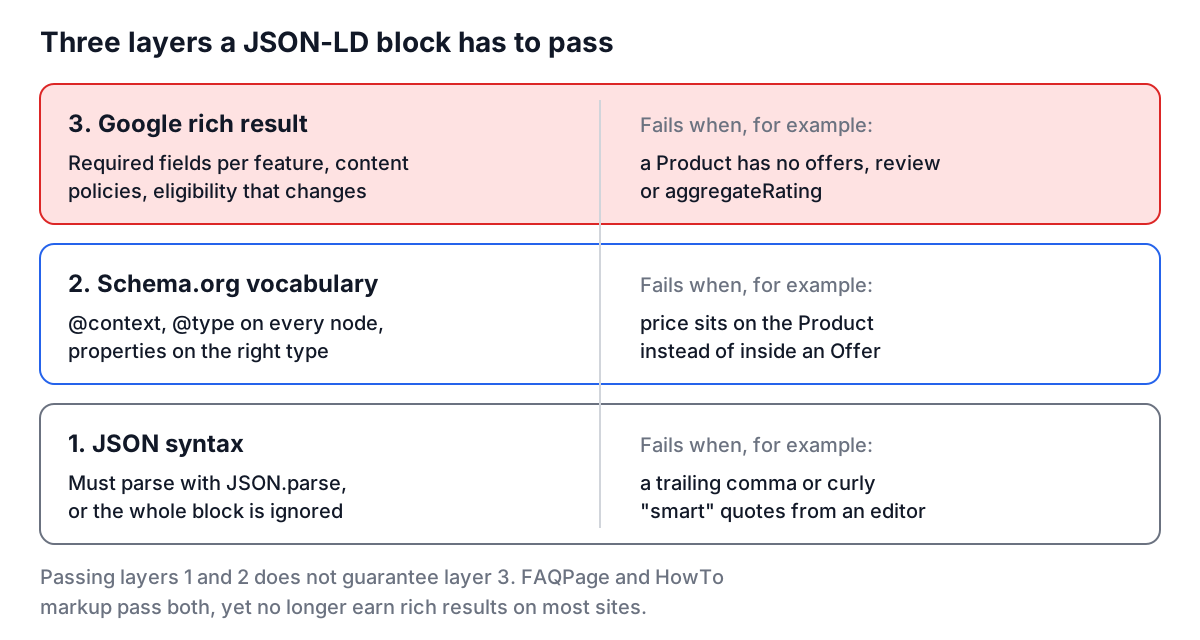
- Syntax. It must be valid JSON. Trailing commas, smart quotes pasted from a document editor and unescaped line breaks inside strings all break it, and a broken block is ignored entirely.
- Vocabulary. It should use schema.org types and properties correctly: an
@contextofhttps://schema.org, an@typeon every node, and properties that belong to that type. Schema.org itself has no required properties; it is a vocabulary, not a schema in the validation sense. - Search features. Each Google rich result has its own required and recommended properties, its own content policies, and its own eligibility rules that change over time.
A short history
Schema.org was launched in June 2011 by Google, Bing and Yahoo, with Yandex joining later that year, to replace a mess of competing vocabularies. It can be written three ways: Microdata and RDFa put the properties into HTML attributes, while JSON-LD (a W3C Recommendation since 2014, version 1.1 in 2020) keeps them in a separate script block. Google recommends JSON-LD because it does not tangle markup with templates and is easy to generate on the server.
What Google actually requires
Most confusion comes from mixing up "valid schema.org" and "eligible for a rich result". These are the requirements Google documents for some common types:
| Type | Required for the rich result | Commonly recommended |
|---|---|---|
| Article, BlogPosting, NewsArticle | Nothing | headline, author, datePublished, dateModified, image |
| Product (snippets) | name, plus one of offers, review or aggregateRating | image, description, brand |
| Recipe | name, image | recipeIngredient, recipeInstructions, cookTime, author |
| Event | name, startDate, location | endDate, eventStatus, offers, organizer, image |
| LocalBusiness | name, address | telephone, url, openingHoursSpecification, geo |
| BreadcrumbList | itemListElement | |
| FAQPage | mainEntity | Rich result only for authoritative government and health sites since August 2023 |
| HowTo | No longer shown as a rich result since September 2023 |
Two policy rules matter as much as the properties. Markup must describe content that is visible on the page: a price, rating or author that users cannot see is a policy violation that can earn a manual action. And meeting every requirement makes a page eligible, not entitled. Google decides per query whether to show the rich result.
Generating markup that is right the first time
The usual hand-written mistakes are structural rather than typos:
- Price on the Product.
price,priceCurrencyandavailabilitybelong to anOfferinsideoffers, not to the Product itself. - Strings where objects are expected.
"author": "Ada Lovelace"is accepted by schema.org but Google recommends a Person or Organization object with a name (and ideally a url). - Free-text enumerations. Availability is a URL such as
https://schema.org/InStock, not "In stock". - Relative URLs. Use absolute https URLs for image, logo and url.
The Schema Markup Generator builds JSON-LD for Article, Organization, Product, Person and LocalBusiness from a form and handles those reshapes: it turns an author into a Person, a publisher into an Organization, a brand into a Brand, moves price into an Offer, and normalises "In Stock" to the schema.org URL.
There is one more trap specific to JSON inside HTML. A browser ends a script element at the first </script it sees, even inside a JSON string. If a description field contains user text with </script>, the block breaks and anything after it becomes page HTML, which is also an injection risk. The fix is cheap, because \/ is a valid JSON escape for /:
const json = JSON.stringify(data).replace(/<\//g, '<\\/');
const tag = `<script type="application/ld+json">${json}</script>`;
The generator applies the same escape to its output, and so should any server template that writes JSON-LD.
Worked example: fixing a product page
A store's product template renders this:
{
  "@context": "https://schema.org",
  "@type": "Product",
  "name": "Trail Runner 2",
  "price": "129.00",
  "image": "/img/trail-runner-2.jpg",
  "availability": "In stock"
}
Paste it into the Structured Data Validator. It reports one error and a few warnings:
- Error: Product needs at least one of: offers, review, aggregateRating.
- Warning: "image" is not an absolute URL.
- Warnings: missing recommended description and brand.
The price is there, but in the wrong place, so Google sees a Product with no offer. The fix moves it:
{
  "@context": "https://schema.org",
  "@type": "Product",
  "name": "Trail Runner 2",
  "image": "https://shop.example.com/img/trail-runner-2.jpg",
  "brand": { "@type": "Brand", "name": "Acme" },
  "offers": {
    "@type": "Offer",
    "price": "129.00",
    "priceCurrency": "USD",
    "availability": "https://schema.org/InStock"
  }
}
Validate again and the error is gone. Then run the live URL through Google's Rich Results Test, because the validator here covers common types and top-level properties, while Google's tool knows every feature and checks nested objects too.
Several items on one page
A page often describes more than one thing: the organization, the website, a breadcrumb trail and the article itself. You can use several script blocks, a top-level array, or a single block with @graph:
{
  "@context": "https://schema.org",
  "@graph": [
    { "@type": "Organization", "@id": "https://example.com/#org", "name": "Example", "logo": "https://example.com/logo.png" },
    { "@type": "WebSite", "@id": "https://example.com/#site", "url": "https://example.com/", "publisher": { "@id": "https://example.com/#org" } },
    { "@type": "BlogPosting", "headline": "Shipping JSON-LD", "author": { "@type": "Person", "name": "Ada Lovelace" }, "publisher": { "@id": "https://example.com/#org" } }
  ]
}
The @id values let nodes reference each other instead of repeating the organization in every block. Google reads all three forms. The validator here checks each node in an array or @graph, and in URL mode it pulls every JSON-LD block on the page, which is how you find the second, conflicting Organization block a plugin added.
Checks before you ship
Validate the JSON, confirm every node has @context and @type, match each rich result's required properties, keep dates in ISO 8601 with a time zone for events (2026-11-05T19:00:00-05:00), use absolute URLs, and mark up only what users can see. Do not add FAQPage or HowTo markup expecting a visual boost in Google; add it only if another consumer needs it. For the rest of the head of the page, the meta tags guide covers titles, descriptions and Open Graph, which still decide most of what people see before they click. After deploying, Search Console's rich result reports tell you which pages Google actually parsed, which is the only number that counts.