
How Subnetting Works: CIDR Prefixes, Masks and Host Counts
Work out network, broadcast and host ranges for any IPv4 prefix, split a /24 cleanly, handle /31 and /32 correctly, and read addresses as 32-bit numbers.
· 7 min read
A ticket lands at 4pm: "new VLAN for the build agents, give it 192.168.10.64/26, gateway on the first address." Before you touch the switch you need four answers. Which addresses can the agents actually use, what goes in the DHCP pool, what is the broadcast address, and does the range collide with the /25 someone carved out of the same /24 last year. All four come from the same piece of arithmetic, and once you can see it in binary it stops being something you look up and becomes something you can check in your head.
What a prefix length actually says
An IPv4 address is a 32-bit number. Dotted decimal (192.168.10.77) is just a friendlier way to write those 32 bits, one byte per octet. The prefix length after the slash, the "/26" in CIDR notation, says how many of those 32 bits, counted from the left, identify the network. The rest identify a host inside that network.
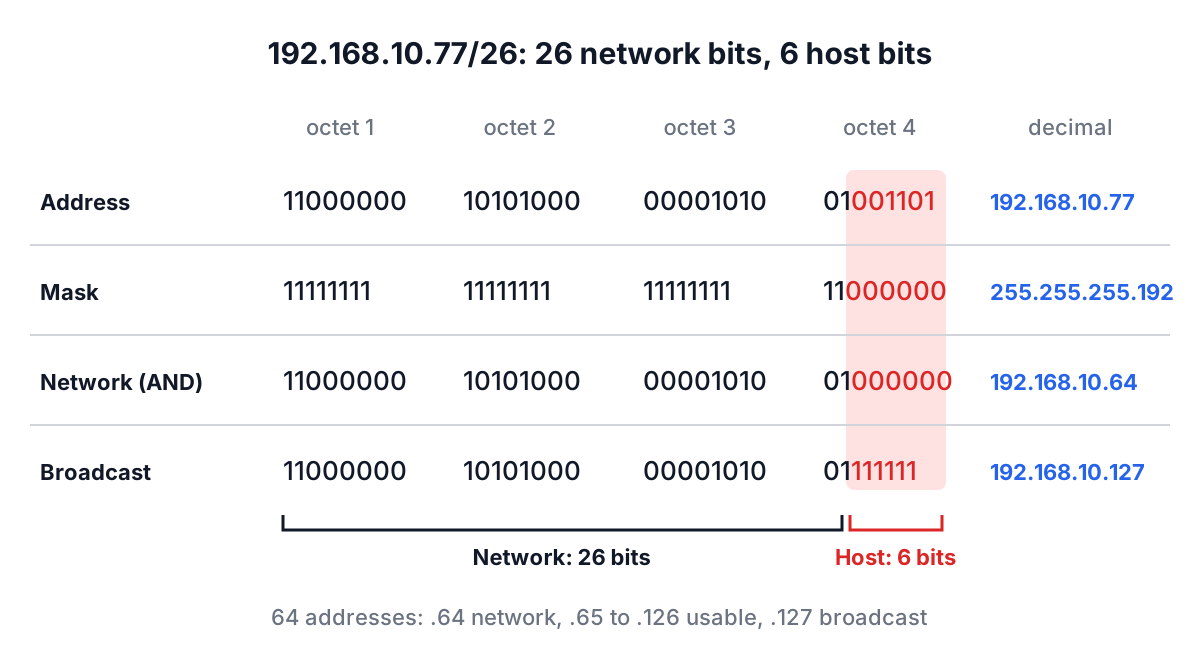
So 192.168.10.77/26 means: the first 26 bits are the network, the last 6 bits are the host. Six host bits give 2^6 = 64 addresses in the block. The subnet mask is the same information written as an address: 26 ones followed by 6 zeros, which is 255.255.255.192.
Everything else follows from that split:
- Network address: keep the network bits, set every host bit to 0. For .77 (01001101) with six host bits, that is 01000000, or 192.168.10.64.
- Broadcast address: keep the network bits, set every host bit to 1. That is 01111111, or 192.168.10.127.
- Usable hosts: everything in between, 192.168.10.65 to 192.168.10.126, which is 64 minus 2, so 62 addresses.
- Wildcard mask: the mask with its bits flipped, 0.0.0.63. Cisco ACLs and OSPF network statements use it.
CIDR itself comes from RFC 4632 (originally RFC 1519 in 1993). Before it, addresses were "classful": a Class A network was always a /8, a Class B a /16 and a Class C a /24, decided by the first few bits of the address. That wasted space so badly that the classes were abandoned for routing more than thirty years ago. You will still see the words in exam questions and in tools (the Subnet Calculator shows a Network Class field for reference), but modern routing on the internet is classless and forwards on prefix length, not class.
Working the example in the Subnet Calculator
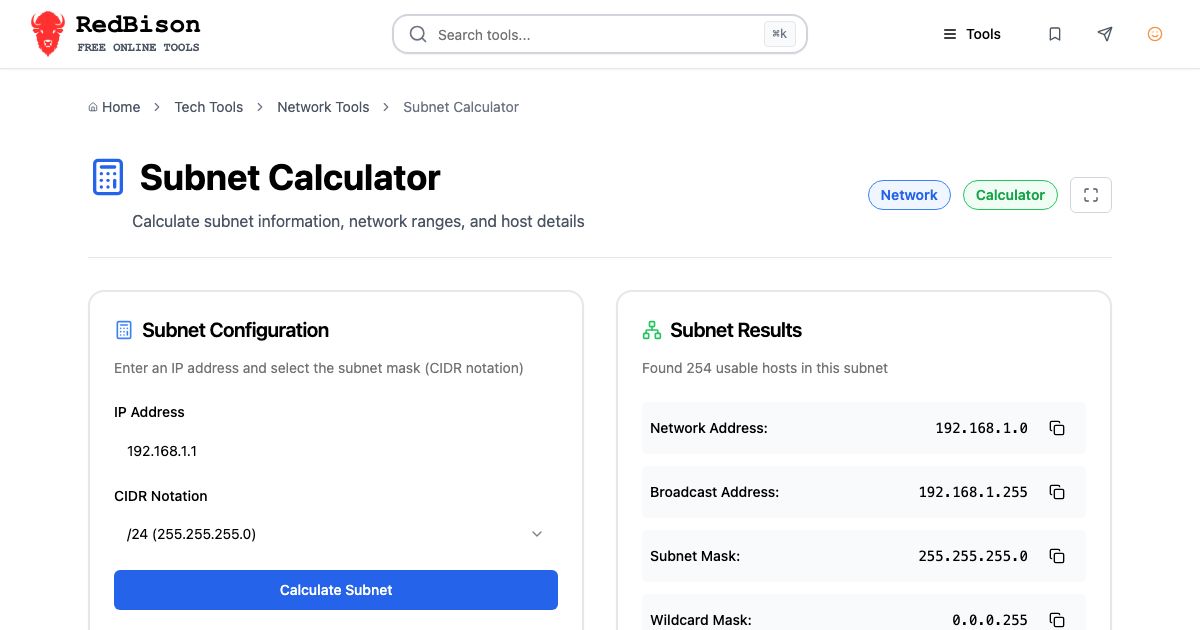
Open the Subnet Calculator, type 192.168.10.77 into the IP Address field and pick /26 (255.255.255.192) from the CIDR Notation dropdown. The results update as you type; the Calculate Subnet button reruns the same calculation if you want to be explicit. You get:
| Field | Value |
|---|---|
| Network Address | 192.168.10.64 |
| Broadcast Address | 192.168.10.127 |
| Subnet Mask | 255.255.255.192 |
| Wildcard Mask | 0.0.0.63 |
| CIDR Notation | /26 |
| Network Class | Class C |
| Total Hosts | 64 |
| Usable Hosts | 62 |
| First Usable IP | 192.168.10.65 |
| Last Usable IP | 192.168.10.126 |
Each row has a copy button, which is handy when you are pasting a mask into a router config and do not want to retype 255.255.255.192 for the fifth time. Back to the ticket: the gateway goes on 192.168.10.65, the DHCP pool can run from .66 to .126, and the block ends at .127. If last year's /25 was 192.168.10.128/25, there is no overlap, because that one starts exactly where yours stops.
A second check worth doing: a block that does not sit on an octet boundary. 172.16.37.9/20 has 12 host bits, so the block is 4,096 addresses wide, and the third octet only moves in steps of 16. The calculator returns network 172.16.32.0, broadcast 172.16.47.255 and 4,094 usable hosts. People who do this by hand often write 172.16.37.0 as the network, which is the single most common subnetting mistake.
Splitting a /24 into smaller subnets
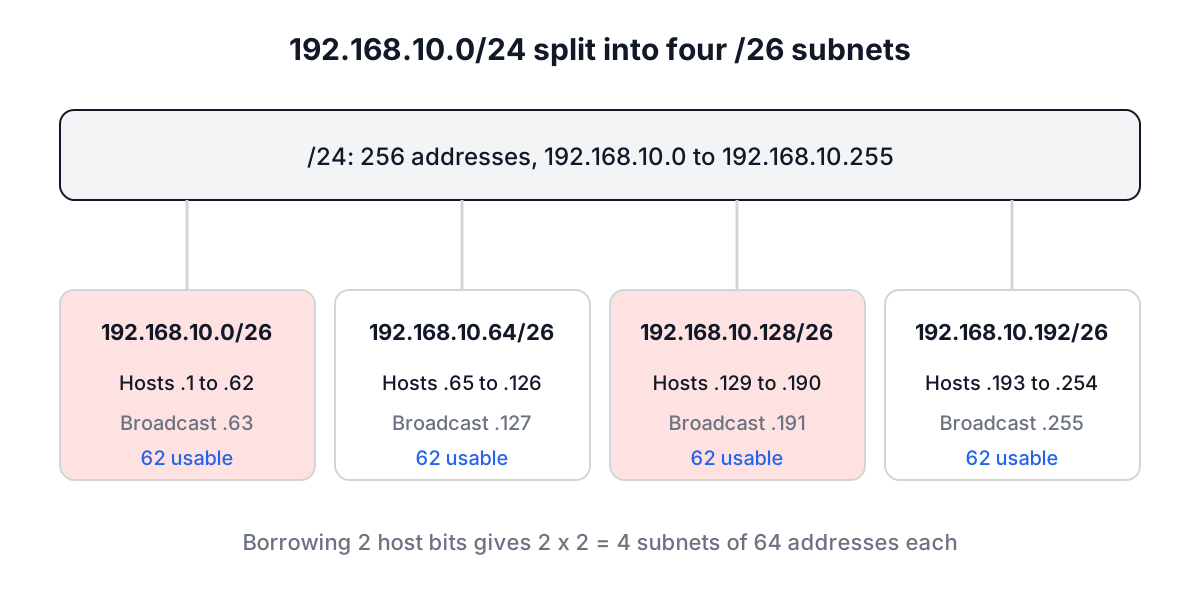
Borrowing host bits for the network is how you subnet. Each bit you borrow doubles the number of subnets and halves their size. A /24 split into /26 blocks borrows two bits, so you get four subnets of 64 addresses each.
The quick reference most network engineers carry around in their head:
| Prefix | Mask | Addresses | Usable hosts | Typical use |
|---|---|---|---|---|
| /24 | 255.255.255.0 | 256 | 254 | Office LAN, one VLAN |
| /25 | 255.255.255.128 | 128 | 126 | Half a /24 |
| /26 | 255.255.255.192 | 64 | 62 | Small VLAN, cloud subnet |
| /27 | 255.255.255.224 | 32 | 30 | Management network |
| /28 | 255.255.255.240 | 16 | 14 | Small DMZ |
| /29 | 255.255.255.248 | 8 | 6 | ISP handoff with a few statics |
| /30 | 255.255.255.252 | 4 | 2 | Old-style point-to-point link |
| /31 | 255.255.255.254 | 2 | 2 | Point-to-point link (RFC 3021) |
| /32 | 255.255.255.255 | 1 | 1 | Single host route, loopback |
Cloud providers shave the usable count further. AWS reserves five addresses in every VPC subnet (the network address, the next three for the router, DNS and future use, and the last one), so a /26 in a VPC gives you 59, not 62. The calculator gives you the IP standard answer; subtract your platform's reservations yourself.
The /31 and /32 edge cases
The "subtract two" rule breaks at the bottom of the table, and older calculators get this wrong.
A /31 has two addresses and, by the old rule, zero usable hosts. That was always silly for a link between two routers, which only ever has two ends and never needs a broadcast. RFC 3021 (2000) made /31 legal on point-to-point links: both addresses are hosts and there is no broadcast address. Enter 10.0.0.1 with /31 and the calculator shows 2 usable hosts, first 10.0.0.0, last 10.0.0.1, and the Broadcast Address as "None". Using /31 instead of /30 on every router link halves the address space your backbone eats.
A /32 is one address: a host route, a loopback on a router, or a single allow-list entry in a firewall. Total and usable are both 1, and first and last are the address itself.
At the other end, /0 means "every IPv4 address", which is what a default route (0.0.0.0/0) matches. The calculator accepts it and reports 4,294,967,296 total addresses.
Converting IPv4 to integer, hex and binary
Everything above is easier when you can see the address as the number it really is. The IPv4 Address Converter does that conversion in both directions. Type 192.168.1.1 into the IP to Decimal card and click Convert to Decimal: you get 3232235777, along with the hex form 0xC0A80101 and the dotted binary 11000000.10101000.00000001.00000001.
The integer is just the four octets read as one base-256 number:
192 × 256³ + 168 × 256² + 1 × 256 + 1
= 3221225472 + 11010048 + 256 + 1
= 3232235777
Going the other way, paste 134744072 into the Decimal to IP card and click Convert to IP to get 8.8.8.8 (hex 0x08080808). The decimal box also takes 0x-prefixed hex, so 0xAC100000 converts to 172.16.0.0.
Why you would want this:
- Databases. Storing IPv4 as an unsigned 32-bit integer makes range queries trivial. "Is this address inside 10.0.0.0/8?" becomes
ip BETWEEN 167772160 AND 184549375. MySQL's INET_ATON and INET_NTOA do the same conversion. - Logs and packet captures. Some tools print addresses as hex. 0x7F000001 is 127.0.0.1.
- Checking a mask by eye. In binary, a valid mask is always a run of ones followed by a run of zeros. 255.255.255.192 is fine; 255.255.255.100 is not a mask at all.
The converter is strict on purpose. It rejects values above 4294967295 (2^32 minus 1) instead of silently wrapping them, and it rejects junk like 123abc rather than reading the leading digits. Both tools also reject octets with leading zeros, such as 192.168.010.1. That is not pedantry: BSD-style parsers like inet_aton read 010 as octal 8, while others read it as decimal 10, and the mismatch has caused real allow-list bypasses (Python's ipaddress module started rejecting leading zeros in 2021 for that reason).
Common subnetting mistakes
- Using the host address as the network. 172.16.37.0/20 is not a network; 172.16.32.0/20 is. Routers and cloud consoles will either reject it or silently round it down, which is worse.
- Overlapping ranges. A 10.1.0.0/16 VPC peered with a 10.1.128.0/17 on-premises range will route half its traffic to the wrong place. Write the network and broadcast of every block side by side before you commit.
- Forgetting reserved addresses. The network and broadcast addresses, plus whatever your cloud provider takes. Size DHCP pools after subtracting them.
- Mixing up mask and wildcard. An ACL that says
permit 10.0.0.0 255.255.255.0on a Cisco box means something very different from0.0.0.255. - Assuming /30 for every link. /31 is supported by every modern router OS for point-to-point links and saves two addresses per link.
- Trusting the class. 10.0.0.0/24 is a perfectly normal subnet even though the first octet is "Class A".
Once the subnet is planned, the next things you usually check are the names and reverse records pointing into it; the DNS Lookup tool and the DNS records guide cover that side.
Keep the calculator open in a tab while you write the change request. Type the block, check that the network address it prints matches what you wrote, copy the mask and range straight out of it, and you have removed the one class of mistake that is embarrassing to roll back.