
Video Bitrate and File Size: The Simple Maths Behind Storage
Why file size is bitrate times duration, megabits versus megabytes, recommended upload bitrates, ProRes data rates, fitting a clip under an upload limit and planning card space for a shoot.
· 10 min read
How big will this video be? How many cards do I need for tomorrow's shoot? What bitrate gets my clip under an upload limit? All three questions come down to the same short formula, plus a little care with units. The Video File Size Calculator does the sums in all three directions; this article explains what it is doing, which numbers to feed it, and why real files sometimes differ from the estimate.
Bitrate is data per second
A video file is a stream of compressed pictures and sound. The bitrate is how much data that stream uses per second of running time, measured in bits per second. A camera recording at 100 Mbps writes 100 million bits to the card every second. A YouTube upload encoded at 8 Mbps uses 8 million bits per second of playback.
File size is therefore just bitrate times duration, converted from bits to bytes:
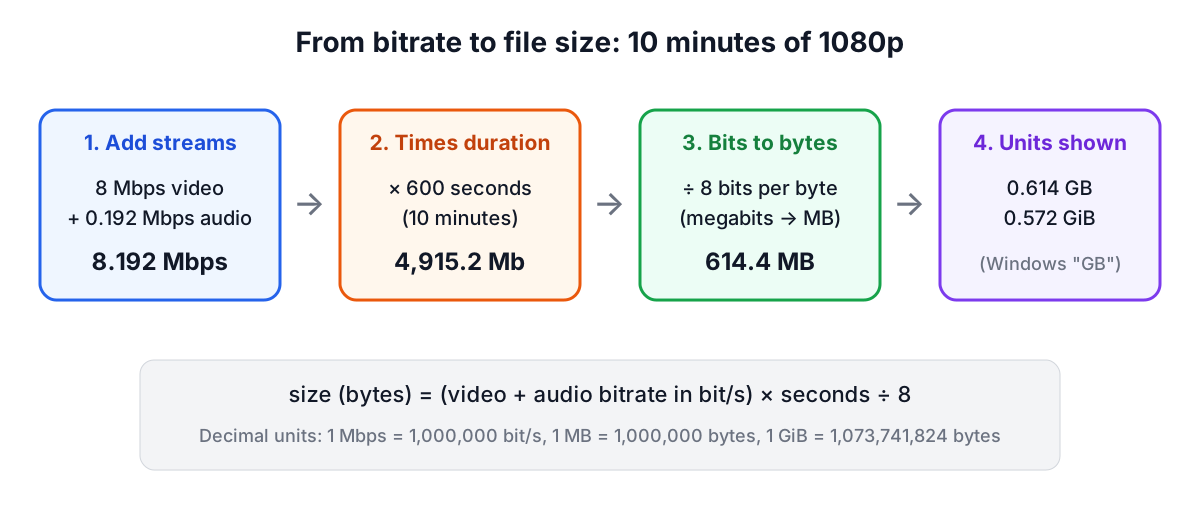
size in bytes = (video bitrate + audio bitrate) × seconds ÷ 8
Ten minutes of 1080p at 8 Mbps with 192 kbps audio:
(8,000,000 + 192,000) × 600 ÷ 8 = 614,400,000 bytes = 614.4 MB
Resolution, frame rate and codec do not appear in the formula. They matter for quality at a given bitrate, but once the bitrate is fixed the size depends only on time. That is also why a 4K file at 8 Mbps is no larger than a 1080p file at 8 Mbps; it just looks worse, because each pixel gets fewer bits.
Bits, bytes, and two kinds of gigabyte
Three unit traps account for most wrong estimates.
Megabits versus megabytes. Bitrates use bits (Mb, Mbps); file sizes use bytes (MB). There are eight bits in a byte, so 8 Mbps is 1 MB per second, not 8.
Decimal versus binary. Camera makers, card makers, network speeds and video software count in decimal: 1 Mbps is 1,000,000 bits per second, 1 GB is 1,000,000,000 bytes. Windows, and some older tools, count in binary (1 GiB = 1,073,741,824 bytes) but print "GB". A 128 GB card therefore appears as about 119 "GB" in Windows Explorer without a single byte missing. The calculator works in decimal units and shows binary GiB alongside.
Kilobits for audio. Audio bitrates are quoted in kbps. 192 kbps is 0.192 Mbps; for long recordings it adds up (192 kbps is about 86 MB per hour), but next to a video stream it is small. Uncompressed audio is not: 48 kHz, 16-bit stereo PCM is 48,000 × 16 × 2 = 1,536 kbps, about 0.69 GB per hour.
Typical bitrates and what they cost per hour
You rarely need to guess a bitrate. Encoders show it, camera manuals list it for each recording mode, and platforms publish recommendations. YouTube Help's recommended upload settings for SDR video, and Apple's ProRes target data rates at 1920 × 1080 and 29.97 fps, give useful reference points:
| Source | Bitrate | Per minute | Per hour |
|---|---|---|---|
| YouTube 720p, 24 to 30 fps | 5 Mbps | 37.5 MB | 2.25 GB |
| YouTube 1080p, 24 to 30 fps | 8 Mbps | 60 MB | 3.6 GB |
| YouTube 1080p, 48 to 60 fps | 12 Mbps | 90 MB | 5.4 GB |
| YouTube 1440p, 24 to 30 fps | 16 Mbps | 120 MB | 7.2 GB |
| YouTube 4K, 24 to 30 fps (upper value) | 45 Mbps | 337.5 MB | 20.25 GB |
| YouTube 4K, 48 to 60 fps (upper value) | 68 Mbps | 510 MB | 30.6 GB |
| ProRes 422 Proxy, 1080p 29.97 | 45 Mbps | 337.5 MB | 20.25 GB |
| ProRes 422 LT, 1080p 29.97 | 102 Mbps | 765 MB | 45.9 GB |
| ProRes 422, 1080p 29.97 | 147 Mbps | 1.1 GB | 66.15 GB |
| ProRes 422 HQ, 1080p 29.97 | 220 Mbps | 1.65 GB | 99 GB |
| ProRes 4444, 1080p 29.97 | 330 Mbps | 2.48 GB | 148.5 GB |
Figures are video only. ProRes rates scale roughly with pixel count and frame rate, so 1080p at 59.94 fps needs about twice the 29.97 figure. Delivery codecs such as H.264 and HEVC are far more efficient than ProRes, which is built for fast editing rather than small files; that is why an hour of ProRes 422 HQ fills about 99 GB while the same hour as a YouTube-ready 1080p file is under 4 GB.
A rough quality yardstick is bits per pixel: bitrate ÷ (width × height × frame rate). 1080p30 at 8 Mbps works out to 0.13 bits per pixel; 4K30 at 45 Mbps is 0.18; 1080p60 at 12 Mbps is 0.10. Comparing that number only makes sense within one codec, but it shows quickly whether a setting is generous or starved.
Working backwards: the bitrate for a size limit
Upload forms, email attachments and messaging apps all cap file size. To fit under a limit, turn the size into a bit budget, divide by the duration, and take out the audio:
video bitrate = size × 8 ÷ seconds ÷ (1 + overhead) − audio bitrate
A 2-minute clip that must fit in 25 MB, with 128 kbps audio and 1% container overhead:
- 25 MB × 8 = 200 megabits
- 200 ÷ 120 s ÷ 1.01 = 1.650 Mbps in total
- 1.650 − 0.128 = 1.522 Mbps for video (1,522 kbps)
That is the number to type into an encoder's average bitrate field. Two things push the real file over: single-pass encoders overshoot or undershoot the average, and some containers carry more overhead than expected. Aim 3 to 5% under the limit, or use two-pass encoding, which measures the whole clip first and lands close to the target. The Video Compressor on this site works out the bitrate from a target size the same way and encodes the file in your browser.
If the result comes out tiny or negative, the clip is too long for the limit at any watchable quality. Shorten it, lower the resolution or drop the audio bitrate. The calculator says so rather than returning a nonsense bitrate.
Planning card and drive space for a shoot
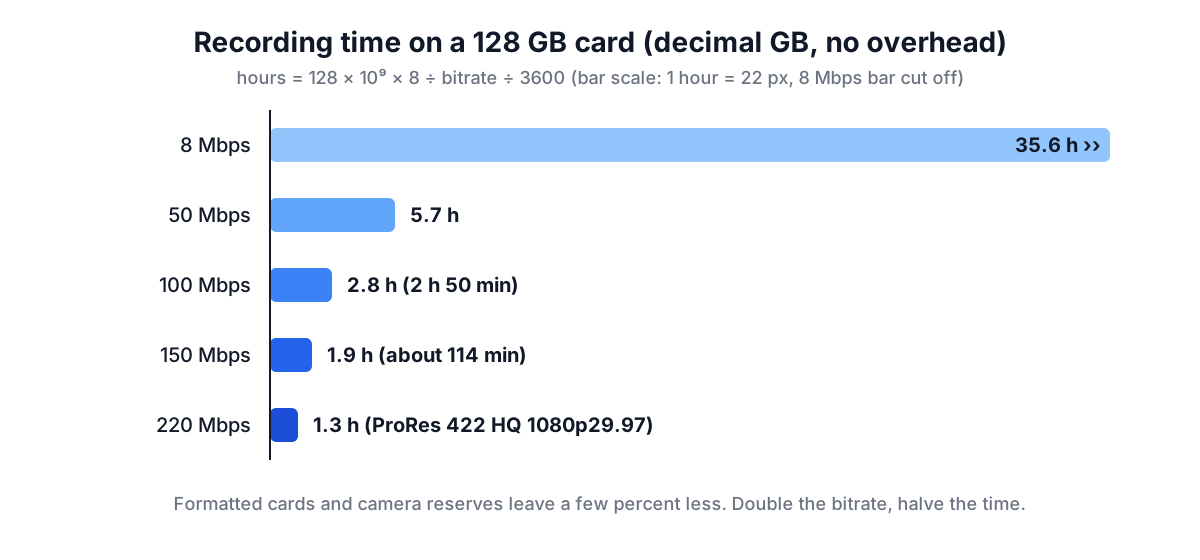
The third direction turns capacity into minutes:
recording time = capacity × 8 ÷ total bitrate
| Card | Recording mode | Time |
|---|---|---|
| 64 GB | 100 Mbps | about 85 min |
| 128 GB | 100 Mbps | 2 h 50 min |
| 128 GB | 150 Mbps | about 114 min |
| 512 GB | ProRes 422 HQ at 220 Mbps | about 310 min |
Real cards hold a little less: formatting takes some space, cameras reserve some for their own files, and a camera's quoted bitrate is often a maximum rather than an average, so it may record slightly more than the sum says. Budget 5 to 10% headroom, and remember that multi-camera shoots multiply everything. Two cameras at 100 Mbps for a three-hour event is 2 × 100 × 10,800 ÷ 8 = 270 GB before backups. The calculator's "cameras or streams" field does that multiplication, and the same sum works for streamers archiving every broadcast or podcasters recording several cameras.
Why a real file differs from the estimate
- Variable bitrate. Most camera and delivery codecs vary the rate with scene complexity. Static talking heads come out smaller than the setting suggests; confetti, water and grain come out at or near the maximum.
- Container overhead. MP4 and MOV indexes and headers are usually well under 1% of the file. Transport streams (.ts, .mts) carry more, often a few percent.
- Extra streams. Timecode tracks, a second audio track, embedded proxies or high-rate PCM audio all add data the video bitrate does not include.
- Metadata and thumbnails. Small, but visible on very short clips.
None of these changes the basic arithmetic. If a file is much larger than the formula predicts, check whether the audio is uncompressed PCM or the bitrate setting is a different mode from the one you assumed.
Common mistakes
- Dividing by 8 twice, or not at all, when moving between Mbps and MB.
- Mixing decimal card sizes with binary operating-system sizes.
- Planning storage from a delivery bitrate when the camera records at five or ten times that rate.
- Forgetting audio, especially uncompressed audio in professional recorders.
- Treating a camera's maximum bitrate as an average and running out of space later in the day, or the reverse, buying far more storage than needed.
Sources
- YouTube Help, "Recommended upload encoding settings" (SDR bitrates by resolution and frame rate).
- Apple, "Apple ProRes" white paper (target data rates at 1920 × 1080, 29.97 fps: Proxy 45, LT 102, 422 147, 422 HQ 220, 4444 330 Mbps).
- International System of Units prefixes (BIPM SI Brochure) and IEC 80000-13 for decimal and binary prefixes (MB versus MiB).
To run your own numbers, open the Video File Size Calculator. For background on containers and codecs, see the video formats guide, and to cut a recording down before compressing it, use the Video Trimmer.
Related searches
- video file size calculator
- bitrate to file size formula
- how many gb per hour of 4k video
- mbps to mb per minute
- bitrate for 25mb file
- prores 422 hq file size per hour
- youtube recommended bitrate
- how much video fits on a 128gb card
- megabits vs megabytes