
Weighted Decision Matrix and Impact vs Effort Scoring, Worked Through
How to weigh options instead of counting pros and cons: a weighted decision matrix worked through on a real job offer, plus impact versus effort scoring for long idea lists.
· 8 min read
Three job offers sit in your inbox. One pays the most, one has the best team, one lets you work from a cabin. You have made a pros and cons list for each, and the lists are the same length. A pros and cons list counts arguments. It doesn't weigh them, and that is why it so often ends in a shrug.
A weighted decision matrix fixes that by asking two separate questions. How much does each criterion matter to you? How well does each option do on it? Multiply, add up, and you get a ranking you can argue with. This guide shows how the method works, walks through a full example in the Decision Maker, and then covers a lighter cousin for long idea lists: impact versus effort scoring in the Ideas Organizer.
How a weighted decision matrix works
The structure is a grid. Options go across the columns, criteria (the Decision Maker calls them aspects) go down the rows. Each row gets a weight, and each cell gets a score.
The arithmetic is plain:
total(option) = sum over aspects of (score × weight)
In the Decision Maker, a weight runs from 1 to 10 and a score runs from -10 to +10. The negative half of the scale matters. A pros and cons list can say "long hours" is a con, but it can't say how bad. A score of -2 says "slightly worse than neutral", while -9 says "this nearly rules it out". Zero means the aspect makes no difference for that option.
Engineers will know this method under other names. Product teams use it to compare vendors, architects use it for build-versus-buy reviews, and design engineering has a close relative called the Pugh matrix, associated with Stuart Pugh's concept selection work, which scores options relative to a baseline design instead of on an absolute scale. The idea is the same in all of them: make the trade-offs explicit, so the discussion is about the inputs and not about who argued loudest.
A worked example in the Decision Maker
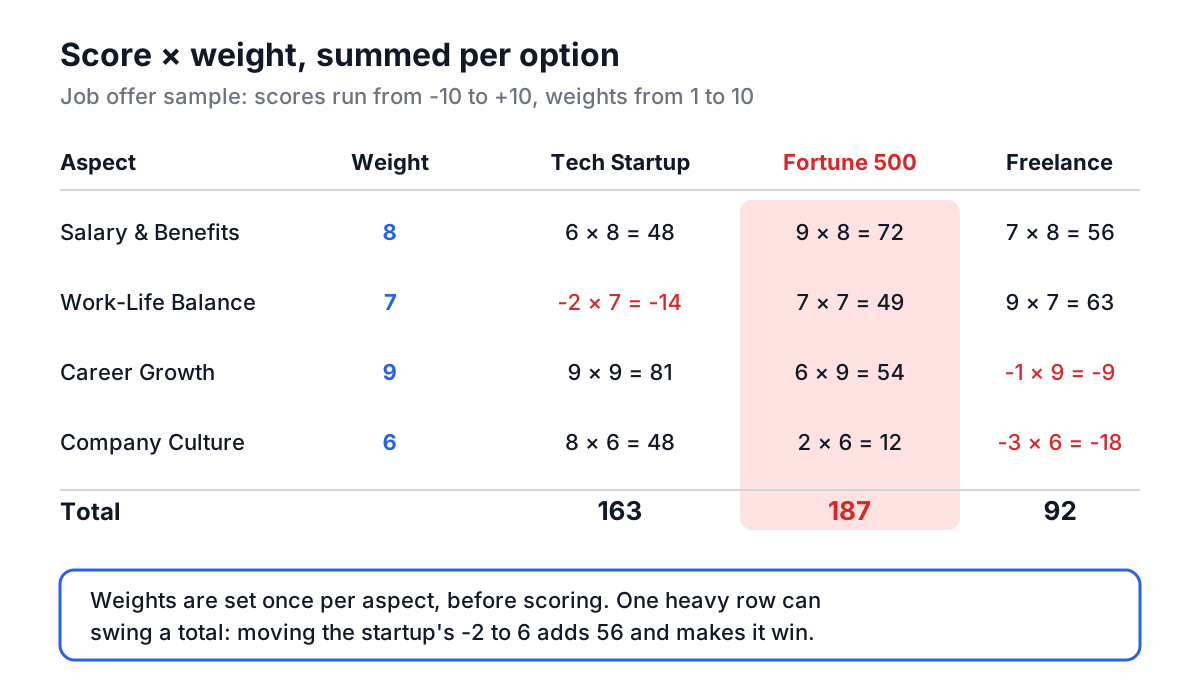
The Decision Maker ships with a sample you can load with one click: "Which job offer should I accept?" It compares three options against four aspects.
| Aspect | Weight | Tech Startup | Fortune 500 Company | Remote Freelance |
|---|---|---|---|---|
| Salary & Benefits | 8 | 6 | 9 | 7 |
| Work-Life Balance | 7 | -2 | 7 | 9 |
| Career Growth | 9 | 9 | 6 | -1 |
| Company Culture | 6 | 8 | 2 | -3 |
Now multiply each score by its weight and add down the column.
- Tech Startup: 6×8 + (-2)×7 + 9×9 + 8×6 = 48 - 14 + 81 + 48 = 163
- Fortune 500 Company: 9×8 + 7×7 + 6×9 + 2×6 = 72 + 49 + 54 + 12 = 187
- Remote Freelance: 7×8 + 9×7 + (-1)×9 + (-3)×6 = 56 + 63 - 9 - 18 = 92
Click Analyze & Decide and the tool shows the same ranking: Fortune 500 Company first at 187, Tech Startup second at 163, a 24 point gap, and Remote Freelance well behind at 92.
The interesting part is not the winner, it is why. The startup wins Career Growth outright (81 points against 54), but its -2 on Work-Life Balance costs it 63 points relative to the corporate job on that row alone. Remote Freelance scores best on balance and decently on pay, yet two negative rows sink it. Reading the per-aspect breakdown, which the results card shows under Detailed Breakdown, tells you which single change would flip the decision. If you discover the startup's hours are actually fine and move that -2 to a 6, it gains 56 points and overtakes the Fortune 500 offer at 219 to 187.
That is how to use a matrix well: as a way to find the one or two inputs the decision hinges on, then go and check those inputs in the real world.
Getting started with your own decision
- Type the question in Decision Title. Phrase it as a choice, such as "Which database should we use for the event store?"
- Click Add Option for each candidate. The tool allows up to 5 options and 10 aspects, which is a deliberate limit: past that, the matrix becomes a spreadsheet nobody reads.
- Click Add Aspect for each criterion, then click the round weight badge to set its weight with the slider.
- Click each score cell and drag the slider between -10 and +10. Add a short note to explain the score; the notes appear in the breakdown and in the downloads.
- Click Analyze & Decide, then download the result as text or as an image to share.
Your matrix is kept in your browser's local storage and mirrored into the page URL, so it survives a reload and the link carries the matrix with it.
Common mistakes with decision matrices
Choosing weights after scoring. If you fill in scores first, you will be tempted to nudge the weights until your favourite wins. Set the weights before you look at the options in detail, ideally with the people affected by the decision. Then leave them alone.
Double-counting one concern. "Salary", "Total compensation" and "Bonus" are mostly the same thing. Put all three in the matrix and money gets three times its intended influence. If two aspects would always move together, merge them.
False precision. A total of 187 against 183 is a tie. Your scores are judgments on a 21-point scale, and a single point of disagreement on a heavily weighted row moves the total by up to 10. Treat any gap smaller than one heavy weight as "too close to call", and look at the breakdown instead of the headline number.
Ignoring deal-breakers. A matrix trades everything off against everything else. If an option fails a hard requirement (the visa doesn't work, the vendor has no EU region), remove it before scoring rather than giving it -10 and hoping the arithmetic does the right thing.
Treating ties as a verdict. When two options finish level, the tool still lists one first. That ordering means nothing. A tie is a signal to add the aspect you left out, or to accept that either choice is fine and pick the one that is easier to reverse.
If your decision is about strategy rather than a choice between options, a SWOT analysis or a gap analysis is often the better first step. They help you discover which aspects belong in the matrix.
Impact versus effort in the Ideas Organizer
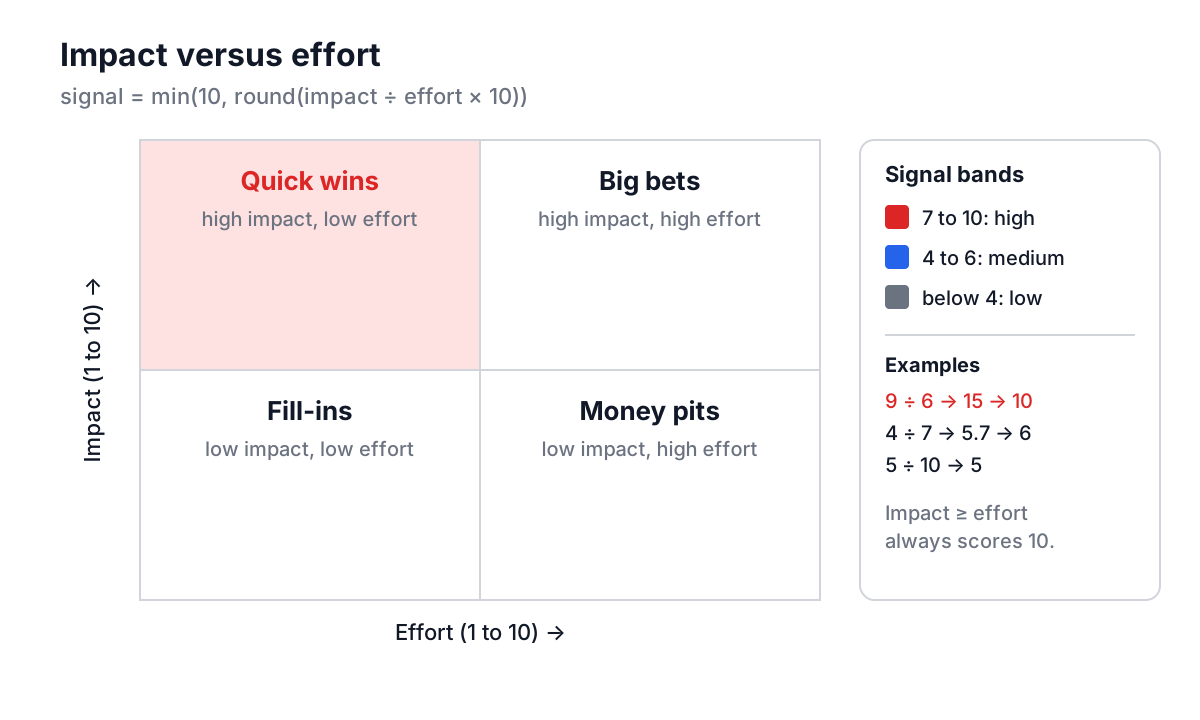
A decision matrix is for one decision with a handful of options. A backlog of thirty ideas needs something lighter. The classic tool is the impact/effort 2x2: plot each idea by how much it would help and how much it would cost. Quick wins sit top left, big bets top right, fill-ins bottom left, and the bottom right is where time goes to die. It is a close relative of the Eisenhower matrix, which sorts tasks by urgency and importance instead.
The Ideas Organizer turns the 2x2 into a single number it calls the signal score. Each thought gets an impact from 1 to 10 and an effort from 1 to 10, and:
signal = min(10, round(impact / effort × 10))
So equal impact and effort scores 10 divided by 10, times 10, which is 10. Anything with impact at least as high as effort lands at the top of the scale.
| Thought | Impact | Effort | Raw ratio × 10 | Signal | Band |
|---|---|---|---|---|---|
| Automated CI/CD pipeline | 9 | 6 | 15 | 10 | High |
| Reorganize component library | 4 | 7 | 5.7 → 6 | 6 | Medium |
| Real-time collaborative editor | 5 | 10 | 5 | 5 | Medium |
| Rewrite the build in a new language | 3 | 9 | 3.3 → 3 | 3 | Low |
The bands follow the tool: 7 and above is high signal, 4 to 6 is medium, below 4 is low. The cap at 10 matters for reading the score. Without it, a trivial tweak with impact 3 and effort 1 would score 30 and outrank everything, which is the mathematical version of "we spent the sprint on easy things".
Beyond scoring, each thought has a category (idea, task, concern or insight), a priority, a status (new, reviewing, actionable, archived) and tags. The Organize & Filter tab puts the strongest signal at the top. Among thoughts with equal scores, your priority setting comes into play, which is the right place for judgment the numbers can't capture.
Using the score without being fooled by it
Impact and effort are guesses, and people consistently underestimate effort. A useful habit is to score effort in a group and take the highest estimate, not the average. Revisit scores when a thought moves to "reviewing": by then you know more, and the original guess is usually optimistic.
Low signal doesn't mean bad. A low-signal concern, such as a security issue that is expensive to fix, may still be the most important item on the list. Signal measures payoff per unit of effort, not urgency. For anything with a hard deadline or real risk, use the priority field and status to keep it visible.
Choosing between the two tools
| Situation | Better fit |
|---|---|
| One decision, 2 to 5 clear options | Decision Maker |
| Criteria differ a lot in importance | Decision Maker |
| A long list of ideas or tasks to rank | Ideas Organizer |
| You need a quick triage before a planning meeting | Ideas Organizer |
| You need a record of why a choice was made | Decision Maker (download the breakdown) |
They also chain nicely. Triage a backlog in the Ideas Organizer, take the three high-signal candidates that compete for the same slot, and compare them properly in the Decision Maker with weighted aspects. Once a choice is made and work starts, the Project Dashboard Generator tracks it, and a sprint retrospective is a good place to check whether the impact you scored actually showed up.
Start small: one decision you are stuck on this week, four aspects, weights set before you score. If the result surprises you, read the breakdown, find the row that decided it, and check that one fact. That single check is usually worth more than the whole matrix.