
Three Random Words Tested: NCSC Password Advice Scored
The NCSC's three random words advice scored in a password strength checker, why Pa55word! fails, and the Cyber Essentials password rules for UK organisations.
By Redbison Dev · · 10 min read
United Kingdom edition. UK edition built on NCSC guidance: three random words, password deny lists, no forced expiry, and the password and brute-force rules in Cyber Essentials Requirements for IT Infrastructure v3.3 (April 2026). US edition
The UK's National Cyber Security Centre (NCSC) tells people to build passwords from three random words, and the maths backs it, with two catches. Put through the Password Strength Checker, kettlemarbleotter needs about 10^11.6 guesses and takes the top score of 4, while Pa55word!, which satisfies most "one capital, one number, one symbol" rules, falls in fewer than 20 guesses. The catches: the words have to be genuinely random rather than a familiar phrase, and nothing published as an example is random any more.
For UK organisations the same thinking is written into Cyber Essentials. Under version 3.3 of the requirements (April 2026), it accepts a 12-character minimum, or 8 characters with a deny list, or multi-factor authentication, and tells certified organisations not to force password expiry or complexity rules. The US version of this article, built around NIST SP 800-63B, is here.
What the NCSC actually recommends
The NCSC's "three random words" page gives the advice in a few lines: combine three random words (its example is applenemobiro) or let a password manager create passwords for you; avoid the most common passwords, significant dates, your favourite sports team and family or pet names, most of which can be found on social media; and do not bother swapping o for 0, because criminals know those tricks too. It also says writing a password down is fine if you keep it somewhere safe.
The NCSC blog post explaining the logic is more candid. It calls three random words "not a password panacea" but better than enforcing arbitrary complexity. Among its reasons:
- Length without patterns. Several words make a long password without the predictable
!on the end. - Diversity. A separate section argues that complexity rules make people converge on the same patterns, so attackers can tune one cheap search to them; different construction methods force attackers to run several search strategies.
- Usability. A rule people can follow without effort is one they actually follow.
The same post concedes that a random password from a password manager is stronger than either three random words or a human-made "complex" password. The words are for the passwords you have to remember.
Three random words in the strength checker
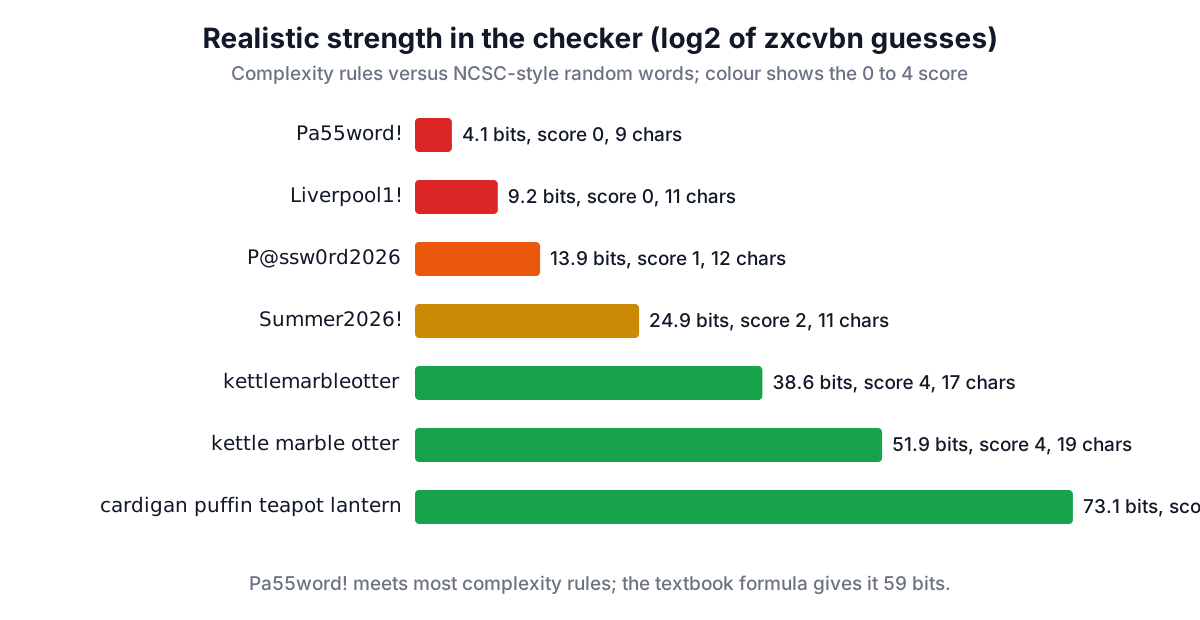
The checker uses zxcvbn, which estimates how many guesses an attacker trying likely passwords first would need. Here is how NCSC-style passwords compare with the kind its guidance warns against:
| Password | Length | Guesses (log10) | Realistic bits | Score | Offline, slow hash (10,000/s) |
|---|---|---|---|---|---|
Pa55word! | 9 | 1.23 | 4.1 | 0 | less than a second |
Liverpool1! | 11 | 2.77 | 9.2 | 0 | less than a second |
P@ssw0rd2026 | 12 | 4.18 | 13.9 | 1 | 2 seconds |
Arsenal1886 | 11 | 6.63 | 22.0 | 2 | 7 minutes |
Summer2026! | 11 | 7.51 | 24.9 | 2 | 54 minutes |
kettlemarbleotter | 17 | 11.61 | 38.6 | 4 | 1 year |
kettle marble otter | 19 | 15.62 | 51.9 | 4 | centuries |
cardigan puffin teapot lantern | 30 | 22.02 | 73.1 | 4 | centuries |
Pa55word! is the NCSC's own example of a password that meets complexity rules and is still "lousy". zxcvbn recognises it as rank 2 on its common password list with l33t substitutions. A football club plus a year or 1! costs little more: zxcvbn's leaked-password list ranks arsenal 145th and liverpool 297th, and a founding year is just a date. The three-word passwords score 4 at 17 characters or more, and in zxcvbn's estimate adding spaces between the words multiplies the guess count by about ten thousand.
The textbook formula, length × log2(pool size), gives Pa55word! 59 bits because it contains all four character types. That gap between 59 and 4 bits is the whole case against composition rules.
Two things a meter cannot see
Published examples. applenemobiro scores 4, about 10^10.9 guesses, because zxcvbn has never seen "nemobiro". But it is printed on one of the most visited pages of the NCSC site, so any attacker building a word list has it. Never use an example from guidance, a poster or a training slide.
Familiar phrases. fishchipspeas also scores 4 (10^10.91), since zxcvbn prices each word by its frequency rank and does not know that the three belong together. An attacker targeting British accounts can put food, football and TV phrases near the top of a guess list. Random means picked by chance, ideally with dice or a generator, not chosen because they sound good together.
Cyber Essentials: the password rules for UK organisations
Cyber Essentials, the NCSC-backed certification, sets its password rules under the User Access Control section of Requirements for IT Infrastructure. Version 3.3 (April 2026) says:
- Brute-force protection, at least one of: multi-factor authentication; throttling that allows no more than 10 guesses in 5 minutes; or locking after no more than 10 unsuccessful attempts.
- Password quality, at least one of: MFA; a minimum length of 12 characters with no maximum; or a minimum of 8 characters with no maximum plus automatic blocking of common passwords with a deny list.
- MFA always for administrative accounts and accounts reachable from the internet, with the password element at least 8 characters.
- Device unlock credentials of at least 6 characters, when they are used only to open the device.
- Support for users: teach them to avoid common passwords and patterns, encourage passwords of at least three words, provide a password manager or other secure storage, do not enforce regular expiry and do not enforce complexity requirements.
The throttling limit changes the arithmetic dramatically. At 10 guesses per 5 minutes, the checker's custom rate (10 ÷ 300 = 0.033 guesses a second) puts Summer2026! at 31 years of online guessing and Arsenal1886 at 4 years, while Pa55word! lasts 9 minutes. The 12-character rule and the deny list exist for the other case, when an attacker has stolen the password database and guesses offline at whatever speed the hash allows.
Notice what P@ssw0rd2026 shows: it passes a 12-character minimum yet scores 1. That is why the 8-character route requires a deny list, and why a deny list is worth having even if you choose the 12-character route.
Beyond Cyber Essentials: the NCSC's guidance for system owners
The NCSC's password collection for system owners adds detail the certification does not spell out:
- Prefer throttling to lockout. Lockout lets an attacker deny service to real users; if you do lock out, allow between 5 and 10 attempts.
- Do not force regular expiry. People make minor variations of the old password, and stolen passwords are usually used at once. Change a password when you know or suspect it is compromised.
- Set a minimum length, not a maximum. Cap length only at what the system can handle.
- Be wary of strength meters. The guidance notes that meters often miss personal information and repeated strings, which is the limit shown above.
- Store passwords salted and hashed with multiple iterations, following a public standard such as PBKDF2. The Bcrypt Hash Generator shows what a slow, salted hash looks like.
The NCSC now also says passkeys should be the default way for consumers to log in where a service offers them, because there is no password to guess or reuse.
A UK checklist
- For accounts you must remember (your password manager, laptop, email): three or more words chosen at random, with spaces if the site allows them.
- For everything else: let a password manager generate and store it.
- Never a club, a pet, a birthday or a phrase people say together.
- Turn on two-step verification on email and banking; see the guide to TOTP codes.
- If you run IT for a business seeking Cyber Essentials: MFA on admin and internet-facing accounts, throttling or 10-attempt lockout, 12 characters or 8 plus a deny list, and no expiry or complexity rules.
Frequently asked questions
Is three random words secure enough?
For passwords you need to remember, yes, if the words are genuinely random. kettlemarbleotter takes the checker's top score at about 10^11.6 guesses. The NCSC itself says a password manager's random passwords are stronger still, so use one for everything you do not have to type from memory.
What is the minimum password length for Cyber Essentials?
Version 3.3 of the requirements accepts any one of three options: multi-factor authentication, a minimum of 12 characters, or a minimum of 8 characters with a deny list blocking common passwords. None of the options may set a maximum length.
Does the NCSC recommend changing passwords regularly?
No. Its guidance for system owners says regular expiry harms security because people pick minor variations and stolen passwords are used straight away. Cyber Essentials also tells organisations not to enforce regular expiry. Change a password when you know or suspect it has been compromised.
Why does Pa55word! fail when it has a capital, a number and a symbol?
Because attackers try common passwords with predictable substitutions first. The checker finds it as the second most common password with l33t swaps, fewer than 20 guesses, even though the length × pool formula credits it with 59 bits.
How many login attempts does Cyber Essentials allow?
If you rely on throttling, no more than 10 guesses in 5 minutes; if you rely on lockout, no more than 10 unsuccessful attempts. Multi-factor authentication is the third option.
Sources and further reading
- Three random words, National Cyber Security Centre. The advice and the
applenemobiroexample. - The logic behind three random words, National Cyber Security Centre. Length, usability, password diversity and the
Pa55word!example. - Password administration for system owners: updating your approach, National Cyber Security Centre. Throttling, deny lists, expiry, strength meters and storage.
- Cyber Essentials: Requirements for IT Infrastructure v3.3, National Cyber Security Centre, April 2026. User Access Control and password-based authentication.
- Password administration for system owners, National Cyber Security Centre. Includes the NCSC's passkeys guidance.
- zxcvbn: Low-Budget Password Strength Estimation, USENIX Security Symposium. Daniel Lowe Wheeler, 2016.
Open the Password Strength Checker
More Security Tools
Every tool in the Security Tools section, free and in your browser.
- Hash Generator
- Password Generator
- Bcrypt Hash Generator
- Htpasswd Generator
- JWT Decoder
- SSL Checker
- Security Headers Analyzer
- JWK Tool
- X.509 Parser
- SQL Injection Tester
- SAML Tool
- Hash File Verifier
- Digital Signature Validator
- Security Threat Checklist
- Password Strength Checker
- TOTP / 2FA Code Generator
- HMAC Generator
- AES Encrypt & Decrypt
- RSA & EC Key Pair Generator