
The Chief of Staff Agent: Designing Multi-Agent Systems That Finish the Job
How an orchestrator agent plans, delegates to specialists and asks a person at the right moments: four patterns, when one agent is better, delegation messages, budgets and failure modes.
· 8 min read
A good human chief of staff does not do everyone's job. They turn a vague goal into a plan, hand pieces to the right people with everything those people need, keep a list of who is doing what, check the work before it goes up, and know which decisions belong to the boss. The same role works for AI agents. One orchestrator agent owns the outcome and a few specialist agents do focused work. This article explains how to design that system so it actually finishes: which pattern to pick, when not to bother, what a delegation message should contain, how to set budgets and approval points, what usually goes wrong and how to measure it. The Multi-Agent System Designer turns those decisions into prompts, a handoff schema and starter code.
What a chief-of-staff agent does
The orchestrator has six jobs, and its system prompt should spell out each one:
- Define done. Restate the goal as three to six acceptance criteria it can check, such as "every claim has a linked source" or "the page builds without errors".
- Plan. Split the work into the fewest tasks that one specialist can each finish without talking to the others. Independent tasks run in parallel; dependent ones wait.
- Delegate. Send each specialist a task message with the full context. A specialist cannot see the orchestrator's conversation. Anthropic's Agent SDK documentation is blunt about this: the only thing passed from parent to subagent is the prompt string of the delegation call.
- Track. Keep a status board of task, owner, status and next step, and update it after every report.
- Check and merge. Compare results with the acceptance criteria, send specific feedback for another round if needed, then combine the pieces into one deliverable and resolve contradictions.
- Escalate. Stop and ask a person when the goal is ambiguous, specialists disagree on facts, a task fails twice, a budget is nearly spent, or the next step is public, costly or irreversible.
The specialists get the opposite brief: work only on the task in front of you, return "blocked" with exactly what is missing rather than guessing, check your own output against the criteria, and never take an irreversible action yourself. Return a short structured result.
Four patterns and when each fits
Anthropic's engineering article "Building effective agents" (December 2024) describes a handful of composable patterns. Four of them cover most team designs:
| Pattern | How work flows | Use it when |
|---|---|---|
| Chief of staff (orchestrator-workers) | The orchestrator decides the subtasks at run time, delegates them and merges results | The subtasks are not known in advance, such as research or a product launch |
| Sequential pipeline (prompt chaining) | Fixed stages, each working on the previous stage's output, with a check between stages | The job repeats with the same steps, such as a weekly report |
| Router | Classify each request and hand it to exactly one specialist | Mixed incoming work, such as a support inbox |
| Evaluator-optimizer | One agent drafts, another grades against criteria, repeat until it passes | Quality can be checked against written criteria, such as a style guide |
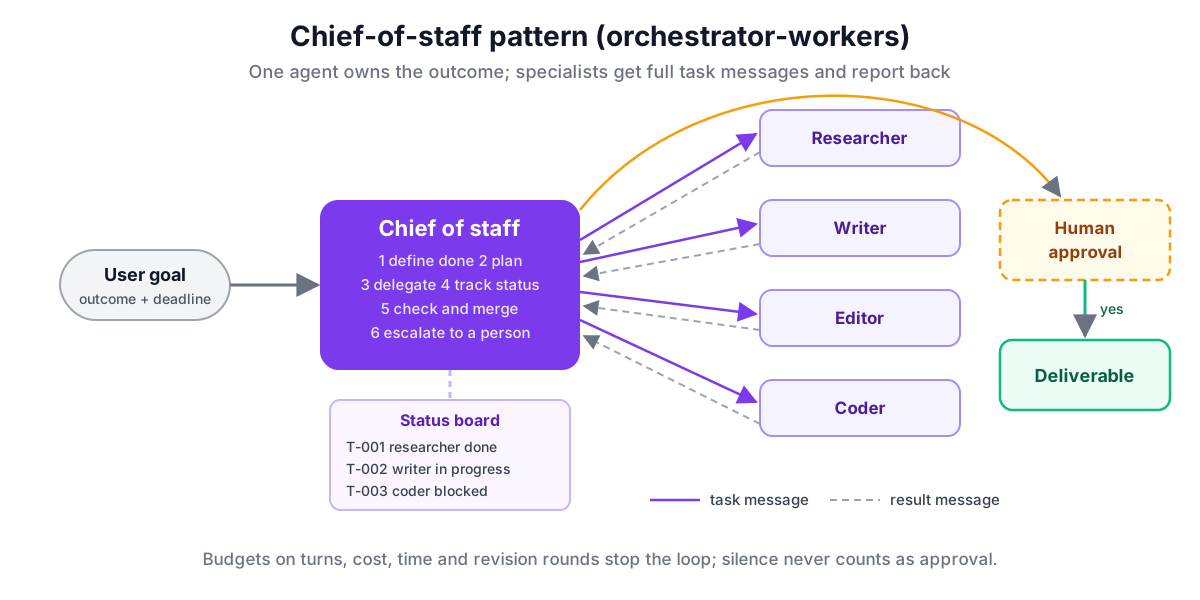
The OpenAI Agents SDK has two mechanisms that map onto these. With agent.as_tool(), the orchestrator calls a specialist like a function, gets the answer back and stays in charge: that is the chief-of-staff pattern. With handoffs, control of the conversation passes to the specialist: that is a router. The Claude Agent SDK and Claude Code use subagents, which the main agent starts through its Agent tool and which report back with one final message.
When not to use multiple agents
Start with one agent. The same Anthropic article recommends finding the simplest solution and adding complexity only when it clearly improves results, and that advice saves more money than any other in this field. Each extra agent adds model calls, latency and a handoff where context can be lost.
Stay with a single agent when:
- one prompt of a few hundred words covers the job and one tool set serves it;
- the subtasks share most of their context, so splitting them means copying the same background into every message;
- you cannot yet measure quality, because you will not be able to tell whether the team is better;
- the work is a fixed sequence that plain code can run, calling the model at each step.
Split into specialists when the prompt grows long enough that rules start to be ignored, when subtasks need different tools or permissions (a researcher with web access and a coder with a shell should not share both), or when independent pieces can run in parallel to save time. The Agent System Prompt Generator is a good first stop: if a single well-structured prompt does the job, you are done.
Writing delegation messages
Free-text delegation fails quietly: the orchestrator writes "look into competitors" and the researcher has no idea which product, which market or how much detail. A fixed message shape fixes that. A task message needs:
{
  "type": "task",
  "task_id": "T-003",
  "from": "chief-of-staff",
  "to": "researcher",
  "objective": "Find how three competitors price invoicing for small businesses.",
  "context": "We launch an invoicing feature for UK freelancers on Friday. Our price is £9 a month.",
  "inputs": [{ "name": "competitors", "content": "FreshBooks, Xero, Zoho Invoice" }],
  "deliverable": "A table of plan, monthly price and invoice limits, with a link and date per row.",
  "acceptance_criteria": ["Prices are from the vendors' own pages", "Every row has a source link"],
  "constraints": ["Do not contact vendors"],
  "budget": { "max_turns": 8, "max_cost_usd": 1 },
  "requires_approval": false
}
The result comes back as task_id, status (done, blocked, failed or needs_approval), a two-sentence summary, the output and a list of issues. Validating both with a JSON Schema catches malformed messages before they cause confusion further down. The designer generates that schema in JSON Schema 2020-12, with the to field limited to your actual specialists, and the AI Tool Schema Builder helps when the specialists' own tools need schemas.
Budgets and limits
Agents in a loop spend money until something stops them. Set four limits and write them into the orchestrator's prompt as well as the code:
- Turns. A cap on model turns for the whole run. The OpenAI Agents SDK takes
max_turnsonRunner.runand raisesMaxTurnsExceededwhen it is passed. - Cost. A dollar cap. The Claude Agent SDK takes
maxBudgetUsd, which also counts subagent requests and refuses to start more subagents once it is reached. The OpenAI SDK reports token usage on the result, so you price it yourself. - Time. A wall-clock limit, so a stuck tool call does not hold the run open.
- Revision rounds. How many times a deliverable may go back for fixes. Two is usually enough; a third round rarely fixes what two did not.
Delegation trees can also grow on their own. The Claude Agent SDK documents environment variables that cap subagent nesting depth (default three layers) and concurrent subagents (default 20). Lower both for predictable runs.
Human approval checkpoints
Put a checkpoint in front of anything published, sent, paid for or deleted, and in front of decisions that change the rest of the work, such as approving positioning before copy is written. At each checkpoint the orchestrator should present what it wants approved, the options and its recommendation, then wait. The prompt must also say that silence is not approval. In code, a checkpoint can be as simple as a function that posts to Slack and blocks until someone clicks a button; the designer's Python skeleton uses input() as a placeholder.
Failure modes to design for
- Lost context. A specialist redoes work or contradicts a decision because nobody told it. Fix: complete task messages and a shared definition of done.
- Silent guessing. A specialist fills a gap with a plausible invention. Fix: a "blocked" status and an instruction to use it.
- Endless polishing. Reviewer and writer bounce a draft forever. Fix: written criteria and a revision cap.
- Duplicate work. Two specialists research the same thing. Fix: the status board, and tasks that do not overlap.
- Unchecked merges. The orchestrator stitches results together without reading them. Fix: an explicit check step against the criteria.
- Over-delegation. The orchestrator spawns agents for trivial steps. Fix: tell it to do small things itself and cap concurrency.
How to evaluate the system
Measure the team the way you would measure one agent, plus a few extra numbers. Keep a set of 20 to 50 realistic goals with known good outcomes, run the system on them after every prompt change and record: task success against the acceptance criteria, cost per run, wall-clock time, number of escalations and how many were justified, and how often a checkpoint rejected the work. Compare against a single-agent baseline on the same set. If the team is not clearly better on success or time, the single agent wins on cost and simplicity. The LLM Eval Scorer can score those runs, and the LLM Cost Calculator turns token counts into budgets.
Putting it into code
For Claude Code, specialists become Markdown files in .claude/agents/, each with YAML frontmatter where name and description are required and tools, model and maxTurns are optional; the body is the specialist's system prompt. With the Claude Agent SDK the same definitions go in the agents option of query(), the orchestrator prompt goes in systemPrompt, and Agent must be in allowedTools for delegation to happen without a permission prompt. With the OpenAI Agents SDK, define each specialist as an Agent and give the orchestrator tools=[specialist.as_tool(...)] or handoffs=[...], depending on the pattern.
The Multi-Agent System Designer writes all of these from one design, along with a Mermaid diagram you can drop into your docs. If your specialists need outside systems, give them tools through MCP: the guide on setting up MCP servers covers connecting them, and building an MCP server covers making your own.