
Speeds and Feeds for Milling, Drilling and Turning, From First Principles
Surface speed, RPM, chip load and feed rate explained, with radial chip thinning, metal removal rate, starting values by material and how to tune from the chips.
· 11 min read

Speeds and feeds have a reputation as black magic, mostly because the numbers in catalogues vary so much and because the same cutter behaves differently in a rigid production machine and a benchtop mill. The arithmetic underneath is short, though, and once it is clear the catalogue numbers make sense and you can adjust them with confidence. This guide covers the two quantities that matter, surface speed and chip load, the formulas that turn them into spindle RPM and feed rate, the chip-thinning correction, metal removal rate, and how to read the chips to tune a cut. The Speeds and Feeds Calculator applies all of it for milling, drilling and turning.
Surface speed: how fast the edge moves
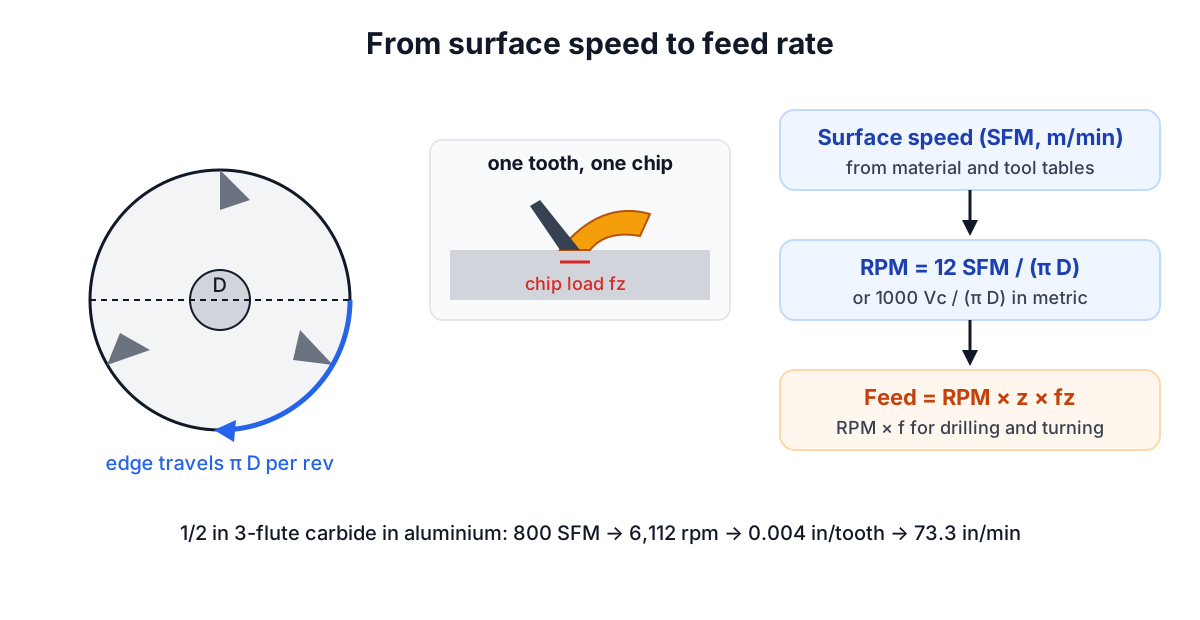
A cutting edge on a rotating tool, or on a rotating workpiece in a lathe, travels around a circle of circumference π × D on every revolution. Multiply by revolutions per minute and you get the speed of the edge through the material, the surface speed or cutting speed. It is the quantity that sets the temperature at the cutting edge, and therefore tool life, so tooling data is always given as surface speed rather than RPM.
In US units surface speed is in surface feet per minute (SFM) and diameter in inches:
RPM = 12 × SFM / (π × D) ≈ 3.82 × SFM / D
In metric units cutting speed Vc is in metres per minute and D in millimetres:
RPM = 1000 × Vc / (π × D)
The factor 12 converts feet to inches and the factor 1000 converts metres to millimetres. Many machinists round 3.82 up to 4, which gives about 5% more RPM than the exact formula; fine for a drill press, worth avoiding for carbide at the top of its range.
Example: a 1/2 inch end mill in aluminium at 800 SFM runs at 12 × 800 / (π × 0.5) = 6,112 rpm. The same surface speed with a 1/8 inch end mill needs 24,446 rpm, which is why small tools are so often limited by the spindle, not by the material.
Chip load: how much each edge takes
The second number is the thickness of chip each cutting edge removes per revolution. For milling it is called chip load or feed per tooth, fz. For drilling and turning it is feed per revolution, f. Chip thickness controls how much heat goes into the chip rather than the tool, and how much force the edge sees.
Too thin and the edge rubs instead of cutting. Rubbing generates heat with nothing to carry it away, glazes the surface and, in stainless steel and nickel alloys, work-hardens the next layer so the following tooth has an even harder job. Too thick and the edge chips or the tool breaks.
The feed rate follows:
milling:   Vf = RPM × z × fz
drilling:  Vf = RPM × f
turning:   Vf = RPM × f
A 3-flute end mill at 6,112 rpm and 0.004 in per tooth feeds at 6,112 × 3 × 0.004 = 73.3 in/min.
Starting values by material
Published speeds vary a lot between sources, because they assume different tool coatings, machine rigidity, coolant and target tool life. The calculator's presets deliberately sit at the conservative end, the kind of number you can run on a first part without breaking anything:
| Material | HSS (SFM) | Carbide (SFM) | Chip load, 1/2 in carbide end mill (in) |
|---|---|---|---|
| Aluminium 6061 | 300 | 800 | 0.004 |
| Free-cutting brass | 150 | 450 | 0.003 |
| Mild steel 1018 | 90 | 350 | 0.002 |
| Alloy steel 4140, annealed | 70 | 250 | 0.0018 |
| Stainless 304 | 60 | 200 | 0.0015 |
| Grey cast iron | 80 | 250 | 0.0025 |
| Titanium Ti-6Al-4V | 40 | 120 | 0.0015 |
The HSS column follows the shop tables derived from Machinery's Handbook that appear in many machine manuals; carbide values are about 2.5 to 3 times HSS for general-purpose tools. Modern coated carbide on a rigid CNC machine often runs well above these figures, so once a cut is stable, move toward the tool maker's recommendation.
Chip load scales with cutter diameter. A rule of thumb that the calculator applies is to scale the 1/2 inch value in proportion to diameter, so a 1/4 inch end mill starts at half the chip load. Very small tools need even more care because their flutes and cores are weaker.
Radial chip thinning
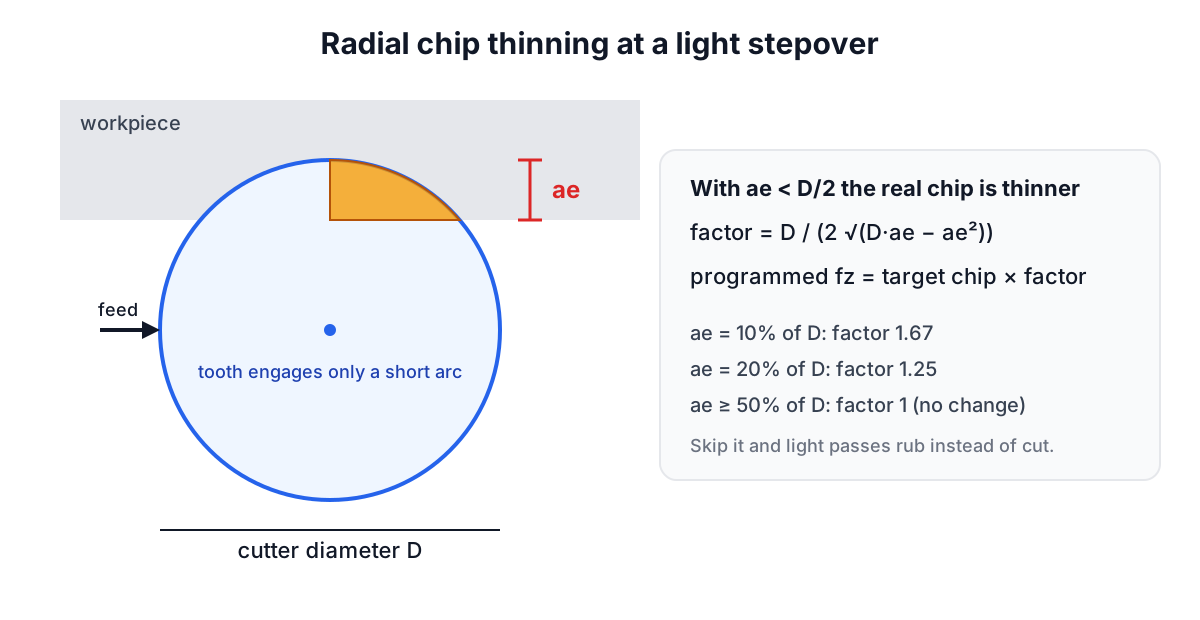
The chip load in a catalogue is the maximum chip thickness when the cutter is engaged across at least half its diameter. With a light stepover, each tooth enters the material at a shallow angle and leaves before it reaches full depth, so the thickest part of the chip is thinner than the programmed fz.
The correction is geometric:
chip thinning factor = D / (2 × √(D·ae − ae²))      when ae < D/2
programmed fz = target chip × factor
At a 10% stepover (ae = 0.05 in on a 1/2 inch cutter) the factor is 1.67, so to get a real 0.004 in chip you program 0.0067 in per tooth. At 20% stepover it is 1.25. The calculator applies it when chip thinning compensation is on. This is the main idea behind high-efficiency milling and adaptive toolpaths: small stepover, full flute length, and a much higher feed rate than slotting would allow.
Forget the correction and finishing passes with a light stepover end up rubbing, which is the most common reason a cutter that slots happily wears out quickly in profiling.
Metal removal rate and power
Metal removal rate (MRR) is the volume cut per minute:
milling:  MRR = ae × ap × Vf
turning:  MRR = 12 × SFM × ap × f       (in³/min)
          MRR = Vc × ap × f             (cm³/min, Vc in m/min, ap and f in mm)
drilling: MRR = (π D² / 4) × Vf
With 0.25 in axial depth, 0.1 in stepover and the 91.7 in/min feed the calculator gives after chip thinning, the aluminium example removes 2.29 in³/min. Multiply MRR by the material's unit power (roughly 0.25 to 0.35 hp per in³/min for aluminium and about 1 to 1.5 for steels) to see whether the spindle can take the cut, and allow for the machine's efficiency.
A turning example in metric: a 50 mm bar at 200 m/min runs at 1,273 rpm. With 0.25 mm/rev and a 2 mm depth of cut the feed is 318 mm/min and MRR is 200 × 2 × 0.25 = 100 cm³/min.
When the machine sets the limit
If the calculated RPM is above the spindle's maximum, run at the maximum and accept the lower surface speed. Keep the chip load and let the feed rate fall in proportion. Raising the chip load to make up the lost feed rate puts a thicker chip on a tool that is already running slower than intended, which is the wrong direction for small tools that are fragile anyway.
A 1/8 inch carbide end mill in mild steel wants 10,695 rpm at 350 SFM. A 10,000 rpm machine is close enough. A 4,000 rpm benchtop mill can only reach 131 SFM, so the feed rate is about 37% of the ideal, and that is fine: the tool simply cuts more slowly. More flutes or a larger diameter tool are the honest ways to get productivity back.
Tuning from the chips
The formulas give a starting point. The chips tell you where to go next:
- Fine, powdery or discoloured chips in aluminium mean too little chip load or rubbing. Increase feed.
- Long, stringy chips in steel turning usually mean the feed is too low for the insert's chip breaker. Increase feed per rev before changing speed.
- Blue chips in steel are normal with carbide at proper speed; with HSS they mean the edge is overheating. Reduce surface speed.
- Chatter is a rigidity problem, not a speeds and feeds problem. Reduce stick-out, depth of cut or radial engagement, or change RPM a little to move away from a resonance.
- Built-up edge in aluminium or soft steel means too low a surface speed or poor lubrication. Increase speed and use coolant or a sharper, polished tool.
Related tools and guides
Spindle power and torque at a given RPM come from the Torque and Power Calculator and the Horsepower Calculator. Belt-drive mills and drill presses can be checked with the Pulley and Belt Calculator. For the hole that comes before tapping, see the tap drill and thread percentage guide, and for spindle bearings and why they limit RPM, the bearing L10 life guide. Treat every number here as a starting point and follow the tool maker's data for the cutter in your hand.