
Gzip vs Brotli vs LZ4: Choosing a Compression Algorithm
How DEFLATE, Brotli and LZ4 work, what the gzip and zlib wrappers add, how to read ratios honestly, and which codec fits web assets, APIs and logs.
· 7 min read
Turn on Brotli for a site's JavaScript bundles and the transfer size drops further than gzip managed. Turn it on at the same quality for every dynamic API response and the servers' CPU graph climbs. Both results are correct, and they are the whole story of compression in one sentence: you are always trading bytes against time, and the right trade depends on how often the data is compressed versus how often it is read.
This guide explains how the common codecs work, what the gzip and zlib wrappers actually add, how to read ratios without fooling yourself, and how to measure your own data with Compress and Decompress Text and the Compression Algorithm Comparison.
How the common codecs work
Almost every general-purpose compressor does two things. First it finds repetition: a later occurrence of a string is replaced by a back-reference, "copy 12 bytes from 340 bytes ago". That is the LZ77 idea from Lempel and Ziv's 1977 paper. Then, optionally, it encodes the resulting symbols with fewer bits for common ones and more for rare ones, which is entropy coding.
DEFLATE (RFC 1951) was designed by Phil Katz for PKZIP and documented as an RFC in 1996. It combines LZ77 over a 32 KB window with Huffman coding. It is everywhere: ZIP, gzip, PNG, PDF streams and HTTP.
Brotli (RFC 7932, 2016) came from Google. It keeps the LZ77 plus entropy coding structure but adds a much larger window (up to 16 MB), better context modelling, and a built-in static dictionary of about 120 KB containing common English words and fragments of HTML, CSS and JavaScript. That dictionary is why Brotli does especially well on small web files: a short HTML page can reference <!DOCTYPE html> without ever having seen it. Quality runs from 0 to 11; 11 is slow and is meant for content compressed once, at build time.
LZ4, written by Yann Collet in 2011, skips entropy coding entirely and keeps its match finding simple. It compresses and decompresses very fast and accepts larger output. That is the right trade for databases, file systems, caches and log shipping, where CPU time is the bottleneck.
Zstandard, also by Yann Collet (released by Facebook in 2016, RFC 8878), sits between them with tunable levels and is increasingly common. It is not in the tools on this site, but it belongs on any shortlist.
What the gzip and zlib wrappers add
People say "deflate" and "gzip" as if they were different algorithms. They hold the same compressed stream with different packaging.
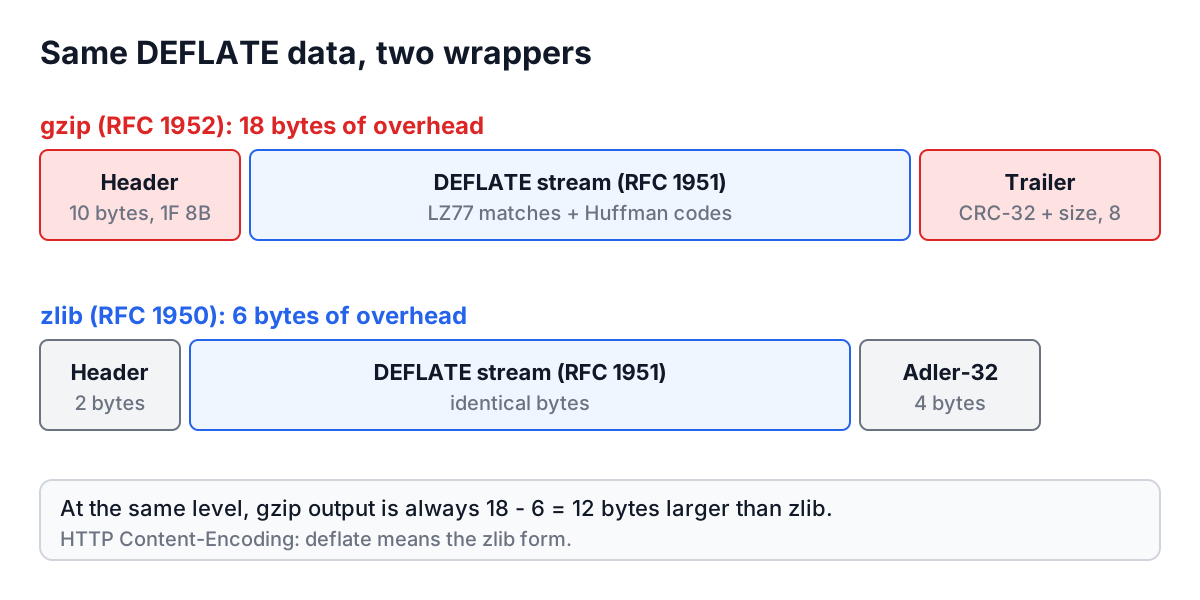
| Format | Spec | Header | Trailer | Total overhead | Starts with |
|---|---|---|---|---|---|
| Raw DEFLATE | RFC 1951 | none | none | 0 bytes | (no magic) |
| zlib | RFC 1950 | 2 bytes | Adler-32, 4 bytes | 6 bytes | 78 9C at default level |
| gzip | RFC 1952 | 10 bytes | CRC-32 and length, 8 bytes | 18 bytes | 1F 8B |
Two practical consequences. First, at the same level gzip output is always exactly 12 bytes larger than zlib output, whatever the input. Second, HTTP's Content-Encoding: deflate means the zlib format, not raw DEFLATE, which is why Compress and Decompress Text labels that option Deflate (zlib). Some old servers sent raw DEFLATE under that name, and browsers learned to accept both; gzip avoids the ambiguity.
A gzip stream Base64-encoded always starts with H4sI, the encoding of 1F 8B 08. Spotting that prefix in a log line or a cookie tells you to decompress before reading.
Reading ratios honestly
Three numbers describe a compression result, and they are easy to mix up.
- Compression ratio: original size divided by compressed size. 1,000 bytes to 250 bytes is 4:1. Higher is better.
- Space saved: (original minus compressed) divided by original. The same example saves 75%.
- Compressed fraction: compressed divided by original, 25% here. Some tools call this "ratio", which inverts the direction. Check before comparing numbers from two sources.
The scale is not linear. Going from 50% saved to 75% saved halves the output. Going from 90% to 95% halves it again. A codec that "only" saves 2 more percentage points at the top end can still be 20% smaller.
Overhead dominates small inputs. Here is what the tools on this site report for two inputs, measured in UTF-8 bytes:
| Input | Gzip (level 6) | Deflate (zlib) | LZ4 | Base64 |
|---|---|---|---|---|
hello (5 bytes) | 25 bytes, 400% larger | 13 bytes | 20 bytes | 8 bytes |
{"id":1,"name":"Ada"} repeated 50 times (1,050 bytes) | 50 bytes, 95.2% smaller | 38 bytes | 50 bytes | 1,400 bytes |
Brotli at quality 11 produces about 40 bytes for the repeated JSON. Base64 appears only to make a point: it is an encoding, and it always adds a third.
Compress and Decompress Text
Compress and Decompress Text runs one codec on text you paste. Choose Compress, a format (Gzip, Deflate (zlib), LZ4 or Brotli) and click Compress. The output is Base64, because compressed data is binary, and the badge reports the size of the compressed bytes against your input, for example 1050 → 50 bytes, 95.2% smaller. Sizes are measured on the binary output, not on the longer Base64 text.
Decompress reverses it. Paste a Base64 string, choose the format it was compressed with and click Decompress. This is the quickest way to read a gzip blob from a message queue or a debugging header. The command-line equivalent:
$ echo 'H4sIAAAAAAAAA8tIzcnJVyjPL8pJAQCFEUoNCwAAAA==' | base64 -d | gunzip
hello world
Things to know:
- Codecs are real: pako for gzip and zlib, brotli-wasm (Google's encoder compiled to WebAssembly, loaded on first use) for Brotli at quality 11, and lz4js for LZ4 in the standard frame format, which the
lz4command-line tool reads. - Base64, URL and hex encodings are on the same menu for convenience, and the badge says "larger" for them, because they are.
- Input is text and must decompress to valid UTF-8. For binary files use the command-line tools.
Compression Algorithm Comparison
The Compression Algorithm Comparison runs six settings over the same input: gzip at levels 1, 6 and 9, zlib at level 6, Brotli at quality 11 and LZ4. The table shows compressed size, ratio as original:compressed with space saved in brackets, and compression and decompression times.
Worked example. Choose the JSON sample data type, set Iterations to 50 and the metric to P50, and click Compare Algorithms. On typical machines the pattern looks like this, though the exact numbers depend on your browser and CPU:
- Brotli usually produces the smallest output and has by far the slowest compression time.
- Gzip level 9 is only slightly smaller than level 6 and noticeably slower to compress.
- LZ4 has the fastest times and the largest output.
- Decompression times are close across gzip levels, because the decoder does the same work whatever level produced the stream.
Then paste a real API response with Custom and run it again. Real payloads with IDs, timestamps and free text compress far less than samples built from repeated records, and that is the number to base a decision on.
About the timings: each iteration compresses, decompresses and checks the round trip, timed with performance.now(). Average is the mean; P50, P95 and P99 use the nearest-rank method, so with 10 iterations P95 and P99 are both the slowest run. Use 50 or 100 iterations before reading anything into tail percentiles. Browser JavaScript and WebAssembly are slower than native zlib or Brotli on a server, so compare codecs with each other, not with production throughput.
Choosing a codec
| Situation | Good default | Why |
|---|---|---|
| Static web assets (JS, CSS, fonts, SVG) | Brotli quality 11, pre-compressed at build time | Smallest transfer, compression cost paid once |
| Dynamic HTML and API responses | Brotli 4 to 6, or gzip 6 | Good size without burning CPU per request |
| Files for broad compatibility | gzip | Every system can read it |
| Logs, caches, database pages | LZ4 or Zstandard at a low level | Speed matters more than the last few percent |
| Images, video, already-compressed archives | none | They are already compressed; you add overhead |
Browsers only advertise br in Accept-Encoding over HTTPS, so plain HTTP traffic falls back to gzip.
Common mistakes
Compressing compressed data. JPEG, PNG, MP4, ZIP and gzip files will not shrink and may grow. For images, the image optimization guide covers what actually helps.
Measuring the Base64. Compressed bytes shown as Base64 look 33% bigger than they are. Measure the binary.
Benchmarking on toy data. Repeated JSON and lorem ipsum flatter every codec. Use a real sample.
Maximum level for dynamic content. Brotli 11 and gzip 9 on every request cost CPU for a small gain. Save them for build-time compression.
Calling zlib "raw deflate". If a decoder fails with "incorrect header check", you have zlib data and a raw inflater, or the reverse.
Take one real response from your own API, paste it into the comparison, and look at two numbers: Brotli's size against gzip level 6, and gzip level 6's compression time against LZ4's. Those two comparisons settle most compression decisions. For the bigger question of which data format to compress in the first place, the data format comparison guide compares JSON, XML and Protocol Buffers before and after gzip.