
How to Make Your Website Visible to AI Assistants and AI Search
How AI crawlers and fetchers find and read pages, robots.txt for AI bots, server-rendered content, structured data, llms.txt, MCP, and what is known versus guesswork.
· 12 min read
More people now ask ChatGPT, Claude, Perplexity or Google's AI Mode a question instead of scanning ten blue links, and the answer comes with a handful of cited sources. Site owners understandably want to be one of them. A lot of advice on this, often sold as "generative engine optimisation", mixes things that are documented with things that are guesses. This article separates the two. It covers how AI products find and read pages, how to control AI crawlers in robots.txt, why server-rendered HTML matters, what structured data and llms.txt do and do not do, and how MCP lets AI use your app rather than just read it. The AI Visibility Checker, AI Crawler robots.txt Generator and llms.txt Generator help with each step.
How AI assistants find and read pages
There are three routes from your page to an AI answer.
- Training data. Crawlers such as GPTBot, ClaudeBot, CCBot (Common Crawl) and Meta-ExternalAgent collect pages that may be used to train future models. Training happens months before a model ships, and models do not cite training data reliably, so this route builds general knowledge about you rather than links.
- AI search indexes. OAI-SearchBot (ChatGPT search), Claude-SearchBot, PerplexityBot, DuckAssistBot and others build indexes that answers are grounded on at question time. Google's AI Overviews and AI Mode use Google's regular search index and Googlebot. This is the route that produces citations.
- User-triggered fetches. When someone pastes a URL or the assistant decides to open a page, agents such as ChatGPT-User, Claude-User, Perplexity-User and Google-Agent fetch it live.
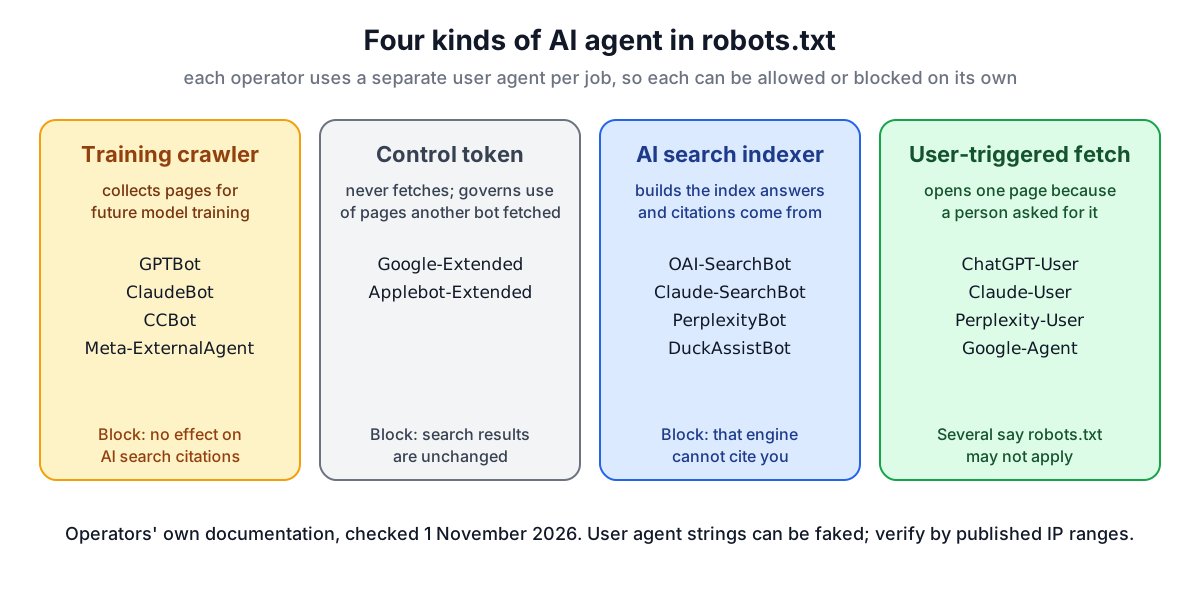
Each operator documents its agents separately, and each can be allowed or blocked on its own. That split is the most useful fact in this whole topic.
Controlling AI crawlers with robots.txt
Because the jobs are separate, you can opt out of training without disappearing from AI search. A common publisher policy looks like this:
User-agent: GPTBot
User-agent: ClaudeBot
User-agent: CCBot
User-agent: Meta-ExternalAgent
User-agent: Google-Extended
User-agent: Applebot-Extended
Disallow: /

User-agent: OAI-SearchBot
User-agent: Claude-SearchBot
User-agent: PerplexityBot
Disallow: /account/
A few details catch people out:
- Group matching. Under RFC 9309, a crawler follows only the group that names it and ignores the
*group. If*disallows/account/and you add a GPTBot group withAllow: /, GPTBot may now read/account/. Copy your general rules into AI groups. - Control tokens. Google-Extended and Applebot-Extended never fetch anything. They tell Google and Apple whether content their normal crawlers already fetched may be used for Gemini or Apple model training. Blocking them does not affect search inclusion or rankings. Google points site owners to the normal Search controls (robots rules for Googlebot and snippet settings) for AI Overviews and AI Mode, not to Google-Extended.
- Voluntary. robots.txt is a request. OpenAI, Perplexity, Google and Meta all say their user-triggered fetchers may not follow it, because a person asked for that page. Anthropic says its agents, including Claude-User, respect robots.txt. Unknown scrapers ignore it entirely. Use server or CDN rules, ideally with the IP ranges operators publish, for anything that must be blocked.
- Stale names. Tokens such as
anthropic-aiandClaude-Webare no longer on Anthropic's list, and some widely copied names, like Bytespider and cohere-ai, have no official documentation. The generator only lists agents whose operator documents them, with the date the list was checked.
The AI Crawler robots.txt Generator builds these groups, merges them into your existing file and shows a diff. For general rules and search engine bots, use the robots.txt Generator.
Put the content in the HTML
Allowing a crawler is pointless if it sees an empty page. Many AI crawlers and fetchers read the HTML your server returns and do not run JavaScript, or do so inconsistently. A single-page app that sends <div id="root"></div> and a script tag can look blank to them, even if Googlebot, which does render JavaScript, indexes it fine.
The fix is server-side rendering or prerendering: generate the HTML for each URL at request or build time so that headings, text, links and structured data are present before any script runs. You can check quickly with View source in your browser (not the Elements panel, which shows the page after JavaScript). If the text you care about is not there, crawlers that skip JavaScript cannot see it either. This site prerenders every tool page to static HTML for exactly this reason.
Structure that is easy to quote
Once a page is readable, structure decides how easily an answer can be lifted from it. None of these are secret AI signals; they are the same things that help readers and classic search:
- One H1 that names the topic, then H2 and H3 headings that follow the outline without skipping levels.
- Questions people actually ask as headings, with a direct answer in the first sentence below. Detail can follow.
- Lists for steps, tables for comparisons, and specific numbers with units.
- Clear authorship and dates, visible on the page and in markup.
- A descriptive title and meta description, a canonical URL and Open Graph tags.
Structured data deserves a careful word. schema.org JSON-LD states unambiguously that a page is an Article, Product, FAQPage or HowTo, who wrote it and when it changed. Google's guidance on AI features is explicit that there is no special schema.org markup needed to appear in AI Overviews or AI Mode, and no other special optimisation either; normal SEO practice applies. So add structured data because it describes the page accurately, not as a trick. The Schema Markup Generator writes it.
Also check you are not opting out by accident. Google says nosnippet, data-nosnippet, max-snippet and noindex limit what its AI features show from a page, so a stray nosnippet in a template can keep you out.
llms.txt: cheap, optional, unproven
llms.txt is a proposal from 2024, described at llmstxt.org: a Markdown file at /llms.txt with your site's name as an H1, a short blockquote summary, and H2 sections listing your most useful pages as - [title](url): notes. A section called Optional holds links that can be skipped when context is short. The proposal also suggests offering Markdown versions of pages at the same URL with .md added.
What is known: some developer tools, coding assistants and agent frameworks read llms.txt when they find it, and many documentation sites publish one, often alongside an llms-full.txt with the full text of every linked page. What is not known: none of the major AI search engines has said it uses llms.txt to choose or rank sources. Treat it as a small, low-cost addition for agents and developers, generated from the same source as your sitemap so it never goes stale. The llms.txt Generator builds one from a sitemap and validates existing files.
Beyond reading: letting AI use your app with MCP
Everything above is about being read. The Model Context Protocol (MCP) is about being used. An MCP server exposes your application's actions, such as searching a catalogue, creating an invoice or running a calculation, as tools with JSON Schema inputs that AI assistants can call directly instead of scraping pages. For a product with real functionality, this is often more valuable than any citation, because the assistant can complete the task for the user. See how to build an MCP server for a walk-through, and the MCP Server Generator for starter code.
What is known and what is guesswork
| Claim | Status |
|---|---|
| Separate user agents for training, search and user fetches | Documented by each operator |
| Blocking a training crawler does not block that operator's AI search | Documented (OpenAI, Anthropic and others) |
| User-triggered fetchers may ignore robots.txt | Documented by OpenAI, Perplexity, Google, Meta |
| Content must be in the HTML for crawlers that do not run JavaScript | Follows from how those crawlers work; verify with View source |
| Special markup is needed for Google AI features | Google says no |
| llms.txt improves AI search citations | No major engine has said so |
| Any specific ranking factor for AI answers | Not public; treat confident claims with suspicion |
So the reliable checklist is short: let the AI search and user agents you want in, keep the content in server-rendered HTML, structure it so answers are easy to find, mark it up honestly, and do not block snippets by accident. Run your key pages through the AI Visibility Checker to see where each one stands, and remember that no tool can promise a citation: the engines choose their sources, and the best you can do is make yours easy to read and worth quoting.