
What Is a Parquet File? Row Groups, Footers and Types Explained
How Parquet lays out columns, row groups and pages, what the footer stores, how physical and logical types fit together, and the settings that make files fast.
· 7 min read
A 4 GB CSV export becomes a 600 MB Parquet file, and a query that sums one column out of forty goes from a minute to a couple of seconds. Nothing magic happened. Parquet stores each column's values together, compresses them as a group, and writes enough metadata that a reader can skip everything it does not need. Once you understand that layout, the settings that make Parquet fast, and the mistakes that make it slow, stop being mysterious.
This guide walks through how a Parquet file is built, what its footer records, how its types work, and how to inspect a file with the Parquet File Viewer before you load it anywhere.
Rows versus columns
CSV, JSON lines and most database pages are row-oriented: all the fields of record 1, then all the fields of record 2. That is ideal when you read or write whole records, as an application does.
Analytics queries look different. SELECT country, SUM(revenue) FROM sales GROUP BY country touches two columns out of perhaps forty, across millions of rows. A row store has to read every byte of every row to find them. A column store reads only the two columns.
Columnar storage also compresses better. A country column holds a few hundred distinct values repeated millions of times; stored together they shrink to a dictionary plus small integer codes. A timestamp column of increasing values can be stored as small deltas. Row storage interleaves those values with unrelated fields and loses most of that opportunity.
Parquet was created by Twitter and Cloudera in 2013, building on the nested columnar layout Google described in its 2010 Dremel paper, and became a top-level Apache project in 2015. It is now the default file format for data lakes, Spark, DuckDB, Snowflake external tables, BigQuery exports and pandas users who have outgrown CSV.
Anatomy of a Parquet file
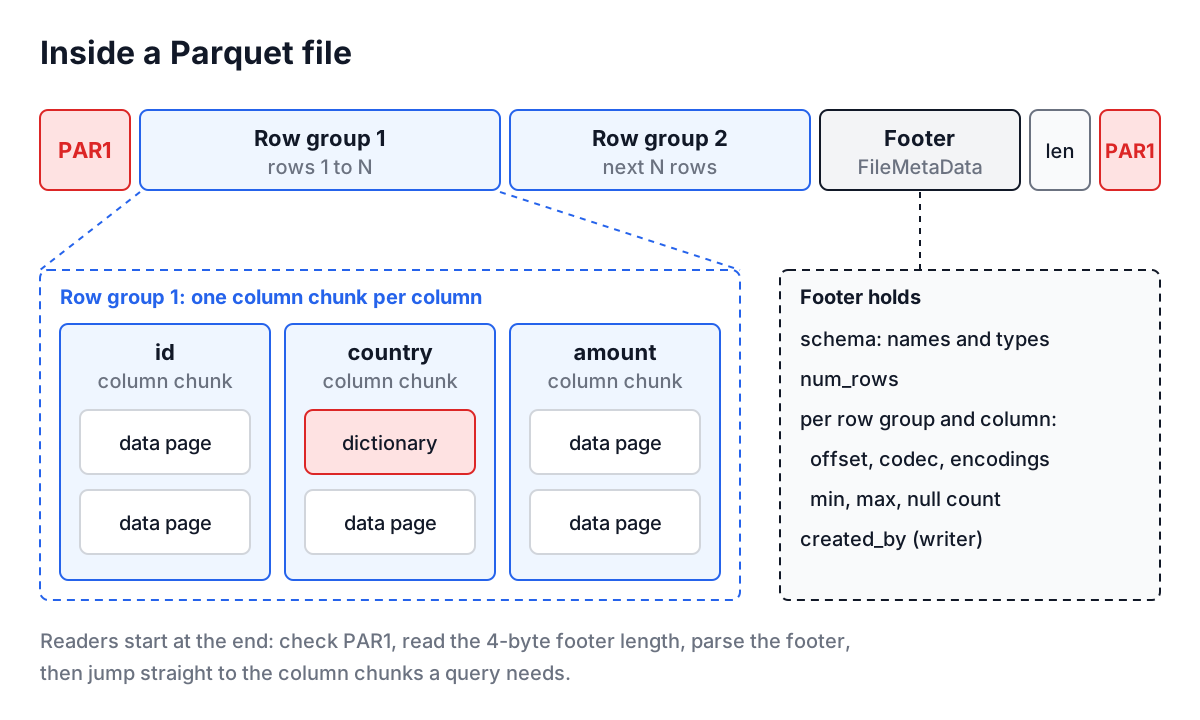
From the outside in:
- Magic bytes. The file starts and ends with the four ASCII bytes
PAR1(50 41 52 31). - Row groups. Rows are split into horizontal groups, typically tens of megabytes to a gigabyte each. A row group is the unit of parallelism: different workers can read different groups.
- Column chunks. Inside a row group, each column's values are stored contiguously in a column chunk, compressed with a codec such as Snappy, ZSTD or GZIP.
- Pages. A column chunk is split into pages, often around 1 MB, the unit of encoding and compression. An optional dictionary page comes first, followed by data pages.
- Footer. After the last row group comes
FileMetaData, serialized with Apache Thrift's compact protocol, then a 4-byte little-endian length of the footer, thenPAR1.
A reader seeks to the end of the file, reads 8 bytes to get the footer length and check the magic, reads the footer, and from then on knows where every column chunk lives. That is why tools can list a file's schema and row count almost instantly regardless of its size, and why a file truncated during upload is unreadable: the footer is the part that went missing.
What the footer records
The footer is the table of contents. The fields that matter in practice:
| Footer field | What it tells you |
|---|---|
schema | Every column, flattened depth-first, with physical type, logical type and repetition |
num_rows | Total rows, exact, without scanning data |
row_groups | Each group's row count, byte size and column chunk metadata |
Column chunk codec | Compression used for that column in that row group |
Column chunk encodings | PLAIN, RLE_DICTIONARY, DELTA_BINARY_PACKED and so on |
Column chunk statistics | Min, max and null count, used to skip row groups |
created_by | The library and version that wrote the file |
key_value_metadata | Free-form metadata, such as the Arrow schema pandas and pyarrow store |
The statistics are what make filters fast. A query for WHERE event_date = '2026-10-01' can skip every row group whose min and max dates exclude that day, without decompressing anything. Sorting data by a commonly filtered column before writing makes those ranges narrow and the skipping effective.
Physical and logical types
Parquet has only eight physical types, which describe how bytes are laid out. Logical types (called converted types in older files) annotate them with meaning.
| You think of it as | Physical type | Logical annotation |
|---|---|---|
| Text | BYTE_ARRAY | STRING (older files: UTF8) |
| Date | INT32 | DATE, days since 1970-01-01 |
| Timestamp | INT64 | TIMESTAMP(MILLIS, MICROS or NANOS) |
| Decimal money | INT32, INT64 or FIXED_LEN_BYTE_ARRAY | DECIMAL(precision, scale) |
| UUID | FIXED_LEN_BYTE_ARRAY(16) | UUID |
| Small integers | INT32 | INTEGER(8 or 16 bits, signed or not) |
| Legacy timestamp | INT96 | none; written by older Spark and Impala |
Each column also has a repetition: REQUIRED (never null), OPTIONAL (may be null) or REPEATED (a list). Nested data such as address.city is stored as a group with leaf columns, and Parquet records definition and repetition levels per value so a reader can rebuild nulls and lists from the flat columns. That machinery is invisible to most users, but it explains why a nested field shows up as a dotted path.
Worked example: inspecting a file before loading it
Suppose a partner sends orders.parquet and you need a CREATE TABLE for it.
- Open the Parquet File Viewer and click Choose Parquet File. Only the footer is read, in your browser; the file is not uploaded.
- The toast shows the row, column and row group counts. Schema Information lists the codecs and encodings, the row count, the writer (for example
parquet-cpp-arrow version 15.0.0), and a table of fields. - Read the field table carefully.
order_id INT64not nullable,customer BYTE_ARRAY (STRING)nullable,amount INT64 (DECIMAL(18,2)),created_at INT64 (TIMESTAMP(MICROS)),shipping.city BYTE_ARRAY (STRING). The decimal and timestamp annotations decide your column types; the dotted path tells you the source was nested. - Pick YAML and click Convert Data to paste the schema into a ticket, or CSV to get a field list for a spreadsheet.
If instead the viewer reports Missing "PAR1" magic at the end of the file, stop there: the transfer was cut short or the file is not Parquet. The hex dump guide shows how to look at the last bytes yourself.
The viewer does not decode row values. For that, use DuckDB or pyarrow:
-- DuckDB
DESCRIBE SELECT * FROM 'orders.parquet';
SELECT * FROM parquet_metadata('orders.parquet');
SELECT * FROM 'orders.parquet' LIMIT 10;
import pyarrow.parquet as pq
print(pq.read_metadata("orders.parquet"))
print(pq.ParquetFile("orders.parquet").schema)
Parquet versus CSV
| CSV | Parquet | |
|---|---|---|
| Human readable | Yes | No |
| Types | None, everything is text | Physical and logical types per column |
| Compression | Whole file, if any | Per column chunk, with encodings |
| Reading one column | Read everything | Read that column only |
| Skipping rows by value | No | Min and max statistics per row group |
| Appending rows | Easy | Write a new file or row group |
| Good for | Exchange, small data, spreadsheets | Analytics, data lakes, large tables |
CSV and TSV remain the right choice for small exports and anything a person will open in a spreadsheet. The CSV to JSON guide and the TSV format guide cover those formats.
Common mistakes
Thousands of tiny files. Streaming jobs that write a file every few seconds produce row groups of a few kilobytes. Every file and row group has fixed overhead, so reads slow to a crawl. Compact them into larger files on a schedule.
Unsorted data with selective filters. If every row group spans the full range of dates, statistics cannot skip any of them. Sort or partition by the columns you filter on.
INT96 timestamps. Older Spark versions wrote timestamps as INT96, which newer readers handle inconsistently. Write INT64 timestamps with an explicit unit.
Mixing schemas in one dataset. One file with amount as INT64 and another with DOUBLE breaks many readers. Compare schemas file by file with the viewer before merging.
Expecting to edit in place. Parquet files are immutable. Updates mean rewriting files, which is what table formats like Delta Lake and Apache Iceberg manage on top of Parquet.
Open the next Parquet file you receive in the Parquet File Viewer before writing any code against it. Thirty seconds with the schema, the codec and the row group count tells you whether to load it as is, ask for a different export, or compact it first.