
TSV Files: The Format Rules, Quoting Traps and TSV vs CSV
What the IANA text/tab-separated-values rules say, how Excel and databases bend them, and how to parse TSV without losing rows, quotes or leading zeros.
· 6 min read
Copy a block of cells from a spreadsheet and paste it into a terminal or a text box, and what lands is TSV: values separated by tab characters, one row per line. It is the most common data format nobody chooses on purpose. That is part of its charm, and part of the trouble, because "tab-separated" covers at least three incompatible conventions for the one hard case: a value that itself contains a tab or a line break.
This guide covers what the TSV standard actually says, how real tools bend it, how TSV compares with CSV, and how to parse it without losing rows, quote marks or leading zeros, using the TSV to JSON Converter as the worked example.
What the standard says
TSV is registered with IANA as the media type text/tab-separated-values. The registration dates from 1993 and came from the University of Minnesota's Internet Gopher team. It is very short, and its rules fit in a list:
- The first line is a header with the field names.
- Fields are separated by a single tab character.
- Records are separated by a line break.
- Every record has the same number of fields as the header.
- A field may not contain a tab or a line break.
There is no quoting and no escape mechanism. If your data contains a tab, strict TSV simply cannot represent it. That sounds like a weakness, but it is also why TSV is so easy to process: split('\t') on each line is a complete, correct parser for strict TSV, and Unix tools work on it directly:
cut -f2,4 data.tsv               # columns 2 and 4
awk -F'\t' '$3 > 100' data.tsv   # rows where column 3 exceeds 100
sort -t#x27;\t' -k2,2 data.tsv      # sort by column 2
CSV has no such luck. Commas appear constantly in names, addresses and numbers, so CSV needed quoting from the start, and its rules were only written down in RFC 4180 in 2005, long after incompatible dialects had spread.
Three conventions for the hard case
Real files do contain tabs and line breaks inside values: product descriptions, addresses, comments. Writers deal with it in one of three ways.
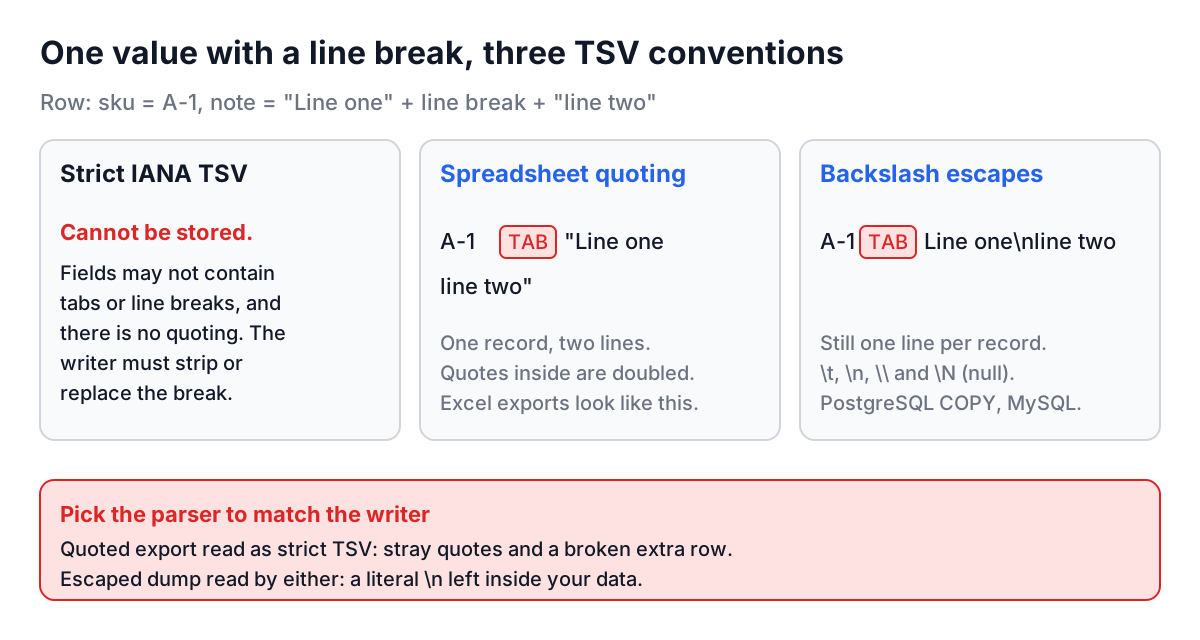
Strict IANA. The writer replaces or strips tabs and line breaks before writing, or refuses. Quote characters are just data: a field 12" pipe is twelve-inch pipe, quote included.
Spreadsheet quoting. Excel's tab-delimited export, and copy and paste from most spreadsheets, borrow CSV's rule. A field that contains a tab, a line break or a double quote is wrapped in double quotes, and quotes inside it are doubled. fits 1/2" pipe becomes "fits 1/2"" pipe".
Backslash escapes. PostgreSQL's COPY ... TO in text format and MySQL's SELECT ... INTO OUTFILE write a tab as \t, a line break as \n, a backslash as \\, and NULL as \N. No quotes are involved, and every record stays on one physical line.
A parser has to know which convention produced the file. Reading a quoted export as strict TSV leaves stray quotes and splits multi-line fields into broken rows. Reading strict TSV with quote handling turns a value that happens to start with " into a field that swallows the rest of the file. Reading database output with either leaves literal \n sequences in your data.
TSV versus CSV
| TSV | CSV | |
|---|---|---|
| Separator | Tab | Comma (semicolon in some locales) |
| Standard | IANA registration, 1993 | RFC 4180, 2005 |
| Quoting in the standard | None | Double quotes, doubled inside |
| Commas in data | No special handling | Must be quoted |
| Tabs and line breaks in data | Not allowed in strict TSV | Allowed inside quotes |
| Parsing with Unix tools | cut, awk -F'\t' work directly | Needs a real CSV parser |
| Support in other software | Good | Universal |
TSV wins for copy and paste, terminal work and exports where values contain commas but never tabs, which describes most business data. CSV wins when you hand files to systems you do not control, because every importer understands it. Converting between them is mechanical once you know the source convention; the CSV to JSON guide covers the CSV side.
Worked example: a spreadsheet export
A colleague exports a product sheet from Excel as tab-delimited text:
sku	name	note
A-1	Widget	"fits 1/2"" pipe"
B-2	Gadget
- Open the TSV to JSON Converter, paste the text into TSV Input (or Upload File) and leave Spreadsheet-style quotes ticked, since this came from Excel.
- Click Parse TSV. The JSON tab shows:
[
  { "sku": "A-1", "name": "Widget", "note": "fits 1/2\" pipe" },
  { "sku": "B-2", "name": "Gadget", "note": "" }
]
The quoted field lost its wrapping quotes and the doubled quote became one, exactly as intended. The trailing tab on the last line produced an empty note, not a missing one.
- Now untick Spreadsheet-style quotes and parse again. The note comes through literally as
"fits 1/2"" pipe", all quote marks included. That is the correct reading if the file were strict TSV, and the wrong one here. The checkbox exists because only you know where the file came from.
The converter also reports problems instead of hiding them. A row with more fields than the header keeps the extras as extra_1, extra_2 and warns with the line number. A row with fewer fields gets empty strings and a warning. Duplicate header names become id, id_2, and a blank header becomes column_3, so no value is overwritten. Windows line endings and a UTF-8 byte order mark are handled, and every value stays a string, so a ZIP code 02134 keeps its leading zero.
Parsing TSV in code
Python's csv module handles both common conventions:
import csv

with open("data.tsv", newline="", encoding="utf-8-sig") as f:
    # spreadsheet-style quoting (the default)
    rows = list(csv.DictReader(f, delimiter="\t"))

with open("data.tsv", newline="", encoding="utf-8") as f:
    # strict TSV: quote characters are data
    rows = list(csv.DictReader(f, delimiter="\t", quoting=csv.QUOTE_NONE))
utf-8-sig strips a byte order mark if one is present. In pandas, pd.read_csv("data.tsv", sep="\t", dtype=str, keep_default_na=False) keeps every value as text and stops strings such as NA or null from becoming missing values. In JavaScript, papaparse with delimiter: "\t" follows the spreadsheet convention, which is what the converter on this site uses.
Common mistakes
Assuming no quotes. line.split('\t') is correct for strict TSV and wrong for spreadsheet exports. Check the first few lines for a field that starts with ".
Letting tools guess types. Spreadsheets and pandas both turn 02134 into 2134 and 1E5 into 100000, and spreadsheets turn the gene name MARCH1 into a date. Keep values as strings until you convert specific columns deliberately.
Trimming whitespace. Strict TSV fields keep their spaces. A trailing space may be meaningful, and trimming every cell can merge values that should stay distinct.
Ignoring ragged rows. A row with one field too many is usually an unescaped tab inside a value. Silently dropping the extra field loses data; report it and fix the source.
Spaces instead of tabs. Editors configured to expand tabs turn a TSV file into space-separated text. If every row parses as a single field, check the separator in a hex view: a tab is 09, a space 20. The hex dump guide shows how.
Before you parse a TSV file, look at where it came from and pick the convention to match: strict for hand-made and Unix-tool output, quoted for spreadsheets, escaped for database dumps. Then parse it into strings, check the row warnings, and convert types on purpose. If the data is headed for analytics at scale, the Parquet File Viewer and its guide cover the columnar format it will probably end up in.