
Pixel Density Explained: PPI, Dot Pitch and the Retina Threshold
Why PPI is the diagonal pixel count over the diagonal size, how one arcminute of visual acuity sets the distance at which pixels vanish, and what that means when choosing a monitor, phone or TV.
· 9 min read
Two screens can have the same resolution and look completely different. A 1920 x 1080 panel is sharp on a 15.6 inch laptop and visibly grainy on a 27 inch monitor, because the same number of pixels is spread over a larger area. Pixel density, measured in pixels per inch (PPI), is the number that captures this. Combined with how far away you sit, it tells you whether you can see individual pixels at all. This post derives both, with numbers you can reproduce in the PPI Calculator.
Why PPI uses the diagonal
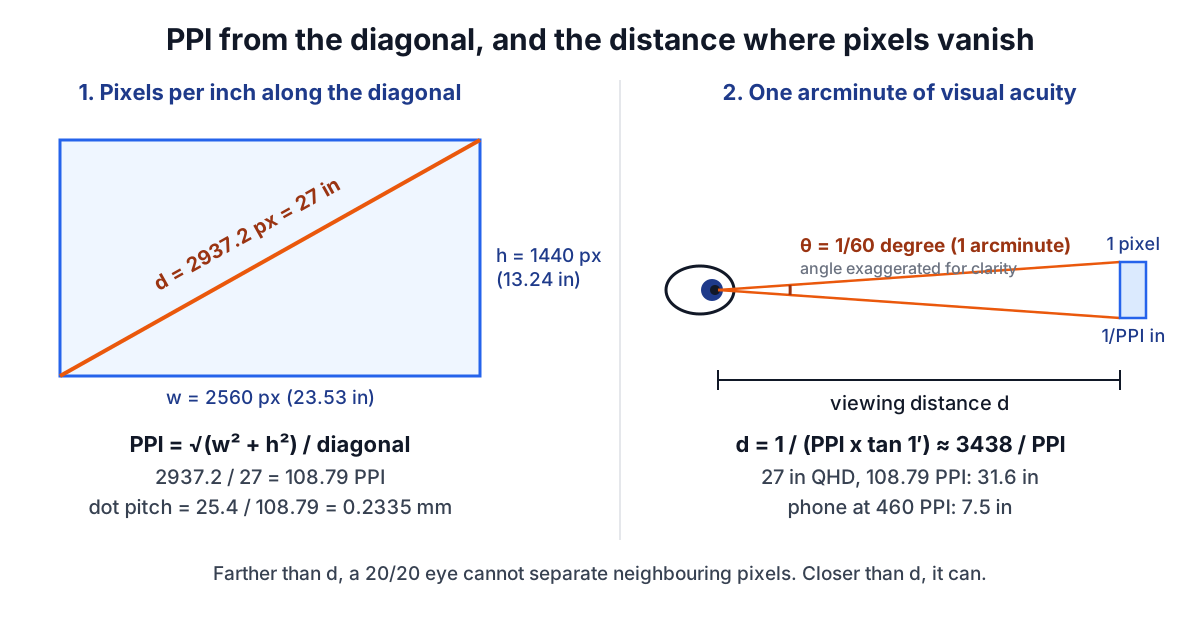
Screens are sold by diagonal size, so the diagonal is the one physical dimension you usually know. Pixels are square on almost every modern panel, which means the pixel grid and the physical screen are similar rectangles. The diagonal of the pixel grid in pixels, divided by the diagonal of the glass in inches, therefore gives pixels per inch in every direction:
diagonal in pixels  dp = √(w² + h²)
PPI                    = dp / diagonal in inches
where w and h are the horizontal and vertical resolution. From PPI everything else follows:
dot pitch (mm)       = 25.4 / PPI
physical width (in)  = w / PPI
physical height (in) = h / PPI
Dot pitch is the centre to centre distance between adjacent pixels. It is the same information as PPI, written as a length instead of a frequency, and monitor spec sheets often quote it in millimetres. Each pixel is usually made of three coloured subpixels side by side, so the subpixel spacing is finer than the dot pitch, but the pixel is still the unit an image is addressed in.
Worked example: a 27 inch 1440p monitor
Take the common 27 inch, 2560 x 1440 monitor:
dp      = √(2560² + 1440²) = √(6,553,600 + 2,073,600) = 2937.2 px
PPI     = 2937.2 / 27     = 108.79
pitch   = 25.4 / 108.79   = 0.2335 mm
width   = 2560 / 108.79   = 23.53 in
height  = 1440 / 108.79   = 13.24 in
Running the same sums for other screens shows the spread:
| Screen | Resolution | PPI | Dot pitch |
|---|---|---|---|
| 24 in monitor | 1920 x 1080 | 91.79 | 0.2767 mm |
| 27 in monitor | 2560 x 1440 | 108.79 | 0.2335 mm |
| 27 in monitor | 3840 x 2160 | 163.18 | 0.1557 mm |
| 13.3 in laptop | 2560 x 1600 | 226.98 | 0.1119 mm |
| 65 in TV | 3840 x 2160 | 67.78 | 0.3747 mm |
A note on phones. A 2532 x 1170 phone sold as 6.1 inches works out at 457.25 PPI, but the manufacturer quotes 460. The difference is the diagonal: Apple's specification footnote gives 6.06 inches measured as a plain rectangle, and 6.06 inches gives 460.3 PPI. Marketing diagonals are rounded and sometimes include rounded corners, so expect the computed PPI of any device to be within a percent or so of the published one, not identical. The calculator's presets are labelled approximate for that reason.
The retina threshold: one arcminute
Whether pixels are visible depends on the angle each one subtends at your eye, not on PPI alone. The usual reference is normal (20/20 Snellen) visual acuity, defined as resolving detail that subtends one minute of arc, 1/60 of a degree. A Snellen 20/20 letter is five arcminutes tall with strokes and gaps one arcminute wide.
A pixel of width 1/PPI inches at distance d subtends an angle θ where tan θ = (1/PPI) / d. Setting θ to one arcminute and solving for d:
d = 1 / (PPI x tan(1/60°))
  = 3437.75 / PPI   inches
Beyond that distance, adjacent pixels are closer together than a 20/20 eye can separate, and the screen looks continuous. Closer than that, a careful eye can pick out the grid, jagged diagonal edges or the screen door effect.
For the 27 inch 1440p monitor, d = 3437.75 / 108.79 = 31.6 inches. Most people sit 20 to 30 inches from a desktop monitor, so at that density pixels are just resolvable, which matches the common experience that 1440p at 27 inches is fine but not crisp for text. The 27 inch 4K panel brings d down to 21.1 inches, inside normal viewing distance.
At 326 PPI, the density Apple introduced with the iPhone 4 in 2010 under the Retina name, d is 10.55 inches, roughly where people hold a phone. That is the whole of the Retina idea: enough density that pixels fall below one arcminute at the device's usual viewing distance. The 65 inch 4K TV has only 67.78 PPI but a threshold of 50.7 inches, about 4.2 feet, and is normally watched from 6 to 10 feet, so it looks sharp despite having a third of a laptop's density.
Choosing a screen with these numbers
Turn the formula around to get the PPI you need for a given distance: PPI = 3437.75 / d.
phone at 12 in    → 286 PPI
laptop at 20 in   → 172 PPI
monitor at 28 in  → 123 PPI
TV at 8 ft (96 in) → 36 PPI
So for a desk monitor used at arm's length, anything above about 120 to 140 PPI is past the 20/20 threshold. Beyond that, extra density buys smoother text rendering and room for integer scaling rather than visible detail. Operating systems scale their interfaces in fixed steps: Windows treats 96 DPI as 100% scaling, and a 163 PPI 4K panel at 27 inches is commonly run at 150%. A display whose PPI suits a whole-number scale factor avoids blurry, fractionally scaled UI.
When comparing screens with different aspect ratios, look at physical height as well as diagonal. The Ratio Calculator and the calculator's own aspect output show why a 34 inch ultrawide is about as tall as a 27 inch 16:9 monitor.
PPI is not DPI
The two are often used interchangeably, and the calculator follows that loose convention for screens, but they describe different things. PPI counts image pixels per inch on a display or in an image file. DPI, strictly, counts ink dots per inch from a printer, and a printer lays down many dots of a few ink colours to build up each image pixel. A photo printer rated at 1200 or more DPI still prints a 300 PPI image well. The print resolution guide and the Print Size Calculator cover that side, including why a poster can get away with far fewer pixels per inch than a photo.
CSS adds a third convention. A CSS pixel is defined as 1/96 inch at arm's length, and a high-density screen maps several device pixels to each one. The px vs rem vs em guide explains why CSS sizes therefore look about the same size on screens with very different PPI.
Common mistakes
- Dividing horizontal pixels by the diagonal. 2560 / 27 = 94.8, not 108.79. Use the diagonal pixel count.
- Using the marketed diagonal for small devices without checking. Rounded corners and rounded inches shift PPI by a few points.
- Treating higher PPI as always better. Past the acuity threshold at your distance, more pixels cost GPU work and battery without visible gain.
- Comparing PPI across very different viewing distances. A TV and a phone should be compared by the angle a pixel subtends, which is what the threshold distance captures.
- Assuming non-square pixels never occur. Some older video formats used non-square pixels. For them the diagonal formula gives a blended figure and horizontal and vertical density should be computed separately.
When the simple model breaks down
One arcminute is a convention, not a hard limit. Many young adults see better than 20/20, and the eye can detect misalignment between two lines (vernier acuity) at a small fraction of an arcminute, which is why jagged edges on high-contrast diagonal lines remain visible past the threshold. Subpixel layouts such as PenTile have fewer subpixels of some colours than the PPI suggests, so fine coloured detail is softer than a stripe panel of the same PPI. Contrast matters too: low-contrast detail is harder to resolve than black on white, the same physics that drives the Contrast Checker. And for images, the pixels you see are only as sharp as the source: upscaling a small picture with the Image Resizer does not add detail, it only spreads the existing pixels over more device pixels. Use the threshold as a guide to diminishing returns rather than a pass or fail line.