
PX vs REM vs EM: Choosing CSS Units for Accessible Sizing
What rem and em are relative to, why 16 px is the default root, how compounding em catches people out, the 62.5% trick and its cost, and where px is still the right unit.
· 9 min read

Every length in CSS eventually becomes a number of CSS pixels, but the route it takes decides who gets to change it. A size written in px is fixed by the author. A size written in rem follows the root font size, which by default follows the reader's browser setting. A size written in em follows whatever font size its parent ended up with, which may itself have been scaled by its parent. Pick the wrong one and either the reader's preferred text size is ignored or a nested menu grows larger at every level. This post explains what each unit is relative to, with numbers you can reproduce in the PX to REM Converter.
What px, em and rem are relative to
The definitions come from the W3C CSS Values and Units specification.
px is an absolute unit in CSS, defined as 1/96 of a CSS inch. It is not a device pixel. The spec ties it to a "reference pixel", the visual angle of one pixel on a 96 DPI screen viewed at about 28 inches, roughly 0.0213 degrees. A phone with three device pixels per CSS pixel still draws a 16 px font at about the same apparent size as a desktop monitor does. The pixel density guide covers the hardware side of that.
em is equal to the computed font size of the element it is used on. There is one exception that causes most of the confusion: when em appears in the font-size property itself, it refers to the parent's computed font size, because the element's own font size is the thing being calculated.
rem ("root em") is the em of the root element, html. It has one reference point for the whole page, so 1.5rem means the same length in a footer, a modal and a deeply nested table cell.
The conversions are simple division:
rem = px / root font size
em  = px / parent font size      (for font-size)
em  = px / own font size         (for padding, margin, width, etc.)
Why 16 px is the root, and why that matters
Browsers ship with a default font size of 16 px for the medium keyword, and the root element inherits it. Readers can change it: every major browser has a setting for the default font size, separate from page zoom. Someone with low vision might set 20 or 24 px and leave zoom at 100%.
Those two controls behave differently:
- Page zoom scales everything, px included. A layout sized entirely in px still grows when zoomed.
- Default font size changes only the root font size. Text set in rem or em follows it. Text set in px does not move.
That second path is why rem is the usual recommendation for font sizes. WCAG 2.1 Success Criterion 1.4.4 Resize Text (Level AA) asks that text can be resized up to 200 percent without assistive technology and without loss of content or functionality. Zoom alone can satisfy it, so px is not a WCAG failure by itself, but a site in px quietly ignores a preference the reader has already set. Rem honours it at no cost.
Worked example: converting a set of sizes
Take a design handed over in pixels: body 16 px, small print 14 px, a subheading 24 px. With the default root of 16 px:
16 px / 16 = 1 rem
14 px / 16 = 0.875 rem
24 px / 16 = 1.5 rem
The converter's batch box accepts a mixed list such as 12, 14px, 1.5rem, 2em. Bare numbers and px are read as pixels, rem and em are converted to px first, then everything is shown in all three units. With root and parent both at 16 px that list comes out as 12 px (0.75 rem), 14 px (0.875 rem), 24 px (1.5 rem) and 32 px (2 rem).
Now an em case. A caption inside a component whose font size is 12 px needs to render at 18 px:
18 px / 12 px = 1.5 em
Move the same caption into a 16 px container and 1.5em becomes 24 px. That is the point of em: the caption stays one and a half times its surroundings wherever it lands. Whether that is a feature or a bug depends on the component.
How compounding em catches people out
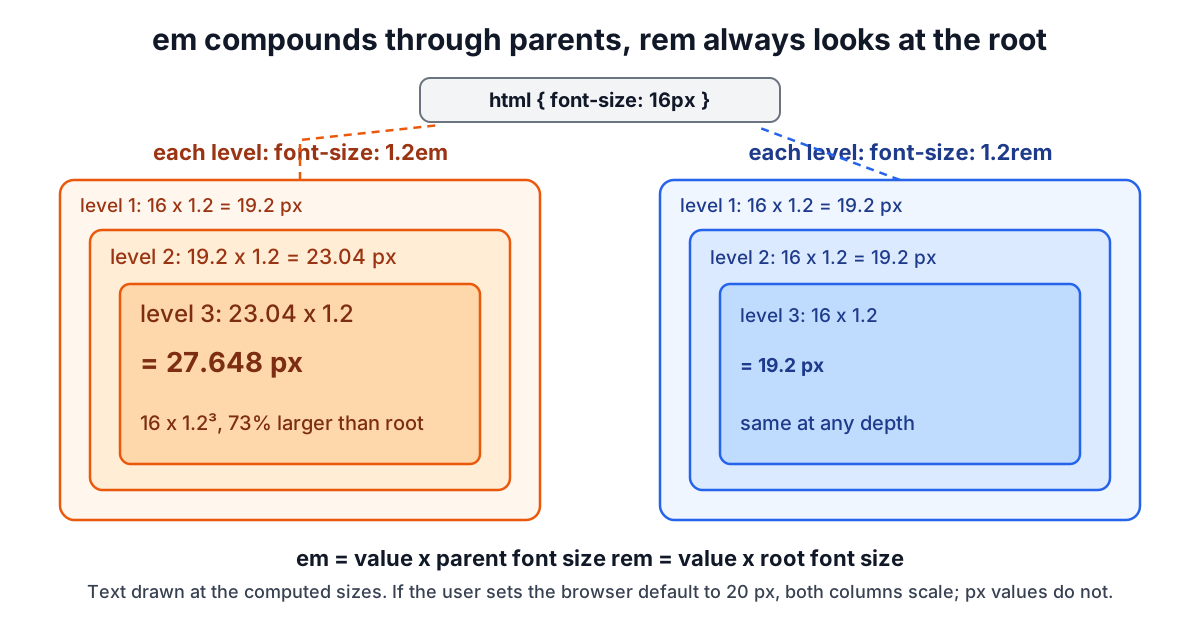
Because em in font-size reads the parent, nesting multiplies. Give a list item font-size: 1.2em and nest the list three levels deep:
level 1: 16     x 1.2 = 19.2 px
level 2: 19.2   x 1.2 = 23.04 px
level 3: 23.04  x 1.2 = 27.648 px    (16 x 1.2³)
The third level is 73% larger than the root, which was never the intent. The same rule written as 1.2rem gives 19.2 px at every depth.
The shrinking version is just as common. font-size: 0.875em on a nested small inside a .note that is already 0.875em gives 16 x 0.875² = 12.25 px, not the 14 px the designer drew. The fix is usually to set font sizes in rem and keep em for spacing that should scale with local text.
The 62.5% trick and what it costs
Dividing by 16 is awkward, so a long-standing trick sets html { font-size: 62.5% }. 62.5% of 16 px is 10 px, and conversions become a decimal shift: 24 px is 2.4 rem, 14 px is 1.4 rem.
It works, and because it is a percentage it still respects the reader's setting (a reader at 20 px gets a 12.5 px root). The costs are:
- Body text needs resetting. The root is now 10 px, so
body { font-size: 1.6rem }is required, and anything that inherits before that rule applies is tiny. - Third-party components break. A date picker or embed that assumes 1 rem = 16 px renders at 62.5% of its intended size.
- It solves a tooling problem with a runtime change. A converter, a Sass function or a design token pipeline does the division at build time and leaves the root alone.
Never write html { font-size: 10px }. A fixed px root discards the reader's preference entirely, which defeats the reason for using rem at all.
Where px is still the right unit
Rem is the default for type, not for everything.
- Borders and hairlines. A 1 px border should stay 1 px. At a 24 px root,
0.0625rembecomes 1.5 px and may render blurry or uneven. - Box shadows and small decorative offsets that are visual detail rather than reading size. The CSS Gradient Generator and the gradients, shadows and transforms guide output px for these for that reason.
- Media queries. Here the rule is different: em and rem in media queries resolve against the browser's initial font size, not the
htmlrule, so@media (min-width: 40em)means 640 px at default settings and moves when the reader enlarges text. Many teams use em for breakpoints so that a reader with large text gets the narrower layout sooner. - Image and canvas dimensions that must match a bitmap. Resize the file itself with the Image Resizer.
Em is the right choice for padding and icon sizes inside a component that should scale with its own text, such as a button: padding: 0.5em 1em keeps the same proportions on a small and a large button.
Common mistakes
- Converting with the wrong root. If the project sets a 62.5% or 18 px root, dividing by 16 gives wrong rem values. Set the converter's root to the project's value first.
- Using em for font sizes in reusable components and then nesting them.
- Mixing units for line height. Use a unitless
line-height: 1.5. An em or px line height is computed once on the parent and inherited as a fixed length, so a larger child heading inherits a cramped line height. - Treating zoom testing as text-size testing. Test with the browser's default font size raised to 24 px as well as with zoom at 200%.
- Rounding too early. 13 px is 0.8125 rem. Rounding to 0.81 gives 12.96 px, which is harmless, but rounding a whole scale to one decimal accumulates visible drift. Four decimals is plenty.
When the simple model breaks down
The conversion is exact, but the rendered result is not always the number you computed. Browsers have a minimum font size setting that can raise very small text. Fractional pixel sizes are laid out with sub-pixel precision but glyphs are still rasterised on a device pixel grid. Container query units (cqi) and viewport units (vw) are relative to something else entirely and do not respond to the reader's font setting unless combined with rem, which is why fluid type formulas add a rem term to the vw term. The modular type scale guide works through that with clamp() and the Type Scale Calculator.
For the other sizing jobs in the same family, the Unit Converter handles physical lengths, the Contrast Checker covers the other half of readable text (see the WCAG colour contrast guide), and the print resolution guide explains what happens when pixels become ink.