
Print Resolution: How Many Pixels You Need at 300 DPI
Pixels, inches and DPI in one relation, why 300 DPI is the rule for photos and 150 is fine for posters, the ISO 216 paper sizes in pixels, and how viewing distance changes what counts as sharp.
· 9 min read
A digital image has no physical size. It is a grid of pixels, 6000 by 4000 for a typical 24 megapixel camera, and it only acquires inches when you decide how many of those pixels to place in each inch of paper. That decision is the print resolution, and it trades size against sharpness one for one: halve the pixels per inch and the print doubles in width and height. This post sets out the relation, where the 300 DPI rule comes from, the pixel counts for standard paper sizes and when you can safely use less, with numbers you can reproduce in the Print Size Calculator.
Pixels, inches and DPI in one relation
There is only one equation:
pixels = inches x DPI
Rearranged, it answers each of the usual questions:
print size (in)   = pixels / DPI
pixels needed     = print size (in) x DPI
DPI achieved      = pixels / print size (in)
For centimetres, divide inches by 2.54 first or multiply the result by 2.54. The Unit Converter does that if you need other units.
Strictly, the number in these equations is PPI, pixels per inch of the printed image. DPI is the printer's dot density: an inkjet that advertises 1440 or 2880 DPI places many tiny dots of a few ink colours to reproduce each image pixel's colour. Print shops, camera software and most people say DPI when they mean image PPI, and the calculator follows that usage. When a lab asks for "300 DPI files", it means 300 image pixels per printed inch.
Worked example: a 24 MP photo
A 6000 x 4000 pixel image is 24.0 megapixels (6000 x 4000 / 1,000,000). At three common resolutions:
300 DPI:  6000 / 300 = 20 in    4000 / 300 = 13.33 in
150 DPI:  6000 / 150 = 40 in    4000 / 150 = 26.67 in
 72 DPI:  6000 / 72  = 83.3 in  4000 / 72  = 55.6 in
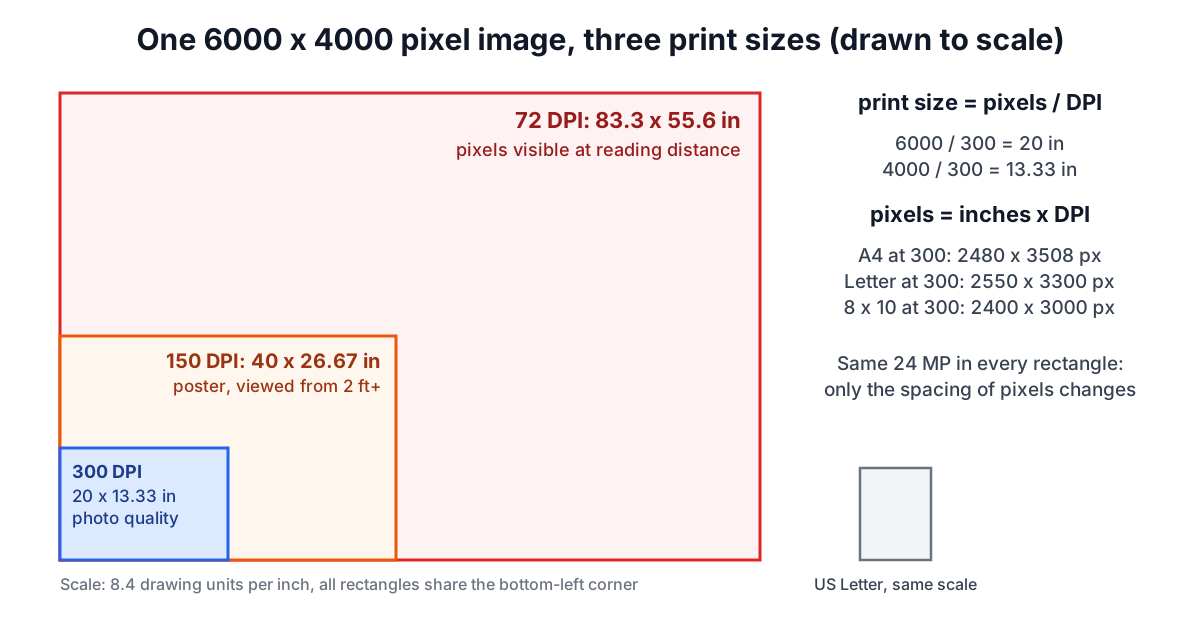
Every rectangle holds the same 24 million pixels. Only their spacing changes. Whether the 40 inch version looks good depends on where the viewer stands, covered below.
Going the other way, the calculator checks the image against paper sizes. The image can be rotated to match the paper's orientation, and if the aspect ratios differ the image is scaled to fill the sheet and the excess cropped, so the achieved DPI is set by the tighter of the two directions. For the 6000 x 4000 image at 300 DPI:
| Paper | Pixels needed at 300 DPI | Achieved DPI | Fits at 300? |
|---|---|---|---|
| Photo 8 x 10 in | 2400 x 3000 | 500.0 | yes |
| US Letter | 2550 x 3300 | 470.6 | yes |
| A4 | 2480 x 3508 | 483.8 | yes |
| A3 | 3508 x 4961 | 342.1 | yes |
| Poster 16 x 20 in | 4800 x 6000 | 250.0 | no |
| A2 | 4961 x 7016 | 241.9 | no |
| Poster 24 x 36 in | 7200 x 10800 | 166.7 | no |
So A3 is the largest ISO sheet this image fills at 300 DPI. A smaller example: a 3000 x 2400 pixel image fills an 8 x 10 inch print at exactly 300 DPI, because 3000 / 10 = 300 and 2400 / 8 = 300, and the shapes match, so nothing is cropped. Pixel counts are rounded to whole pixels, which is why A4 shows 3508 rather than 3507.87.
Where 300 DPI comes from
The figure follows from the same visual acuity limit used for screens in the pixel density guide. A 20/20 eye resolves about one arcminute. The pixel density at which one pixel subtends one arcminute at distance d (in inches) is
PPI = 1 / (d x tan(1/60°)) ≈ 3438 / d
At 300 PPI, d = 3438 / 300 = 11.5 inches, about the distance at which people hold a photo or a magazine. Closer than that a sharp-eyed reader may spot pixel structure in fine detail; farther than that 300 PPI is more than the eye can use. That is why 300 is the standard for photo prints, books and brochures, and why printing at 600 PPI rarely looks different on continuous-tone images. Line art and small text are the exception: hard black edges benefit from higher resolution, which is why scanned text and bitmap line art are often handled at 600 PPI or more.
Viewing distance and why posters can use less
Turn the formula around and the required density falls quickly with distance:
viewed at 12 in  → 286 PPI
viewed at 24 in  → 143 PPI
viewed at 36 in  → 95.5 PPI
viewed at 10 ft  →  29 PPI
A poster on a wall is seen from a metre or more, so 150 PPI is a common target and 100 is often acceptable. A 24 x 36 inch poster at 150 PPI needs 3600 x 5400 pixels, 19.4 MP, which a 24 MP camera supplies (it reaches 166.7 PPI on that sheet). The same poster at 300 PPI would need 77.8 MP. Billboards, seen from tens of metres, are printed at a few tens of pixels per inch.
The catch is that people walk up to prints. A gallery print that will be examined closely should be held to photo standards regardless of size.
ISO 216 paper sizes in pixels
The A series is defined by ISO 216. A0 has an area of one square metre and sides in the ratio 1 : √2. Cutting a sheet in half across its long side gives the next size with the same ratio, so A1 is half of A0, A2 half of A1, and so on down to A4 (210 x 297 mm) and beyond. Because every A size has the same shape, an image composed for one scales to any other without cropping, and the pixel counts at a given DPI step by a factor of √2 per size:
| Size | mm | 300 DPI | 150 DPI |
|---|---|---|---|
| A6 | 105 x 148 | 1240 x 1748 | 620 x 874 |
| A5 | 148 x 210 | 1748 x 2480 | 874 x 1240 |
| A4 | 210 x 297 | 2480 x 3508 | 1240 x 1754 |
| A3 | 297 x 420 | 3508 x 4961 | 1754 x 2480 |
| A2 | 420 x 594 | 4961 x 7016 | 2480 x 3508 |
| A1 | 594 x 841 | 7016 x 9933 | 3508 x 4967 |
| A0 | 841 x 1189 | 9933 x 14043 | 4967 x 7022 |
Notice that A4 at 300 DPI and A2 at 150 DPI need the same 2480 x 3508 pixels: twice the size at half the density. A4 at 300 DPI is 8.7 MP and US Letter is 8.4 MP, so almost any modern camera covers a full page.
US sizes do not share a single ratio: Letter is 8.5 x 11 in (1 : 1.29), Legal 8.5 x 14 and Tabloid 11 x 17, and photo sizes 4 x 6 (2 : 3), 5 x 7 and 8 x 10 (4 : 5) all differ. A 3 : 2 camera frame printed on 8 x 10 loses a strip from the long side. Check the crop with the Ratio Calculator before ordering.
Common mistakes
- Trusting the DPI field in the file. A JPEG tagged 72 DPI and the same file tagged 300 DPI contain identical pixels. The tag only sets the default print size in some software. The pixel dimensions are what matter.
- Upsampling to reach 300. Resampling a 1500 pixel image to 3000 pixels with the Image Resizer satisfies a lab's file check but adds no detail. Modern upscalers can soften the result convincingly, but they invent detail rather than recover it.
- Forgetting bleed. Printed pieces that run to the edge are usually supplied with a margin of about 3 mm (1/8 inch) per side to be trimmed off, so the pixels needed are slightly more than the trim size.
- Cropping after checking resolution. A 50% crop halves the pixels in each direction and halves the achievable print size at the same DPI.
- Compressing heavily for print. Strong JPEG compression artefacts that are invisible on screen can show on paper. The image formats guide and image optimization guide cover the trade-off.
When the simple model breaks down
Pixel count is necessary, not sufficient. A 24 MP file from a slightly out of focus or shaken shot holds less real detail than its pixel count suggests, and noise reduction smears fine texture. Paper matters too: uncoated and matte stocks spread ink and soften detail, so they forgive lower resolution than glossy photo paper. Colour is a separate problem: screens show RGB and presses print CMYK, and saturated screen colours can fall outside what ink can reproduce. Finally, the acuity figure is for a 20/20 eye under good light. For contrast and legibility of any text on the print, the Contrast Checker applies just as it does on screen. Use the calculator to set a floor on pixels and let the viewing distance tell you how far above that floor it is worth going.