
Public IP Addresses Explained: NAT, Geolocation and Lookups
Why every device in your house shares one IP, what CGNAT and IPv6 change, how accurate IP geolocation really is, and what IP lookup services can and cannot tell you.
· 7 min read
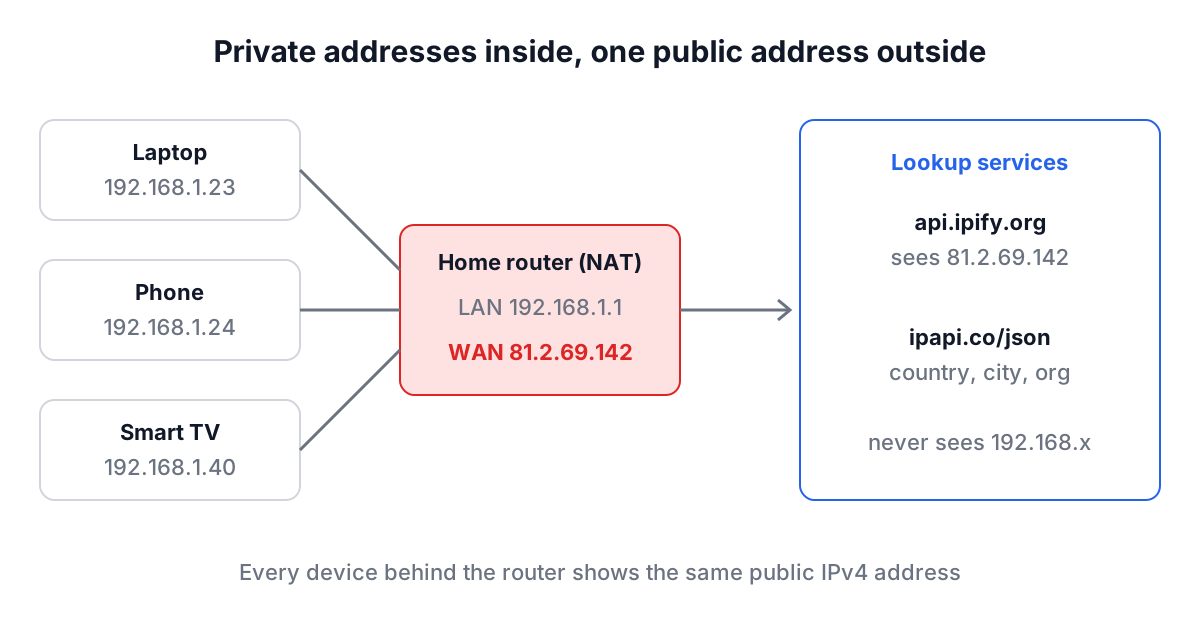
Run ipconfig or ip addr on your laptop and you will probably see something like 192.168.1.23. Ask a website what your address is and it will say something completely different, maybe 81.2.69.142. Neither is wrong. They are two different addresses for two different networks, and almost every confusing support conversation about "my IP" comes from mixing them up. This guide explains which address is which, what a public IP can and cannot reveal, and how three RedBison tools look it up, including exactly which outside services each one talks to.
Private, public and the router in between
Your home or office network uses private addresses. RFC 1918 (1996) set aside three ranges that are never routed on the public internet:
| Range | CIDR | Addresses | Where you see it |
|---|---|---|---|
| 10.0.0.0 to 10.255.255.255 | 10.0.0.0/8 | 16,777,216 | Corporate networks, cloud VPCs |
| 172.16.0.0 to 172.31.255.255 | 172.16.0.0/12 | 1,048,576 | Docker's default bridge, some offices |
| 192.168.0.0 to 192.168.255.255 | 192.168.0.0/16 | 65,536 | Home routers |
| 100.64.0.0 to 100.127.255.255 | 100.64.0.0/10 | 4,194,304 | Carrier-grade NAT (RFC 6598) |
When your laptop sends a request out, the router rewrites the source address to its own public address. That is network address translation (NAT). The website only ever sees the router's address, which is why every device in your house shows the same "public IP".
Two complications are now common. First, carrier-grade NAT: many mobile networks and some fibre providers give your router an address in 100.64.0.0/10 and do a second layer of NAT upstream. Your "public" IP is then shared with hundreds or thousands of other customers, and you cannot open ports to it. If your router's WAN address starts with 100.64 to 100.127 and a website reports something else, you are behind CGNAT.
Second, IPv6. With IPv6 there is usually no NAT: each device gets its own globally routable address, often several, with privacy extensions (RFC 8981) rotating the interface part every day or so. A dual-stack connection therefore has two public identities, one IPv4 shared by the household and one IPv6 per device, and which one a website sees depends on which protocol the connection happened to use.
What Is My IP Address: the quick check
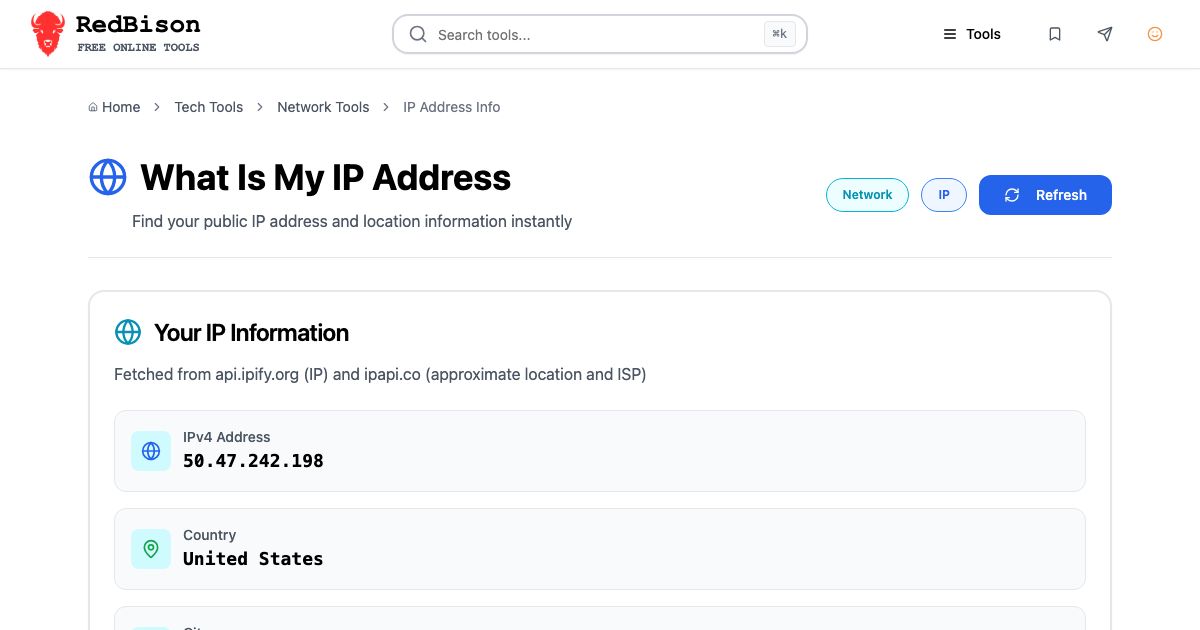
The What Is My IP Address tool answers the simplest question: what address does the internet see right now. It makes three requests from your browser as soon as the page loads, and again whenever you press Refresh:
https://api.ipify.org?format=jsonreturns your public IPv4 address.https://api64.ipify.org?format=jsonanswers over IPv6 when your connection has it. The tool shows the IPv6 row only when the answer actually contains colons and differs from the IPv4 result, so on an IPv4-only network that row simply does not appear.https://ipapi.co/json/returns the location and network fields: country, region, city and the organisation (ISP) name.
Those services see your IP address (they have to, it is how they answer) plus the usual browser headers. The tool sends nothing else: no form input, no identifiers. The results stay in the page, and Copy All Information puts them on your clipboard as plain text lines.
A worked example. On a home broadband line you might see IPv4 81.2.69.142, no IPv6 row, Country United Kingdom, City London, ISP/Organization showing your provider's name. Turn on a VPN and press Refresh: the IPv4 address, country and organisation all change to the VPN provider's exit node. That two-click test is the fastest way to confirm a VPN is actually carrying your web traffic. If the IPv4 changes but an IPv6 row still shows your provider's prefix, your VPN is leaking IPv6, which is a real and common misconfiguration.
IP Address Lookup: checking someone else's address
The IP Address Lookup tool works on any address you type, not just your own. Paste an address from a server log, a firewall alert or an email header into the box and press Lookup. The tool validates the input first: dotted IPv4 such as 8.8.8.8, or IPv6 in full or compressed form such as 2001:4860:4860::8888 or ::ffff:192.0.2.1. Anything else is refused before a request is sent.
The lookup itself goes to https://ipinfo.io/<address>/json, so the address you typed is sent to ipinfo.io. The My IP button calls https://ipinfo.io/json instead, which returns your own address. The result cards show:
- IP Address and IP Type (IPv4 or IPv6)
- Hostname, when the address has a reverse DNS (PTR) record
- Location as city and country, plus Coordinates with a Maps button that opens the point in Google Maps in a new tab
- Organization, normally the AS number and network owner, for example "AS15169 Google LLC" for 8.8.8.8
- Timezone
Two things trip people up. A private address such as 10.0.0.5 or 192.168.1.1 has no public owner or location, so the lookup returns almost nothing; that is correct, not a failure. And the free ipinfo.io tier is rate limited, so a burst of lookups from one network can start failing until the limit resets.
Network and Browser Info: everything a site can read
The Network and Browser Info page combines the public address lookups with what your browser reports about itself. It fetches your public IPv4 from api.ipify.org, IPv6 from api64.ipify.org, and ISP and location from ipapi.co, the same three services as the IP address page. Everything else comes from JavaScript APIs that run locally and send nothing:
- Platform, Language and User Agent from
navigator - Timezone from
Intl.DateTimeFormat().resolvedOptions().timeZone - Screen Resolution from
screen.widthandscreen.height - Cookies enabled or disabled, and Online Status from
navigator.onLine - Effective Connection Type from the Network Information API
The last one is widely misread. navigator.connection.effectiveType reports a speed class (slow-2g, 2g, 3g or 4g) estimated from recent round-trip times and throughput. It does not tell you whether you are on Wi-Fi, Ethernet or mobile data, and a fast fibre line reads as "4g" because that is the top bucket. The API exists only in Chromium-based browsers, so Firefox and Safari show Unknown.
This page is useful as a support checklist. When a user says "the site is broken for me", ask them to open it and press Copy All Information. In one paste you get their public IP, ISP, browser version, language, time zone and screen size, which covers most of the questions you would otherwise ask one at a time.
How accurate is IP geolocation?
Not very, at city level, and it was never designed to be. Geolocation databases are built from registry records (who was allocated the block), ISP-provided data, latency measurements and user-submitted corrections. Country is right most of the time. City is often the location of the ISP's equipment or the registered office of the network, which can be a hundred kilometres from the user. Mobile carriers frequently geolocate an entire region to one city.
| Question | Can an IP lookup answer it? |
|---|---|
| Which country is this visitor probably in? | Usually, unless they use a VPN or proxy |
| Which ISP or cloud provider owns this address? | Yes, from the AS number |
| Is this traffic coming from a data centre? | Often, from the organisation name |
| What street does this person live on? | No |
| Who is this person? | No; only the ISP can map an address to a subscriber, and only with a legal request |
The coordinates in the lookup results are a centroid for the area, not a position. Do not use them for anything that matters, such as fraud decisions on their own or emergency location.
Common mistakes
- Allow-listing a home IP permanently. Most residential addresses are dynamic and change after a router reboot or a lease expiry. Under CGNAT, the address may also belong to thousands of other people.
- Blocking by IP after one abusive request. On mobile networks you may be blocking a whole town.
- Reading a private address in a log as an attacker's address. If your app sits behind a load balancer, the client address is in X-Forwarded-For; the socket address is the balancer.
- Testing a VPN only over IPv4. Check that the IPv6 row disappears or changes too.
- Treating Effective Connection Type as Wi-Fi versus cellular. It is a speed estimate.
When an address raises questions, look up its owner, then check what the name side says with the DNS Lookup tool and the DNS records guide. If you need to know whether two addresses sit in the same block, the Subnet Calculator and the subnetting guide answer that in seconds.
For day-to-day work, keep it simple: use What Is My IP Address to confirm what the world sees, IP Address Lookup to identify an address you found somewhere, and Network and Browser Info when you need the whole picture in one paste for a bug report.