
AI for Sales, Marketing, Insurance and Restaurants: Prompts and Pitfalls
Customer-facing teams can draft emails, briefs, policy explainers and menus with AI. Here is what works, the rules on reviews, email and allergens, and how to review drafts.
· 10 min read

Sales reps, marketers, insurance agents and restaurant operators have one thing in common: a lot of what they write is read by customers. Cold emails, campaign briefs, ad copy, renewal letters, coverage explainers, menu descriptions and replies to online reviews all shape whether someone buys, stays or comes back. AI assistants are quick at producing first drafts of exactly this kind of text, which is why customer-facing teams were among the first to adopt them.
The same teams also work under rules that a model does not know about your business: anti-spam law for email, consumer protection rules on reviews and testimonials, insurance regulators' expectations about fair and accurate communication, and food allergen requirements. A draft that sounds great and breaks one of those rules costs more than it saved. This article covers which tasks AI helps with in each of the four roles, the rules worth knowing, worked prompts, a review routine and a 30-day plan. The AI Prompts for Sales Teams, AI Prompts for Marketers, AI Prompts for Insurance Agents and AI Prompts for Restaurant Operators kits contain ready versions of these prompts and run entirely in your browser.
Where AI drafting pays off
| Role | Good fit | Keep human |
|---|---|---|
| Sales | Prospect research summary from notes you paste, cold email variants, discovery questions, follow-up after a demo, mutual action plan, CRM notes | Pricing and discount decisions, contract terms, anything you claim about a customer you have not verified |
| Marketing | Campaign brief, persona draft from research you supply, SEO outline, ad copy variants within character limits, content calendar, A/B test hypotheses | Brand and legal sign-off, claims about results, which test to run |
| Insurance | Plain-language coverage explainer from policy wording, renewal emails, claim status updates, needs analysis questions, objection handling | Advice on suitability, any statement about whether a loss is covered, disclosures required by your regulator |
| Restaurants | Menu descriptions, replies to reviews, specials posts, job ads, supplier emails, a draft staff schedule from your availability list | Allergen information, food cost decisions, final rota |
The common thread: the model writes well when you supply the facts, and it guesses when you do not. A cold email that "references the prospect's recent funding round" is only good if there was one. A coverage explainer is only accurate if it is built from the actual policy wording. That is why every prompt in the kits includes a constraint like "use only the facts provided; write [CONFIRM: ...] where something is missing".
Rules worth knowing before you hit send
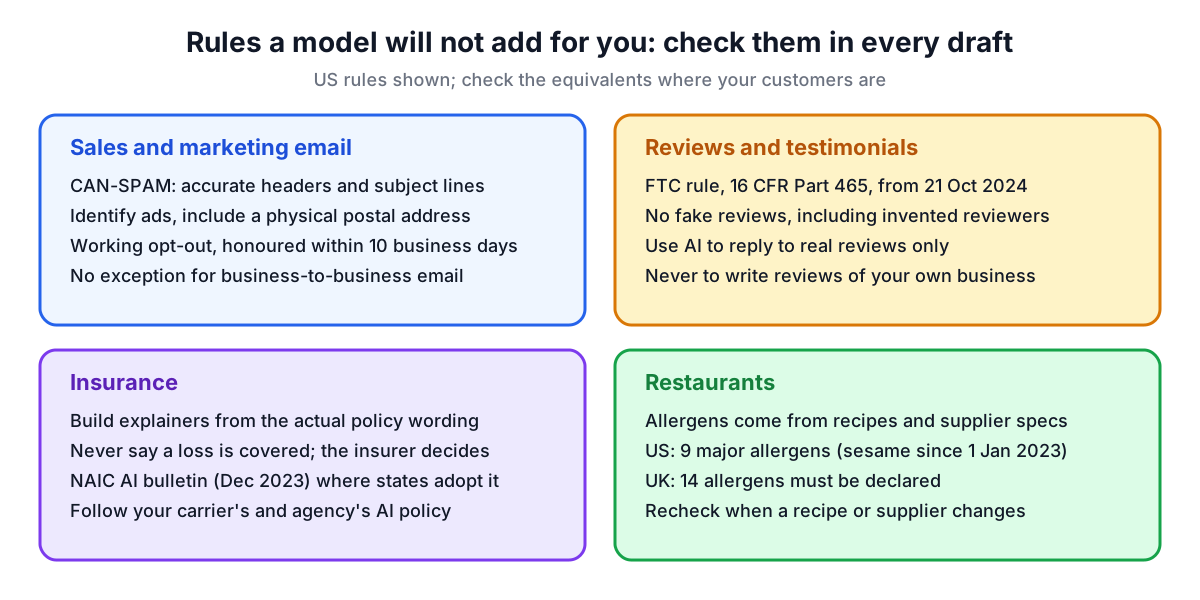
Email marketing and sales emails (US). The CAN-SPAM Act applies to commercial email, and the FTC notes it makes no exception for business-to-business email. The FTC's summary of its requirements includes accurate header information, subject lines that are not deceptive, identifying the message as an ad where it is one, a valid physical postal address, and a working way to opt out that you honour within 10 business days. A model will not add your postal address or unsubscribe line unless you tell it to. Other countries have their own rules, such as the GDPR and the UK's electronic marketing regulations, so check the ones that apply to your recipients.
Reviews and testimonials (US). The FTC's Trade Regulation Rule on the Use of Consumer Reviews and Testimonials, 16 CFR Part 465, took effect on 21 October 2024. It bans fake reviews and testimonials, including ones attributed to people who do not exist, which covers reviews generated by AI. Use AI to reply to genuine reviews; never to write reviews for your own restaurant, product or agency.
Insurance. The NAIC adopted its Model Bulletin on the Use of Artificial Intelligence Systems by Insurers on 4 December 2023. It is binding only in states that adopt it, and it expects insurers to maintain a written program governing their AI systems. If you are an agent or broker, your carrier or agency may have its own AI policy built on it. Separately, client data such as policy numbers, health information for life cover and claim details is personal data under privacy law, and should not go into an unapproved tool.
Food allergens. In the US, sesame became the ninth major food allergen on 1 January 2023 under the FASTER Act, joining milk, eggs, fish, crustacean shellfish, tree nuts, peanuts, wheat and soybeans. In the UK, 14 allergens must be declared. A model can format an allergen notice, but the allergen content of each dish must come from your recipes and supplier specifications, checked by a person, every time a recipe or supplier changes.
Customer data and the masking helper
Sales notes, CRM exports, insurance files and reservation lists contain personal data. Under the GDPR, personal data covers anything relating to an identifiable person (Article 4(1)); you should process only what the task needs (Article 5(1)(c)) and use vendors under a processor contract (Article 28). In practice: use your company's approved AI tool, paste the minimum, and remove identifiers first.
The kits include a masking helper that scans pasted text and replaces common identifiers with tokens such as [NAME-1], [POLICY-NO-1] or [EMAIL-1]. It looks for names after a title or a label such as "Client:", email addresses, phone numbers, dates, ages over 89, policy, claim and account numbers, Social Security numbers, card numbers, street addresses, ZIP codes and postcodes, URLs and IP addresses. It is pattern-based, so a first name on its own, a company name or a distinctive detail ("the only Tesla dealer in town") gets through. Read the text before you copy it.
Worked prompts
The kits use the same structure for every prompt: role, context, task, constraints and output format.
A follow-up after a sales demo:
## Role
You are a sales writing assistant for an account executive selling scheduling software to clinics. You draft emails for the rep to edit and send.

## Context
- Demo notes: operations lead and two practice managers attended. Main pain: double bookings across 3 sites. Asked about SMS reminders and integration with their practice system. Next step agreed: technical call with their IT contact next week.

## Task
Write the follow-up email.

## Constraints
- Use only what is in the notes. Do not invent pricing, results or customer names.
- One clear call to action: confirm a time for the technical call.
- Under 150 words. Include placeholders for our postal address and opt-out line.

## Output format
Subject line options (3), then the email.
A reply to a negative restaurant review:
## Role
You are a writing assistant for the owner of a neighbourhood Italian restaurant. You draft public replies for the owner to edit.

## Context
- Review (2 stars): waited 40 minutes for mains on Saturday, pasta was lukewarm, server was friendly.
- What we know: kitchen was short one cook that night. We have since added a second Saturday cook.

## Task
Draft a public reply.

## Constraints
- Thank them, acknowledge the wait and the cold pasta without excuses, mention the fix once.
- Do not offer refunds or vouchers in public; invite them to contact us instead.
- Under 90 words. No exclamation marks.

## Output format
The reply only.
For pricing work, the model can lay out a food cost check, but use a calculator for the numbers: the Margin and Markup Calculator and the Recipe Scaler are quicker and do not make arithmetic mistakes. Sales teams can do the same with the Commission Calculator, and marketers can tag campaign links with the UTM Builder.
Reviewing drafts before they reach customers
- Facts. Every product feature, price, policy term, dish ingredient and customer detail must trace to your input or source documents.
- Claims. Results, savings, rankings and "best" statements need evidence you could show a regulator. Delete what you cannot back up.
- Required elements. Postal address and opt-out for commercial email, disclosures your agency requires, allergen statements from the recipe file.
- Character limits. Ad platforms and SMS have hard limits; count them with the Word Counter rather than trusting the model's count.
- Tone. Read it as the customer. Pushy follow-ups and defensive review replies do more harm than no message.
- Consistency. Use an approved template for messages that repeat, so the wording that passed review once is the wording that goes out.
A 30-day plan
| Week | What to do |
|---|---|
| 1 | Confirm which AI tools your company approves, and what customer data, if any, may go into them. Find your email footer, required disclosures and allergen matrix. |
| 2 | Pick two templates that need no customer data: menu descriptions or ad copy variants, and a campaign brief or discovery question list. Use them on real work. |
| 3 | Add one customer-facing template with masked data, such as a renewal email, a demo follow-up or review replies. Log review time and every correction. |
| 4 | Keep what saved time after review. Export the library as Markdown from the kit, add your footer and disclosure lines to it, and share it with the team. |
Write down the corrections you make. If the same fix keeps coming up, such as a missing opt-out line or an invented feature, add it to the template's constraints so the next draft gets it right. If you want to build your own prompts in the same structure, the AI Prompt Builder helps, and the Prompt Quality Checker catches vague instructions before you rely on them.