
Article Structured Data: Required and Recommended Properties
What Google reads from Article, BlogPosting and NewsArticle markup, how to mark up authors, and why datePublished and dateModified must match the dates readers see.
By Redbison Dev · · 9 min read
You have just published a blog post, the byline says "Updated 2 April 2026", and you want Google to show the right author and the right date. Article structured data is how you tell it. Google lists no required properties for Article markup: it recommends headline, image, datePublished, dateModified and an author with a name and a URL, on one of three types (Article, NewsArticle or BlogPosting), and it asks that the dates in the markup match the dates printed on the page.
This post covers only the Article family. For the general picture of JSON-LD, schema.org and rich results across Product, Recipe, Event and other types, read the structured data guide first.
What Google reads from Article markup
Google's Article documentation is short and has one surprise at the top: "There are no required properties." Article markup is not a rich result you either qualify for or miss. It is extra information that helps Google understand the page, pick its title, image and date, and connect the post to its author. Every property is optional, and these five are the ones Google recommends.
| Property | What Google says about it |
|---|---|
headline | The title of the article. Keep it concise, as long titles may be truncated on some devices. |
image | One or more images that represent the article. Google recommends several high-resolution images of at least 50,000 pixels (width times height) in 16x9, 4x3 and 1x1 aspect ratios. Use real content images, not a logo. |
datePublished | When the article was first published, in ISO 8601 format, ideally with a time zone. |
dateModified | When it was last modified, in the same format. |
author | A Person or Organization with name and url (or sameAs). |
Other schema.org properties such as description, publisher and url are valid and harmless, and other consumers of your markup may use them. They are just not on Google's recommended list for this feature.
Article, NewsArticle or BlogPosting
All three types are in the same branch of schema.org. NewsArticle is a direct subtype of Article, and BlogPosting sits one level further down: Thing, CreativeWork, Article, SocialMediaPosting, BlogPosting. A subtype inherits every property of its parents, so headline, author and the two dates work the same on all three.
Google's documentation lists the same recommended properties for all three types, so the choice does not unlock anything extra. Pick the type that describes the content honestly:
- NewsArticle for reporting on current events from a news publisher.
- BlogPosting for a post on a blog, including company and personal blogs.
- Article for anything else: a guide, a reference page, a long-form feature, or when you are unsure.
Getting this "wrong" is not an error. A tutorial marked up as Article instead of BlogPosting loses nothing. What does cause trouble is marking up a page that is not an article at all, such as a category listing or a product page, as one.
Author markup that Google can match
Author markup is where most Article blocks go wrong, and a validator cannot catch the mistakes because they are about meaning, not syntax. Google's best practices boil down to five rules.
- Include every author shown on the page. If the byline names two people, the markup names two people.
- One author per entry. Use an array of two
Personobjects, never onenameof "Dana Okafor and Lee Park". - Only the name in
author.name. Not "By Dana Okafor", not "Dana Okafor, Senior Editor", not a date or the publisher's name. - Use the right type.
Personfor people,Organizationfor a company or newsroom, and never the genericThing. - Add
urlorsameAs. Point at a page that identifies the author: an author bio page on your site, or a profile elsewhere. Google says it understands both for telling authors with the same name apart.
Here is the difference in practice:
"author": { "@type": "Person", "name": "By Dana Okafor, Senior Editor" }
"author": [{
  "@type": "Person",
  "name": "Dana Okafor",
  "url": "https://example.com/authors/dana-okafor"
}]
The first block passes every validator, including ours, and still tells Google the author's name is "By Dana Okafor, Senior Editor". The second gives a clean name and a page that proves who she is. If your site has author pages, link them; if it does not, a stable public profile works as sameAs.
Dates that match the page
Google's guidance on byline dates is separate from the Article page but applies directly to it. Show a visible date, label it ("Published", "Updated"), make sure the date and any time and time zone match between the visible text and the structured data, and do not use future dates or the date of the events the story describes.
Three rules follow from that:
- Write ISO 8601 with an offset.
2026-03-14T08:00:00+00:00is unambiguous.2026-03-14is valid, but without a time zone Google falls back to Googlebot's own.March 14, 2026is not ISO 8601 at all. - Move
dateModifiedonly when the content changes. A date bumped by every deploy says the post changed when it did not, and it will drift away from the visible "Updated" line. Store a real last-edited date per page and feed both the byline and the markup from it. - Keep one source of truth. If your template prints the date from one field and the JSON-LD reads another, they will disagree sooner or later. Generate both from the same value.
Worked example: a recipe blog post, generated then fixed
Say you run a cooking blog and want markup for a post called "How to Season a Cast Iron Pan", published on 14 March 2026 and updated on 2 April 2026.
Step 1: generate a starting block. Open the Schema Markup Generator, choose the Article template and type:
- Headline:
How to Season a Cast Iron Pan - Description:
Oil, heat and the mistakes that leave a sticky pan. - Author:
Dana Okafor - Publisher:
Example Kitchen - Date Published:
2026-03-14 - Image URL:
https://example.com/img/cast-iron-16x9.jpg - Article URL:
https://example.com/blog/season-cast-iron
The generator turns the author and publisher into nested Person and Organization objects for you:
{
  "@context": "https://schema.org",
  "@type": "Article",
  "headline": "How to Season a Cast Iron Pan",
  "description": "Oil, heat and the mistakes that leave a sticky pan.",
  "author": { "@type": "Person", "name": "Dana Okafor" },
  "publisher": { "@type": "Organization", "name": "Example Kitchen" },
  "datePublished": "2026-03-14",
  "image": "https://example.com/img/cast-iron-16x9.jpg",
  "url": "https://example.com/blog/season-cast-iron"
}
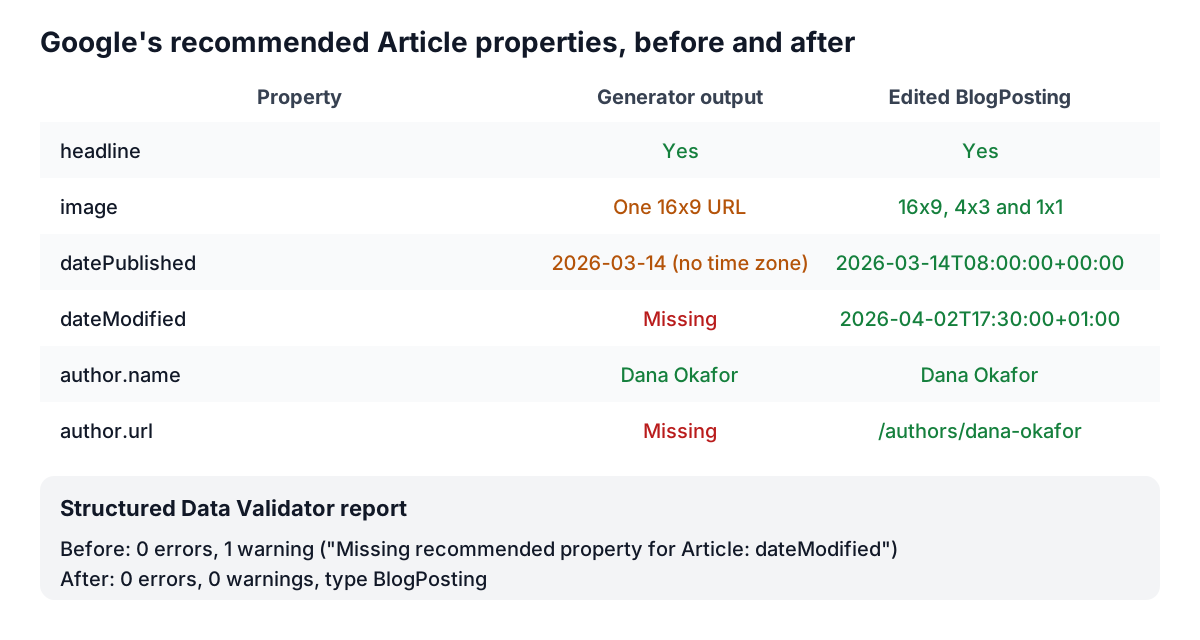
Step 2: validate it. Paste the block into the Structured Data Validator. It reports no errors and one warning: "Missing recommended property for Article: dateModified". The post was updated on 2 April, so the markup should say so.
Step 3: edit by hand. The generator gives you the skeleton; the details are yours. Change the type to BlogPosting (it is a blog post), add the time and offset to datePublished, add dateModified to match the "Updated" line, give the author a URL, and list three image crops:
{
  "@context": "https://schema.org",
  "@type": "BlogPosting",
  "headline": "How to Season a Cast Iron Pan",
  "description": "Oil, heat and the mistakes that leave a sticky pan.",
  "image": [
    "https://example.com/img/cast-iron-16x9.jpg",
    "https://example.com/img/cast-iron-4x3.jpg",
    "https://example.com/img/cast-iron-1x1.jpg"
  ],
  "datePublished": "2026-03-14T08:00:00+00:00",
  "dateModified": "2026-04-02T17:30:00+01:00",
  "author": [{
    "@type": "Person",
    "name": "Dana Okafor",
    "url": "https://example.com/authors/dana-okafor"
  }],
  "publisher": { "@type": "Organization", "name": "Example Kitchen", "logo": "https://example.com/img/logo.png" },
  "url": "https://example.com/blog/season-cast-iron"
}
Step 4: validate again. The validator now reports the type as BlogPosting with no errors and no warnings. Try one deliberate mistake to see the date check work: change dateModified to April 2, 2026 and it warns that the value "is not an ISO 8601 date".
The +01:00 offset on the update is not a typo. If the blog is run from London, on 2 April the UK is on British Summer Time, so a 17:30 local edit is 17:30:00+01:00. Google's byline guidance asks for an accurate time zone that accounts for daylight saving time, which is exactly what a hard-coded Z gets wrong for half the year.
Two things the validator cannot tell you: whether "Dana Okafor" is really the byline on the page, and whether 2 April is really the date printed under the title. Open the live page and compare them by eye before you ship the template.
Mistakes to check for
- Markup on the wrong pages. Category pages, tag archives and the home page are lists, not articles.
- Headline that differs from the page title. Use the visible H1 or something very close to it.
- Logo as the only image. Google asks for images that represent the article, not the site.
- Relative image URLs.
/img/pan.jpgshould behttps://example.com/img/pan.jpg. The validator warns about this. - Author pages that do not exist. An
author.urlthat returns 404 is worse than none.
Tools for this job
- Schema Markup Generator: start here when you have no markup yet; it builds a valid Article skeleton with nested author and publisher objects from a short form.
- Structured Data Validator: paste a block or a whole page's HTML to check JSON syntax, the schema.org shape and Google's recommended Article properties, including the ISO 8601 date check.
- Meta Tag Analyzer: check that the page's title and description agree with the headline and description in your markup.
Related reading: the structured data guide covers every common rich result type and multi-item @graph blocks, and title tag and meta description length covers how long a headline can be before search results cut it. The meta tags guide covers the Open Graph tags that usually sit next to Article markup.
Frequently asked questions
Does Article structured data make a post rank higher?
Google does not describe Article markup as a ranking factor. It helps Google understand the page and choose the title, image, date and author it shows. A page without it can still rank and still show a date; the markup makes the information explicit instead of guessed.
Should I use NewsArticle or BlogPosting for a company blog?
BlogPosting. NewsArticle is meant for reporting on current events by a news publisher. Google recommends the same properties for Article, NewsArticle and BlogPosting, so the choice describes the content rather than changing what Google can show.
Do I need a publisher property in Article markup?
Google's Article documentation does not list publisher among its recommended properties. It is still valid schema.org and other consumers may read it, so keeping a simple Organization with a name and logo does no harm.
What format should datePublished and dateModified use?
ISO 8601, ideally with a time and a time zone offset, such as 2026-03-14T08:00:00+00:00. A date alone, such as 2026-03-14, is valid but leaves Google to assume a time zone. Written-out dates like "March 14, 2026" are not ISO 8601.
How do I mark up an article with two authors?
Use an array with one Person object per author, each with its own name and url. Google's documentation says not to merge several people into one author name.
Sources and further reading
- Article (Article, NewsArticle, BlogPosting) structured data, Google Search Central. Recommended properties and author markup best practices.
- Influence your byline dates in Google Search, Google Search Central. Visible dates, labels, time zones and consistency with structured data.
- Article, Schema vocabulary founded by Google, Microsoft, Yahoo and Yandex. The type and its properties.
- BlogPosting, Schema vocabulary founded by Google, Microsoft, Yahoo and Yandex. The subtype's place in the hierarchy.
- General structured data guidelines, Google Search Central. Quality rules that apply to every type.