
Binary, Hex and IEEE 754 Floats, Bit by Bit
How integers become binary and hex, how two's complement stores negatives, and how a float packs sign, exponent and fraction, with 0.1 decoded bit by bit.
By Redbison Dev · · Updated · 10 min read
You are stepping through code and the debugger shows a variable as 0x3DCCCCCD, a register as 0xFFD6, and a byte in a packet as C8. Each is a number written in hexadecimal: four bits per hex digit. Whole numbers are stored as plain binary place values, negative ones in two's complement (invert the bits and add one), and real numbers as IEEE 754 floats, which pack a sign bit, a biased exponent and a fraction into 16, 32 or 64 bits. 0x3DCCCCCD is the 32-bit float nearest to 0.1, and this guide decodes it bit by bit with the Number Base Converter and the IEEE 754 Float Converter, so you can repeat every step.
Binary and hex: one number, several spellings
A positional number is digits times powers of the base. In base 2 the place values are 1, 2, 4, 8 and so on, so 200 is 128 + 64 + 8, or 11001000. Hexadecimal groups those bits in fours from the right: 1100 is 12, written C, and 1000 is 8, so 200 is C8. Octal groups them in threes and gives 310. None of these change the number; they are spellings of the same eight bits, and hex survives in programming because it is the most compact one that still maps cleanly onto bits.
Type 200 into the Number Base Converter and it shows all four forms at once, grouped for reading. Type 0xC8 and you get the same row back, because it reads the 0x, 0o and 0b prefixes defined for numeric literals in the ECMAScript specification (Python and Rust use the same three; C has 0x, and 0b since C23). For a short integer it also prints the positional expansion in the input base; for 0xC8 that is 12×16^1 + 8×16^0, which is how to convert by hand.
The same idea scales to anything. An IPv4 address is one 32-bit number written as four bytes: 192.168.1.1 is C0 A8 01 01, or 3,232,235,777 as a single integer, which the IPv4 Address Converter shows in all its forms. A file is a long run of bytes, and the Hex Editor shows them in hex next to their binary and text views.
One limit trips people up in JavaScript. Numbers there are 64-bit floats, so integers are exact only up to 2^53. parseInt("20000000000001", 16) returns 9,007,199,254,740,992, one less than the true value. The base converter uses BigInt, so it returns 9,007,199,254,740,993, and it handles a 64-bit mask or a 128-bit ID just as exactly.
Two's complement: how negative integers are stored
A fixed-width integer has no room for a minus sign, so processors use two's complement. To negate a value, invert every bit and add one. In 16 bits, 42 is 0000 0000 0010 1010. Inverted it is 1111 1111 1101 0101, and adding one gives 1111 1111 1101 0110, which is 0xFFD6.
Do it with the tool: type -42 and set the width to 16-bit. The two's complement card shows the pattern FFD6, the signed reading -42, the unsigned reading 65,494 and the signed range -32,768 to 32,767. To decode a raw register value instead, type FFD6, choose base 16 and tick "Read the input as a bit pattern"; the decimal result is -42.
The trick works because the top bit is given a weight of -2^(n-1) instead of +2^(n-1). That is why a signed byte runs from -128 to 127, not -127 to 127, and why the same adder handles signed and unsigned values. It is also why a byte has no fixed meaning: C8 is 200 as an unsigned byte and -56 as a signed one. When a value read from a sensor or a file is suddenly a large positive number, or negative when it should not be, the program has usually picked the wrong one of those two readings.
Fractions in binary, and why 0.1 never ends
Digits after the point have place values 1/2, 1/4, 1/8 and so on. 10.625 is 8 + 2 + 1/2 + 1/8, so it is 1010.101 in binary and A.A in hex. That one ends because 0.625 is 5/8 and 8 is a power of two.
0.1 is 1/10, and 10 = 2 × 5. A fraction ends in a base only if every prime factor of its denominator divides the base, and 5 does not divide 2. So the binary digits of 0.1 repeat forever. The base converter marks the repeating block in parentheses: 0.0(0011) in binary, 0.1(9) in hex. Any format with a fixed number of bits has to cut that series off and round, which is where floating-point error comes from.
How a float is stored: sign, exponent, fraction
IEEE 754, the standard behind float and double in almost every language and processor, stores a binary number in scientific notation. A 32-bit float (binary32) has 1 sign bit, 8 exponent bits and 23 fraction bits. A normal number is (-1)^sign × 1.fraction × 2^(exponent - 127). The leading 1 is not stored, which buys one extra bit of precision, and the exponent is stored with a bias of 127 so that the field is a plain unsigned number.
Take -6.25. In binary it is 110.01, which normalises to 1.1001 × 2^2. The sign is 1, the exponent field is 2 + 127 = 129 = 10000001, and the fraction is 1001 followed by 19 zeros. Put together that is 0xC0C80000. Type -6.25 into the IEEE 754 Float Converter with single precision selected and the coloured fields show exactly this, with "none, exact" as the rounding error, since 6.25 is a sum of powers of two.
Decoding 0.1 bit by bit
Now type 0.1, still in single precision. The tool shows 0x3DCCCCCD:
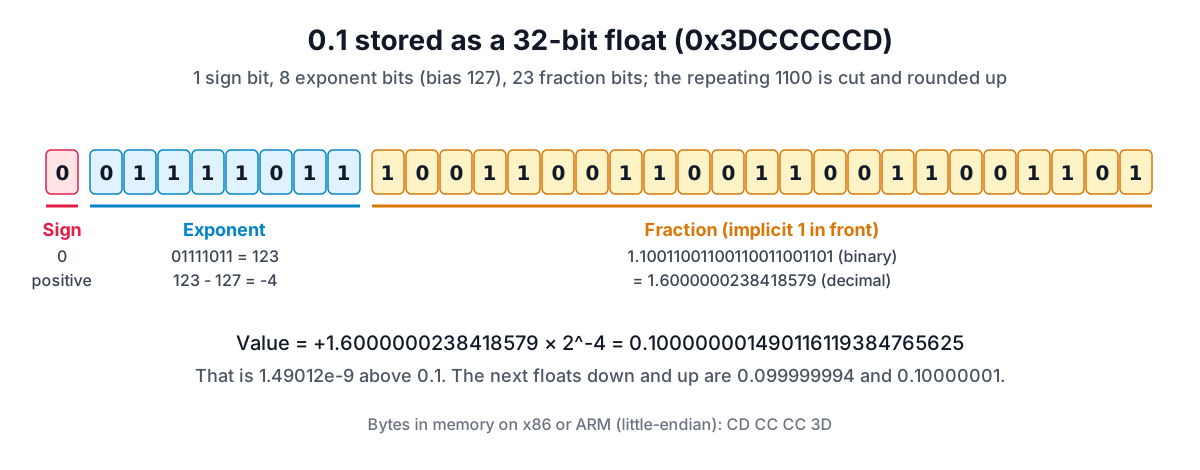
- Sign
0: positive. - Exponent
01111011= 123, and 123 - 127 = -4. So the value lies between 2^-4 = 0.0625 and 2^-3 = 0.125. - Fraction
10011001100110011001101: the repeating1001 1001...of 0.1 shifted into 1.6 × 2^-4, cut after 23 bits. The bits after the cut start with 1, so the result rounds up, which is why the pattern ends inCDrather thanCC.
The tool's "Exact decimal value" is 0.100000001490116119384765625. Every binary float is a finite decimal, so this is the exact number the computer holds, about 1.49 × 10^-9 above 0.1. The neighbouring floats are 0.099999994 below and 0.10000001 above; 0.1 falls between them and the nearer one wins. The "Shortest decimal" is 0.1, because no other float is closer to 0.1, so printing "0.1" identifies this one uniquely. That is why console.log and print show 0.1 even though 0.1 is not what is stored.
Switch to double precision and the same input gives 0x3FB999999999999A, exact value 0.1000000000000000055511151231257827021181583404541015625, an error of about 5.55 × 10^-18. More bits make the error smaller, not zero. The addition 0.1 + 0.2 and how to compare floats safely are covered in why 0.1 + 0.2 is not 0.3; the point here is that both inputs were already rounded before the sum.
float16 vs float32 vs float64
The three most common binary interchange formats in IEEE 754-2019 (the standard also defines binary128 and wider ones) differ only in how many bits go to the exponent and the fraction. The tool's limits panel and its "Same number in each format" table give these figures:
| binary16 (half) | binary32 (float) | binary64 (double) | |
|---|---|---|---|
| Exponent / fraction bits | 5 / 10 | 8 / 23 | 11 / 52 |
| Bias | 15 | 127 | 1023 |
| Largest finite value | 65504 | 3.4028235e+38 | 1.7976931348623157e+308 |
| Smallest normal value | 0.00006103515625 | 1.1754944e-38 | 2.2250738585072014e-308 |
| Significant decimal digits | 3 to 5 | 6 to 9 | 15 to 17 |
| Integers exact up to | 2,048 | 16,777,216 | 9,007,199,254,740,992 |
| 0.1 is stored as | 0.0999755859375 | 0.100000001490116... | 0.1000000000000000055... |
The integer row is 2 to the power of the precision (11, 24 and 53 bits). Past it, the gap between neighbouring floats is 2 or more, so in single precision 16,777,217 is stored as 16,777,216: it sits exactly halfway between two floats and the tie goes to the one with an even last bit. Half precision is good for weights and colour channels, single for graphics and sensor data, and double for most general computing. JavaScript numbers are always double.
Zeros, subnormals, infinity and NaN
Two exponent values are reserved. All zeros means zero or a subnormal number: the hidden bit becomes 0, so values below the smallest normal number shrink gradually towards zero instead of jumping to it. The smallest positive float is 0x00000001, exactly 2^-149, about 1.4 × 10^-45; the tool prints all 105 significant digits of it. All zeros with the sign bit set is -0, which compares equal to 0 but keeps its sign through division: 1 / -0 is -Infinity.
All ones means infinity if the fraction is zero and NaN otherwise. IEEE 754-2019 recommends that the first fraction bit mark a quiet NaN, so 0x7FC00000 is the usual quiet NaN and 0x7F800001 a signalling one; the remaining bits are a payload. Decode 7FC00001 and the tool reports a quiet NaN with payload 0x1.
Tools for this job
- Number Base Converter: binary, octal, decimal, hex and any base up to 36, two's complement at any width, and exact fractions with repeating digits marked.
- IEEE 754 Float Converter: the bits, exact value, rounding error and neighbours of a half, single or double float, or the value behind a hex pattern.
- Hex Editor: see the bytes of a file or snippet in hex, binary and text, the place where most of these patterns turn up.
- IPv4 Address Converter: an IPv4 address as the 32-bit integer, hex and binary number it really is.
Related reading: how to read a hex dump for finding these values inside files, big-endian vs little-endian for the byte order they are stored in, and the subnetting guide for binary masks applied to IP addresses.
Frequently asked questions
Is a float's mantissa the same as its fraction field?
Not quite. The stored field is the trailing significand, the bits after the binary point. The full significand, which older texts call the mantissa, adds the hidden leading bit: 1 for normal numbers, 0 for subnormals. That is why binary32 stores 23 bits but has 24 bits of precision.
Why does adding a small number to a large float sometimes do nothing?
Because the small number is at most half the gap between neighbouring floats at that size (an exact half rounds to the neighbour with an even last bit). Just above 16,777,216 single-precision floats are 2 apart, so 16,777,216 + 1 lands exactly halfway and rounds back to 16,777,216. Summing many small values into a large total loses precision this way; sorting them or using a wider type helps.
How do I tell whether a hex value is an integer or a float?
The bits alone do not say. 0x3F800000 is 1,065,353,216 as an integer and 1.0 as a float. You need the type from the source code, the file format specification or the protocol. Decoding it both ways with the two converters and seeing which result is plausible is a quick check.
Do all languages use IEEE 754?
Practically all mainstream languages map their float and double types to IEEE 754 binary32 and binary64 on current hardware. Decimal types such as Python's decimal, Java's BigDecimal and SQL's NUMERIC are separate, software-based formats that store decimal digits, so they can hold 0.1 exactly.
Sources and further reading
- IEEE 754-2019: Standard for Floating-Point Arithmetic, IEEE Standards Association. Format parameters, roundTiesToEven and NaN encoding.
- What every computer scientist should know about floating-point arithmetic, ACM Computing Surveys. David Goldberg, 1991.
- ECMAScript Language Specification: Numeric Literals, Ecma International TC39. The 0x, 0o and 0b prefixes.
- ECMAScript Language Specification: The Number Type, Ecma International TC39. JavaScript numbers as binary64 values.
- BigInt, MDN Web Docs. Exact integers beyond 2^53 and fixed-width wrapping.
- Two's Complement, Cornell University. Negation and the signed range.
Open the IEEE 754 Float Converter
More Data Formats
Every tool in the Data Formats section, free and in your browser.