
How to Merge PDF Files Without Losing Pages or Quality
What really happens when PDFs are combined: copying page objects, why bookmarks and form fields get lost, mixed page sizes, taking ranges from each file and keeping private files off upload sites.
· 9 min read
Merging PDFs sounds like stapling: put file B after file A and you are done. Inside the file format it is closer to transplanting organs. Each page is an object that points at fonts, images and drawing instructions, and some of what makes a document useful (bookmarks, form fields, links between pages) does not live on the pages at all. This guide explains what a merge copies, what it leaves behind and how to get a clean combined file, using the same approach as the Merge PDF tool, which joins files in your browser with the pdf-lib library and never uploads them.
What a PDF page actually is
ISO 32000, the PDF standard, describes a document as a tree of objects. At the top is the document catalog. Under it sits the page tree (section 7.7.3), a set of nodes whose leaves are page objects. A page object is a small dictionary that says how big the page is (its MediaBox and optional CropBox), how it is turned (its /Rotate value), which content streams draw it, and which resources those streams use: fonts, images, colour spaces and graphics states.
Because everything is linked by object references, a single page can drag a lot along with it. Page 7 might use an embedded font that pages 1 to 40 also use, a logo image shared by every page, and an annotation for a web link. Merging means following every one of those references and writing a copy of each object into the new file.
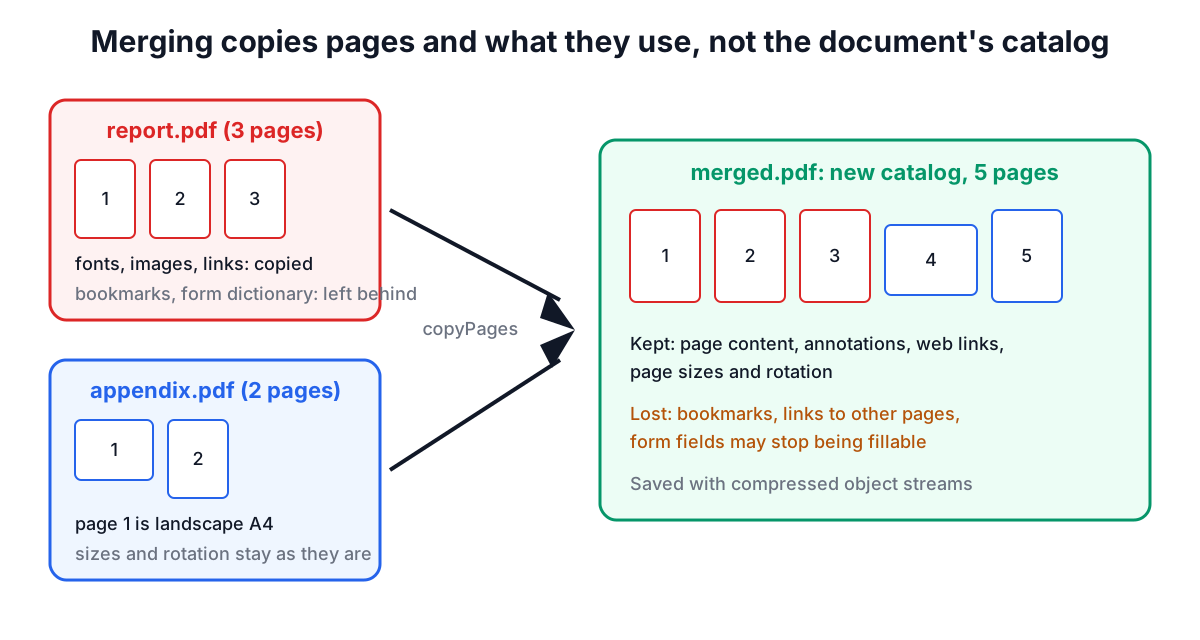
That is exactly what the tool does. For each input file it loads the document, works out which pages you asked for, and calls pdf-lib's copyPages, which copies the page dictionaries and everything they reference into a fresh output document. Then the copied pages are appended in order and the result is saved with compressed object streams.
What survives a merge and what does not
Things attached to a page come across. Things attached to the document catalog do not, because a new catalog is created for the merged file.
| Feature | Where it lives in the PDF | After merging |
|---|---|---|
| Text, vector drawings, images | Page content streams and resources | Kept exactly, no re-compression |
| Page size, crop box, rotation | Page object | Kept per page, sizes can be mixed |
| Comments, highlights, web links | Annotations in the page's /Annots | Kept |
| Links that jump to another page | Annotations whose destination points at a page object | Copied, but the target page is not in the new page tree, so they no longer go anywhere useful |
| Bookmarks (outlines) | Document catalog, section 12.3.3 | Dropped |
| Fillable form fields | Widget annotations plus the catalog's /AcroForm dictionary | The fields still show their current values, but may stop being fillable |
| Title and author | Document information dictionary | Not carried over from the sources |
Two practical consequences follow. First, fill in and save any forms before merging if you want the answers kept, because the appearance of a filled field is part of the page and survives even when interactivity does not. Second, if the merged file needs bookmarks, add them afterwards in a desktop editor; there is no reliable way to transplant one document's outline into another when page numbers shift.
Order, ranges and mixed page sizes
The tool joins files from top to bottom. Use the arrow buttons to move a file up or down, or Sort by file name, which uses a natural sort so scan2.pdf comes before scan10.pdf (a plain alphabetical sort would put 10 first because the character 1 is lower than 2).
Each file also has a pages box. Leave it empty to take every page, or type a selection:
1-3, 5takes pages 1, 2, 3 and 5.8-takes page 8 to the last page.-4takes pages 1 to 4.
Within one file the selected pages come out in ascending order with duplicates removed. If you need the same file twice, or pages in a different order, add the file twice with different ranges, or merge first and rearrange afterwards with Organize PDF Pages.
Page sizes are never changed. A Letter report (612 × 792 points) followed by an A4 appendix (595 × 842 points) produces a file whose pages switch size, which every PDF reader handles and which prints correctly as long as the printer driver is set to fit or to choose paper by page size. If the second document has sideways pages, fix them before or after with Rotate PDF; their /Rotate value is copied as is.
A worked example
Suppose you are sending a grant application assembled from three files:
cover-letter.pdf, 1 page.proposal.pdf, 14 pages, of which page 14 is an old draft budget you do not want.budget-2026.pdf, 3 pages, of which you need pages 1 and 2.
Add the three files, keep them in that order, type 1-13 in the proposal's pages box and 1-2 in the budget's. The card under the list adds up the selections before you merge: 1 + 13 + 2 = 16 pages. Name the output application.pdf and click Merge 3 files.
The result card shows the new file size. It is usually close to the sum of the inputs minus whatever you left out. It can be smaller when the sources used old-style cross-reference tables, because the output packs objects into compressed object streams (ISO 32000-1, 7.5.7). It can also be larger than you expect when two sources embed the same font: they are separate objects in separate files, so both copies are kept.
Common problems and how to avoid them
"This PDF is encrypted." pdf-lib cannot decrypt files. That includes PDFs that open without a password but carry owner restrictions (no editing, no copying), which are still encrypted under the hood. Open the file in a reader that knows the password, print it to a new PDF, and merge that copy.
Scanned pages in the wrong order. Single-sided scanners often produce fronts and backs as separate files. Merge them, then use the duplex interleave button in Organize PDF Pages to put page 1, its back, page 2, its back and so on in order.
The merged file is too big to email. Merging does not re-encode anything. Run the output through Compress PDF, starting with its lossless mode and switching to the JPEG mode only for scans and photos.
A page range error. The tool checks each range against that file's page count as you type, so 12 on an 8-page file is flagged with the file name before you click Merge. A range written backwards, such as 5-2, is rejected rather than guessed at.
Phone browsers. The merge runs in JavaScript, so it works on iPhone and Android browsers too. Very large inputs (hundreds of megabytes) are limited by the device's memory, because every file is held in memory while the new one is built.
Why merging in the browser matters
Many free merge sites upload your files to a server, process them and keep them for some period. For contracts, medical records, payslips and identity documents that is a real risk. In this tool the files are read with the browser's File API, combined by pdf-lib running in the page, and the result is handed back as a download link created on your device. You can check this by opening your browser's developer tools on the Network tab while merging: no request carries the file.
If you want to go further with the combined document, the rest of the PDF tools work the same way: split it, add page numbers, stamp a watermark or sign it, all locally.
Sources
- ISO 32000-1:2008, Document management: Portable document format, Part 1: PDF 1.7, sections 7.5.7 (object streams), 7.7.2 (document catalog), 7.7.3 (page tree and page objects), 12.3.2 (destinations), 12.3.3 (document outline) and 12.7.2 (interactive form dictionary). ISO 32000-2:2020 keeps the same structures.
- pdf-lib documentation,
PDFDocument.copyPagesandPDFDocument.save(pdf-lib.js.org). - Mozilla pdf.js project documentation, used for page previews in the PDF tools.
Related searches
- merge pdf files
- combine pdfs into one
- merge pdf without uploading
- merge pdf keep bookmarks
- combine pdf different page sizes
- merge only some pages of a pdf
- join scanned pdfs in order
- merge pdf on iphone browser
- why merged pdf lost form fields