
RedBison Now Has 563 Free Tools: What's Included and What's New
A tour of all 12 categories and the 143 tools added since October 28: a new AI Tools category, PDF and video editing, statistics and physics calculators, and security utilities.
· 7 min read

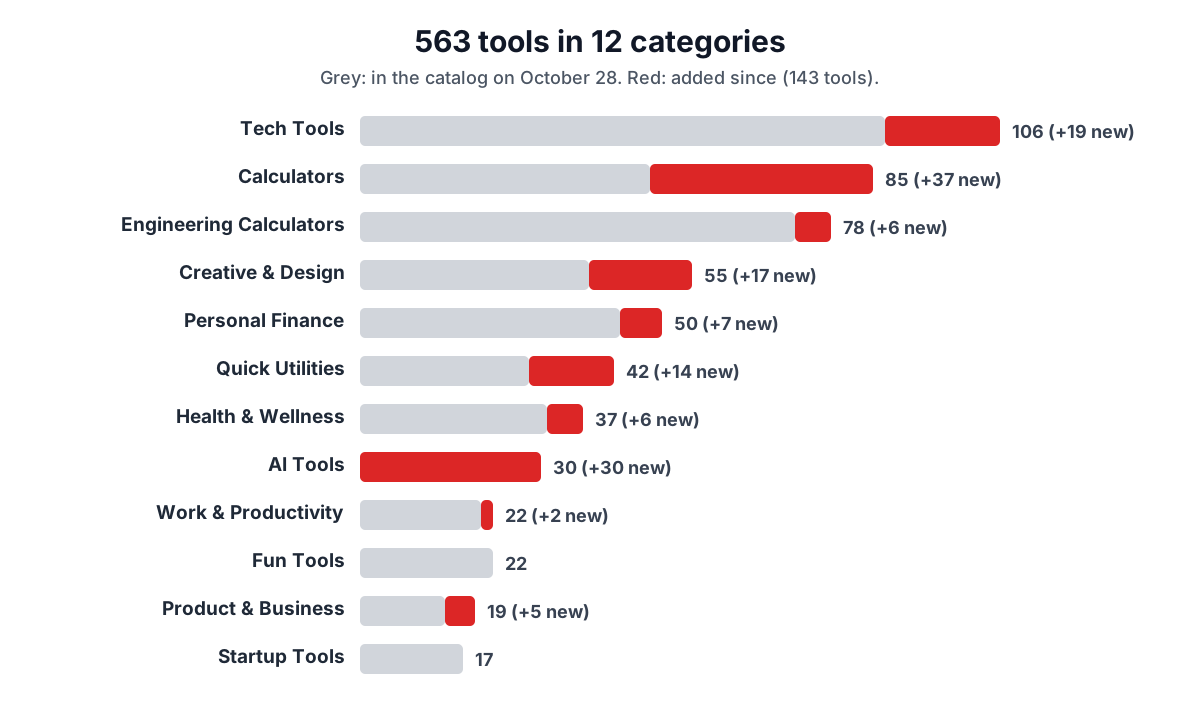
On October 28 we wrote about passing 400 tools, most of them file converters and engineering calculators. Five days later the catalog stands at 563 free tools in 12 categories, with 143 added since that post. The biggest addition is a whole new category of 30 AI tools, alongside PDF editing, image and video editing, statistics and physics calculators, and a set of developer and security utilities.
Everything is still free, has no ads, needs no account, and comes with a write-up and a guide that explain how it works. This post lists what is in the catalog now and what is new.
What is in the catalog
The 563 tools sit in 12 categories. Each category page has a short guide to picking the right tool for a task.
- Tech Tools (106): formatters, validators and converters for JSON, YAML, XML, SQL and CSV, plus encoders, hashes, JWTs, regex, network and DevOps helpers.
- Calculators (85): everyday sums, maths, statistics, physics and chemistry, construction and home projects, and energy costs.
- Engineering Calculators (78): civil and structural, mechanical, electrical, electronics, fluids, HVAC, carpentry, sheet metal and automotive.
- Creative & Design (55): colour, image, photography, audio and video tools.
- Personal Finance (50): loans and mortgages, savings and investing, pay, tax and planning.
- Quick Utilities (42): PDF tools, file converters, generators and writing tools.
- Health & Wellness (37): fitness, body measurement, pregnancy and wellness tools.
- AI Tools (30): prompts, tokens and cost, model training, agents and MCP, tracing, and prompt kits for professions.
- Work & Productivity (22), Fun Tools (22), Product & Business (19) and Startup Tools (17) cover planning, team tools, games, pricing, SEO and early-stage company work.
New: a category of AI tools
All 30 AI tools are new. None of them call a language model or need an API key; they build, check and calculate in your browser, so you can paste confidential prompts and data.
- Prompt engineering (5). The AI Prompt Builder assembles a role, task, context, examples and output format. The LLM Token Counter gives exact counts for OpenAI models and labelled estimates for others, and the LLM API Cost Calculator turns usage into a monthly bill with dated prices.
- Model training (4). Validate a fine-tuning dataset, size the GPU memory a model needs for inference or LoRA training, estimate pre-training compute, and score model outputs against expected answers.
- Agents and MCP (6). Design a multi-agent system led by a chief-of-staff agent, write agent instructions and tool schemas, and generate MCP client configs or a complete MCP server, including one built from an OpenAPI spec.
- Observability and visibility (5). Set up OpenTelemetry tracing for LLM calls, design an audit log, write an llms.txt file, control AI crawlers in robots.txt, and check what AI search can read on a page.
- AI for professions (10). Prompt kits for doctors, nurses, civil engineers, QA engineers, insurance agents, front desk staff, executive assistants, restaurant operators, marketers and sales teams, such as the kit for nurses. Each kit masks obvious personal details before you copy and lists what to check in the AI's draft.
New: PDF, image, audio and video editing
These are the jobs people most often hand to an upload site. All of them now run on your device.
- PDF tools (8): Merge PDF, Split PDF, Compress, Rotate and Organize pages, Watermark, add page numbers, and Sign PDF. The file is read, edited and saved in your browser and never uploaded.
- Image and design tools (8): crop, rotate and flip, watermark, blur and pixelate, a photo collage maker, a meme generator, image to ASCII art and a colour palette generator.
- Audio and video (4): the Video Trimmer and Audio Trimmer cut files locally with ffmpeg compiled to WebAssembly, a video file size calculator plans bitrates, and the YouTube Clip Maker builds share links and embeds that play only the part you choose. That one uses YouTube's player, so it does contact YouTube.
- Photography (5): depth of field, exposure, ND filters, field of view and the NPF rule for sharp stars.
New: calculators for school, home and money
- Statistics (6): linear regression, t-tests, p-values, chi-square, the normal distribution and one-way ANOVA. These are tested against NIST's certified reference data sets.
- Physics and chemistry (8): kinetic energy, projectile motion, free fall, force, density, wavelength and frequency, the ideal gas law and pH.
- Maths (7): percent error, roots, exponents, logarithms, rounding, weighted averages and a system of equations solver.
- Home and energy (12): paint, fence, wallpaper, pool volume, grass seed, insulation and ramps, plus a carbon footprint calculator, EV versus petrol costs, EV charging, heat pump savings and solar payback.
- Everyday (4): week numbers, the day of the week for any date, a recipe scaler and a unit price comparison.
- Money (7): a paycheck calculator, HELOC and home equity, dividends, stock averaging, required minimum distributions, net worth and an emergency fund planner.
- Health (6): body surface area, waist-to-hip ratio, VO2 max, steps to distance and calories, a blood pressure category checker and an intermittent fasting timer.
New: developer, security and writing tools
- Security (5): a password strength checker, a TOTP code generator, HMAC, AES encryption with the browser's Web Crypto API, and an RSA and EC key pair generator.
- Web and DevOps (8): HTTP status codes, MIME types, a user agent parser, a cron expression generator, redirect rules, Docker run to Compose, .gitignore files and a chmod calculator.
- Data and code (6): JSON Schema validation and generation, TOML conversion, cURL to code, Markdown tables, and JavaScript and CSS beautifiers.
- Writing (5): a word counter, a readability checker, Morse code, the NATO phonetic alphabet and ASCII art text.
- Engineering (6): conduit fill, ISO fits and tolerances, bolt circles, SMD resistor codes, antenna length and fuel injector sizing.
- Business and productivity (8): an invoice generator, payback period, freelance hourly rate, a UTM link builder, a search snippet preview, a barcode generator, a meeting cost calculator and a Pomodoro timer.
How the new tools were checked
Every new tool arrived with tests for its logic before it shipped, and the expected values come from outside RedBison wherever possible: standards, reference data sets and published tables. Across the whole catalog, 4,821 automated tests check that the tools give the right answers. How accurate are RedBison's tools? explains what those tests cover, the bugs they have caught, and the limits no test can remove.
Each tool page shows the date its own content last changed, so you can see how recently it was revised.
Using the tools from an AI assistant
Many of the calculators and text tools are also available to Claude, Cursor and other assistants through the RedBison MCP server, with the same code and answers as the pages. The AI and MCP page explains how to connect.
Tell us what is missing, or what is wrong
If there is a tool you need that we do not have, or a tool gives an answer that looks wrong, email team@redbison.dev. Requests shape what we build next, and every confirmed bug gets a test so it stays fixed.